
Decision Framework
Last updated on 2026-08-27 | Edit this page
Overview
Questions
- How do I document my classification for the audit trail?
- What are the most common classification mistakes?
- How do I handle reclassification as research evolves?
Objectives
- Use the classification decision tree to classify any dataset
- Document classification decisions for auditing
- Recognize common classification mistakes and how to avoid them
Classification Decision Tree
Use this flowchart to classify your data:
START: New dataset or file

│
├─> Does it contain student education records?
│   (grades, performance data, assessment results linked to students)
│   YES → RESTRICTED (FERPA)
│   NO → Continue
│
├─> Does it contain legally protected health information?
│   (names + medical conditions, health data, genetic data)
│   YES → RESTRICTED (HIPAA/Privacy)
│   NO → Continue
│
├─> Does it contain export-controlled research?
│   (cryptography, advanced materials, dual-use bio research)
│   YES → RESTRICTED (EAR/ITAR)
│   UNCERTAIN → Consult ORSP
│   NO → Continue
│
├─> Does it contain CUI or DOD-funded research data?
│   YES → RESTRICTED (NIST 800-171)
│   NO → Continue
│
├─> Does it contain any personally identifiable information?
│   (names, SSN, financial info, genetic data, sensitive personal info)
│   YES → PROPRIETARY (minimum; may be Restricted if sensitive)
│   NO → Continue
│
├─> Does it contain sensitive institutional data?
│   (unpublished research, grant proposals, business plans, salaries)
│   YES → PROPRIETARY
│   NO → Continue
│
├─> Is it restricted to specific authorized individuals?
│   (only certain people can access, not the entire group)
│   YES → PROPRIETARY
│   NO → PUBLIC (freely available or shared openly within lab/groups)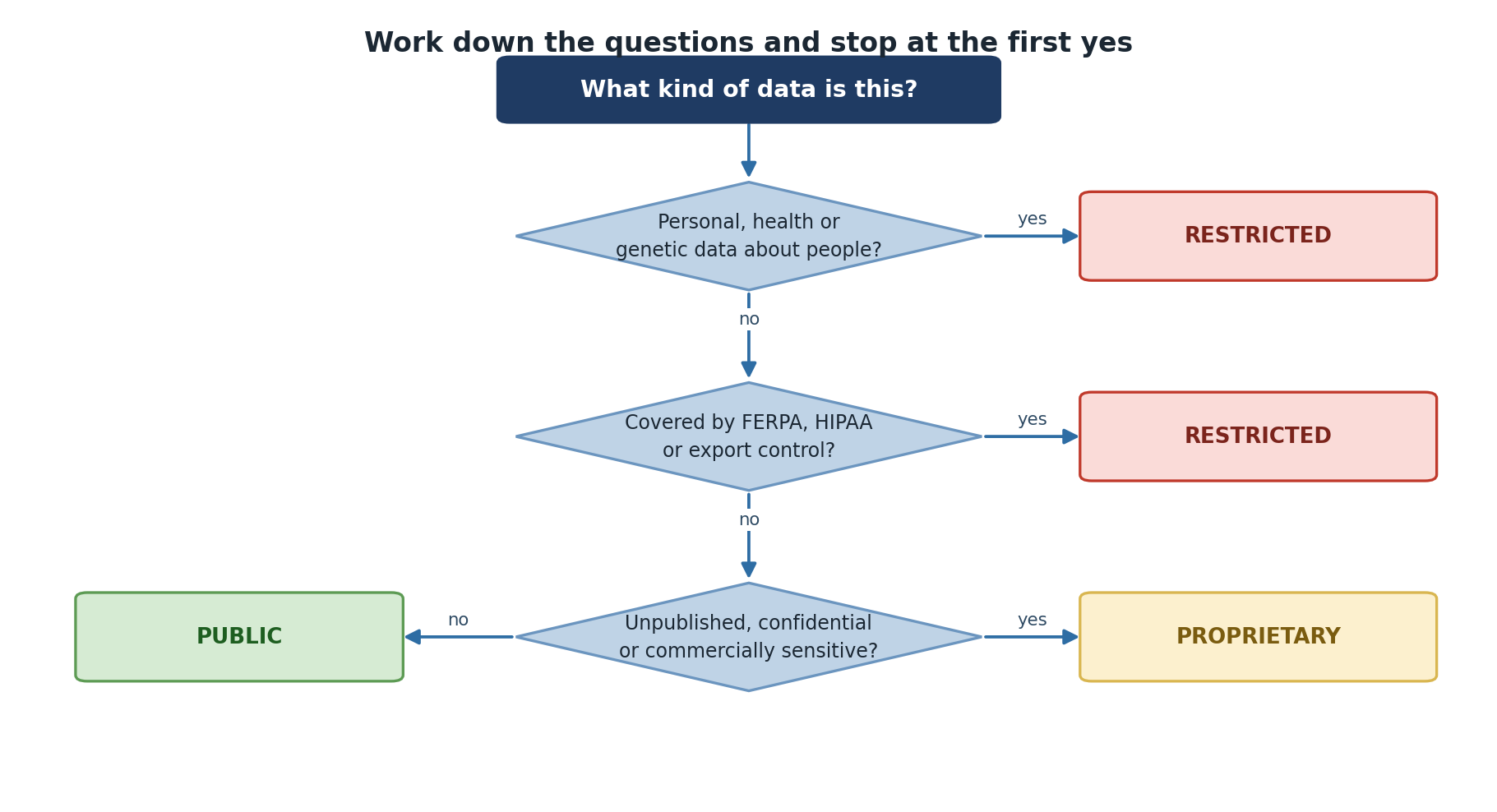
Decision Documentation
Once you’ve classified, document your decision. This serves two purposes: 1. Audit trail: Shows you thought carefully about classification 2. Consistency: Helps team members re-classify correctly if you leave
Classification Decision Form
DATA CLASSIFICATION DECISION RECORD
===================================

Project: [Name]
Date: [Date]
Classified by: [Name]

Dataset: [Dataset name/description]
Location: /bigdata/lab/<labname>/project_X

CLASSIFICATION DECISION: [PUBLIC / PROPRIETARY / RESTRICTED]

CLASSIFICATION REASONING: [Which rules triggered this classification]
REGULATORY FRAMEWORKS: [FERPA / HIPAA / EAR-ITAR / NIST 800-171 / Pomona ISP]
HANDLING: [Encryption / Access controls / Audit logging / De-id plan / Retention]
PEOPLE WHO NEED ACCESS: [Name/Role list]
RETENTION: [Until publication / 7 years / indefinite / etc.]
QUESTIONS: [Uncertainties requiring PI/ORSP review]
Store classification records in a shared lab document (e.g.,
/bigdata/lab/<labname>/DATA_CLASSIFICATION_LOG.md),
accessible to your PI, updated when classification changes, and reviewed
annually.
When to Ask for Help
- Consult your PI when uncertain about export control, collaboration agreements, human subjects, external sharing, or reclassification
- Consult ORSP for export control questions, IRB/FERPA applicability, CUI handling, or dual-use research concerns
- Consult ITS (its-hpc@pomona.edu) for classification decisions, encryption setup, access controls, or incident reporting
Common Misclassifications
Too High (Overly Restrictive)
Scenario: A researcher classifies all lab data as Restricted because she thinks “better safe than sorry.”
Problem: - Impedes legitimate collaboration - Creates unnecessary encryption overhead - Leads to audit fatigue (too much data flagged for review)
Fix: Use the decision tree; be precise about what’s actually sensitive.
Too Low (Inadequately Protective)
Scenario: A researcher classifies student survey data as Public because it’s “only shared with the lab.”
Problem: - Violates FERPA (student data is Restricted) - Creates legal/compliance liability - Not discoverable during audit until breach occurs
Fix: Classify conservatively; when in doubt, ask your PI or contact its-hpc@pomona.edu
Classifying by Format, Not Content
Wrong: “All .xlsx files are Public because they’re spreadsheets”
Right: “This .xlsx contains student test scores, so it’s Restricted. That .xlsx contains lab budget summaries, so it’s Public.”
→ Content and context matter, not file type.
Never Changing Classification
Wrong: “I classified this as Proprietary six months ago, so it stays Proprietary forever”
Right: “I classified this as Proprietary when it was a draft paper. Now it’s published, so it’s Public.”
→ Re-classify regularly as your research evolves.
Challenge 6.1: Reclassification Scenario
A researcher is wrapping up her PhD project. Her data evolution: 1. Year 1 (Raw data): Classification → ? - Lab is generating new datasets from a collaborator’s samples - No publications yet - Shared among 5 lab members 2. Year 2 (Analysis): Classification → ? - Novel findings (unexpected mechanism) - Writing first manuscript - Preparing to submit to Nature 3. Year 3 (Publication): Classification → ? - Paper is published in open-access journal - Lab publishes data on public repository (GitHub)
For each stage, determine: - What is the appropriate classification? - What changed from previous stage? - What handling requirements apply?
- Public (shared freely within group during raw data stage)
- Proprietary (novel findings, competitive advantage during manuscript review)
- Public (published and deposited in public repository)
Re-classification required at each transition!
Challenge 6.2: Real-World Classification
A computer science researcher is working on a deep learning model for medical image analysis. Her dataset includes: - 10,000 chest X-ray images - Patient age and gender (de-identified with code numbers) - Radiologist diagnoses (labeled as positive/negative for pneumonia)
She wants to: 1. Share the dataset with a collaborator at another university 2. Upload the dataset to a cloud service for training models 3. Publish the dataset for reproducibility
For each action, determine: - What classification does this data require? - What are the barriers to this action? - What would you recommend?
Classification: Restricted (health information + potential re-identification from image metadata + diagnosis data)
Barriers: - HIPAA-covered entity (if hospital data) - Re-identification risk (even de-identified X-rays can identify individuals) - Legal/ethical constraints on external sharing
Recommendations: 1. Collaborator sharing: Collaboration agreement required; encrypted transfer; access to encrypted instance only 2. Cloud training: Use DEA or BAA; encrypt data in transit/at rest; consider federated learning instead 3. Publishing: Publish only heavily de-identified version (aggregated results); keep raw data restricted
- Use the decision tree to classify systematically: check regulatory triggers first
- Document decisions: create an audit trail for classification choices
- Re-classify regularly: as research evolves (publication, sharing, retention end)
- Avoid common mistakes: classifying by format, over-classifying, or never reclassifying
- Implement requirements: classification is meaningless without proper handling