
Ignoring Things
Last updated on 2026-08-24 | Edit this page
Overview
Questions
- How can I tell Git to ignore files I don’t want to track?
Objectives
- Configure Git to ignore specific files.
- Explain why ignoring files can be useful.
What if we have files that we do not want Git to track for us, like backup files created by our editor or intermediate files created during data analysis? Let’s create a few dummy files:
and see what Git says:
OUTPUT
On branch main
Untracked files:
  (use "git add <file>..." to include in what will be committed)

	a.dat
	b.dat
	c.dat
	results/

nothing added to commit but untracked files present (use "git add" to track)
Putting these files under version control would be a waste of disk space. What’s worse, having them all listed could distract us from changes that actually matter, so let’s tell Git to ignore them.
We do this by creating a file in the root directory of our project
called .gitignore:
OUTPUT
*.dat
results/
These patterns tell Git to ignore any file whose name ends in
.dat and everything in the results directory.
(If any of these files were already being tracked, Git would continue to
track them.)
.gitignore Prevents Accidents
The most important rule: never commit sensitive files like passwords,
API keys, or private data. Always create a .gitignore to
exclude these files before they accidentally get tracked. Once a file is
committed to Git history, it’s very difficult to remove completely.
Prevention is much easier than remediation.
Once we have created this file, the output of git status
is much cleaner:
OUTPUT
On branch main
Untracked files:
  (use "git add <file>..." to include in what will be committed)

	.gitignore

nothing added to commit but untracked files present (use "git add" to track)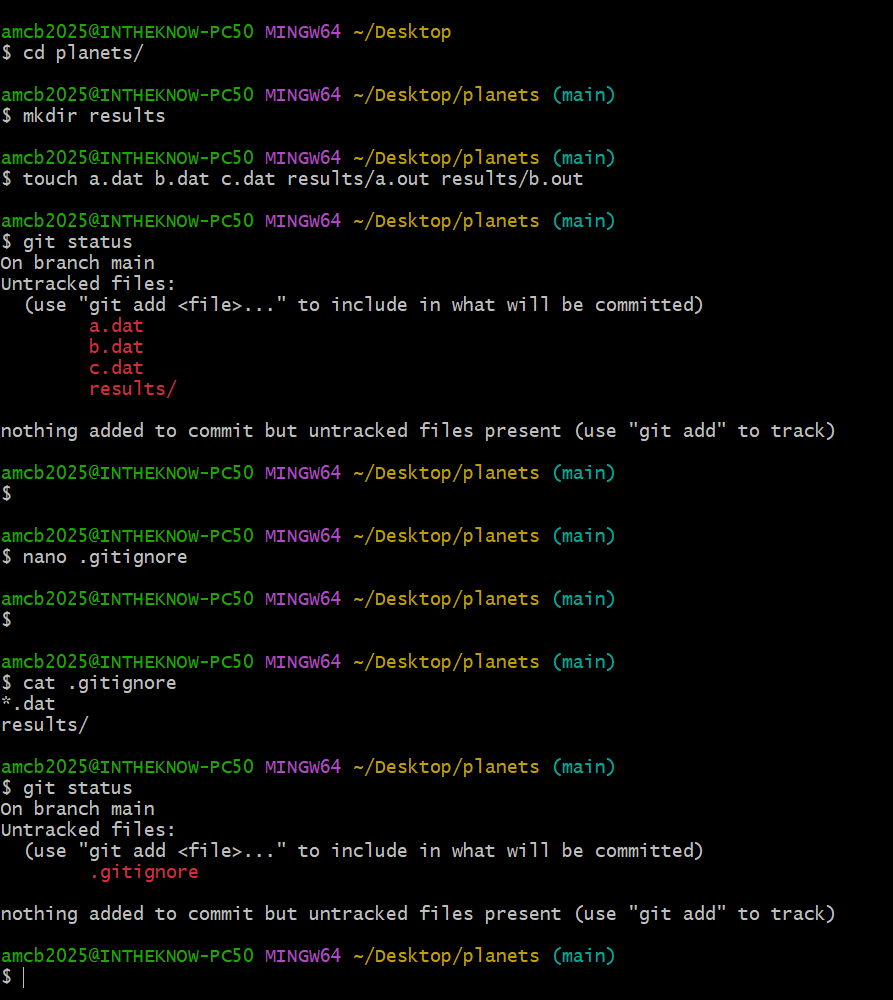
.gitignore written, and git status now showing
only the .gitignore itself.The only thing Git notices now is the newly-created
.gitignore file. You might think we wouldn’t want to track
it, but everyone we’re sharing our repository with will probably want to
ignore the same things that we’re ignoring. Let’s add and commit
.gitignore:
OUTPUT
On branch main
nothing to commit, working tree clean
As a bonus, using .gitignore helps us avoid accidentally
adding files to the repository that we don’t want to track:
OUTPUT
The following paths are ignored by one of your .gitignore files:
a.dat
Use -f if you really want to add them.
If we really want to override our ignore settings, we can use
git add -f to force Git to add something. For example,
git add -f a.dat. We can also always see the status of
ignored files if we want:
OUTPUT
On branch main
Ignored files:
 (use "git add -f <file>..." to include in what will be committed)

        a.dat
        b.dat
        c.dat
        results/

nothing to commit, working tree cleanIf you only want to ignore the contents of
results/plots, you can change your .gitignore
to ignore only the /plots/ subfolder by adding the
following line to your .gitignore:
OUTPUT
results/plots/This line will ensure only the contents of results/plots
is ignored, and not the contents of results/data.
As with most programming issues, there are a few alternative ways that one may ensure this ignore rule is followed. The “Ignoring Nested Files: Variation” exercise has a slightly different directory structure that presents an alternative solution. Further, the discussion page has more detail on ignore rules.
Including Specific Files
How would you ignore all .dat files in your root
directory except for final.dat? Hint: Find out what
! (the exclamation point operator) does
You would add the following two lines to your .gitignore:
OUTPUT
*.dat           # ignore all data files
!final.dat      # except final.data
The exclamation point operator will include a previously excluded entry.
Note also that because you’ve previously committed .dat
files in this lesson they will not be ignored with this new rule. Only
future additions of .dat files added to the root directory
will be ignored.
Ignoring Nested Files: Variation
Given a directory structure that looks similar to the earlier Nested Files exercise, but with a slightly different directory structure:
How would you ignore all of the contents in the results folder, but
not results/data?
Hint: think a bit about how you created an exception with the
! operator before.
If you want to ignore the contents of results/ but not
those of results/data/, you can change your
.gitignore to ignore the contents of results folder, but
create an exception for the contents of the results/data
subfolder. Your .gitignore would look like this:
OUTPUT
results/*               # ignore everything in results folder
!results/data/ # do not ignore results/data/ contentsIgnoring all data Files in a Directory
Assuming you have an empty .gitignore file, and given a directory structure that looks like:
BASH
results/data/position/gps/a.dat
results/data/position/gps/b.dat
results/data/position/gps/c.dat
results/data/position/gps/info.txt
results/plots
What’s the shortest .gitignore rule you could write to
ignore all .dat files in
result/data/position/gps? Do not ignore the
info.txt.
Appending results/data/position/gps/*.dat will match
every file in results/data/position/gps that ends with
.dat. The file
results/data/position/gps/info.txt will not be ignored.
Ignoring all data Files in the repository
Let us assume you have many .dat files in different
subdirectories of your repository. For example, you might have:
BASH
results/a.dat
data/experiment_1/b.dat
data/experiment_2/c.dat
data/experiment_2/variation_1/d.dat
How do you ignore all the .dat files, without explicitly
listing the names of the corresponding folders?
In the .gitignore file, write:
OUTPUT
**/*.dat This will ignore all the .dat files, regardless of their
position in the directory tree. You can still include some specific
exception with the exclamation point operator.
The ! modifier will negate an entry from a previously
defined ignore pattern. Because the !*.dat entry negates
all of the previous .dat files in the
.gitignore, none of them will be ignored, and all
.dat files will be tracked.
Log Files
You wrote a script that creates many intermediate log-files of the
form log_01, log_02, log_03, etc.
You want to keep them but you do not want to track them through
git.
Create a few dummy files to work with: touch
log_01log_02log_03etc. How would you write one.gitignoreentry that excludes all files of the formlog_01log_02log_03? Check that it worked —git statusshould not list the log files.You find that the file
log_01is very important after all. How would you add it to the tracked files without editing the.gitignoreagain?What other types of files could sit in your directory that you do not want to track and thus would exclude via
.gitignore?
- append either
log_*as a new entry in your .gitignore - track
log_01usinggit add -f log_01 - Passwords, other credentials, API keys, large data files, etc.
- The
.gitignorefile tells Git what files to ignore.