
gocryptfs Architecture
Last updated on 2026-08-27 | Edit this page
Overview
Questions
- How does gocryptfs work technically?
- What is the two-directory model?
- How does FUSE enable transparent encryption?
- Why is gocryptfs better than alternatives like EncFS?
Objectives
- Understand gocryptfs architecture and the two-directory model
- Learn what FUSE is and how it enables transparent encryption
- Understand the read/write flow through FUSE and gocryptfs
- Know why gocryptfs is the optimal choice for HPC clusters
Introduction: From Theory to Practice
Episode 1 explained why encryption matters: regulatory requirements, legal liability, and protecting research subjects. Now you’ll understand how gocryptfs makes encryption practical for daily research work.
gocryptfs is elegant technology because it makes encryption transparent. When properly set up, you don’t think about encryption—you just use your files normally. The magic lies in how gocryptfs achieves this transparency while maintaining military-grade security.
A Brief History: Why gocryptfs?
Before gocryptfs, researchers used EncFS (2003-2012), another FUSE-based encryption tool. However, security researchers discovered vulnerabilities in EncFS’s design: - Weak filenames encryption - Predictable initialization vectors - Vulnerability to known-plaintext attacks
In response, Jakob Unterwurzacher created gocryptfs in 2014 as a modern, secure successor. gocryptfs: - Uses authenticated encryption (AES-256-GCM) - Employs modern, memory-hard key derivation (scrypt) - Encrypts filenames securely (EME mode) - Passed independent security audit in 2017
Key takeaway: gocryptfs is purpose-built for security and has been vetted by independent security researchers.
What is gocryptfs?
gocryptfs is a user-space encryption tool that:
- Encrypts files with AES-256-GCM (military-grade, NSA-approved cipher)
- Uses FUSE to transparently mount encrypted directories
- Allows normal file access without thinking about encryption
- Works with any SLURM job or application on Sagehen HPC
- Requires no administrator access (you can create encrypted directories yourself)
- Is written in Go (small attack surface, memory-safe language)
The Two-Directory Model
gocryptfs creates and manages two directories:
Naming Conventions
The directory names are entirely up to you. This workshop’s examples
use the NAME_cipher / NAME_plain pattern so
it’s obvious which directory is which. Pomona’s Security Awareness
training and the lab setup templates use the campus-canonical names
encrypted_base / decrypted_view. Both
conventions work identically – pick one for your lab and use it
consistently.
What is NOT up to you is the placement: the cipher directory lives on
/bigdata/lab/<labname>/... (persistent BeeGFS
storage), but the plain/mountpoint directory must be on node-local
/scratch/$USER/... – FUSE cannot mount onto
/bigdata, because BeeGFS is a network filesystem. Mounting
also requires a compute session (srun/sbatch),
not the login node. Episode 6 covers this in detail.
Cipher Directory
(/bigdata/lab/<labname>/secret_cipher)
This is the actual encrypted storage on disk:
- Contains encrypted files with encrypted names
- Stored permanently on Sagehen HPC’s BeeGFS filesystem
- Looks like random data to anyone without the passphrase
- This is what gets backed up
- Remains encrypted when you’re not actively working
- Uses storage quota just like any other files
Example contents:
/bigdata/lab/<labname>/secret_cipher/
  ├── gocryptfs.conf
  ├── gocryptfs.longfilename.4A3Lx7=9zQ_...
  ├── gocryptfs.longfilename.K2mNp1=5jR_...
  └── gocryptfs.longfilename.uVwXy8=2Qa_...
Plain Directory (/scratch/$USER/secret_plain)
This is the decrypted view you work with:
- Shows real filenames and contents
- Created in memory when you mount the cipher directory
- Automatically decrypts files when you read them
- Automatically encrypts files when you write them
- Disappears when you unmount (plain files vanish from view)
- Users work here transparently (just use
ls,cat,cp, etc.)
Example contents (same files as above, after mounting):
/scratch/$USER/secret_plain/
  ├── data.csv
  ├── analysis.py
  └── results.txt
The Two-Directory Model Visualized
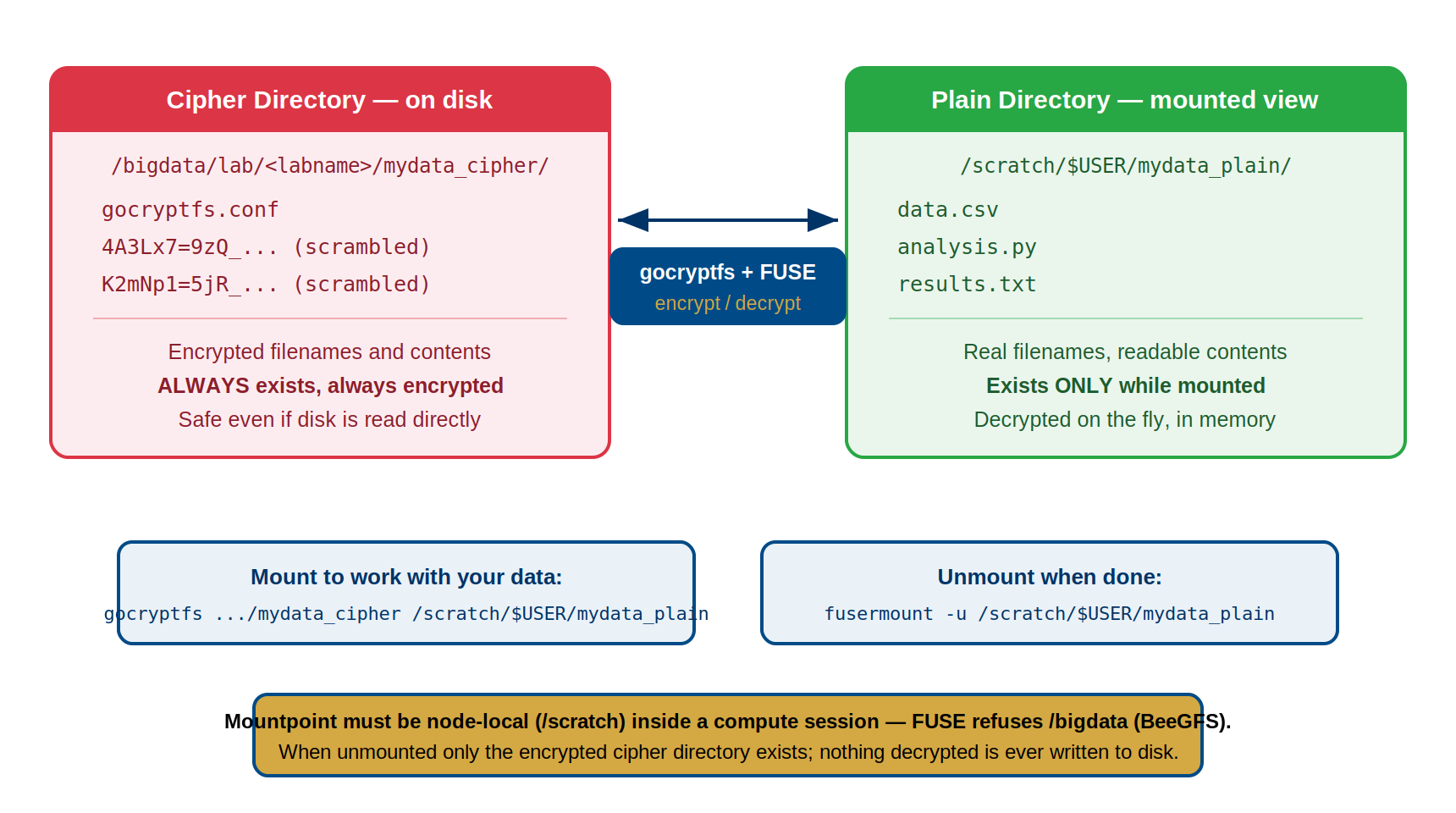
On-Disk (Encrypted):          Visible When Mounted (Decrypted):
/bigdata/lab/<labname>/secret_cipher/   /scratch/$USER/secret_plain/
  ├── gocryptfs.conf          ├── data.csv
  ├── 4A3Lx7=9zQ_... -------- data.csv (decrypted on-the-fly)
  ├── K2mNp1=5jR_... -------- analysis.py
  └── uVwXy8=2Qa_... -------- results.txt

When cipher mounted via FUSE:
Applications work with plain directory (decrypted).
FUSE layer handles encryption/decryption transparently.
Disk stores only encrypted data.
Key insight: The cipher directory is always encrypted on disk. The plain directory only exists in memory during the mount session. When you unmount, plain files disappear, leaving only encrypted data on disk.
FUSE and Transparent Encryption
What is FUSE?
FUSE = Filesystem in Userspace
Normally, only the kernel and privileged processes can manage filesystems. FUSE flips this: it allows unprivileged users to create and manage filesystems.
How FUSE Works
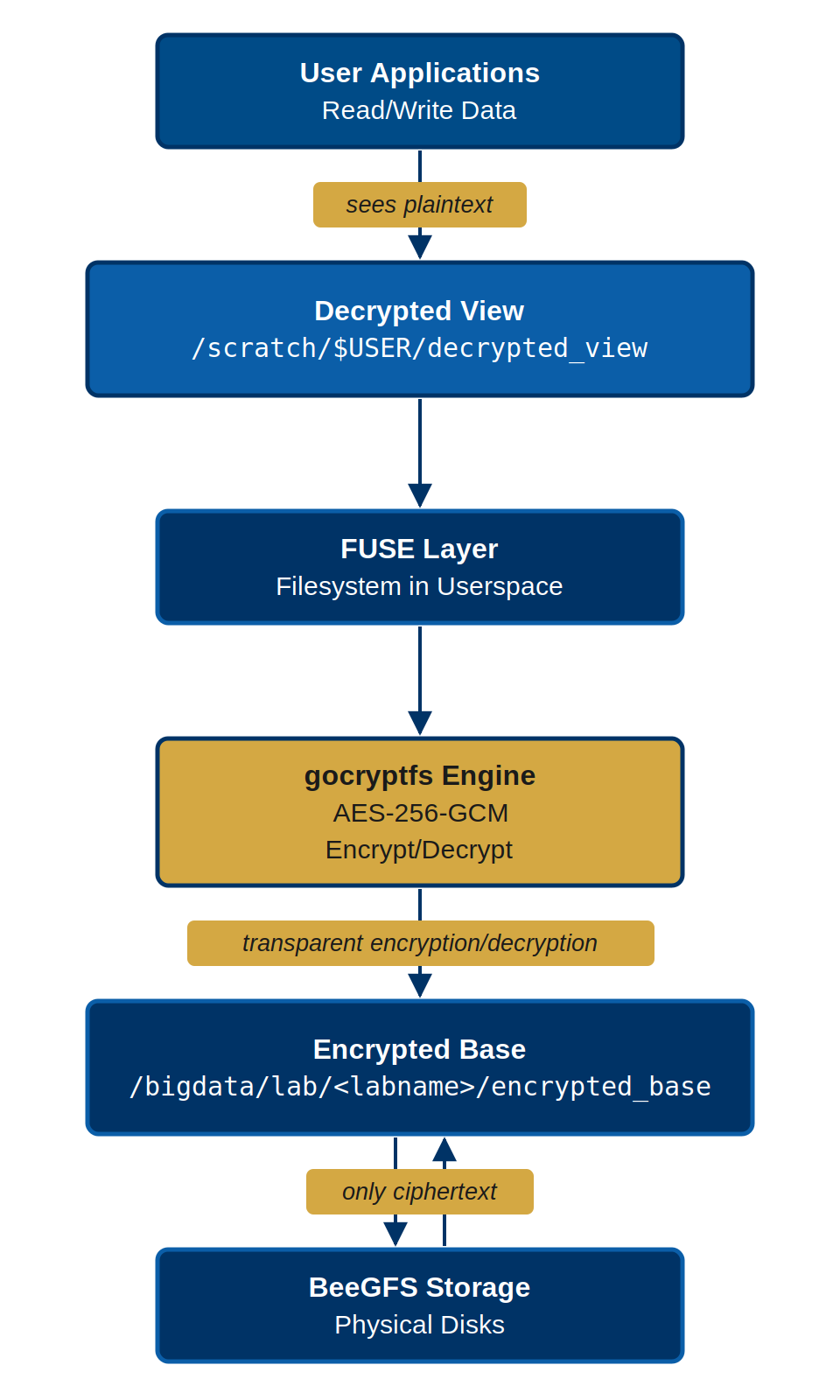
Your application (Python, R, Bash, SLURM job)
         ↓
System calls (read /scratch/$USER/secret_plain/data.csv)
         ↓
FUSE kernel module (forwards to user process)
         ↓
gocryptfs user daemon (running as you, not root)
         ↓ (decrypts on read, encrypts on write)
Encrypted files on disk (/bigdata/lab/<labname>/secret_cipher/)
Flow for reading a file: 1. Your program:
open("/scratch/$USER/secret_plain/data.csv") 2. Kernel:
Recognizes this is a FUSE mount point 3. FUSE: Routes to gocryptfs user
daemon 4. gocryptfs: “I need to read the plaintext for this file” 5.
gocryptfs: Finds corresponding encrypted file in cipher directory 6.
gocryptfs: Decrypts it using master key 7. gocryptfs: Returns plaintext
to your program 8. Your program: Sees decrypted file (no idea encryption
happened)
Flow for writing a file: 1. Your program:
echo "results" > /scratch/$USER/secret_plain/results.txt
2. Kernel: Routes write through FUSE 3. gocryptfs: “I received plaintext
to write” 4. gocryptfs: Encrypts the plaintext 5. gocryptfs: Writes
encrypted bytes to cipher directory 6. gocryptfs: Encrypts filename and
metadata 7. Your program: Returns from write (done)
Key insight: FUSE makes encryption invisible. Your
programs use open(), read(),
write() as normal; gocryptfs handles encryption
transparently.
Challenge: Trace the Data Flow
A researcher runs this command on the Sagehen HPC cluster:
Trace exactly what happens from the moment the shell executes this write until the data is stored on disk. List each component involved and what it does at each step.
-
Shell / Application: The shell calls
write()to createresults.txtwith the content “experiment results: 42.7” at the path/scratch/$USER/secret_plain/results.txt. -
Kernel (VFS layer): The kernel recognizes that
/scratch/$USER/secret_plain/is a FUSE mount point and routes the write request to the FUSE kernel module instead of the normal filesystem driver. - FUSE kernel module: FUSE forwards the write request to the gocryptfs user-space daemon running under the researcher’s UID.
- gocryptfs daemon (encrypt content): gocryptfs receives the plaintext content and encrypts it using AES-256-GCM with the master key derived from the researcher’s passphrase.
-
gocryptfs daemon (encrypt filename): gocryptfs
encrypts the filename
results.txtusing EME wide-block encryption, producing an encrypted filename likegocryptfs.longfilename.uVwXy8=2Qa_.... -
gocryptfs daemon (write to cipher directory):
gocryptfs writes the encrypted content under the encrypted filename to
the cipher directory at
/bigdata/lab/<labname>/secret_cipher/. - BeeGFS (disk): The encrypted bytes are written to Sagehen’s BeeGFS parallel filesystem and stored on disk. Only encrypted data is ever written to persistent storage.
The shell receives a successful return from write() and
has no idea encryption occurred.
- gocryptfs is the secure successor to EncFS, created in 2014 after security vulnerabilities in EncFS
- The two-directory model: cipher (encrypted on-disk) and plain (decrypted in-memory during mount)
- FUSE (Filesystem in Userspace) allows unprivileged users to create and manage filesystems
- Encryption is transparent: applications use regular file operations; gocryptfs handles encryption invisibly
- File-level encryption (not block-level) is necessary for HPC shared storage (no admin required)
- The cipher directory is always encrypted; the plain directory exists only during an active mount session
- FUSE makes encryption invisible to applications—they use open(), read(), write() normally