
Functions
Last updated on 2026-08-24 | Edit this page
Overview
Questions
- How else can I eliminate redundancy in my Makefiles?
Objectives
- Write Makefiles that use functions to match and transform sets of files.
At this point, we have the following Makefile:
include config.mk

# Generate summary table.
results.txt : $(ZIPF_SRC) isles.dat abyss.dat last.dat
	$(LANGUAGE) $^ > $@

# Count words.
.PHONY : dats
dats : isles.dat abyss.dat last.dat

%.dat : $(COUNT_SRC) books/%.txt
	$(LANGUAGE) $^ $@

.PHONY : clean
clean :
	rm -f *.dat
	rm -f results.txt
Make has many functions which
can be used to write more complex rules. One example is
wildcard. wildcard gets a list of files
matching some pattern, which we can then save in a variable. So, for
example, we can get a list of all our text files (files ending in
.txt) and save these in a variable by adding this at the
beginning of our makefile:
TXT_FILES=$(wildcard books/*.txt)We can add a .PHONY target and rule to show the
variable’s value:
.PHONY : variables
variables:
@echo TXT_FILES: $(TXT_FILES)@echo
Make prints actions as it executes them. Using @ at the
start of an action tells Make not to print this action. So, by using
@echo instead of echo, we can see the result
of echo (the variable’s value being printed) but not the
echo command itself.
If we run Make:
We get:
OUTPUT
TXT_FILES: books/abyss.txt books/isles.txt books/last.txt books/sierra.txtNote how sierra.txt is now included too.
patsubst (‘pattern substitution’) takes a pattern, a
replacement string and a list of names in that order; each name in the
list that matches the pattern is replaced by the replacement string.
Again, we can save the result in a variable. So, for example, we can
rewrite our list of text files into a list of data files (files ending
in .dat) and save these in a variable:
DAT_FILES=$(patsubst books/%.txt, %.dat, $(TXT_FILES))We can extend variables to show the value of
DAT_FILES too:
.PHONY : variables
variables:
	@echo TXT_FILES: $(TXT_FILES)
	@echo DAT_FILES: $(DAT_FILES)
If we run Make,
then we get:
OUTPUT
TXT_FILES: books/abyss.txt books/isles.txt books/last.txt books/sierra.txt
DAT_FILES: abyss.dat isles.dat last.dat sierra.dat
Now, sierra.txt is processed too.
With these we can rewrite clean and
dats:
.PHONY : dats
dats : $(DAT_FILES)

.PHONY : clean
clean :
	rm -f $(DAT_FILES)
	rm -f results.txt
Let’s check:
We get:
OUTPUT
python countwords.py books/abyss.txt abyss.dat
python countwords.py books/isles.txt isles.dat
python countwords.py books/last.txt last.dat
python countwords.py books/sierra.txt sierra.dat
We can also rewrite results.txt:
results.txt : $(ZIPF_SRC) $(DAT_FILES)
	$(LANGUAGE) $^ > $@
If we re-run Make:
We get:
OUTPUT
python countwords.py books/abyss.txt abyss.dat
python countwords.py books/isles.txt isles.dat
python countwords.py books/last.txt last.dat
python countwords.py books/sierra.txt sierra.dat
python testzipf.py  last.dat  isles.dat  abyss.dat  sierra.dat > results.txt
Let’s check the results.txt file:
OUTPUT
Book	First	Second	Ratio
abyss	4044	2807	1.44
isles	3822	2460	1.55
last	12244	5566	2.20
sierra	4242	2469	1.72
So the range of the ratios of occurrences of the two most frequent words in our books is indeed around 2, as predicted by Zipf’s Law, i.e., the most frequently-occurring word occurs approximately twice as often as the second most frequent word. Here is our final Makefile:
include config.mk

TXT_FILES=$(wildcard books/*.txt)
DAT_FILES=$(patsubst books/%.txt, %.dat, $(TXT_FILES))

# Generate summary table.
results.txt : $(ZIPF_SRC) $(DAT_FILES)
	$(LANGUAGE) S^ > $@

# Count words.
.PHONY : dats
dats : $(DAT_FILES)

%.dat : $(COUNT_SRC) books/%.txt
	$(LANGUAGE) $^ $@

.PHONY : clean
clean :
	rm -f $(DAT_FILES)
	rm -f results.txt

.PHONY : variables
variables:
	@echo TXT_FILES: $(TXT_FILES)
	@echo DAT_FILES: $(DAT_FILES)
Remember, the config.mk file contains:
# Count words script.
LANGUAGE=python
COUNT_SRC=countwords.py

# Test Zipf's rule
ZIPF_SRC=testzipf.py
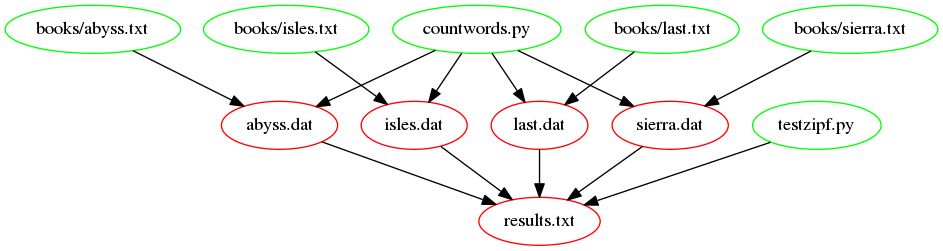
The following figure shows the dependencies embodied within our
Makefile, involved in building the results.txt target, now
we have introduced our function:
Adding more books
We can now do a better job at testing Zipf’s rule by adding more books. The books we have used come from the Project Gutenberg website. Project Gutenberg offers thousands of free ebooks to download.
Exercise instructions: - go to Project Gutenberg and use the
search box to find another book, for example ‘The Picture of Dorian
Gray’ from Oscar Wilde. - download the ‘Plain Text UTF-8’ version
and save it to the books folder; choose a short name for
the file (that doesn’t include spaces)
e.g. “dorian_gray.txt” because the filename is going to be used in the
results.txt file - optionally, open the file in a text
editor and remove extraneous text at the beginning and end (look for the
phrase END OF THE PROJECT GUTENBERG EBOOK [title]) - run
make and check that the correct commands are run, given the
dependency tree - check the results.txt file to see how this book
compares to the others
After dropping a new file (for example, dorian_gray.txt)
into books/, the wildcard and
patsubst functions automatically pick it up — you should
not need to edit any rules. A typical run looks like:
OUTPUT
python countwords.py books/abyss.txt abyss.dat
python countwords.py books/dorian_gray.txt dorian_gray.dat
python countwords.py books/isles.txt isles.dat
python countwords.py books/last.txt last.dat
python countwords.py books/sierra.txt sierra.dat
python testzipf.py  abyss.dat  dorian_gray.dat  isles.dat  last.dat  sierra.dat > results.txt
OUTPUT
Book          First   Second  Ratio
abyss          4044    2807    1.44
dorian_gray    5031    2746    1.83
isles          3822    2460    1.55
last          12244    5566    2.20
sierra         4242    2469    1.72
The exact numbers depend on which version of the text you downloaded
and whether you trimmed the Project Gutenberg header/footer, but the new
ratio should land in roughly the same neighbourhood as the others
(~1.4–2.2), supporting Zipf’s law. The key takeaway is that no
Makefile changes were required: the wildcard/patsubst functions
automatically expanded TXT_FILES and DAT_FILES
to include the new book.
- Make is actually a small programming language with many built-in functions.
- Use
wildcardfunction to get lists of files matching a pattern. - Use
patsubstfunction to rewrite file names.