
The Call Stack
Last updated on 2026-08-27 | Edit this page
Estimated time: 20 minutes
Overview
Questions
- What is the call stack, and how does R know what order to do things in?
- How does scope work in R?
Objectives
- Explain how stack frames are created and destroyed as functions are called.
- Correctly identify the scope of a function’s local variables.
- Explain variable scope in terms of the call stack.
The Call Stack
Let’s take a closer look at what happens when we call
fahrenheit_to_kelvin(32). To make things clearer, we’ll
start by putting the initial value 32 in a variable and store the final
result in one as well:
R
original <- 32
final <- fahrenheit_to_kelvin(original)
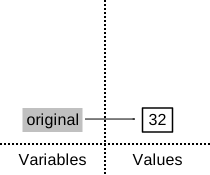
The diagram below shows what memory looks like after the first line has been executed:
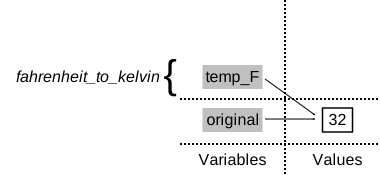
When we call fahrenheit_to_kelvin, R doesn’t
create the variable temp_F right away. Instead, it creates
something called a stack frame
to keep track of the variables defined by
fahrenheit_to_kelvin. Initially, this stack frame only
holds the value of temp_F:
When we call fahrenheit_to_celsius inside
fahrenheit_to_kelvin, R creates another stack frame to hold
fahrenheit_to_celsius’s variables:
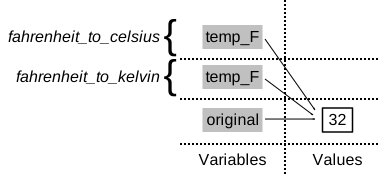
It does this because there are now two variables in play called
temp_F: the argument to fahrenheit_to_celsius,
and the argument to fahrenheit_to_kelvin. Having two
variables with the same name in the same part of the program would be
ambiguous, so R (and every other modern programming language) creates a
new stack frame for each function call to keep that function’s variables
separate from those defined by other functions.
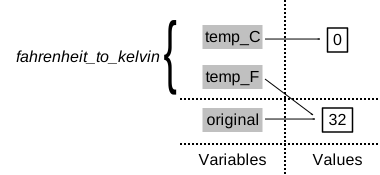
When the call to fahrenheit_to_celsius returns a value,
R throws away fahrenheit_to_celsius’s stack frame and
creates a new variable in the stack frame for
fahrenheit_to_kelvin to hold the temperature in
Celsius:
It then calls celsius_to_kelvin, which means it creates
a stack frame to hold that function’s variables:
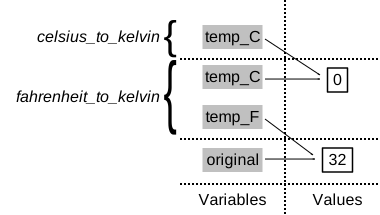
Once again, R throws away that stack frame when
celsius_to_kelvin is done and creates the variable
temp_K in the stack frame for
fahrenheit_to_kelvin:
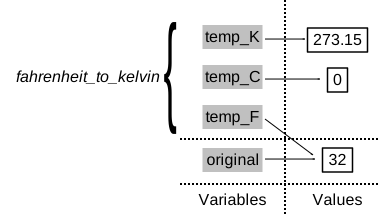
Finally, when fahrenheit_to_kelvin is done, R throws
away its stack frame and puts its result in a new variable
called final that lives in the stack frame we started
with:
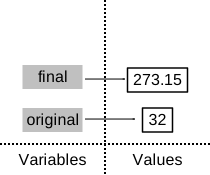
This final stack frame is always there; it holds the variables we
defined outside the functions in our code. What it doesn’t hold
is the variables that were in the various stack frames. If we try to get
the value of temp_F after our functions have finished
running, R tells us that there’s no such thing:
R
temp_F
ERROR
Error in eval(expr, envir, enclos): object 'temp_F' not foundWhere to Learn More
The explanation of the stack frame above was very general and the basic concept will help you understand most languages you try to program with. However, R has some unique aspects that can be exploited when performing more complicated operations. We will not be writing anything that requires knowledge of these more advanced concepts. In the future when you are comfortable writing functions in R, you can learn more by reading the R Language Manual or this chapter from Advanced R Programming by Hadley Wickham. For context, R uses the terminology “environments” instead of frames.
Why go to all this trouble? Well, here’s a function called
span that calculates the difference between the minimum and
maximum values in an array:
R
span <- function(a) {
  diff <- max(a) - min(a)
  return(diff)
}

dat <- read.csv(file = "data/inflammation-01.csv", header = FALSE)
# span of inflammation data
span(dat)
OUTPUT
[1] 20Notice span assigns a value to variable called
diff. We might very well use a variable with the same name
(diff) to hold the inflammation data:
R
diff <- read.csv(file = "data/inflammation-01.csv", header = FALSE)
# span of inflammation data
span(diff)
OUTPUT
[1] 20We don’t expect the variable diff to have the value 20
after this function call, so the name diff cannot refer to
the same variable defined inside span as it does in the
main body of our program (which R refers to as the global environment).
And yes, we could probably choose a different name than
diff for our variable in this case, but we don’t want to
have to read every line of code of the R functions we call to see what
variable names they use, just in case they change the values of our
variables.
The big idea here is encapsulation, and it’s the key to writing correct, comprehensible programs. A function’s job is to turn several operations into one so that we can think about a single function call instead of a dozen or a hundred statements each time we want to do something. That only works if functions don’t interfere with each other; if they do, we have to pay attention to the details once again, which quickly overloads our short-term memory.
Following the Call Stack
We previously wrote functions called highlight and
edges. Draw a diagram showing how the call stack changes
when we run the following:
R
inner_vec <- "carbon"
outer_vec <- "+"
result <- edges(highlight(inner_vec, outer_vec))
R evaluates this expression from the inside out. Reading from left to right, the call stack passes through five distinct states:
-
Global frame only —
inner_vecandouter_vecare bound in the global environment. The call stack contains a single frame:[global] inner_vec = "carbon" outer_vec = "+" -
Entering
highlight— R needs the first argument ofedges, so it must callhighlight(inner_vec, outer_vec)first. A new stack frame is pushed forhighlight. Inside that frame, the formal arguments (let’s call themcontentandwrapper) bind to the caller’sinner_vecandouter_vecvalues:[highlight] content = "carbon" wrapper = "+" [global] inner_vec, outer_vec -
highlightreturns — the function returns its result (e.g.,"+carbon+"). R pops thehighlightframe; its locals (content,wrapper) are gone:[global] inner_vec, outer_vec [returned value: "+carbon+"] -
Entering
edges— R now callsedges("+carbon+"). A new frame is pushed foredges, with its formal argument bound to the returned string:[edges] v = "+carbon+" [global] inner_vec, outer_vec -
edgesreturns; assignment toresult—edgesproduces its return value (e.g.,c("+", "+")). Theedgesframe is popped, and the return value is bound toresultin the global environment:[global] inner_vec = "carbon" outer_vec = "+" result = c("+", "+")
The two important takeaways are:
-
Frames are pushed in evaluation order, not lexical
order. Even though
edges(...)appears outermost in the source code,highlight(...)is pushed first because R must evaluate the argument before the call. -
Local variables die with their frame. If you try to
print
content,wrapper, orvat the global prompt, R reports “object not found” — those names existed only inside their respective frames.
A handy way to confirm this in practice is to insert
traceback() inside one of the helper functions, or to set
options(error = recover) before triggering an error inside
highlight — R will list the active frames and let you
inspect their locals.
- R keeps track of active function calls using a call stack comprised of stack frames.
- Only global variables and variables in the current stack frame can be accessed directly.