
Authentication and Access Control
Last updated on 2026-08-27 | Edit this page
Overview
Questions
- How do you secure your HPC account?
- What is multi-factor authentication?
- Why is DUO MFA required?
- How do you protect your password?
Objectives
- Understand password security best practices
- Set up and use DUO Multi-Factor Authentication
- Recognize phishing and social engineering attacks
- Know what to do if credentials are compromised
Account Security Fundamentals
Your HPC account is the key to Sagehen. Securing it protects your research and others’ data.
Strong Passwords
A good password:
- Is long (14+ characters, per NIST SP 800-63B)
- Is random (mix letters, numbers, symbols)
- Is unique (different from other accounts)
- Is NOT: Your name, birthday, pet name, dictionary words
- Is NOT: Reused from other accounts
Password Examples
BAD: MyPassword123 (predictable pattern) BAD: Fluffy2024 (pet name + year) BAD: SamSmith1955 (real name + date)
GOOD: Tr0pic@l*Penguin#42 (random, mixed characters, memorable) GOOD: 7Qk&mL2pX$9Yw2 (random string) GOOD: My-Dog-Ate-11-Socks! (memorable passphrase)
Password Security Rules
- Never share your password with anyone (not even staff)
- Never write it down except in encrypted password manager
- Never type it in email even to support staff
- Never use at work in front of others
- Change immediately if you suspect it’s exposed
- Don’t reuse passwords across multiple accounts
Critical: Staff Will Never Ask for Your Password
If anyone claiming to be HPC staff, IT support, or Pomona administration asks for your password via email, phone, or chat: DO NOT GIVE IT. Legitimate staff will never ask. This is a phishing attempt or social engineering attack. Report it to its-hpc@pomona.edu immediately.
Password Managers
Use a password manager to secure strong passwords:
- LastPass, 1Password, Bitwarden, KeePass
- Store complex passwords you can’t memorize
- One master password protects all
- Available on computer and phone
- Industry standard for security professionals
Multi-Factor Authentication (MFA)
MFA (also called 2FA or two-factor auth) adds a second security layer:
- Something you know: Password
- Something you have: Phone or security key
- Something you are: Biometrics (optional)
DUO MFA at Pomona
The College requires DUO Multi-Factor Authentication for HPC access.
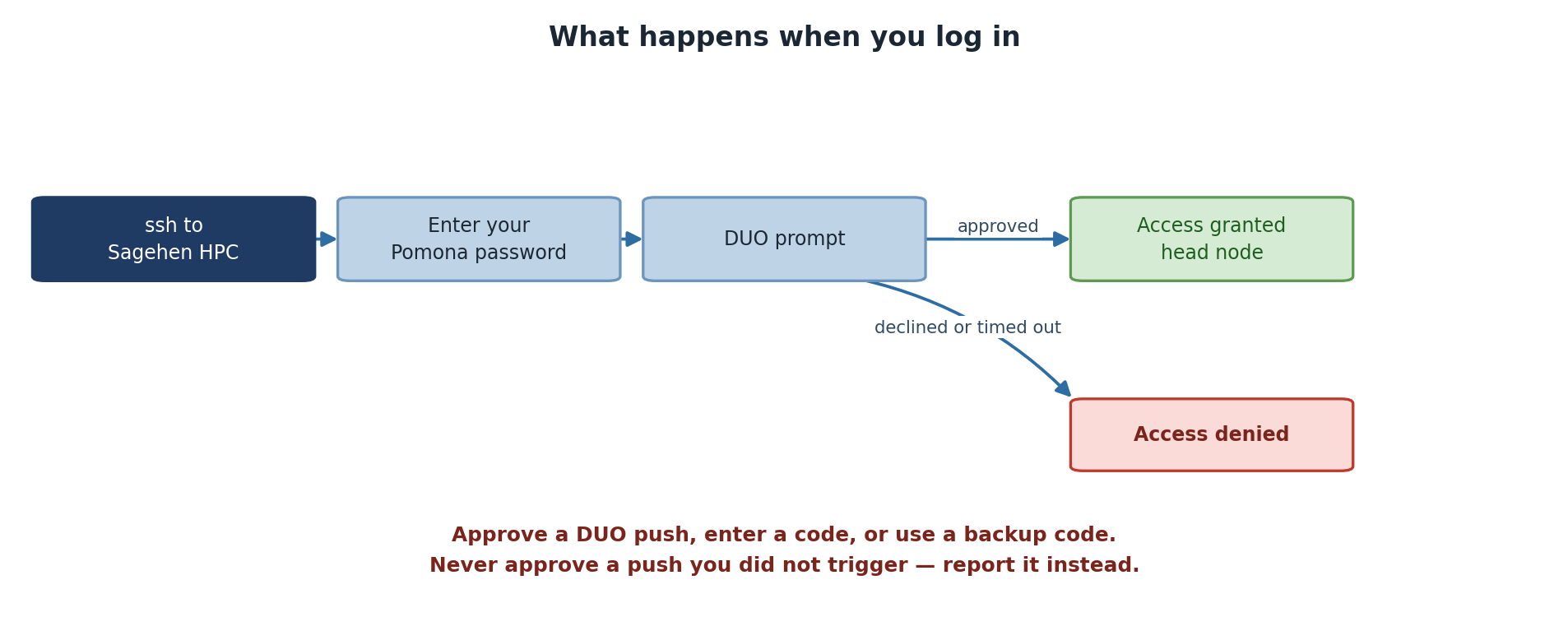
How DUO works:
- You enter username and password
- DUO sends notification to your phone
- You approve the login on your phone
- Login completes
Or you can enter a code from authenticator app instead.
Setting Up DUO
- Go to https://duo.pomona.edu
- Log in with Pomona credentials
- Follow DUO enrollment process
- Choose method:
- DUO mobile app (best - works offline)
- Phone call (always works)
- Text message (backup)
- Test authentication
Session Security
Once logged in, maintain security:
Session Timeout
- OnDemand: Auto-logout after inactivity (typically 1-2 hours)
- SSH: No automatic logout (user responsible)
- Jupyter/RStudio: Browser-based, follows browser security
Recognizing and Preventing Attacks
Phishing Emails
Fake emails trying to steal credentials:
Red flags:
- Urgent language (“Act now!”)
- Unusual requests (verify login, click link)
- Generic greetings (“User” instead of your name)
- Suspicious sender address
- Requests to verify password/PIN
- Too-good-to-be-true offers
Real organizations never ask you to verify credentials via email.
What to do:
- Don’t click any links
- Don’t download attachments
- Report to its-hpc@pomona.edu
- Delete the email
Social Engineering
Attackers may call or email claiming to be:
- “IT support” asking for password
- “HPC team” requesting access
- “From your department” needing confirmation
- “Pomona security” checking accounts
Remember: Legitimate staff never ask for passwords via email/phone.
What to do:
- Say “I’ll contact ITS directly”
- Hang up or close email
- Call actual ITS number from official directory
- Verify the request
If Your Credentials Are Compromised
Immediately:
- Stop what you’re doing
- Change your password right now
- Contact its-hpc@pomona.edu - include details
- Check account activity - look for unexpected jobs/files
- Don’t panic - you’re not alone; this happens
Act Fast: First Minutes Are Critical
If you suspect your password is compromised, changing it immediately limits the damage window. Waiting even a few hours gives attackers time to access data or submit malicious jobs. Treat password compromise like a true emergency: stop, change password, report. Speed matters.
What HPC staff will do:
- Check for suspicious activity
- Review job history
- Scan for malware
- Help reset access
- Provide guidance
Note: The earlier you report, the better.
Challenge: Security Decision-Making
For each scenario, decide what you would do:
- You receive email from “ITS Security” asking you to verify password
- You use the same password on your HPC account and your Gmail
- You’re at a coffee shop; your laptop is at table while you get coffee
- You get DUO push notification you didn’t trigger
- You find a USB drive in a parking lot
Explain your decision for each.
- “ITS Security” email: DELETE IT - never reply, never click links. Call ITS directly using official phone number. This is a phishing attempt.
- Same password everywhere: CHANGE IMMEDIATELY - if one account is breached, all are at risk. Use unique strong passwords for each important account.
- Laptop unattended: LOCK YOUR LAPTOP - use Ctrl+Alt+Delete (Windows) or equivalent. Never leave unlocked in public.
- Unexpected DUO notification: DENY IT - don’t approve logins you didn’t initiate. Contact its-hpc@pomona.edu immediately. Someone may have your password.
- USB drive found: DO NOT PLUG IN - could contain malware or data you should not see. Bring to ITS, they’ll handle safely.
Testing Your Security Knowledge
Verify you understand:
- What constitutes a strong password
- How to set up and use DUO
- How to recognize phishing
- What to do if account is compromised
If you’re unsure about any of these, review or ask its-hpc@pomona.edu.
- Strong, unique passwords are essential; use a password manager
- DUO Multi-Factor Authentication adds critical security layer
- Phishing and social engineering are common; recognize and report
- Log out when finished, especially on shared computers
- If credentials are compromised, contact ITS immediately
- Legitimate staff never ask for passwords via email/phone