
All in One View
Content from Welcome and Your Responsibilities
Last updated on 2026-08-27 | Edit this page
Overview
Questions
- What does HPC security mean?
- What are your responsibilities as an HPC user?
- Why does account suspension happen without security training?
Objectives
- Understand your role in HPC security
- Recognize shared security responsibilities
- Understand why this training is mandatory
- Identify key security concepts
Welcome to HPC Security Training
This is a mandatory workshop for all Pomona College HPC users. Your account will be suspended if this training is not completed within 30 days of account activation.
This isn’t about rules to restrict you. It’s about protecting: - Your research data - Your collaborators’ data - Student data (FERPA protection) - Pomona’s computing infrastructure - Our college’s reputation and compliance
What is HPC Security?
HPC security means protecting research and sensitive data from:
- Accidental loss: Hard drives fail, data gets deleted
- Unauthorized access: Passwords compromised, attackers exploit systems
- Data exposure: Sensitive information exposed publicly
- Compliance violations: Breaking laws or policies
- System compromise: Malware or exploited systems
The Shared Responsibility Model
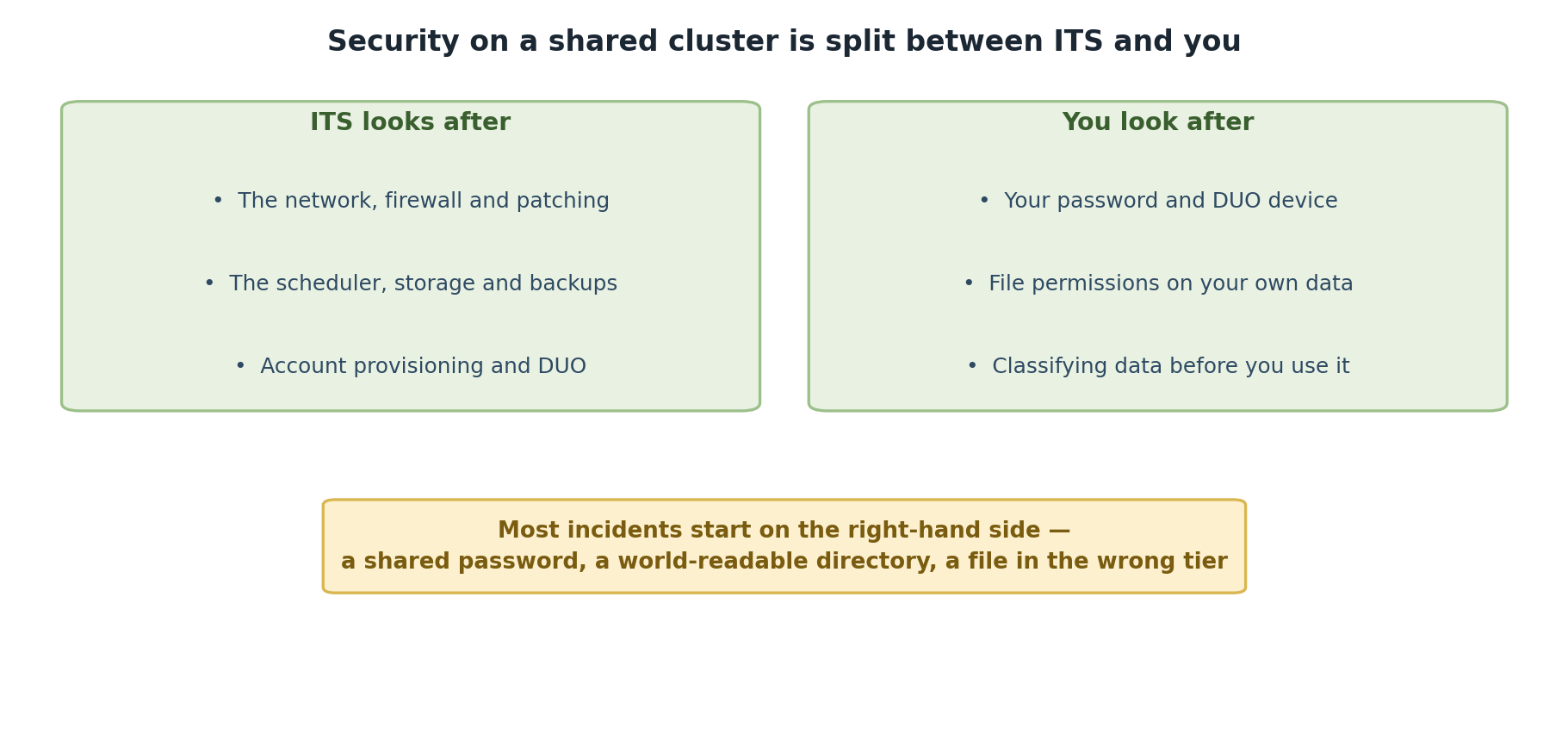
HPC security is NOT just the HPC staff’s job. Everyone has responsibilities:
HPC Staff Responsibility
- Maintain secure infrastructure
- Manage authentication systems
- Monitor for attacks and intrusions
- Keep software updated
- Handle incidents professionally
YOUR Responsibility
- Keep passwords secure
- Use multi-factor authentication
- Handle data appropriately
- Report suspicious activity
- Follow security policies
- Ask for help when uncertain
Critical: Your Role is Essential
Security professionals can build perfect systems, but one weak password or one careless data transfer undermines everything. Your actions directly impact Pomona’s security. This training exists because YOUR vigilance matters most.
Why This Training is Mandatory
Account suspension without completion is not arbitrary. Here’s why:
- Legal compliance: FERPA, export control, other laws
- Data protection: Student information requires protection
- Insurance requirements: Pomona’s cyber insurance mandates training
- Professional standards: Universities must demonstrate due diligence
- Collective security: One compromised account affects everyone
Completing this training shows you understand your role in protecting the community.
Key Security Principles
1. Know Your Data Classification
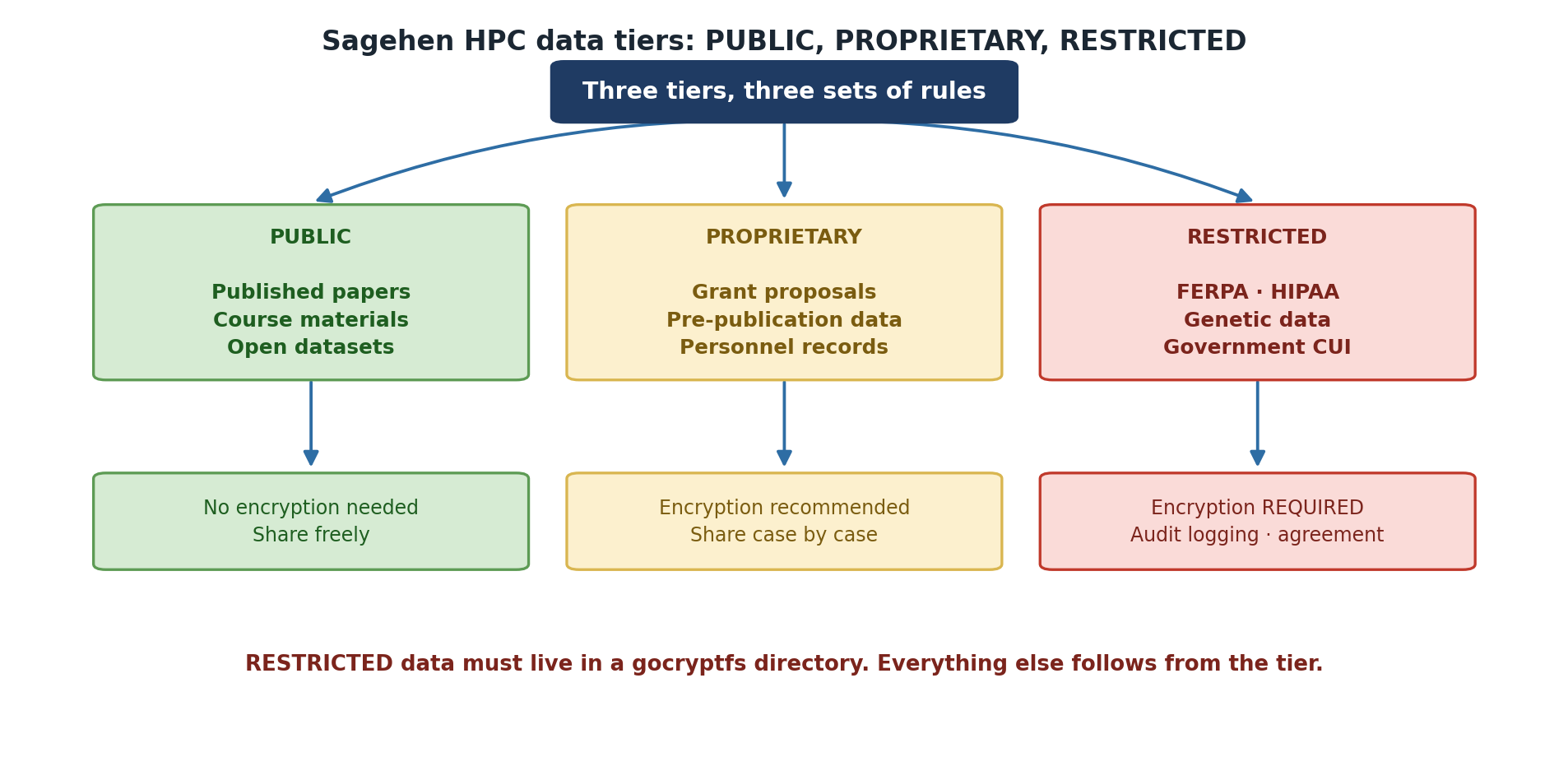
Data falls into three tiers:
- PUBLIC (green; permissions 755): Can be freely shared
- PROPRIETARY (orange; permissions 750): Restricted to authorized people; includes unpublished research
- RESTRICTED (red; permissions 700 + gocryptfs): Student records, medical, financial data
Different data requires different protection levels.
2. Least Privilege
Users get minimum access needed for their work. You don’t have admin access to cluster nodes. This isn’t to frustrate you; it’s to limit damage if your account is compromised.
Your Path to Secure HPC Use
This workshop covers:
- Acceptable Use Policy - What’s allowed and what’s not
- Authentication - How to secure your account
- Data Handling - Protecting research information
- Incident Reporting - What to do if something goes wrong
- Getting Help - Resources for security questions
Important Dates
- Account created: Day 0
- Training deadline: Day 30
- Account suspension: Day 31 if training incomplete
- Re-activation: After completing training
Warning: 30-Day Deadline is Real
This is not a suggestion. Accounts are automatically suspended after 30 days if training is incomplete. Re-activation requires completing all episodes. Plan to finish this training within the first two weeks after your account is created.
Common Questions
Q: Is this security training required every year? A: No, just once during onboarding. But security reminders happen periodically.
Q: What if I’m too busy to complete in 30 days? A: Contact its-hpc@pomona.edu to request extension (rare circumstances only).
Q: Does completing training guarantee security? A: No, but it dramatically improves security. Your ongoing vigilance matters most.
Q: What if I don’t understand something? A: Stop and ask its-hpc@pomona.edu. Honest questions are encouraged.
Challenge: Reflect on Your Responsibilities
Think about your research and computing:
- What types of data will you work with?
- Who else has access to this data?
- What would happen if your password was compromised?
- Where would you report a security problem?
Write 2-3 sentences about why HPC security matters for YOUR work.
There is no wrong answer to this challenge. Good answers mention:
- Recognition that research data has value and needs protection
- Understanding that others depend on security
- Awareness that mistakes happen and have consequences
- Willingness to follow procedures
- Recognition that security is everyone’s responsibility
Examples:
- “My dataset represents 6 months of lab work; losing it would be catastrophic.”
- “Student privacy depends on secure systems.”
- “If my account is hacked, it could compromise the whole lab’s work.”
Next Steps
Now that you understand why security matters, let’s learn how to maintain security. Continue to Episode 2.
- HPC security protects your research, your collaborators, and students
- Security is a shared responsibility between staff and users
- This mandatory training ensures everyone understands their role
- Account suspension without training completion is not arbitrary
- Your ongoing vigilance is the strongest security measure
Content from Acceptable Use Policy
Last updated on 2026-08-27 | Edit this page
Overview
Questions
- What activities are allowed on Sagehen HPC?
- What is strictly prohibited?
- How are policy violations handled?
- What counts as “appropriate use”?
Objectives
- Understand Pomona’s Acceptable Use Policy
- Recognize prohibited activities
- Know consequences of policy violation
- Understand appropriate use guidelines
Pomona’s Acceptable Use Policy
Sagehen is provided for Pomona College’s educational and research mission. Using the cluster means you agree to certain policies.
Acceptable Uses
HPC is appropriate for:
- Research computing: Data analysis, simulations, modeling
- Educational activities: Course projects, learning programming
- Collaboration: Working with others on approved research
- Development: Creating and testing research software
- Data management: Storing and processing research data
- Publication support: Computations enabling published research
All use must be:
- Approved by your PI: Your advisor must sponsor your account
- Mission-aligned: Supporting Pomona’s educational/research work
- Responsible: Not wasteful or excessive
- Compliant: Following all policies
Strictly Prohibited Activities
The following are never permitted on Sagehen:
Security Violations
- Attempting to gain unauthorized access
- Sharing accounts or credentials
- Running tools to crack passwords
- Exploiting known vulnerabilities
- Attempting to access others’ data without permission
No Exceptions: Account Sharing is Automatic Violation
Even sharing your account with a colleague “just this once” is an automatic violation resulting in investigation for both parties. Your account is for you alone. If others need access, they must get their own accounts. No exceptions.
Illegal Activities
- Downloading pirated software
- Distributing copyrighted material without permission
- Creating or distributing malware
- Facilitating illegal activity
- Anything that violates state or federal law
Misuse of Resources
- Mining cryptocurrency
- Streaming video or entertainment
- Hosting websites or web services
- Commercial work without arrangement
- Anything not related to research/education
Specific Examples
NOT Allowed
- Sharing your password with a friend to run their job
- Using HPC to analyze data for a startup company (without approval)
- Installing cryptocurrency mining software
- Accessing files in
/bigdata/lab/<labname>without permission - Sending threatening messages to another user
- Running jobs for a consulting client without special arrangement
- Downloading the entire internet to your /bigdata directory
Allowed (Usually)
- Running your own research code for 200 hours
- Working on class project for approved CS course
- Analyzing data as part of degree-required thesis
- Storing 5 TB of research data in
/bigdata/lab/<labname> - Collaborating with co-PI who also has HPC account
- Publishing results from computations on Sagehen
Consequences of Violations
First Offense (Minor)
- Verbal warning from HPC staff
- Explanation of correct behavior
- Account remains active
- Educational interaction
Second Offense or Serious First Violation
- Account suspension (typically 30 days)
- Meeting required with PI
- Possible referral to administration
- Written documentation
Special Approval Cases
Some uses require special approval:
Commercial Use
- Industry collaboration: Requires special arrangement
- Patent work: Must be disclosed
- Consulting: Not allowed without approval
- Data for startup: Contact its-hpc@pomona.edu
Resource-Intensive Work
- Very long jobs (>720 hours): Contact its-hpc@pomona.edu
- GPU usage (>1 week/month): May need approval
- Excessive storage: Quota system manages this
Policy Acknowledgment
By using Sagehen, you acknowledge:
- You have read and understand this policy
- You will follow all rules
- You understand consequences of violations
- You will report violations you witness
- You hold yourself accountable
You will be asked to sign this acknowledgment. This is legally binding.
Gray Areas
Some situations are less clear. If you’re unsure:
Ask its-hpc@pomona.edu before proceeding.
Examples of situations requiring clarification:
- “Can I share results with external collaborator?”
- “Is this startup work allowed?”
- “Can I download this dataset?”
- “Does this course project qualify?”
Asking protects you and shows good judgment.
Best Practice: Ask First, Act Second
When uncertain, send an email to its-hpc@pomona.edu describing what you want to do. Staff will respond within 24 hours. This single question can prevent weeks of account suspension. Good judgment means asking before acting on gray-area decisions.
Challenge: Policy Scenarios
For each scenario, decide if it’s allowed, prohibited, or requires asking:
- You want to download a TV show episode to relax during a break
- Your brother wants to run a quick job on your account
- You’re analyzing data for a company project your advisor approved
- You need to store research data containing student ID numbers
- You want to help a friend debug their code by looking at their files
Discuss your answers and reasoning.
- Download TV show: PROHIBITED - not research/educational, entertainment
- Brother uses your account: PROHIBITED - account sharing never allowed, automatic violation
- Company analysis with approval: LIKELY ALLOWED - but confirm with PI and its-hpc@pomona.edu to verify “approved”
- Student ID storage: REQUIRES ASKING - student data needs special handling, probably needs encryption
- Help friend debug code: ASK FIRST - depends on data type and whether they authorized you to access it
Key lesson: When uncertain, ask its-hpc@pomona.edu. It’s better to ask and learn the policy than to assume and violate it.
Reporting Violations
If you witness someone violating the Acceptable Use Policy:
- Report to its-hpc@pomona.edu with specific information
- Don’t confront the violator directly
- Include details: What, when, who (if known)
- Investigations are confidential
- Reporting is not retaliation - protected action
Questions About Policy?
Before doing anything you’re unsure about:
Email: its-hpc@pomona.edu
This is why the support team exists - to answer questions and help users stay compliant.
- Acceptable use means research/education only, approved by PI
- Sharing accounts, illegal activity, and harassment are automatic violations
- Minor violations result in warnings; serious violations in account suspension
- Severe violations may result in police involvement
- Always ask its-hpc@pomona.edu if you’re unsure
- You acknowledge this policy by using the cluster
- Reporting violations helps protect the community
Content from Authentication and Access Control
Last updated on 2026-08-27 | Edit this page
Overview
Questions
- How do you secure your HPC account?
- What is multi-factor authentication?
- Why is DUO MFA required?
- How do you protect your password?
Objectives
- Understand password security best practices
- Set up and use DUO Multi-Factor Authentication
- Recognize phishing and social engineering attacks
- Know what to do if credentials are compromised
Account Security Fundamentals
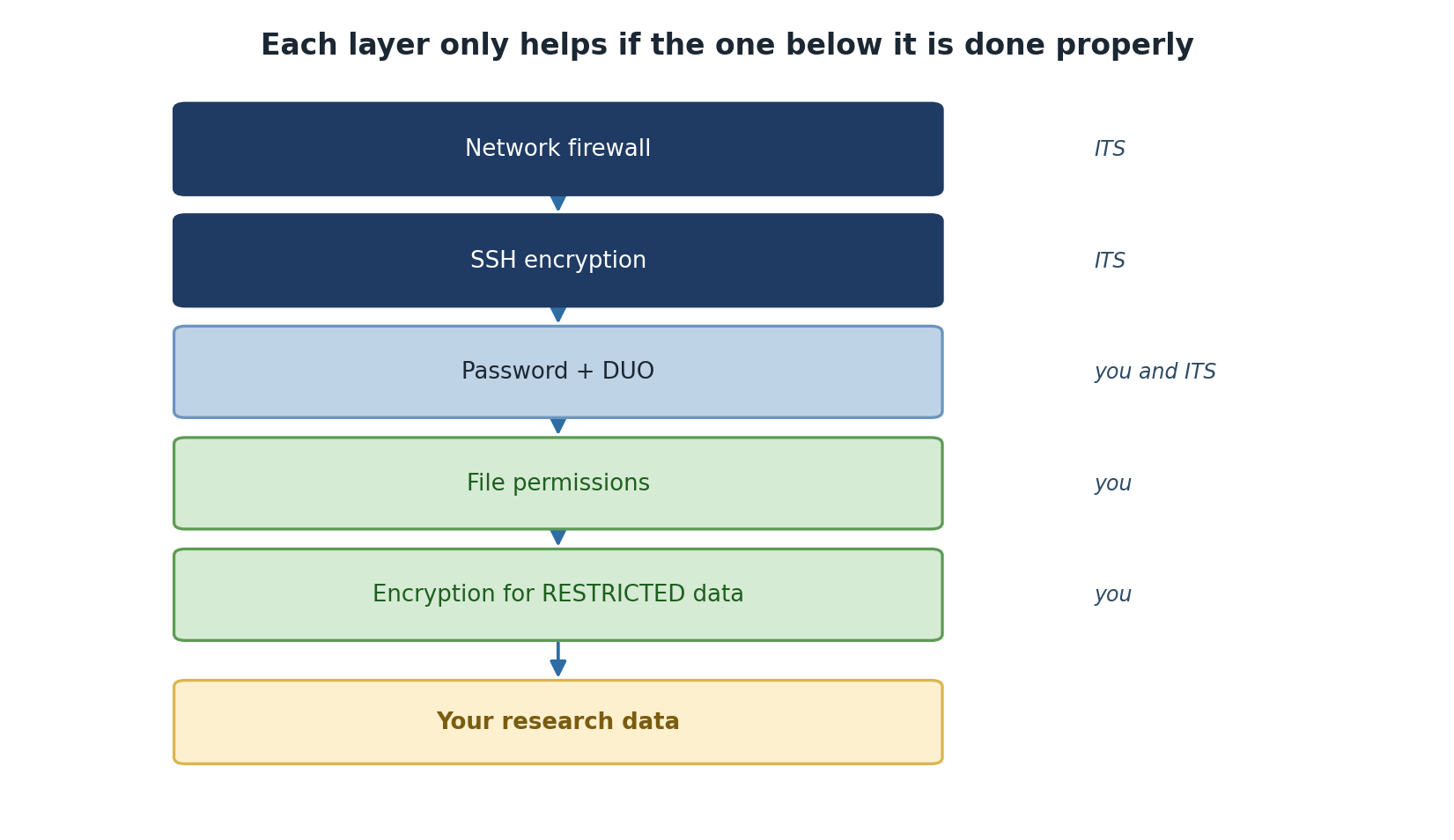
Your HPC account is the key to Sagehen. Securing it protects your research and others’ data.
Strong Passwords
A good password:
- Is long (14+ characters, per NIST SP 800-63B)
- Is random (mix letters, numbers, symbols)
- Is unique (different from other accounts)
- Is NOT: Your name, birthday, pet name, dictionary words
- Is NOT: Reused from other accounts
Password Examples
BAD: MyPassword123 (predictable pattern) BAD: Fluffy2024 (pet name + year) BAD: SamSmith1955 (real name + date)
GOOD: Tr0pic@l*Penguin#42 (random, mixed characters, memorable) GOOD: 7Qk&mL2pX$9Yw2 (random string) GOOD: My-Dog-Ate-11-Socks! (memorable passphrase)
Password Security Rules
- Never share your password with anyone (not even staff)
- Never write it down except in encrypted password manager
- Never type it in email even to support staff
- Never use at work in front of others
- Change immediately if you suspect it’s exposed
- Don’t reuse passwords across multiple accounts
Critical: Staff Will Never Ask for Your Password
If anyone claiming to be HPC staff, IT support, or Pomona administration asks for your password via email, phone, or chat: DO NOT GIVE IT. Legitimate staff will never ask. This is a phishing attempt or social engineering attack. Report it to its-hpc@pomona.edu immediately.
Password Managers
Use a password manager to secure strong passwords:
- LastPass, 1Password, Bitwarden, KeePass
- Store complex passwords you can’t memorize
- One master password protects all
- Available on computer and phone
- Industry standard for security professionals
Multi-Factor Authentication (MFA)
MFA (also called 2FA or two-factor auth) adds a second security layer:
- Something you know: Password
- Something you have: Phone or security key
- Something you are: Biometrics (optional)
DUO MFA at Pomona
The College requires DUO Multi-Factor Authentication for HPC access.
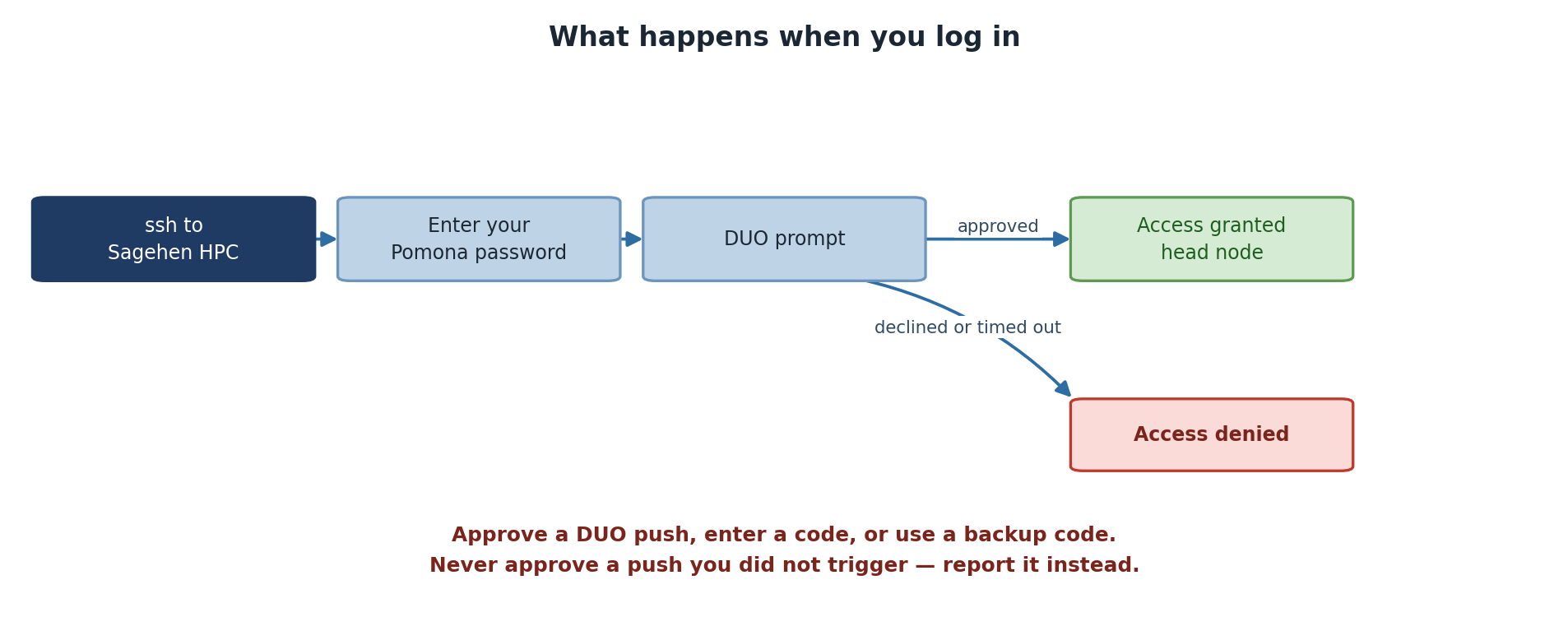
How DUO works:
- You enter username and password
- DUO sends notification to your phone
- You approve the login on your phone
- Login completes
Or you can enter a code from authenticator app instead.
Setting Up DUO
- Go to https://duo.pomona.edu
- Log in with Pomona credentials
- Follow DUO enrollment process
- Choose method:
- DUO mobile app (best - works offline)
- Phone call (always works)
- Text message (backup)
- Test authentication
Session Security
Once logged in, maintain security:
Session Timeout
- OnDemand: Auto-logout after inactivity (typically 1-2 hours)
- SSH: No automatic logout (user responsible)
- Jupyter/RStudio: Browser-based, follows browser security
Recognizing and Preventing Attacks
Phishing Emails
Fake emails trying to steal credentials:
Red flags:
- Urgent language (“Act now!”)
- Unusual requests (verify login, click link)
- Generic greetings (“User” instead of your name)
- Suspicious sender address
- Requests to verify password/PIN
- Too-good-to-be-true offers
Real organizations never ask you to verify credentials via email.
What to do:
- Don’t click any links
- Don’t download attachments
- Report to its-hpc@pomona.edu
- Delete the email
Social Engineering
Attackers may call or email claiming to be:
- “IT support” asking for password
- “HPC team” requesting access
- “From your department” needing confirmation
- “Pomona security” checking accounts
Remember: Legitimate staff never ask for passwords via email/phone.
What to do:
- Say “I’ll contact ITS directly”
- Hang up or close email
- Call actual ITS number from official directory
- Verify the request
If Your Credentials Are Compromised
Immediately:
- Stop what you’re doing
- Change your password right now
- Contact its-hpc@pomona.edu - include details
- Check account activity - look for unexpected jobs/files
- Don’t panic - you’re not alone; this happens
Act Fast: First Minutes Are Critical
If you suspect your password is compromised, changing it immediately limits the damage window. Waiting even a few hours gives attackers time to access data or submit malicious jobs. Treat password compromise like a true emergency: stop, change password, report. Speed matters.
What HPC staff will do:
- Check for suspicious activity
- Review job history
- Scan for malware
- Help reset access
- Provide guidance
Note: The earlier you report, the better.
Challenge: Security Decision-Making
For each scenario, decide what you would do:
- You receive email from “ITS Security” asking you to verify password
- You use the same password on your HPC account and your Gmail
- You’re at a coffee shop; your laptop is at table while you get coffee
- You get DUO push notification you didn’t trigger
- You find a USB drive in a parking lot
Explain your decision for each.
- “ITS Security” email: DELETE IT - never reply, never click links. Call ITS directly using official phone number. This is a phishing attempt.
- Same password everywhere: CHANGE IMMEDIATELY - if one account is breached, all are at risk. Use unique strong passwords for each important account.
- Laptop unattended: LOCK YOUR LAPTOP - use Ctrl+Alt+Delete (Windows) or equivalent. Never leave unlocked in public.
- Unexpected DUO notification: DENY IT - don’t approve logins you didn’t initiate. Contact its-hpc@pomona.edu immediately. Someone may have your password.
- USB drive found: DO NOT PLUG IN - could contain malware or data you should not see. Bring to ITS, they’ll handle safely.
Testing Your Security Knowledge
Verify you understand:
- What constitutes a strong password
- How to set up and use DUO
- How to recognize phishing
- What to do if account is compromised
If you’re unsure about any of these, review or ask its-hpc@pomona.edu.
- Strong, unique passwords are essential; use a password manager
- DUO Multi-Factor Authentication adds critical security layer
- Phishing and social engineering are common; recognize and report
- Log out when finished, especially on shared computers
- If credentials are compromised, contact ITS immediately
- Legitimate staff never ask for passwords via email/phone
Content from Data Handling Basics
Last updated on 2026-08-27 | Edit this page
Overview
Questions
- What are data classification levels?
- How should different data be stored?
- When is encryption required?
- What is restricted data?
Objectives
- Understand Pomona’s data classification system
- Classify your research data appropriately
- Know when encryption is required
- Understand FERPA and export control implications
Data Classification at Pomona
All data falls into one of three categories:
PUBLIC Data (green; permissions 755)
Definition: Can be freely shared with anyone.
Examples:
- Published research results
- Public documentation
- General information materials
- Already published datasets
- Data explicitly released for public use
Storage: Can use /rhome or /bigdata
Sharing: No restrictions
Access: Everyone
Permissions: 755
Encryption: Not required
PROPRIETARY Data (orange; permissions 750)
Definition: Restricted to specific authorized individuals; includes unpublished research and draft work.
Examples:
- Draft research papers and manuscripts
- Lab notebooks and preliminary analysis
- Unpublished research data
- Confidential partnership data
- Patentable research
- Data under non-disclosure agreement (NDA)
- Data from industry partner
- Restricted by contract
Storage: /bigdata with access controls
Sharing: Only with authorized people (specified in contract)
Access: Explicitly listed individuals
Permissions: 750
Encryption: Recommended, sometimes required
RESTRICTED Data (red; permissions 700 + gocryptfs)
Definition: Highly sensitive; requires maximum protection.
Examples:
- FERPA data (student records, grades, ID numbers)
- Medical information (HIPAA if applicable)
- Social Security numbers
- Financial information (credit cards, bank accounts)
- Export-controlled research
- Personal identifying information combined with sensitive data
Storage: Must use /bigdata with strict access controls
Sharing: Only with explicitly authorized people
Access: Minimum necessary basis
Permissions: 700 + gocryptfs
Encryption: MANDATORY - use gocryptfs
Data Classification Decision Tree
Ask yourself:
- Is this already published? → PUBLIC
- Can anyone access it? → PUBLIC
- Does it contain FERPA data? → RESTRICTED (Encryption Required!)
- Is it under NDA or contract? → PROPRIETARY
- Is it unpublished research or draft work? → PROPRIETARY
- Is it ongoing research or lab-only work? → Usually PROPRIETARY
FERPA Protection
FERPA = Family Educational Rights and Privacy Act
FERPA protects student privacy:
Protected Information
- Student ID numbers
- Grades and academic records
- Financial aid information
- Disciplinary records
- Personal notes/comments about students
Your Responsibility
If you work with student data:
- Minimum necessary: Only access data you need
- Secure storage: Must use encryption (gocryptfs)
- Restricted sharing: Never share with unauthorized people
- Retention limits: Delete when no longer needed
- Data agreement: Sign data use agreement if required
FERPA Violations
Unauthorized access to or sharing of FERPA data:
- Violates federal law
- Results in account suspension
- May result in disciplinary action
- Creates liability for college
If you accidentally access FERPA data: Report immediately to its-hpc@pomona.edu
FERPA: Federal Law, Not Just Policy
Student data protection is not just Pomona policy. FERPA is federal law with real legal consequences. Violating FERPA can result in personal legal liability, not just account suspension. If you work with student records, contact your PI immediately about proper handling procedures and required encryption.
Export Control Considerations
Some research is restricted by federal export control laws:
Restricted Research Includes
- Encryption and security research
- Certain physics/materials science work
- Semiconductor/chip technology research
- Military applications
- Some AI/machine learning research
If Your Research is Restricted
- Don’t assume: Ask your PI and compliance office
- Follow controls: May restrict access to non-US persons
- Communicate limits: Mark restricted data clearly
- Report violations: Contact compliance office immediately
Contact: Your department compliance officer or its-hpc@pomona.edu
File Permissions and Access Control
Set appropriate file permissions:
chmod 700 ~/restricted_data   # Only you can access
chmod 750 ~/group_data        # You and group can access
chmod 755 ~/shared_data       # Everyone can read
chmod 644 ~/readme.txt        # Everyone can read, only you write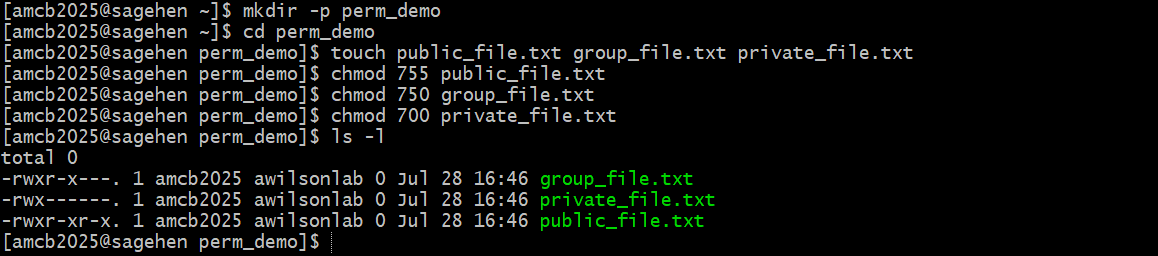
Using gocryptfs for RESTRICTED Data
If storing RESTRICTED data (FERPA, medical, etc.), encrypt it with gocryptfs.
See Workshop 15 for detailed gocryptfs training.
Basic process:
gocryptfs -init /cipher
gocryptfs /cipher /plain
# Work with files in /plain directory
fusermount -u /plainImportant: Encryption is Mandatory, Not Optional
If you’re storing RESTRICTED data (student records, medical information, etc.), encryption with gocryptfs is not optional. It’s a requirement. Storing unencrypted restricted data violates federal law and Pomona policy. Failure to encrypt can result in account suspension and personal liability.
Data Retention and Deletion
Keep Data While Needed
- Active research: Keep on HPC
- Completed research: Archive to /bigdata with backups
- No longer needed: Delete securely
Delete Safely
shred -uvfz filename    # Overwrite before deleting (best effort -- see below)
rm filename             # Then remove file
shred Is Best-Effort on
BeeGFS
On a parallel network filesystem like BeeGFS, shred
cannot guarantee that the physical storage blocks are
overwritten – the filesystem may write the overwrite passes elsewhere.
Treat shred as a best-effort measure. For RESTRICTED data
the real protection is encryption: keep the data in a gocryptfs
directory, and securely destroying the key material
(gocryptfs.conf and its backups) renders the ciphertext
permanently unreadable regardless of what remains on disk.
For large datasets:
- Note: /scratch is auto-deleted when the job completes; there is no grace period for storage cleanup. For longer-term storage, use /bigdata or /rhome.
- For secure deletion of files outside /scratch,
shred -uvfz filename(ordd if=/dev/zero of=filenamethenrm) is best effort on BeeGFS – for RESTRICTED data rely on gocryptfs encryption and key destruction instead
Identifying Your Data Classification
Before storing research data on HPC:
- Discuss with PI - Determine proper classification
- Check requirements - FERPA, NDA, export control, contracts
- Choose location - /rhome vs /bigdata
- Set permissions - Restrict to necessary parties
- Consider encryption - Required for RESTRICTED, recommended for others
- Document decision - Keep note of classification reasoning
Challenge: Classify Research Data
For each dataset, determine its classification:
- Your thesis data combining student surveys with academic records
- RNA sequence data you generated (not yet published)
- Analysis results ready to include in paper
- Data from industry partner marked “Confidential”
- Anonymized census data for comparison analysis
For each, specify:
- Classification level
- Required storage location
- Encryption needed? (Y/N)
- Who should have access?
- Thesis combining student + academic records: RESTRICTED - FERPA data. /bigdata only. ENCRYPTION REQUIRED. Only you and your PI.
- RNA sequence data (unpublished): PROPRIETARY - Ongoing research, not yet published. /bigdata okay. Encryption recommended. Your lab group.
- Analysis for publication: PROPRIETARY→PUBLIC - Okay to share with journal reviewers. Will become PUBLIC at publication. No encryption needed.
- Industry partner “Confidential”: PROPRIETARY - Check NDA for sharing restrictions. /bigdata with access controls. Encryption recommended. Only specified parties.
- Anonymized census data: PROPRIETARY - Research material, not yet published. No FERPA (anonymized). /bigdata okay. No encryption required. Lab group.
Key lesson: When uncertain, classify higher (more restrictive) and ask its-hpc@pomona.edu.
- Data classification determines storage and encryption requirements
- PUBLIC data has no restrictions; RESTRICTED requires encryption
- FERPA data must be protected and never shared without authorization
- Export control may restrict research access
- File permissions control who can access your data
- Deleting data permanently requires special commands
- Ask your PI and its-hpc@pomona.edu if classification is unclear
Content from Incident Reporting and Response
Last updated on 2026-08-27 | Edit this page
Overview
Questions
- What constitutes a security incident?
- How do you report suspicious activity?
- What happens after you report an incident?
- What should you NOT do if you suspect a breach?
Objectives
- Recognize security incidents
- Know how to report incidents properly
- Understand the incident response process
- Know what NOT to do during a potential incident
What is a Security Incident?
A security incident is any unauthorized, suspicious, or policy-violating event involving:
- Accounts: Unauthorized access, password breaches, credential abuse
- Data: Unauthorized access, exposure, theft, destruction
- Systems: Malware, intrusions, denial of service, compromise
- Policy: Violations of acceptable use or security policy
- Suspicious activity: Anything unusual requiring investigation
Examples of Incidents
Definitely Report
- Someone else logs into your account
- You receive suspicious DUO prompts you didn’t trigger
- You find files you didn’t create in your directory
- You notice unusual job activity on your account
- Someone asks for your password
- You accidentally expose sensitive data publicly
- You see someone accessing others’ files
- Strange error messages or system behavior
- Account locked or access denied unexpectedly
- Data appears corrupted or missing
Maybe Report (When Unsure)
- Unusually slow system performance
- Job failures you can’t explain
- Failed login attempts in your email
- Received phishing-like email (forward to ITS)
- Unexpected changes to your home directory
- Module or software behaving strangely
When uncertain: Report it anyway. Better safe than sorry.
How to Report an Incident
Email is Best Method
Send to: its-hpc@pomona.edu
Include:
- Your name and username
- Date and time of incident
- What you observed (specific details)
- Any error messages (copy/paste exactly)
- What you did (if anything)
- How the incident affects your work
- Attachments of evidence (if applicable)
Example Report
Subject: URGENT: Suspicious Activity on My Account
Body:
I believe my HPC account may be compromised.

Date/Time: March 5, 2026, 2:30 PM
Suspicious Activity: I received a DUO push notification
that I did not trigger. I denied the prompt, but it recurred.

Details: This happened twice in 5 minutes. My password has
not been shared, and I don't recall visiting suspicious sites.

Evidence: Screenshot attached showing DUO notification times.

Impact: I'm concerned about my research data security.

Please advise.
Immediate Actions
For very urgent issues (active breach in progress):
- Email: its-hpc@pomona.edu
- Also call: ITS Help Desk [number from Pomona directory]
- If available: Call HPC team directly
- After hours: Campus security can escalate to on-call staff
What Happens After You Report
Initial Response (Within hours)
- HPC staff acknowledges receipt
- Staff evaluates severity
- If critical: Immediate investigation begins
- If routine: Scheduled for investigation
Investigation (1-7 days depending on severity)
- Staff reviews account logs
- Check for unauthorized access
- Scan for malware
- Review file modifications
- Gather evidence
Resolution (3-30 days)
- Staff determines what happened
- Mitigating measures are implemented
- Your account may be secured/reset
- You’re informed of findings
- Guidance provided for future
Severity Levels
CRITICAL (Investigate immediately):
- Active intrusion in progress
- Data exposure or breach
- Malware detected
- Account compromise confirmed
HIGH (Investigate within 24 hours):
- Suspicious DUO prompts
- Unauthorized file access
- Failed login attempts
- Potential policy violation
MEDIUM (Investigate within 3 days):
- Possible account issues
- Unexplained system behavior
- Minor suspicious activity
LOW (Routine investigation):
- Informational reporting
- Questions about security
- General concerns
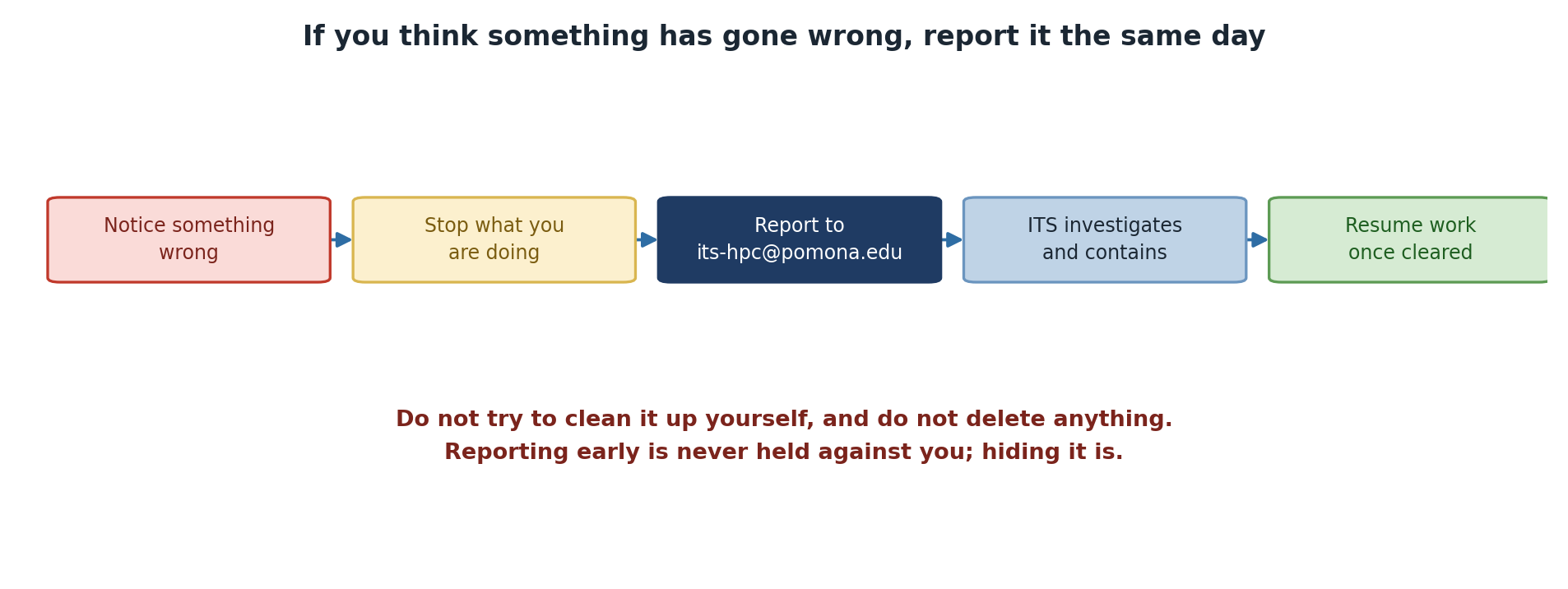
What NOT to Do During an Incident
DON’T
- Don’t panic - Calm assessment is needed
- Don’t cover it up - Immediate disclosure is better
- Don’t continue working - Stop potentially affected operations
- Don’t investigate alone - Let professionals handle it
- Don’t delete evidence - Log files and history matter
- Don’t share passwords - Even with IT staff
- Don’t post publicly - Don’t announce breach on social media
- Don’t assume it will go away - Report promptly
- Don’t delay reporting - Earlier response is better
- Don’t accuse colleagues - Let investigation determine facts
Critical: Report First, Don’t Hide
Your first instinct may be to handle it quietly or avoid “getting in trouble.” DO NOT. Reporting incidents immediately is always the right choice. Covering up or delaying reporting makes things worse and can result in disciplinary action. Early reporting shows integrity and helps protect others.
DO
- Do stay calm - Most incidents are recoverable
- Do report immediately - Minutes matter for critical incidents
- Do preserve evidence - Don’t delete files or logs
- Do change password - After reporting account compromise
- Do disconnect from network - If you suspect active intrusion
- Do document observations - Write down what you noticed
- do cooperate with investigation - Provide information requested
- Do ask questions - Understand what happened
- Do follow guidance - Implement security improvements
- Do inform your PI - Keep your advisor in the loop
Common Incident Scenarios and Response
Scenario 1: Unexpected DUO Prompt
What you observe: DUO notification you didn’t trigger
Your actions:
- DENY the push notification
- Immediately change your password
- Email its-hpc@pomona.edu with details
- Check for unauthorized SSH sessions
- Review recent job history
Staff will do: Review login logs to see if breach occurred
Scenario 2: Someone Accessed Your Files
What you observe: Files you didn’t create in your directory
Your actions:
- Don’t modify or delete the files
- Note the file names and timestamps
- Email its-hpc@pomona.edu with details
- List the files: ls -la > incident_files.txt
- Attach this list to your report
Staff will do: Investigate who accessed the files
Scenario 3: Data Exposed Publicly
What you observe: Your data accidentally in public directory
Your actions: 1. STOP - Don’t move or delete the data yet 2. Immediately remove public access 3. Email its-hpc@pomona.edu for urgent investigation 4. Identify exactly what was exposed 5. Notify your PI and affected parties
Staff will do: Check who accessed the data, issue guidance
Scenario 4: Suspicious Email Requesting Access
What you observe: Email asking for credentials or access
Your actions:
- DO NOT reply
- DO NOT click links or download attachments
- Forward email to its-hpc@pomona.edu
- Include “PHISHING ATTEMPT” in subject
- Delete the email
Staff will do: Verify legitimacy, issue warnings if needed
Post-Incident Learning
After an incident is resolved:
No-Blame Culture
Important: Reporting an incident does not result in punishment.
- Honest mistakes are forgiven
- False alarms are okay
- Learning is the goal
- Reporters are not blamed
- Cooperation is appreciated
The only thing punished is not reporting when you should.
Safe to Report: No Blame for Honest Mistakes
If you accidentally expose data or think your password was compromised, report it. You won’t be punished for honest mistakes or even false alarms. The only thing that gets people in trouble is hiding incidents. Report first, ask questions later.
Challenge: Incident Decision-Making
For each scenario, decide: Report immediately, report today, report within a few days, or talk to PI first?
- You notice a file in your directory you don’t remember creating
- You get an email asking you to “verify your password”
- Your SSH login is slower than usual
- You’re waiting for results; a job completed 12 hours early
- Your disk quota suddenly shows you’ve used 10 GB more than yesterday
For each, draft a 2-3 sentence report you’d send to its-hpc@pomona.edu.
- Unknown file in directory: REPORT IMMEDIATELY - Could be intrusion. Report: “I found a file [filename] in my /rhome directory that I did not create. Timestamp shows [date]. Can you investigate if my account was accessed?”
- Email asking to verify password: REPORT IMMEDIATELY - Phishing attempt. Report: “I received a suspicious email asking me to verify my password. [Include email headers if possible]. This appears to be a phishing attempt.”
- SSH slower than usual: REPORT TODAY - Performance issue, less urgent. Report: “My SSH logins have been much slower than usual for the past few hours. Is there a system issue or DDoS attack?”
- Job completed early: TALK TO PI FIRST - Probably okay. May be a lucky optimization. Only report if result seems wrong or suspicious. Most likely user error in time expectation.
- Disk quota suddenly increased: REPORT TODAY - Data integrity concern. Report: “My /bigdata quota shows 10 GB more usage than yesterday without my uploading data. Did a backup operation occur, or is this a potential compromise?”
Getting Help
For incident reporting or security questions:
- Email: its-hpc@pomona.edu
- Phone: ITS Help Desk (use campus directory)
- Emergency: Campus security can escalate
- Questions: No question is too basic
Remember: Reporting is ALWAYS the right choice when unsure.
- Security incidents include unauthorized access, data exposure, suspicious activity
- Report all incidents to its-hpc@pomona.edu promptly
- Include specific details: date, time, what you observed
- Do NOT investigate alone or delete evidence
- No-blame culture means reporting is encouraged
- Staff will guide you through investigation and recovery
- Learning from incidents improves security for everyone
Content from Getting Help and Resources
Last updated on 2026-08-27 | Edit this page
Overview
Questions
- Who do you contact for security questions?
- What documentation is available?
- How do you get security training updates?
- What if you have questions about this training?
Objectives
- Know who to contact for different types of help
- Find security documentation and resources
- Understand ongoing training and support
- Know how to get clarification on policies
Support Contacts
HPC Security Issues
Email: its-hpc@pomona.edu
Response time: Within 24 hours (hours during business days)
What to contact for:
- Security incidents or breaches
- Policy questions or violations
- Account access problems
- Data handling advice
- Incident reporting
ITS Help Desk
Phone: Check Pomona directory
Website: See ITS portal on Pomona website
Response time: Varies by ticket type
What to contact for:
- Authentication/login problems
- DUO setup or troubleshooting
- Password reset
- General IT issues
- Malware/security concerns on personal device
Documentation and Resources
Pomona Resources
HPC Documentation: www.pomona.edu/its
Security Policies: See ITS website
Data Classification Guide: Request from its-hpc@pomona.edu
Acceptable Use Policy: Full text available from ITS
Sagehen HPC Specific
Cluster Documentation: https://www.pomona.edu/its/
SLURM Documentation: https://slurm.schedmd.com/
OnDemand Documentation: Built-in help at https://ondemand.hpc.pomona.edu/
Industry Standards
NIST Cybersecurity Framework: https://www.nist.gov/cyberframework/
CIS Controls: https://www.cisecurity.org/cis-controls/
SANS Security: https://www.sans.org/
Getting Clarification on This Training
If Something Isn’t Clear
- Re-read the relevant episode
- Review the learner reference guide
- Email its-hpc@pomona.edu with specific question
- Ask in person at office hours or by appointment
Questions You Can Ask
- “What data classification should I use?”
- “Is this activity allowed under the policy?”
- “How do I report a security concern?”
- “Do I need to encrypt my data?”
- “Is this appropriate use?”
- Any other security or policy question
No Question is Dumb
Honest questions show good security practice. Pretending to understand when you don’t is the actual problem.
Default to Asking
If you’re 90% sure about a security decision and 10% uncertain, ask its-hpc@pomona.edu. A one-minute email can prevent weeks of account suspension or worse. Security professionals would rather answer 100 obvious questions than have one serious incident slip through.
Ongoing Training and Updates
Annual Reminders
Pomona sends annual security awareness reminders:
- Check email for messages from ITS
- Review Acceptable Use Policy annually
- Participate in security awareness campaigns
- Attend optional advanced training
Summary: Key Takeaways
Before you finish this training, remember:
Your Responsibilities
- Use HPC for approved research/education only
- Protect your password and authentication
- Classify your data appropriately
- Report security incidents promptly
- Follow all policies
- Ask when unsure
Key Contacts
- its-hpc@pomona.edu: HPC security and policy
- ITS Help Desk: Account and login issues
- Your PI: Research and data questions
- Compliance office: Legal/regulatory questions
Policy Acknowledgment Form
By completing this training, you acknowledge:
- ✓ I have read and understood the Acceptable Use Policy
- ✓ I understand the data classification system
- ✓ I know how to authenticate securely
- ✓ I understand my responsibilities
- ✓ I know how to report incidents
- ✓ I understand consequences of violations
By logging in to Sagehen, you acknowledge all of the above.
Questions Before You Finish?
Before you complete this training:
- Do you understand all 7 episodes? (One more follows this one: social engineering and phishing.)
- Are there concepts that are unclear?
- Do you know who to contact for help?
- Do you have specific questions about your research?
If you answered “no” to any question, email its-hpc@pomona.edu before finishing.
Congratulations!
You have completed the HPC Security Orientation.
Next steps:
- Acknowledge the Acceptable Use Policy (separate form)
- Set up DUO Multi-Factor Authentication if not done
- Start accessing Sagehen securely
- Consider Workshop 15 (gocryptfs) if handling sensitive data
- Refer back to resources anytime you have questions
Thank you for taking HPC security seriously. Your diligence helps protect our community.
Challenge: Create Your Security Action Plan
Based on what you’ve learned, create a personal security action plan:
- My account security: How will I protect my password and DUO?
- My data: What classification applies to my research? Where will I store it?
- My responsibilities: What policies apply to my work?
- My resources: Who will I contact if I have questions or incidents?
Write 2-3 sentences for each.
Example answers:
- Account security: “I will use a password manager to create and store a strong unique password. I will keep my DUO app updated and approved logins I didn’t trigger.”
- Data: “My data is unpublished research, so it’s PROPRIETARY classification. I will store it in /bigdata with my group. If I work with student ID numbers, I will encrypt with gocryptfs (RESTRICTED).”
- Responsibilities: “I will only use Sagehen for my approved research work. I won’t share my account. I will follow the Acceptable Use Policy.”
- Resources: “My PI for research questions, its-hpc@pomona.edu for security questions, and ITS Help Desk for account issues.”
- Contact its-hpc@pomona.edu for all HPC security questions
- ITS Help Desk handles account and authentication issues
- Documentation and resources are available on HPC wiki
- Asking questions is encouraged and appropriate
- This training sets foundation; advanced training available later
- You’re expected to implement these practices immediately
- Security is everyone’s responsibility working together