
Data Handling Basics
Last updated on 2026-08-27 | Edit this page
Estimated time: 30 minutes
Overview
Questions
- What are data classification levels?
- How should different data be stored?
- When is encryption required?
- What is restricted data?
Objectives
- Understand Pomona’s data classification system
- Classify your research data appropriately
- Know when encryption is required
- Understand FERPA and export control implications
Data Classification at Pomona
All data falls into one of three categories:
PUBLIC Data (green; permissions 755)
Definition: Can be freely shared with anyone.
Examples:
- Published research results
- Public documentation
- General information materials
- Already published datasets
- Data explicitly released for public use
Storage: Can use /rhome or /bigdata
Sharing: No restrictions
Access: Everyone
Permissions: 755
Encryption: Not required
PROPRIETARY Data (orange; permissions 750)
Definition: Restricted to specific authorized individuals; includes unpublished research and draft work.
Examples:
- Draft research papers and manuscripts
- Lab notebooks and preliminary analysis
- Unpublished research data
- Confidential partnership data
- Patentable research
- Data under non-disclosure agreement (NDA)
- Data from industry partner
- Restricted by contract
Storage: /bigdata with access controls
Sharing: Only with authorized people (specified in contract)
Access: Explicitly listed individuals
Permissions: 750
Encryption: Recommended, sometimes required
RESTRICTED Data (red; permissions 700 + gocryptfs)
Definition: Highly sensitive; requires maximum protection.
Examples:
- FERPA data (student records, grades, ID numbers)
- Medical information (HIPAA if applicable)
- Social Security numbers
- Financial information (credit cards, bank accounts)
- Export-controlled research
- Personal identifying information combined with sensitive data
Storage: Must use /bigdata with strict access controls
Sharing: Only with explicitly authorized people
Access: Minimum necessary basis
Permissions: 700 + gocryptfs
Encryption: MANDATORY - use gocryptfs
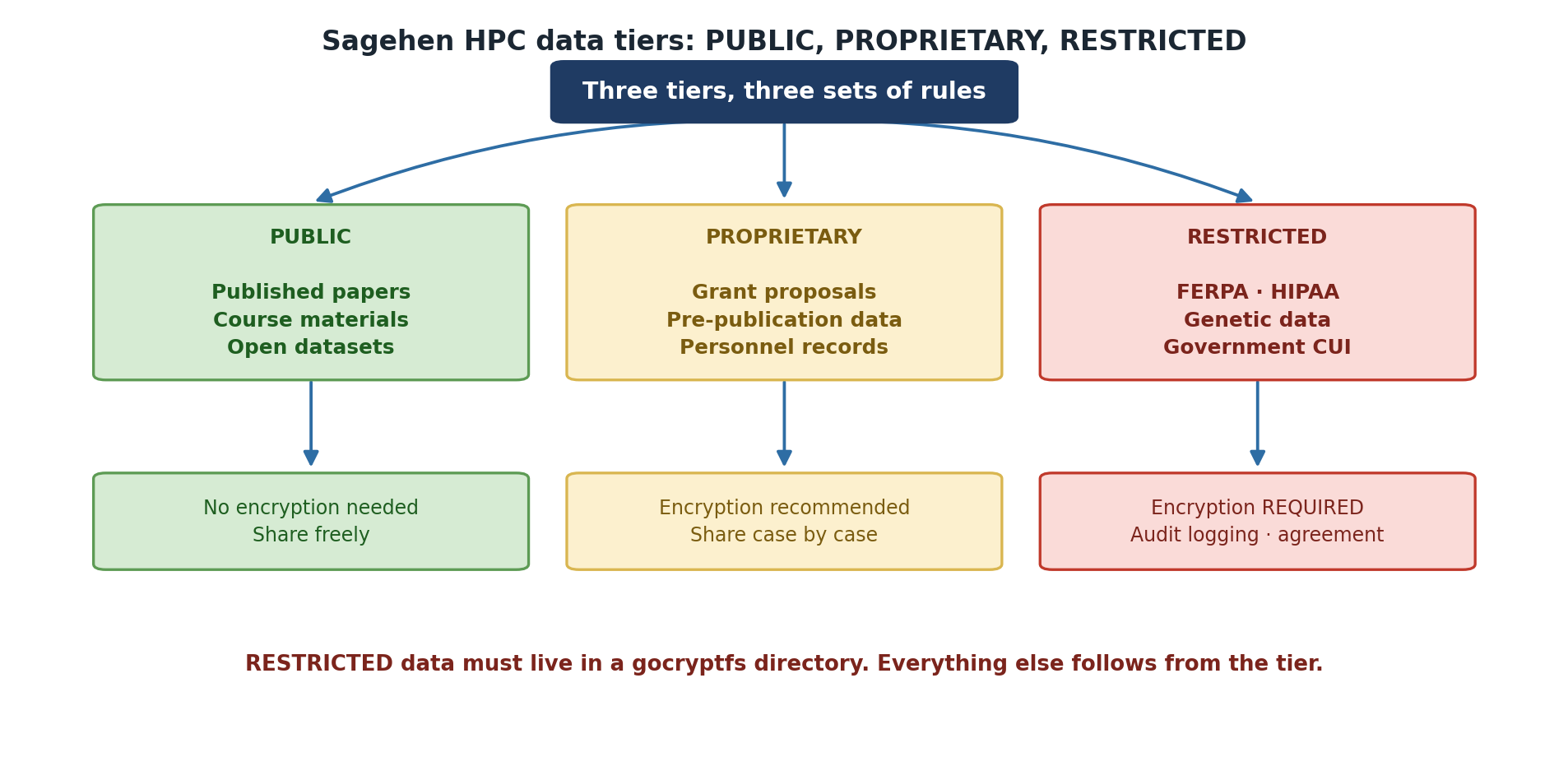
Data Classification Decision Tree
Ask yourself:
- Is this already published? → PUBLIC
- Can anyone access it? → PUBLIC
- Does it contain FERPA data? → RESTRICTED (Encryption Required!)
- Is it under NDA or contract? → PROPRIETARY
- Is it unpublished research or draft work? → PROPRIETARY
- Is it ongoing research or lab-only work? → Usually PROPRIETARY
FERPA Protection
FERPA = Family Educational Rights and Privacy Act
FERPA protects student privacy:
Protected Information
- Student ID numbers
- Grades and academic records
- Financial aid information
- Disciplinary records
- Personal notes/comments about students
Your Responsibility
If you work with student data:
- Minimum necessary: Only access data you need
- Secure storage: Must use encryption (gocryptfs)
- Restricted sharing: Never share with unauthorized people
- Retention limits: Delete when no longer needed
- Data agreement: Sign data use agreement if required
FERPA Violations
Unauthorized access to or sharing of FERPA data:
- Violates federal law
- Results in account suspension
- May result in disciplinary action
- Creates liability for college
If you accidentally access FERPA data: Report immediately to its-hpc@pomona.edu
FERPA: Federal Law, Not Just Policy
Student data protection is not just Pomona policy. FERPA is federal law with real legal consequences. Violating FERPA can result in personal legal liability, not just account suspension. If you work with student records, contact your PI immediately about proper handling procedures and required encryption.
Export Control Considerations
Some research is restricted by federal export control laws:
Restricted Research Includes
- Encryption and security research
- Certain physics/materials science work
- Semiconductor/chip technology research
- Military applications
- Some AI/machine learning research
If Your Research is Restricted
- Don’t assume: Ask your PI and compliance office
- Follow controls: May restrict access to non-US persons
- Communicate limits: Mark restricted data clearly
- Report violations: Contact compliance office immediately
Contact: Your department compliance officer or its-hpc@pomona.edu
File Permissions and Access Control
Set appropriate file permissions:
chmod 700 ~/restricted_data   # Only you can access
chmod 750 ~/group_data        # You and group can access
chmod 755 ~/shared_data       # Everyone can read
chmod 644 ~/readme.txt        # Everyone can read, only you write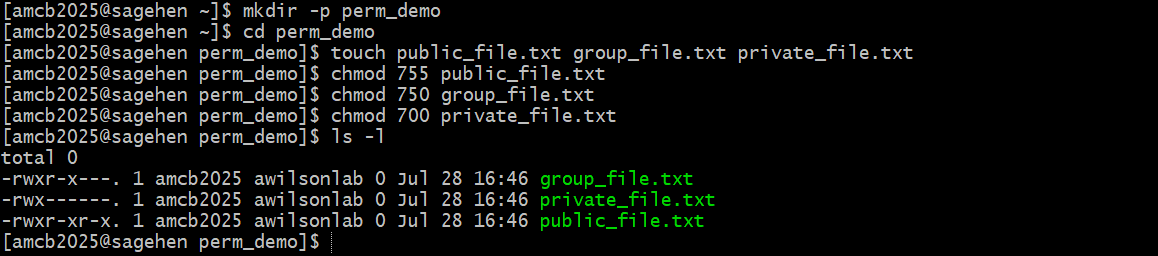
Using gocryptfs for RESTRICTED Data
If storing RESTRICTED data (FERPA, medical, etc.), encrypt it with gocryptfs.
See Workshop 15 for detailed gocryptfs training.
Basic process:
gocryptfs -init /cipher
gocryptfs /cipher /plain
# Work with files in /plain directory
fusermount -u /plainImportant: Encryption is Mandatory, Not Optional
If you’re storing RESTRICTED data (student records, medical information, etc.), encryption with gocryptfs is not optional. It’s a requirement. Storing unencrypted restricted data violates federal law and Pomona policy. Failure to encrypt can result in account suspension and personal liability.
Data Retention and Deletion
Keep Data While Needed
- Active research: Keep on HPC
- Completed research: Archive to /bigdata with backups
- No longer needed: Delete securely
Delete Safely
shred -uvfz filename    # Overwrite before deleting (best effort -- see below)
rm filename             # Then remove file
shred Is Best-Effort on
BeeGFS
On a parallel network filesystem like BeeGFS, shred
cannot guarantee that the physical storage blocks are
overwritten – the filesystem may write the overwrite passes elsewhere.
Treat shred as a best-effort measure. For RESTRICTED data
the real protection is encryption: keep the data in a gocryptfs
directory, and securely destroying the key material
(gocryptfs.conf and its backups) renders the ciphertext
permanently unreadable regardless of what remains on disk.
For large datasets:
- Note: /scratch is auto-deleted when the job completes; there is no grace period for storage cleanup. For longer-term storage, use /bigdata or /rhome.
- For secure deletion of files outside /scratch,
shred -uvfz filename(ordd if=/dev/zero of=filenamethenrm) is best effort on BeeGFS – for RESTRICTED data rely on gocryptfs encryption and key destruction instead
Identifying Your Data Classification
Before storing research data on HPC:
- Discuss with PI - Determine proper classification
- Check requirements - FERPA, NDA, export control, contracts
- Choose location - /rhome vs /bigdata
- Set permissions - Restrict to necessary parties
- Consider encryption - Required for RESTRICTED, recommended for others
- Document decision - Keep note of classification reasoning
Challenge: Classify Research Data
For each dataset, determine its classification:
- Your thesis data combining student surveys with academic records
- RNA sequence data you generated (not yet published)
- Analysis results ready to include in paper
- Data from industry partner marked “Confidential”
- Anonymized census data for comparison analysis
For each, specify:
- Classification level
- Required storage location
- Encryption needed? (Y/N)
- Who should have access?
- Thesis combining student + academic records: RESTRICTED - FERPA data. /bigdata only. ENCRYPTION REQUIRED. Only you and your PI.
- RNA sequence data (unpublished): PROPRIETARY - Ongoing research, not yet published. /bigdata okay. Encryption recommended. Your lab group.
- Analysis for publication: PROPRIETARY→PUBLIC - Okay to share with journal reviewers. Will become PUBLIC at publication. No encryption needed.
- Industry partner “Confidential”: PROPRIETARY - Check NDA for sharing restrictions. /bigdata with access controls. Encryption recommended. Only specified parties.
- Anonymized census data: PROPRIETARY - Research material, not yet published. No FERPA (anonymized). /bigdata okay. No encryption required. Lab group.
Key lesson: When uncertain, classify higher (more restrictive) and ask its-hpc@pomona.edu.
- Data classification determines storage and encryption requirements
- PUBLIC data has no restrictions; RESTRICTED requires encryption
- FERPA data must be protected and never shared without authorization
- Export control may restrict research access
- File permissions control who can access your data
- Deleting data permanently requires special commands
- Ask your PI and its-hpc@pomona.edu if classification is unclear