
Sagehen HPC GPU Hardware Configuration
Last updated on 2026-08-27 | Edit this page
Overview
Questions
- What GPU nodes exist on Sagehen?
- How do you check GPU availability?
- What are GPU memory and compute specifications?
- How do you select specific GPU types?
Objectives
- Understand Sagehen GPU inventory
- Check available GPU resources
- Select appropriate GPUs for workload
- Understand GPU memory management
Sagehen HPC GPU Nodes
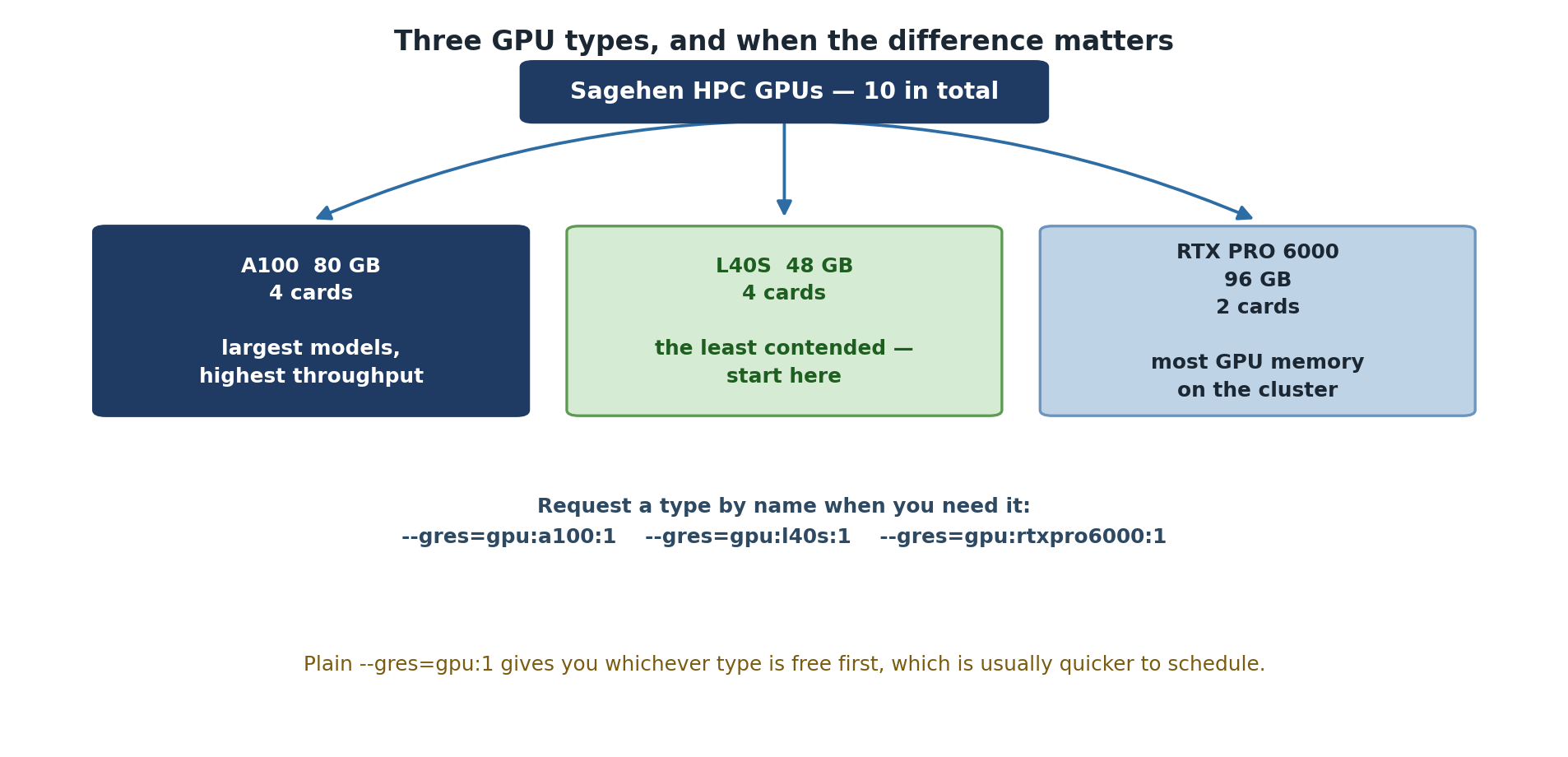
Sagehen has 10 GPUs across multiple nodes (confirmed by Andrew Wilson, May 2026): 4× A100 (80 GB), 4× L40S (48 GB), 2× RTX PRO 6000 (96 GB).
Sagehen has multiple physical GPU nodes (compute nodes that contain GPU cards). The total number of GPU cards across all nodes is 10.
Available GPU Types
Sagehen provides three tiers of GPU hardware to support a range of research workloads:
- NVIDIA A100 (80 GB HBM2e, 4 cards): Highest performance, ideal for large models and AI research
- NVIDIA L40S (48 GB GDDR6, 4 cards): Excellent balance for most deep learning workflows
- NVIDIA RTX PRO 6000 Blackwell (96 GB GDDR7 ECC, 2 cards): Blackwell generation (compute capability 12.0); the largest GPU memory on Sagehen — very large models, memory-heavy simulation, and professional rendering/visualization
Use sinfo -p gpu --Format=NodeList,Gres,GresUsed to
check current availability.
GPU Capabilities Summary
| Feature | A100 | L40S | RTX PRO 6000 |
|---|---|---|---|
| Memory | 80 GB HBM2e | 48 GB GDDR6 | 96 GB GDDR7 ECC |
| Architecture | Ampere | Ada Lovelace | Blackwell |
| Compute Capability | 8.0 | 8.9 | 12.0 |
| Best for | Large models, AI research | Deep learning, prototyping, professional | Largest models, memory-heavy work |
| Tensor Cores | Yes (3rd gen) | Yes (4th gen) | Yes (5th gen) |
| Performance Tier | Highest | Very High | Highest |
| Quantity on Sagehen | 4 | 4 | 2 |
For detailed specifications, see NVIDIA’s official documentation for
each GPU model. Run nvidia-smi on a GPU node to see the
exact hardware available to your job.
GPU Selection Guide
Choose your GPU based on model requirements: - Very large models (>80 GB): RTX PRO 6000 (96 GB) — the only cards that go beyond 80 GB - Large models (48–80 GB): A100 (80 GB) or RTX PRO 6000; pick by queue availability - Mid-large models (up to 48 GB): L40S or A100 - Standard deep learning: L40S or A100 for faster training; RTX PRO 6000 if you need ECC memory or huge headroom - Prototyping and quick iteration: L40S — the least contended cards, and 48 GB is ample for small models - Memory unsure: Start with L40S (48 GB middle ground)
Monitor GPU memory during development with nvidia-smi to
ensure your model fits.
Checking GPU Availability
Using nvidia-smi
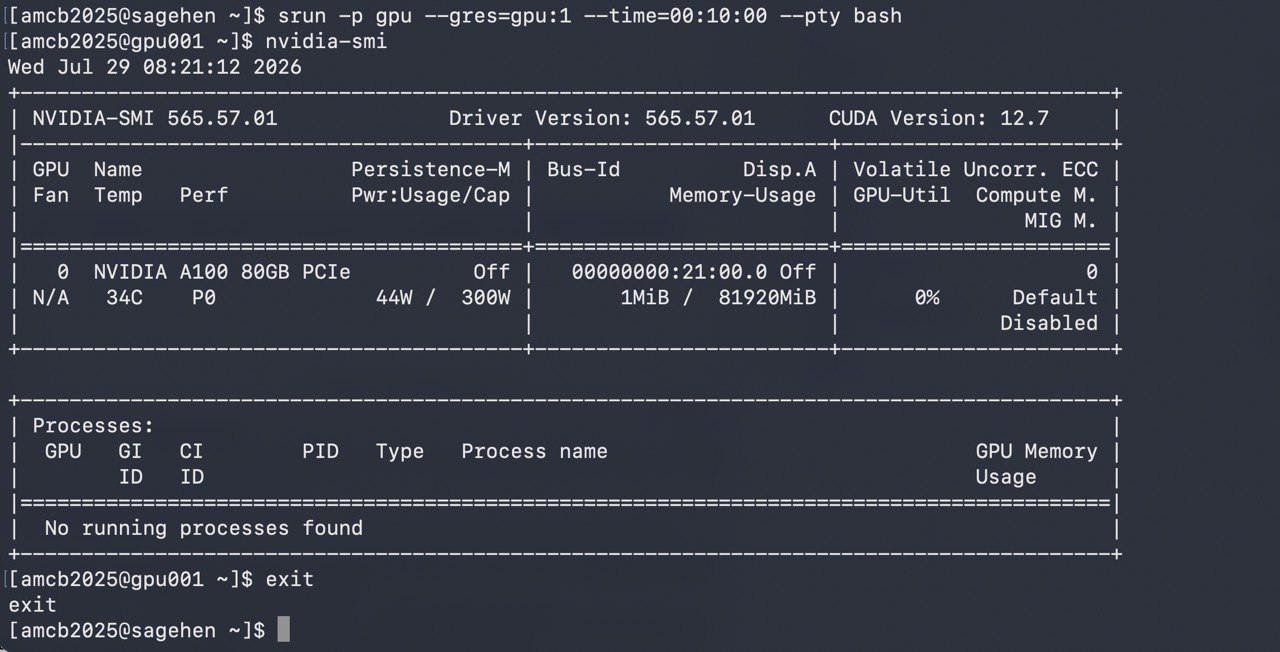
srun session on
gpu001: nvidia-smi confirms the allocated GPU — an A100
80GB PCIe (driver 565.57.01, CUDA 12.7).Requesting Specific GPUs
Multiple GPU Request
BASH
#SBATCH --gres=gpu:4           # Request 4 GPUs (any type)
#SBATCH --gres=gpu:a100:2 # Request 2 A100s specificallyLimits: Per-account GPU limits apply (contact its-hpc@pomona.edu for current limits).
GPU Memory Considerations
Memory Requirements
Choose GPU based on model size:
Very large models (48–96 GB): use A100 (80 GB HBM2e) or RTX PRO 6000 (96 GB GDDR7 — the largest single-GPU memory on Sagehen). For models larger than 96 GB, use model parallelism, gradient checkpointing, mixed-precision training, or DeepSpeed/FSDP to fit larger models across multiple GPUs. - ResNet-3B parameters - Large language models - Large transformer models
Large/medium models (40–48 GB): L40S or A100 (48 GB+ cards) - Standard deep learning models - Fine-tuning mid-sized models - Computer vision models needing high memory - Use RTX PRO 6000 if your workflow benefits from ECC memory or needs headroom to grow
Medium models (20–40 GB): L40S or A100 - Standard deep learning models - Fine-tuning large models - Computer vision models
Small models (under 20 GB): L40S — the smallest card on Sagehen is still 48 GB - Research models - Small networks - Training on smaller datasets
Cost-Benefit Analysis
When A100 is Worth It
- Model > 40GB
- Research requiring tensor cores
- Multi-GPU training
- Production deployment
When L40S is Sufficient
- Standard deep learning (20-48GB models)
- General research
- Training small and medium networks — 48 GB leaves plenty of headroom
- Research prototyping and quick experiments
- Cost-effective for most users, and usually the shortest queue
When the RTX PRO 6000 is the Right Choice
- Models or datasets needing more than 80 GB of GPU memory (nothing else on Sagehen goes this big)
- 40–80 GB workloads when the A100 queue is long
- Workflows that benefit from ECC memory (numerical stability)
- Professional rendering and scientific visualization
- Cutting-edge Blackwell features (compute capability 12.0, 5th-gen Tensor Cores)
Node Selection Strategy
BASH
# For cost-effective general work
#SBATCH --gres=gpu:l40s:1

# For memory-heavy models (48–80 GB)
#SBATCH --gres=gpu:a100:1

# For the very largest models (up to 96 GB)
#SBATCH --gres=gpu:rtxpro6000:1  # verify exact GRES name: sinfo -o '%N %G'

# For quick testing
#SBATCH --gres=gpu:l40s:1

# For production multi-GPU training
#SBATCH --gres=gpu:a100:2Challenge: Choose Your GPU
For each research scenario below, recommend the best Sagehen GPU (A100 80 GB, L40S 48 GB, or RTX PRO 6000 96 GB) and explain your reasoning.
Scenario A: A student is fine-tuning a large language model that requires 60 GB of GPU memory during training.
Scenario B: A researcher is prototyping a small image classifier with a dataset of 1,000 images. They expect the model to use about 4 GB of GPU memory and want results quickly for iteration.
Scenario C: A lab group is training a computer vision model (ResNet-50) that uses about 25 GB of GPU memory and will run for several days.
Scenario D: A computational chemist needs to run a numerical simulation that fits in roughly 40 GB of GPU memory and is sensitive to bit-flip errors. The A100 queue is currently several days deep.
Scenario A: A100 (80 GB) or RTX PRO 6000 (96 GB) The model requires 60 GB of GPU memory, which exceeds the L40S’s 48 GB. Both the A100 (80 GB HBM2e) and the RTX PRO 6000 (96 GB GDDR7) fit the workload — pick whichever queue is shorter. The A100’s HBM bandwidth favours training throughput; the RTX PRO 6000 leaves more memory headroom.
Scenario B: L40S (48 GB) The model only needs about 4 GB, so it fits trivially on an L40S. The L40S cards are also the least contended on Sagehen, so queue waits are typically shortest — exactly what you want when iterating quickly. Tying up an A100 or RTX PRO 6000 for a 4 GB job would waste the cards that large models depend on.
Scenario C: L40S (48 GB) The 25 GB memory requirement fits comfortably on the L40S (48 GB), with excellent compute throughput for a multi-day training run. This leaves the A100s and RTX PRO 6000s free for jobs that genuinely need more than 48 GB.
Scenario D: RTX PRO 6000 (96 GB) The 40 GB workload fits easily, and the RTX PRO 6000’s ECC GDDR7 protects against bit-flip-induced numerical errors during a long simulation — exactly what these cards’ ECC is for. The A100 also offers ECC but has the deep queue; the RTX PRO 6000 delivers the ECC protection with plenty of headroom.
- Sagehen has 10 GPUs across three types: A100, L40S, and RTX PRO 6000
- RTX PRO 6000: Largest memory on Sagehen (96 GB GDDR7 ECC, Blackwell)
- A100: 80 GB HBM2e, best training throughput for large models
- L40S: Best value for most deep learning at 48 GB
- Use –gres=gpu:type:count to request specific GPUs
- Monitor memory usage; request right-sized GPU
- Consider cost-benefit and queue depth when choosing GPU type