
GNU Parallel and Shell Parallelism
Last updated on 2026-08-27 | Edit this page
Estimated time: 50 minutes
Overview
Questions
- How do I run many independent commands in parallel from the shell?
- What does
paralleldo that aforloop with&cannot? - How do I throttle concurrency, capture output, and resume a failed batch?
- When should I move from shell parallelism to SLURM job arrays?
Objectives
- Run parallel tasks from the command line with both shell
backgrounding and
parallel - Throttle concurrency so you do not overload a node
- Tag and capture output so logs from many parallel tasks stay legible
- Resume an interrupted batch from where it stopped
- Recognize when to graduate from shell parallelism to SLURM job arrays
Why Shell-Level Parallelism
Before reaching for SLURM, the simplest parallelism is running
multiple commands at once on a single node. Sagehen HPC amd
nodes have 128 cores; if you only need to process a few hundred files
and each takes a few seconds, running 64 in parallel on one node
finishes faster than the SLURM queue takes to schedule a job array.
Shell parallelism shines for:
- Quick interactive testing of an “embarrassingly parallel” script before scaling to job arrays.
- Workflows under a few hundred tasks where total time is under a few hours.
- Pipeline glue between heavy SLURM jobs (e.g., postprocessing many output files in parallel).
When tasks number in the thousands, run for days, or need different node counts, switch to SLURM job arrays (next episode).
The Simplest Pattern: Background Jobs
Append & to a command to send it to the background.
wait blocks until all backgrounded jobs finish:
BASH
# Run 10 jobs in background
for i in {1..10}; do
    python3 monte_carlo_pi.py $i &
done
wait  # Wait for all background jobs to finish
This works but has three problems. First, it offers no concurrency limit. If the loop has 1000 iterations, you spawn 1000 processes at once and the node falls over. Second, output from all jobs interleaves on stdout in unpredictable order. Third, there is no easy way to know which iteration failed.
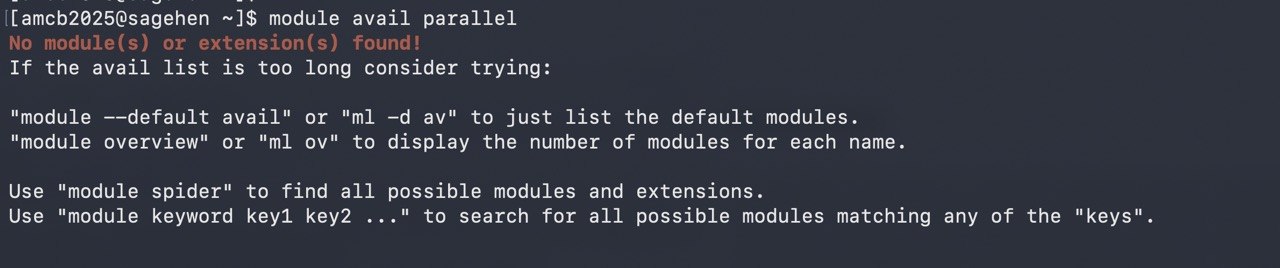
parallel module, which is why the episode installs it into
your own conda environment.GNU Parallel: The Better Default
GNU Parallel solves all three problems. It is not
preinstalled on Sagehen (there is no parallel module
either) – install it once into a conda environment:
If you’d rather not install anything, xargs -P (always
available) covers the basic case, without the progress bars and job
logs:
With GNU Parallel installed, two ways to feed it work:
BASH
# Pass each input as one argument
seq 1 100 | parallel -j 32 python3 monte_carlo_pi.py {}

# Or with explicit file list
ls /scratch/$USER/inputs/*.txt | parallel -j 32 process_file.sh {}
The -j 32 flag caps concurrency at 32 simultaneous
processes. The {} placeholder substitutes each input. You
get a progress bar with --progress, an estimated
time-remaining with --eta, and a per-task log file with
--joblog.
::: arg1 arg2 arg3 is parallel’s inline argument syntax.
You can also use :::: file_with_args.txt. Combine multiple
input lists for cross-products:
BASH
# Sweep over learning rates and seeds: 5 x 10 = 50 jobs
parallel -j 16 python3 train.py --lr {1} --seed {2} \
    ::: 0.001 0.003 0.01 0.03 0.1 \
::: $(seq 1 10)parallel vs xargs -P
xargs also has a -P parallelism flag and is
more universally available than parallel. For very simple
cases (one input list, no quoting headaches)
xargs -P 32 -n 1 -I {} command {} works fine.
Choose parallel when you need:
- Multiple input lists with cross-products
(
::: a b ::: x y). - Per-task log files (
--joblog). - Resume from a failed batch (
--resume-failed). - Output tagged with input value (
--tag). - Distribution across multiple SSH hosts
(
--sshloginfile).
Choose xargs when the parallelism is incidental and you
do not need the bells and whistles.
Keeping Output Legible
The biggest pain point with shell parallelism is interleaved output. Three flags fix it:
BASH
# --tag prefixes each line with the input value
parallel --tag -j 8 'echo Processing {}; sleep 1; echo Done {}' ::: a b c d

# --linebuffer flushes output line-by-line so you see progress in real time
parallel --linebuffer -j 8 long_running_command {} ::: input_*

# Redirect each task to its own file for clean post-hoc analysis
parallel -j 8 'analyze.sh {} > logs/{/.}.log 2>&1' ::: data/*.csv
The {/.} syntax in the last example strips the path and
the extension from the input, turning data/foo.csv into
foo. Other handy substitutions: {/} for
basename only, {.} to drop the extension only,
{#} for the job number.
Throttling and Resume
Two parallel features pay for the rest of the tool.
Concurrency throttling:
BASH
# Hard cap at 32, never more than 32 concurrent processes
parallel -j 32 ...

# Use 75% of available cores, dynamic
parallel -j 75% ...

# Use all cores minus 4 (leave headroom for the OS)
parallel -j -4 ...
And resume after failure:
BASH
# First run, captures status of every task
parallel --joblog runs.log -j 32 python3 task.py {} ::: $(seq 1 1000)

# (Suppose this crashes after task 432.)

# Resume only the failed and unrun tasks
parallel --resume-failed --joblog runs.log -j 32 python3 task.py {} ::: $(seq 1 1000)
This is invaluable for batches that take hours. The job log records which inputs completed successfully so a second invocation skips them and only retries the failures.
Writing Parallel-Ready Scripts
Whether you use parallel, xargs, or SLURM
arrays, the script you parallelize must follow three rules:
Take the variable input as an argument or environment variable. Never hard-code the input file path or seed inside the script.
Write outputs to unique filenames keyed on the input. Two simultaneous instances writing to
output.txtwill trash each other.Be idempotent. Running the same input twice should produce the same result, so resume after a crash is safe.
Monte Carlo Pi Estimation
PYTHON
#!/usr/bin/env python3
import random
import sys

def estimate_pi(n_samples, seed):
    random.seed(seed)
    inside = 0
    for _ in range(n_samples):
        x = random.random()
        y = random.random()
        if x**2 + y**2 <= 1:
            inside += 1
    return 4 * inside / n_samples

if __name__ == "__main__":
    job_id = int(sys.argv[1]) if len(sys.argv) > 1 else 1
    pi_estimate = estimate_pi(1_000_000, seed=job_id)

    with open(f"pi_{job_id:03d}.txt", "w") as f:
        f.write(f"{pi_estimate}\n")

    print(f"Job {job_id}: pi approx {pi_estimate}")
Bootstrap Resampling
PYTHON
#!/usr/bin/env python3
import numpy as np
import sys

data = np.loadtxt("data.csv")

def bootstrap_sample(data, seed):
    np.random.seed(seed)
    indices = np.random.choice(len(data), size=len(data), replace=True)
    return np.mean(data[indices])

if __name__ == "__main__":
    job_id = int(sys.argv[1])
    stats = [bootstrap_sample(data, seed=job_id * 1000 + i) for i in range(1000)]
    np.savetxt(f"bootstrap_{job_id}.csv", stats)
Both scripts accept a job ID, seed deterministically from it, and write to a unique output file. They satisfy all three rules.
Combining Results
After all parallel runs complete, aggregate. Two approaches: a Python combining script for analysis, or shell concatenation for raw data:
PYTHON
#!/usr/bin/env python3
import glob
import numpy as np

estimates = []
for file in sorted(glob.glob("pi_*.txt")):
    with open(file) as f:
        estimates.append(float(f.read().strip()))

estimates = np.array(estimates)
print(f"Mean estimate: {estimates.mean():.6f}")
print(f"Std deviation: {estimates.std():.6f}")
print(f"95% CI: [{np.percentile(estimates, 2.5):.6f}, {np.percentile(estimates, 97.5):.6f}]")When to Graduate to SLURM Job Arrays
Shell parallelism caps at one node’s resources: 128 cores or 512 GB
on an amd node. Beyond that, SLURM job arrays let you
spread tasks across multiple nodes, queue them properly so they share
fairly with other users, and survive a node reboot. Graduate to job
arrays when:
- You need more than one node’s worth of cores or memory.
- The total runtime exceeds a few hours and you want SLURM to manage scheduling.
- Tasks need very different resource amounts (some need GPU, others CPU only).
- You want each task’s accounting and logs handled by SLURM.
The transition is mechanical: a SLURM array’s
$SLURM_ARRAY_TASK_ID plays the role that $1 or
{} played in shell parallelism. Your script does not need
to change. The next episode covers the SLURM side.
Common pitfall: parallel reads from /bigdata
Running parallel -j 32 where every task reads from
/bigdata can saturate the shared BeeGFS filesystem and slow
every job using it. If your tasks read shared input data, copy it to
/scratch once at the start and have all parallel tasks read
from there.
Challenge
Write a Parallel-Ready Script and Run It Two Ways
Write a Python script that accepts a job ID, computes a simple
simulation (e.g., sum of random numbers with that seed), and saves to a
unique file. Run it once with shell backgrounding (&
and wait) and once with parallel. Note one
advantage you observe with parallel.
PYTHON
# simulate.py
import numpy as np, sys
job_id = int(sys.argv[1])
np.random.seed(job_id)
result = np.sum(np.random.randn(1000000))
with open(f"result_{job_id}.txt", "w") as f:
    f.write(f"{result}\n")
PYTHON
# combine.py
import glob, numpy as np
results = [float(open(f).read()) for f in sorted(glob.glob("result_*.txt"))]
print(f"Mean: {np.mean(results):.4f}, Std: {np.std(results):.4f}")
Shell backgrounding:
GNU Parallel:
The parallel version visibly throttles to 8 concurrent
processes (so 20 tasks complete in 3 waves rather than all-at-once),
gives a per-task log in runs.log, and lets you resume
failed tasks with --resume-failed.
Challenge
When to Use Job Arrays Instead
A graduate student wants to run 5,000 hyperparameter configurations of a model that each take 90 minutes on one CPU and uses 8 GB of RAM. Each run is independent. Should they use shell parallelism on one Sagehen node, or SLURM job arrays?
SLURM job arrays. Reasoning:
- 5,000 jobs x 90 min serial = 312 days. Even at 128-way parallelism on one node, that is 2.4 days of wallclock with no fault tolerance.
- 8 GB per task x 128 concurrent tasks = 1 TB RAM, exceeding the node’s 512 GB. Concurrency would have to drop to ~64.
- Job arrays scale across all 12 amd nodes, finishing in roughly 5 hours.
- SLURM tracks each task’s accounting, and a node reboot does not lose progress.
Shell parallelism would be the right choice if there were 50 configs, not 5,000.
-
parallel -j Nruns up to N tasks concurrently with throttling, logging, and resume - Background jobs (
&) work for trivial cases but lack concurrency limits and per-task logs -
--joblogplus--resume-failedmakes long batches restartable -
--tagand per-task log files keep output legible - Structure scripts to take input as args and write unique output files
- Stage shared input on /scratch to avoid hammering /bigdata with parallel reads
- Move from shell parallelism to SLURM job arrays when tasks exceed one node or run for many hours