
The AI Landscape for Researchers
Last updated on 2026-08-27 | Edit this page
Overview
Questions
- What AI tools are available for research and academia?
- Why would you run AI models on HPC clusters instead of cloud services?
Objectives
- Survey the landscape of modern AI tools and models
- Understand why HPC matters for AI-assisted research
- Recognize when cloud vs. local AI is appropriate
Why HPC for AI Tools?
Many researchers ask: “Why use Sagehen HPC for AI when services like ChatGPT are so easy to use?”
Data Privacy is Non-Negotiable for Restricted Data
Cloud AI services cannot be used with restricted data (FERPA, medical records, export-controlled research). If your data is protected by law, it must stay on Pomona infrastructure. This decision is about compliance, not preference.
Reasons to Use HPC for AI
- Data privacy: Restricted data (FERPA, medical, financial) cannot go to external services
- Computational power: Sagehen HPC’s 10 GPUs — A100 (80 GB), L40S (48 GB), and RTX PRO 6000 (96 GB ECC) — handle production workloads
- Data locality: Working with large datasets is faster on local storage than uploading to cloud services
- Reproducibility: Full control over model versions and environments
- Cost: Sagehen HPC is included in lab allocations; cloud GPU costs scale rapidly with intensive compute
The Modern AI Landscape
Large Language Models (LLMs)
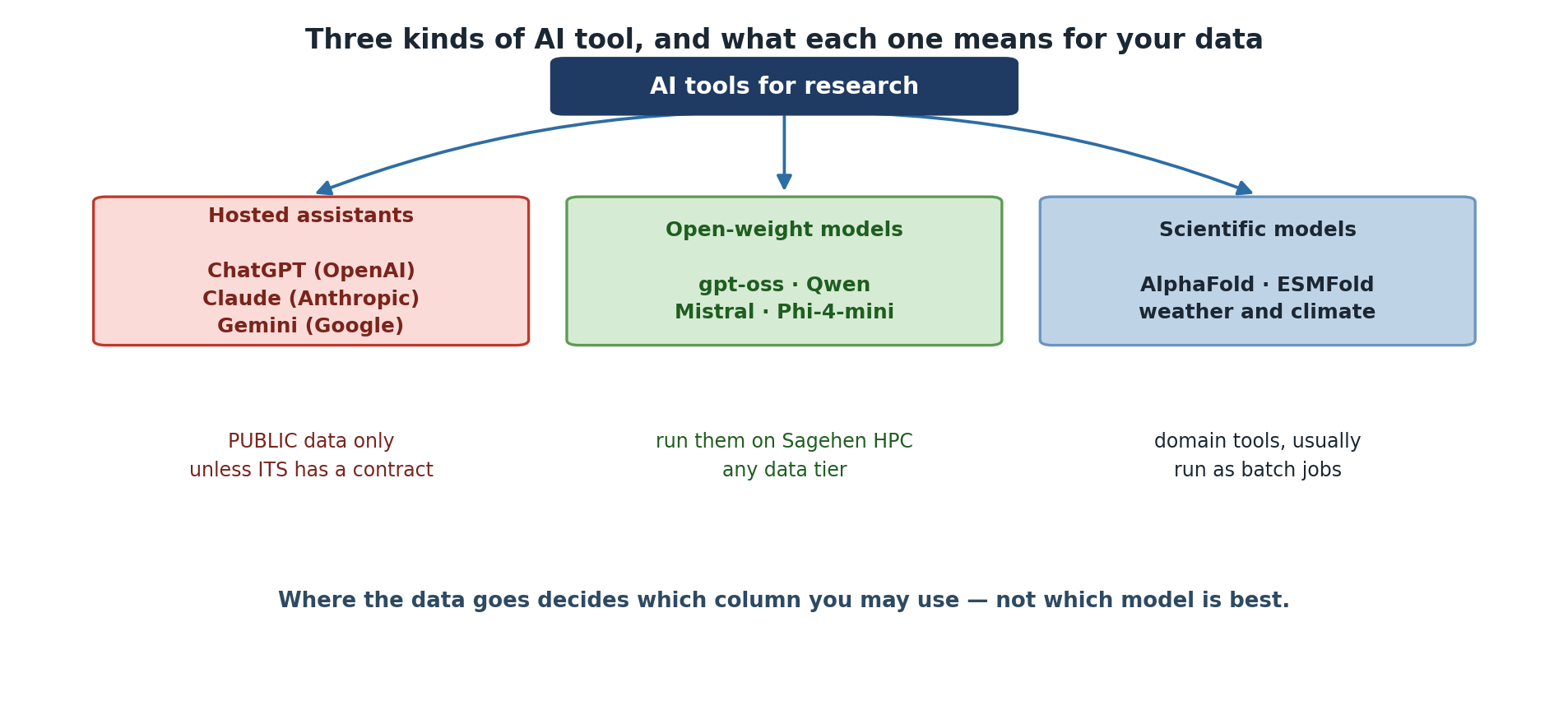
Cloud-based (proprietary): ChatGPT (OpenAI), Claude (Anthropic), Gemini (Google). Per-token pricing; best for quick queries with non-sensitive data.
Local (open-weight, can run on Sagehen): gpt-oss (OpenAI), Qwen (Alibaba), Mistral, Phi (Microsoft), Gemma (Google), Llama (Meta). Useful sizes run from about 4B to over 100B parameters. Best for sensitive data, fine-tuning, and cost-effective batch work.
“Open-Weight” Is Not the Same as “Open-Source”
You can download and run these models, but the licences differ sharply. Some are Apache 2.0 or MIT; others carry custom terms with use restrictions, and some require you to request access before downloading. Training data is almost never released, so none are open-source in the sense a software licence means it.
Check the licence before you build a published result on a model — see Episode 10.
Computer Vision and Scientific ML
Vision models for Sagehen: YOLO (object detection), Stable Diffusion (image generation), CLIP (image-text understanding), SAM (segmentation).
Scientific ML: AlphaFold (protein structure), ESMFold, weather prediction models, climate downscaling, satellite imagery analysis.
Model Size and Requirements
Rather than memorise a model list that will be out of date within months, learn the arithmetic:
VRAM for weights ≈ parameters × bytes-per-parameter
  16-bit → 2 bytes | 8-bit → 1 byte | 4-bit → 0.5 bytes
Then add 20-40% for activations and the KV cache; much more for long contexts.
So a 7B model needs roughly 14 GB at 16-bit, or 3.5 GB at 4-bit, plus headroom.
Worked examples, accurate as of August 2026 — check current sizes on Hugging Face before planning a job:
| Model | Precision | Weights | Sensible GPU |
|---|---|---|---|
| Phi-4-mini (3.8B) | 4-bit | ~2 GB | Any |
| Qwen3 8B | 4-bit | ~4 GB | L40S |
| gpt-oss-20b | native | ~16 GB | L40S |
| Qwen3 32B | 4-bit | ~16 GB | L40S |
| gpt-oss-120b | native | ~60 GB | A100 |
| Llama 4 Scout (109B total) | 4-bit | ~55 GB | A100 |
| Stable Diffusion XL | 16-bit | ~7 GB | L40S |
Mixture-of-Experts Models Still Need All the Weights
Several current models are mixture-of-experts: Llama 4 Scout has 109B total parameters but activates only about 17B per token. That makes it faster than its size suggests, not smaller. All 109B must be resident in GPU memory.
Size your GPU request from total parameters. Sizing from the active count is a common and expensive mistake.
The AI Tool Decision is Data-Driven
It is tempting to choose AI tools based on capability, but the actual decision rule is simpler: what data are you using? Once you know the data classification, the tool choice is largely determined.
Challenge: Match Models to GPUs
For each model below, identify which Sagehen GPU (L40S 48 GB, A100 80 GB, or RTX PRO 6000 96 GB) is the minimum required:
- Phi-4-mini 3.8B at 4-bit (~5GB VRAM)
- Qwen3 32B at 4-bit (~20GB VRAM)
- gpt-oss-120b (~60GB VRAM)
- Stable Diffusion XL (24GB VRAM)
- gpt-oss-120b serving a 128K-token context (~90GB VRAM)
- Phi-4-mini: L40S (48GB) – 5GB used, enormous headroom
- Qwen3 32B 4-bit: L40S (48GB) – 20GB used, room for long contexts
- gpt-oss-120b: A100 (80GB) – needs 60GB, exceeds L40S
- Stable Diffusion XL: L40S (48GB) – 24GB fits, with room for batching
- gpt-oss-120b, 128K context: RTX PRO 6000 (96GB) – the KV cache pushes total memory past the A100’s 80GB
The L40S is the least contended card, so small and mid-sized jobs should start there. Scale up only when the memory figure genuinely requires it.
Notice that items 3 and 5 are the same model: context length alone moved the job up a GPU tier. Estimate your context budget before you request a card.
- HPC is essential for sensitive data, large models, and reproducible research
- Cloud AI is easy but sends data externally; local AI keeps data private
- Model size, memory requirements, and accuracy vary widely across AI tools
- Data classification – not model capability – should drive tool selection