
Running Local LLMs on Sagehen HPC
Last updated on 2026-08-27 | Edit this page
Overview
Questions
- How do I set up and run open-source LLMs on Sagehen?
- How do I use Hugging Face models responsibly?
- How do I build a private AI pipeline for restricted data?
Objectives
- Load and run open-source LLMs on Sagehen GPUs
- Use Hugging Face transformers for model inference
- Apply 4-bit quantization to reduce GPU memory usage
- Build a private pipeline for processing sensitive data
Why Not Ollama?
Ollama is the tool most guides reach for, so it is worth saying
plainly: we do not use it on Sagehen. There is no ollama
module, and running your own Ollama binary is blocked by
permissions.
Instead we use Hugging Face Transformers, which installs cleanly into your conda environment and gives you the same local, private LLM capability with far more control over quantization and model revisions. If Ollama becomes available cluster-wide later, every concept here transfers directly.
(The file name for this episode still says ollama so
that existing links keep working.)
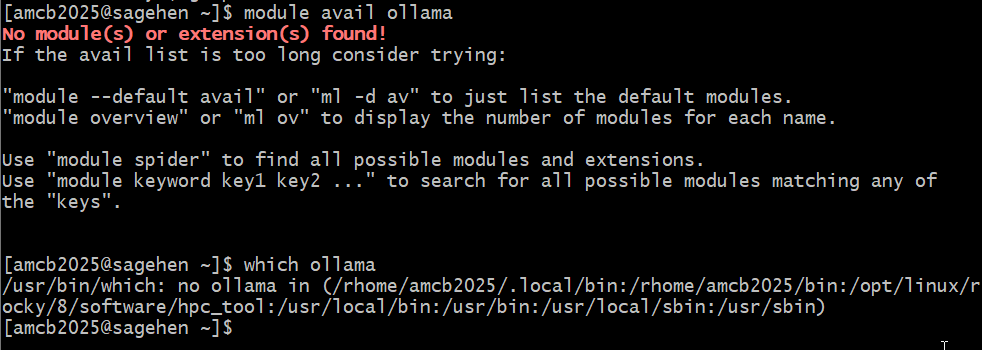
ollama
module, nothing on the PATH, and installing it needs root.Setting Up a Local LLM on Sagehen HPC
Step 1: Choose a Model
We use openai/gpt-oss-20b. It is Apache 2.0 licensed and
ungated, so it downloads without an access request —
which matters in a workshop where twenty people would otherwise each be
waiting on licence approval.
Some models are gated and do require approval. Llama is the common example:
- Visit the model page, for example
https://huggingface.co/meta-llama/Llama-4-Scout-17B-16E-Instruct - Click “Request Access” and accept the licence
- Create a Hugging Face token and run
huggingface-cli login
Approval is usually quick but is not instant, and it is not guaranteed. Plan around it rather than discovering it mid-job.
Step 3: Run Model Inference
PYTHON
import torch
from transformers import AutoTokenizer, AutoModelForCausalLM

model_name = "openai/gpt-oss-20b"
tokenizer = AutoTokenizer.from_pretrained(model_name)
model = AutoModelForCausalLM.from_pretrained(
    model_name,
    dtype=torch.bfloat16,
    device_map="auto"
)

prompt = "Explain photosynthesis in simple terms."
inputs = tokenizer(prompt, return_tensors="pt").to(model.device)
outputs = model.generate(**inputs, max_new_tokens=200)
print(tokenizer.decode(outputs[0], skip_special_tokens=True))Set the Cache Directory Before You Download
Model weights are large and Hugging Face caches them under
~/.cache by default, which will consume your 100 GB
/rhome quota quickly. Point the cache at your lab’s storage
instead:
Put that line in your job script. Do not cache to
/scratch — it is deleted when the job ends, so you would
re-download every run.
Using 4-bit Quantization
Quantization reduces memory by 75%, fitting larger models on smaller GPUs:
PYTHON
from transformers import BitsAndBytesConfig, AutoModelForCausalLM

bnb_config = BitsAndBytesConfig(
    load_in_4bit=True,
    bnb_4bit_use_double_quant=True,
    bnb_4bit_quant_type="nf4",
    bnb_4bit_compute_dtype=torch.bfloat16
)

model = AutoModelForCausalLM.from_pretrained(
    "Qwen/Qwen3-32B",
    quantization_config=bnb_config,
    device_map="auto"
)
# 32B model now fits in ~16GB instead of ~64GB
Building a Private AI Pipeline
For processing restricted data where nothing leaves Sagehen:
PYTHON
class LocalAIPipeline:
    def __init__(self, model_name="openai/gpt-oss-20b"):
        self.tokenizer = AutoTokenizer.from_pretrained(model_name)
        self.model = AutoModelForCausalLM.from_pretrained(
            model_name, dtype=torch.bfloat16, device_map="auto"
        )

    def analyze(self, text, task="summarize"):
        prompts = {
            "summarize": f"Summarize in 2 sentences:\n{text}",
            "classify": f"Classify sentiment (positive/negative/neutral):\n{text}",
            "extract": f"Extract key points:\n{text}"
        }
        prompt = prompts.get(task, text)
        inputs = self.tokenizer(prompt, return_tensors="pt").to(self.model.device)
        with torch.no_grad():
            outputs = self.model.generate(**inputs, max_new_tokens=200,
                                         do_sample=False)
        return self.tokenizer.decode(outputs[0], skip_special_tokens=True)
Auditing AI Usage
Keep records for Pomona compliance:
PYTHON
import json
from datetime import datetime

usage_log = {
    "timestamp": datetime.now().isoformat(),
    "model": "openai/gpt-oss-20b",
    "model_revision": "a1b2c3d",   # pin the exact weights for reproducibility
    "data_type": "Restricted (FERPA)",
    "task": "Sentiment classification",
    "input_tokens": 500,
    "output_tokens": 200
}

with open("ai_usage_log.json", "a") as f:
    json.dump(usage_log, f)
f.write("\n")Model Quality vs. Size Tradeoff
Smaller quantized models run faster and use less memory with slightly lower quality. For many research tasks (summarization, classification), the difference is negligible. Always test on your actual data to verify the quality-efficiency tradeoff is acceptable.
Challenge: Run a Local LLM Job
Write a Slurm batch script that:
- Loads modules and activates a conda environment
- Loads
gpt-oss-20bin bfloat16 - Asks it a question about machine learning
- Times the inference and prints the result
BASH
#!/bin/bash
#SBATCH --job-name=llm-inference
#SBATCH --partition=gpu
#SBATCH --gres=gpu:1
#SBATCH --mem=32GB
#SBATCH --time=00:10:00

module purge && module load anaconda3 cuda/12.2.1
conda activate llm_env

# Keep model weights off your /rhome quota
export HF_HOME=/bigdata/lab/<labname>/huggingface_cache

python3 << 'EOF'
import time, torch
from transformers import AutoTokenizer, AutoModelForCausalLM

model_name = "openai/gpt-oss-20b"
tokenizer = AutoTokenizer.from_pretrained(model_name)
model = AutoModelForCausalLM.from_pretrained(
    model_name, dtype=torch.bfloat16, device_map="auto")

question = "What is machine learning?"
inputs = tokenizer(question, return_tensors="pt").to(model.device)
start = time.time()
with torch.no_grad():
    outputs = model.generate(**inputs, max_new_tokens=150)
print(f"Time: {time.time() - start:.1f}s")
print(tokenizer.decode(outputs[0], skip_special_tokens=True))
EOF- Open-weight LLMs (gpt-oss, Qwen, Mistral, Phi) run locally on Sagehen GPUs
- Prefer ungated, permissively licensed models – no access request to wait on
- 4-bit quantization reduces memory by 75% with minimal quality loss
- Set
HF_HOMEto lab storage so weights do not fill your/rhomequota - Build private pipelines for restricted data that never leaves Sagehen
- Log AI usage for Pomona compliance with timestamps, model, revision and data type