
Using Scratch Storage in Jobs
Last updated on 2026-08-27 | Edit this page
Overview
Questions
- Why should I use temporary storage during jobs?
- How do I access
/scratchin my job scripts? - How do I safely copy data in and out of scratch?
- What are the failure modes that lose results, and how do I prevent them?
Objectives
After completing this episode, participants will be able to: - Explain the performance benefits of scratch storage - Access scratch storage using SLURM environment variables - Implement the copy-in, compute, copy-out pattern - Avoid losing results by copying back before the job ends - Diagnose I/O bottlenecks that scratch can fix
Why Use Scratch?
Scratch storage provides significant performance advantages because the data lives on local NVMe SSDs inside the compute node, not on the cluster’s shared NFS mounts:
/rhome or /bigdata:  ~20-50 MB/s   (network filesystem, contended)
/scratch:            ~100-300 MB/s  (local SSD, dedicated to your job)
For a job reading 10 GB of data, this means completing in 30-50
seconds on scratch versus 200+ seconds on /rhome: a
4-7x speedup. For machine learning, simulation, and any
pipeline that re-reads the same files thousands of times during
training, the cumulative savings are even larger.
The performance gap matters most when many jobs are reading from
/bigdata simultaneously. BeeGFS spreads data across several
storage servers, but that bandwidth is still shared between everyone
using the filesystem. If five jobs on five different nodes are all
reading from /bigdata/lab/<labname>/ at once, each
gets a fraction of the available bandwidth. /scratch is
local: each job has the full disk to itself.
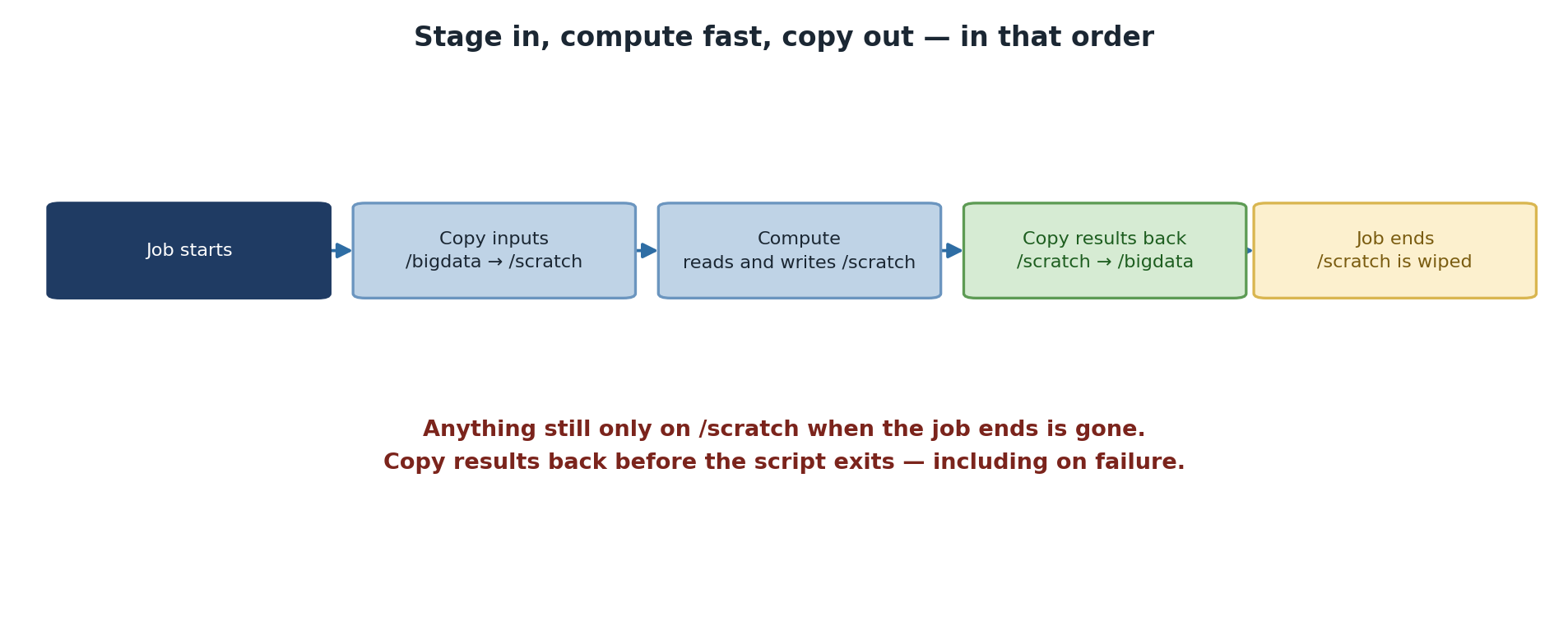
Scratch Is Non-Persistent
Data on /scratch is deleted when your job
completes. Always copy results back to /rhome or
/bigdata before the job ends. If you forget, your results
are permanently lost.
There is no “but I had it five minutes ago” recovery. The cleanup is immediate when SLURM marks the job complete. Build the copy-out step into every script that uses scratch, and verify it before requesting time on a long run.
Accessing Scratch in Job Scripts
SLURM provides environment variables for constructing scratch paths:
Full scratch path:
/scratch/$SLURM_JOB_USER/$SLURM_JOB_ID
This per-job directory naming matters. If you used
/scratch/alice/work/ and submitted ten jobs at once, they
would all write to the same directory and trash each other’s
intermediate files. The $SLURM_JOB_ID keeps each job’s
workspace isolated.
The Standard Pattern: Copy-In, Compute, Copy-Out
BASH
#!/bin/bash
#SBATCH --job-name=process_data
#SBATCH --time=04:00:00
#SBATCH --mem=32G

# Set up paths
SCRATCH_DIR=/scratch/$SLURM_JOB_USER/$SLURM_JOB_ID
mkdir -p $SCRATCH_DIR

echo "=== Stage 1: Copy input data to scratch ==="
rsync -avhP /rhome/<myusername>/input/*.dat $SCRATCH_DIR/

echo "=== Stage 2: Run computation ==="
cd $SCRATCH_DIR
./myanalysis *.dat

echo "=== Stage 3: Copy results back ==="
rsync -avhP $SCRATCH_DIR/output*.h5 /rhome/<myusername>/results/

echo "=== Job complete ==="
The pattern has three deliberate stages and each carries a lesson. Stage 1 stages all input data so subsequent reads hit local SSD instead of the network. Stage 2 does the work in scratch where I/O is fast. Stage 3 copies results back to persistent storage before the SLURM job ends, ensuring nothing is lost when scratch is cleaned.
rsync -avhP is preferred over cp because it
shows progress, preserves attributes, and is restartable if it gets
interrupted. The -h makes sizes human-readable and
-P shows progress and supports partial transfers.
Checking Available Space
Before copying large datasets, verify space is available:
BASH
SCRATCH_DIR=/scratch/$SLURM_JOB_USER/$SLURM_JOB_ID
mkdir -p $SCRATCH_DIR

AVAIL_SPACE=$(df $SCRATCH_DIR | tail -1 | awk '{print $4}')
NEEDED_SPACE=$((5 * 1024 * 1024))  # 5 GB in KB

if [ $AVAIL_SPACE -lt $NEEDED_SPACE ]; then
    echo "ERROR: Not enough space on scratch"
    exit 1
fi
This is most useful for jobs that copy a few hundred GB of data. For smaller jobs, the check is overkill. The key idea: failing fast at job start is much cheaper than failing four hours into a run because scratch filled up halfway through.
Multi-Stage Pipelines
Chain multiple processing stages on scratch to avoid round-tripping through NFS:
BASH
#!/bin/bash
#SBATCH --job-name=pipeline
#SBATCH --time=08:00:00

SCRATCH_DIR=/scratch/$SLURM_JOB_USER/$SLURM_JOB_ID
mkdir -p $SCRATCH_DIR
cd $SCRATCH_DIR

rsync -avhP /rhome/<myusername>/raw_data/ $SCRATCH_DIR/input/
./preprocess input/ -o preprocessed/
./analyze preprocessed/ -o analysis/

# Copy all results back
rsync -avhP analysis/ /rhome/<myusername>/results/analysis/
The intermediate preprocessed/ directory never leaves
scratch. It does not need to: the next stage reads it locally. This
pattern is the single biggest performance win you can get from rewriting
a multi-stage pipeline on HPC.
Real-World Example: Machine Learning
BASH
#!/bin/bash
#SBATCH --job-name=train_model
#SBATCH --time=04:00:00
#SBATCH --gpus=1
#SBATCH --mem=32G

SCRATCH=/scratch/$SLURM_JOB_USER/$SLURM_JOB_ID
mkdir -p $SCRATCH

rsync -avhP /rhome/<myusername>/training_data.h5 $SCRATCH/
cd $SCRATCH
python train.py --data training_data.h5 --output model.pkl

# Save results to permanent storage
rsync -avhP model.pkl /rhome/<myusername>/results/
For ML training in particular, scratch is essentially mandatory.
PyTorch DataLoaders with num_workers > 0 issue many
parallel reads, and NFS handles parallel reads from one client poorly.
Reading from local SSD avoids GPU starvation entirely.
Failure modes that silently lose results
The two failure modes that bite people, in order of frequency:
The script’s compute step fails, the copy-out step is skipped
(because of set -e or just script flow), and scratch gets
cleaned. Mitigation: always run the copy-out unconditionally. Use a trap
or an if block, but make sure it executes even on
failure.
The job hits its time limit during the compute step. SLURM kills it;
copy-out never runs. Mitigation: budget extra time for copy-out, and
consider a signal directive that gives your script a few
minutes’ warning before the timeout.
Challenge: Scratch Performance Test
Create two job scripts: one writing to /rhome and one to
/scratch:
Without scratch:
BASH
#!/bin/bash
#SBATCH --job-name=no_scratch
#SBATCH --time=00:05:00

cd /rhome/<myusername>
time dd if=/dev/zero of=test_1gb.dat bs=1M count=1024
rm test_1gb.dat
With scratch:
BASH
#!/bin/bash
#SBATCH --job-name=with_scratch
#SBATCH --time=00:05:00

SCRATCH=/scratch/$SLURM_JOB_USER/$SLURM_JOB_ID
mkdir -p $SCRATCH
cd $SCRATCH
time dd if=/dev/zero of=test_1gb.dat bs=1M count=1024
Compare the “real” time from each. How much faster was scratch?
Typical results:
Without scratch: real 0m12.456s
With scratch:    real 0m3.821s
Improvement:     3.3x faster
For a 4-hour I/O-intensive job, this difference multiplies significantly: 12 minutes saved per GB of throughput, or roughly an hour saved per 5 GB of working set.
The result varies with cluster load: when /bigdata is
contended by many simultaneous users, the gap can stretch to 10x or
more.
Challenge: Diagnose a Lost Result
A graduate student reports that her 6-hour SLURM job ran successfully
(final output line: “Analysis complete”), but the result file
analysis_summary.csv is nowhere to be found in her home
directory. List two likely explanations and how to fix each for next
time.
Explanation 1: the script wrote to
/scratch/$USER/$SLURM_JOB_ID/ but never copied the result
back to /rhome or /bigdata. The file was
deleted when SLURM cleaned scratch. Fix: add an rsync step
at the end of the script. Check the SLURM output file
(slurm-JOBID.out) for any errors near the end.
Explanation 2: the script wrote to a relative path
(./analysis_summary.csv) without cd-ing first.
The file is in whatever directory sbatch was invoked from,
which may not be where she is looking. Fix: use absolute paths or
explicit cd at the start.
In both cases,
find /rhome/$USER /bigdata -name "analysis_summary.csv" -mtime -1
will quickly locate any candidate file from the last 24 hours.
- Scratch (
/scratch/$SLURM_JOB_USER/$SLURM_JOB_ID) provides 4-7x faster I/O than /rhome - Scratch is deleted when your job completes; always copy results back unconditionally
- Use the copy-in, compute, copy-out pattern for all I/O-intensive jobs
- Multi-stage pipelines should keep intermediate files on scratch, not round-trip through NFS
- Check available space before copying large datasets to fail fast
- Use a trap with
--signalto copy results out even if the job hits its time limit - ML training is essentially mandatory on scratch because of DataLoader parallel reads