
SLURM Script Templates and Patterns
Last updated on 2026-08-24 | Edit this page
Estimated time: 25 minutes
Overview
Questions
- What does a production-ready SLURM script look like?
- How does the trap cleanup pattern work in detail?
- What storage location should you choose for mounted data?
- How do different storage locations compare in performance and persistence?
Objectives
- Use complete annotated SLURM script templates
- Understand trap EXIT pattern for guaranteed cleanup
- Choose appropriate storage locations for mount points
- Implement proper error checking in SLURM scripts
- Build production-ready encrypted data workflows
SLURM Directives Reference
Key directives for encrypted data jobs: -
#SBATCH --job-name=name — Job identifier -
#SBATCH --partition=gpu — Queue (amd,
gpu, or short) -
#SBATCH --gres=gpu:1 — GPU request (adjust number) -
#SBATCH --time=HH:MM:SS — Max runtime -
#SBATCH --mem=16G — RAM needed per node -
#SBATCH --cpus-per-task=4 — CPU cores per task -
#SBATCH --output=%x_%j.log — Log file naming
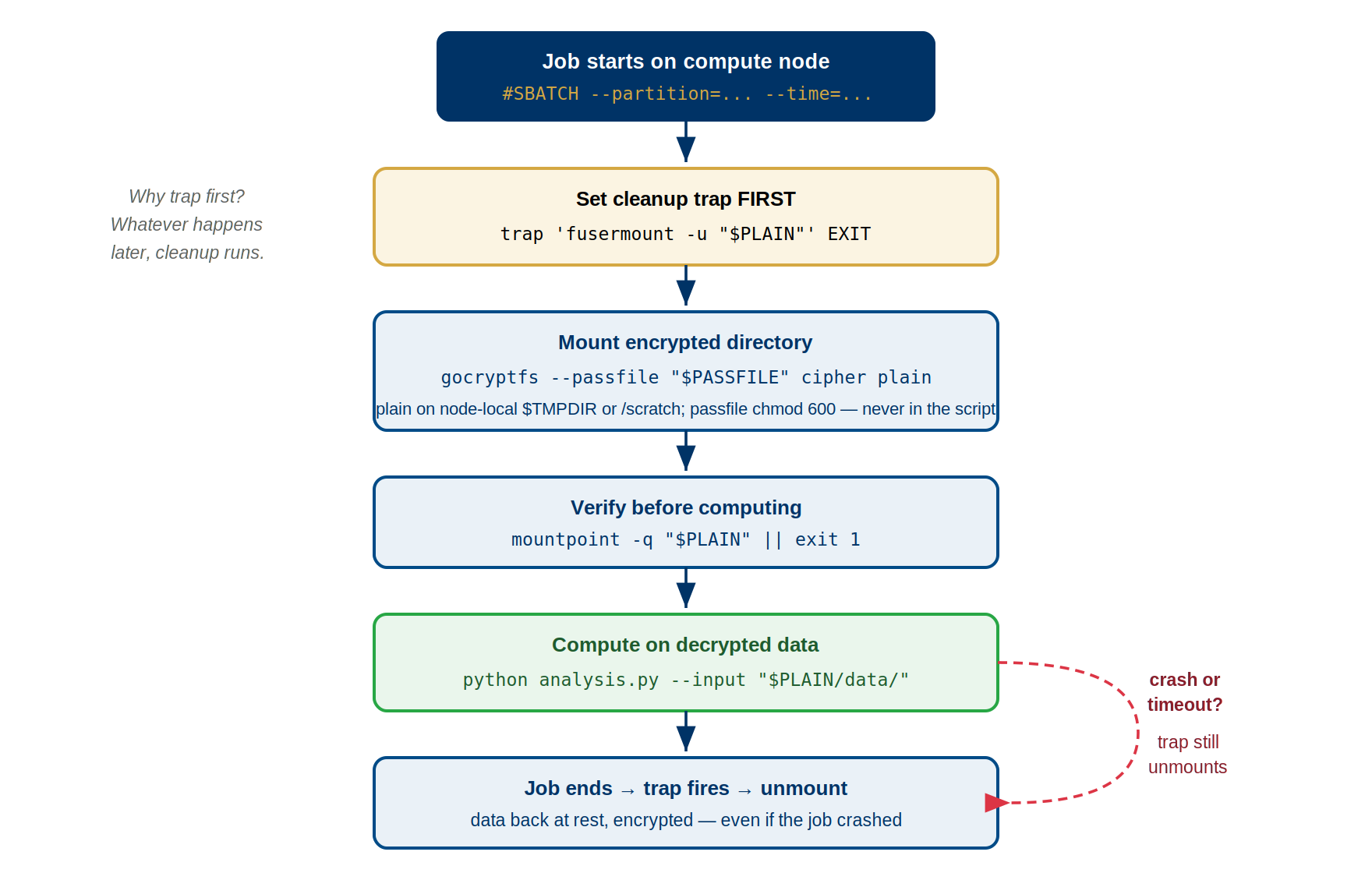
Production-Ready SLURM Script Template
BASH
#!/bin/bash
#SBATCH --job-name=encrypted_ml
#SBATCH --partition=gpu
#SBATCH --gres=gpu:1
#SBATCH --time=04:00:00
#SBATCH --mem=16G

# Setup
CIPHER=/bigdata/lab/<labname>/ml_data_cipher
PLAIN=$TMPDIR/ml_data_plain   # $TMPDIR is node-local (under /scratch) -- valid FUSE mountpoint
PASSWORD=$(cat ~/.gocryptfs_pw)
LOG_FILE="${SLURM_SUBMIT_DIR}/job_${SLURM_JOB_ID}.log"

# Cleanup function (runs on any exit)
cleanup() {
    local exit_code=$?
    echo "$(date): Cleanup starting (exit code: $exit_code)" >> "$LOG_FILE"
    fusermount -u -l "$PLAIN" 2>/dev/null
    rmdir "$PLAIN" 2>/dev/null
    exit $exit_code
}
trap cleanup EXIT

# Mount encrypted directory
mkdir -p "$PLAIN"
echo "$PASSWORD" | gocryptfs "$CIPHER" "$PLAIN" -
if [ $? -ne 0 ]; then
    echo "$(date): ERROR - Mount failed" >> "$LOG_FILE"
    exit 1
fi

# Verify data exists
if [ ! -f "$PLAIN/dataset/data.tar.gz" ]; then
    echo "$(date): ERROR - Data not found" >> "$LOG_FILE"
    exit 1
fi

# Load modules and run work
# Check `module avail` for the exact names/versions installed on Sagehen
module load miniconda3/py313_26.3.2-2
cd "$SLURM_SUBMIT_DIR"
python3 train_model.py --data "$PLAIN/dataset" --output results/

# Cleanup automatically on exit via trap
Key elements: - SLURM directives: job name, partition, GPU, time, memory - Variables: paths, password, log file for easy modification - Trap EXIT: guarantees unmounting on success, error, or timeout - Error checking: mount success and data verification - Logging: timestamps for debugging - Cleanup on any exit: prevents mounted data from persisting
Trap Pattern for Reliable Cleanup
The trap command registers a function to run when your
script exits:
BASH
trap cleanup EXIT
cleanup() {
    echo "Cleaning up..."
    fusermount -u -l "$PLAIN" 2>/dev/null
    rmdir "$PLAIN" 2>/dev/null
}
EXIT signal catches: - Normal completion - Job timeout (SLURM sends TERM → EXIT) - Manual cancellation (scancel) - Job crashes or errors - Out-of-memory kills
Why EXIT is essential: Cleanup runs before job exits even if Python crashes, segfaults, or returns error. This guarantees unmounting, preventing mounted plaintext from persisting after job ends.
Pattern for error handling: Check exit codes instead
of using && chains. Trap ensures cleanup runs on
any exit path:
Common SLURM Script Patterns
Pattern 1: Fast I/O with temporary /tmpfs mount
BASH
#!/bin/bash
#SBATCH --job-name=fast_analysis
#SBATCH --time=01:00:00

CIPHER=/bigdata/lab/<labname>/data_cipher
PLAIN=$TMPDIR/data_plain
PASSWORD=$(cat ~/.gocryptfs_pw)

cleanup() {
    fusermount -u -l "$PLAIN" 2>/dev/null
    rmdir "$PLAIN" 2>/dev/null
}
trap cleanup EXIT

mkdir -p "$PLAIN"
echo "$PASSWORD" | gocryptfs "$CIPHER" "$PLAIN" -
if [ $? -ne 0 ]; then exit 1; fi

python3 analysis.py "$PLAIN/dataset.csv"
Pattern 2: Persistent results (output to /bigdata)
BASH
#!/bin/bash
CIPHER=/bigdata/lab/<labname>/inputs_cipher
PLAIN=$TMPDIR/inputs_plain
PASSWORD=$(cat ~/.gocryptfs_pw)

cleanup() {
    fusermount -u -l "$PLAIN" 2>/dev/null
}
trap cleanup EXIT

mkdir -p "$PLAIN"
echo "$PASSWORD" | gocryptfs "$CIPHER" "$PLAIN" -

# Process and save results to persistent /bigdata
python3 process.py "$PLAIN/data.csv" > /bigdata/lab/<labname>/results.txt

# Results remain after job ends
Pattern 3: Multi-file processing with error checking
BASH
#!/bin/bash
CIPHER=/bigdata/lab/<labname>/dataset_cipher
PLAIN=$TMPDIR/dataset_plain
PASSWORD=$(cat ~/.gocryptfs_pw)
LOG="/tmp/job_${SLURM_JOB_ID}.log"

cleanup() {
    echo "$(date): Cleanup starting" >> "$LOG"
    fusermount -u -l "$PLAIN" 2>/dev/null
    echo "$(date): Job complete" >> "$LOG"
}
trap cleanup EXIT

mkdir -p "$PLAIN"
echo "$PASSWORD" | gocryptfs "$CIPHER" "$PLAIN" -
[ $? -ne 0 ] && { echo "Mount failed"; exit 1; }

# Check required files exist before processing
[ -f "$PLAIN/input.csv" ] || { echo "Missing input.csv"; exit 1; }
[ -d "$PLAIN/models" ] || { echo "Missing models dir"; exit 1; }

# Log and process
echo "$(date): Starting processing" >> "$LOG"
for file in "$PLAIN"/data/*.txt; do
    python3 process.py "$file" >> "$LOG" 2>&1 || exit 1
done
echo "$(date): Processing complete" >> "$LOG"
This pattern includes logging, error checking, and modular structure for maintainability.
Choosing Mount Locations
Choose your mount point based on performance, persistence, and quota needs:
| Location | Speed | Persistence | Quota | Use Case |
|---|---|---|---|---|
| /tmpfs | Fastest (RAM) | Ephemeral (deleted on job end) | None | I/O-bound work, temporary data, speed-critical jobs |
| /scratch | Medium (SSD) | Ephemeral (deleted on job end) | None | Large encrypted datasets, pre-processing |
| /bigdata | Slowest (network BeeGFS) | Persistent | Yes (counts against quota) | Multi-job pipelines, persistent outputs |
Quick decision guidelines: - Small data (<10 GB),
need speed → /tmpfs (mount to $TMPDIR) - Large
data (>10 GB), need speed → /scratch (mount to
/scratch/$USER/) - Need data persistence after job →
/bigdata (stays on disk) - Multi-step pipelines (job 1
output → job 2 input) → /bigdata (persistent)
Performance comparison: /tmpfs (8000
MB/sec) > /scratch (500 MB/sec) >
/bigdata (400 MB/sec). Choose /tmpfs if data
fits in node RAM, otherwise use /scratch for temporary
speed, /bigdata for persistence.
Best Practices
Before running jobs: 1. Create password file:
echo "mypassword" > ~/.gocryptfs_pw && chmod 600 ~/.gocryptfs_pw
2. Store in encrypted /rhome, never in /bigdata or /scratch 3. Test
password manually: gocryptfs /cipher /mnt (interactive
test) 4. Test full script on small data first before production use 5.
Verify you can decrypt with
gocryptfs /cipher /test_mount
In your script: 1. Always set
trap cleanup EXIT immediately after defining cleanup
function 2. Verify mount succeeded before accessing data 3. Log
important steps with timestamps 4. Check that expected data files exist
before processing 5. Capture and return exit codes for job status
tracking 6. Test mounted directory is readable:
ls /path > /dev/null || exit 1
Troubleshooting common issues: - Mount fails: Check
password is correct, verify paths exist, ensure plain directory is empty
- Permission denied: Check ownership with ls -ld /path,
ensure you own cipher directory - Device busy on unmount: Use
lsof /path to find processes, kill them, retry unmount with
fusermount -uz - “Transport endpoint not connected”: Stale
FUSE mount from crash. Use fusermount -u -z /path to force
unmount, then remount
Challenge: Build a Complete Script
Write a SLURM script that does the following:
- Requests 2 hours on the
amdpartition with 8 CPU cores and 32 GB of memory - Mounts the encrypted directory at
/bigdata/lab/<labname>/survey_cipherto a plain directory at$TMPDIR/survey_plain - Reads the password from
~/.gocryptfs_pw - Verifies the mount succeeded and that the file
responses.csvexists - Runs
python3 analyze_survey.py $TMPDIR/survey_plain/responses.csv - Uses a
trapto guarantee cleanup on any exit
BASH
#!/bin/bash
#SBATCH --job-name=survey_analysis
#SBATCH --partition=amd
#SBATCH --time=02:00:00
#SBATCH --cpus-per-task=8
#SBATCH --mem=32G

# Paths
CIPHER=/bigdata/lab/<labname>/survey_cipher
PLAIN=$TMPDIR/survey_plain
PASSWORD=$(cat ~/.gocryptfs_pw)

# Cleanup function — runs on ANY exit (success, error, timeout, cancel)
cleanup() {
    fusermount -u -l "$PLAIN" 2>/dev/null
    rmdir "$PLAIN" 2>/dev/null
}
trap cleanup EXIT

# Create mount point and mount
mkdir -p "$PLAIN"
echo "$PASSWORD" | gocryptfs "$CIPHER" "$PLAIN" -
if [ $? -ne 0 ]; then
    echo "ERROR: gocryptfs mount failed"
    exit 1
fi

# Verify expected data file exists
if [ ! -f "$PLAIN/responses.csv" ]; then
    echo "ERROR: responses.csv not found in encrypted directory"
    exit 1
fi

# Run analysis
module load miniconda3/py313_26.3.2-2
python3 analyze_survey.py "$PLAIN/responses.csv"

# Cleanup runs automatically via trap EXIT
Key elements: trap cleanup EXIT guarantees unmounting
even if Python crashes or SLURM times out; the password is read from a
chmod-600 file in /rhome; the mount point uses
$TMPDIR for fastest I/O; exit codes propagate correctly for
SLURM job tracking.
- Use complete annotated templates as starting points for your scripts
- Trap EXIT pattern guarantees cleanup on all exit paths (success, error, timeout, cancellation)
- Choose storage based on your needs: /tmpfs for speed, /bigdata for persistence
- Always check mount success before proceeding with analysis
- Capture exit codes and return original exit codes for proper job status tracking