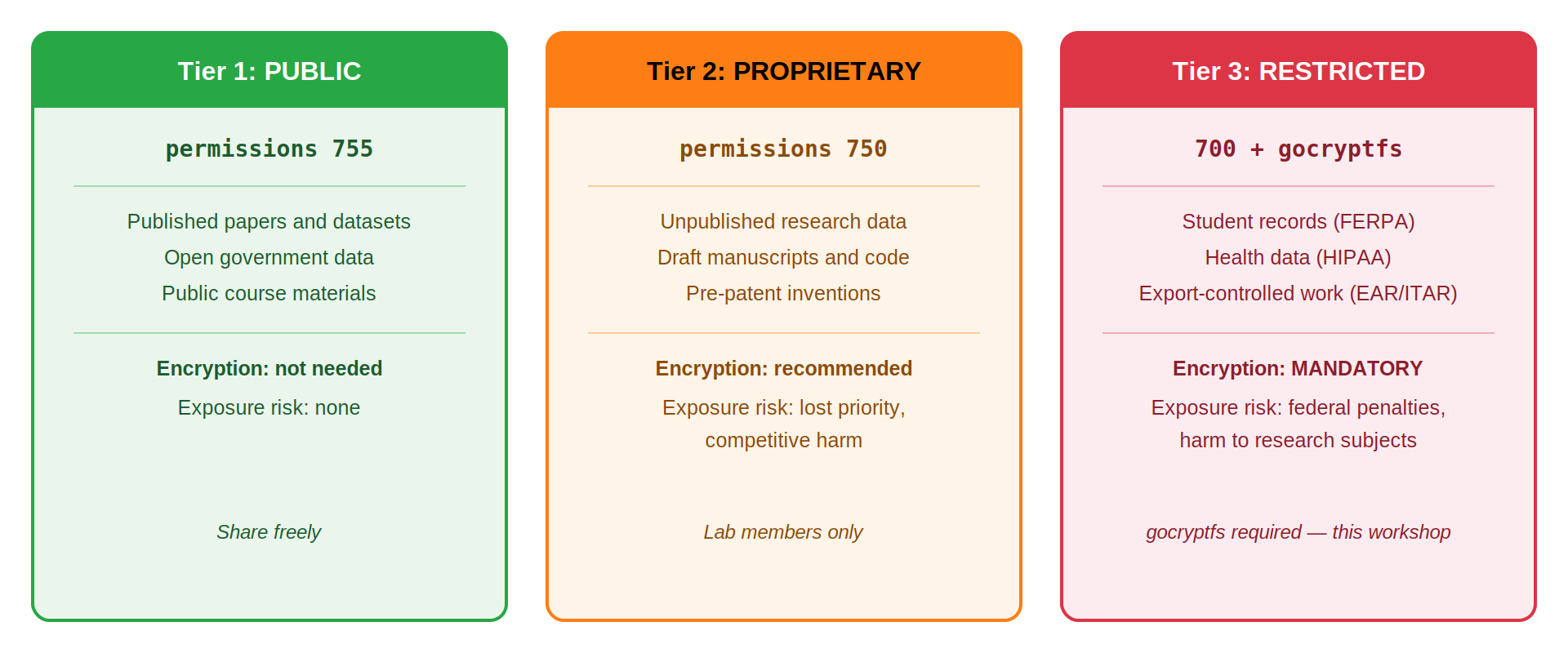
Image 1 of 1: ‘Three-column diagram of Pomona data classification tiers. Tier 1 PUBLIC, green, Unix permissions 755: published papers and datasets, open government data, public course materials; encryption not needed, no exposure risk, share freely. Tier 2 PROPRIETARY, orange, permissions 750: unpublished research data, draft manuscripts and code, pre-patent inventions; encryption recommended, exposure risks lost priority and competitive harm, lab members only. Tier 3 RESTRICTED, red, permissions 700 plus gocryptfs: student records under FERPA, health data under HIPAA, export-controlled work under EAR and ITAR; encryption mandatory, exposure risks federal penalties and harm to research subjects.’
Pomona’s three data classification tiers:
encryption is optional for PUBLIC, recommended for PROPRIETARY, and
mandatory for RESTRICTED.
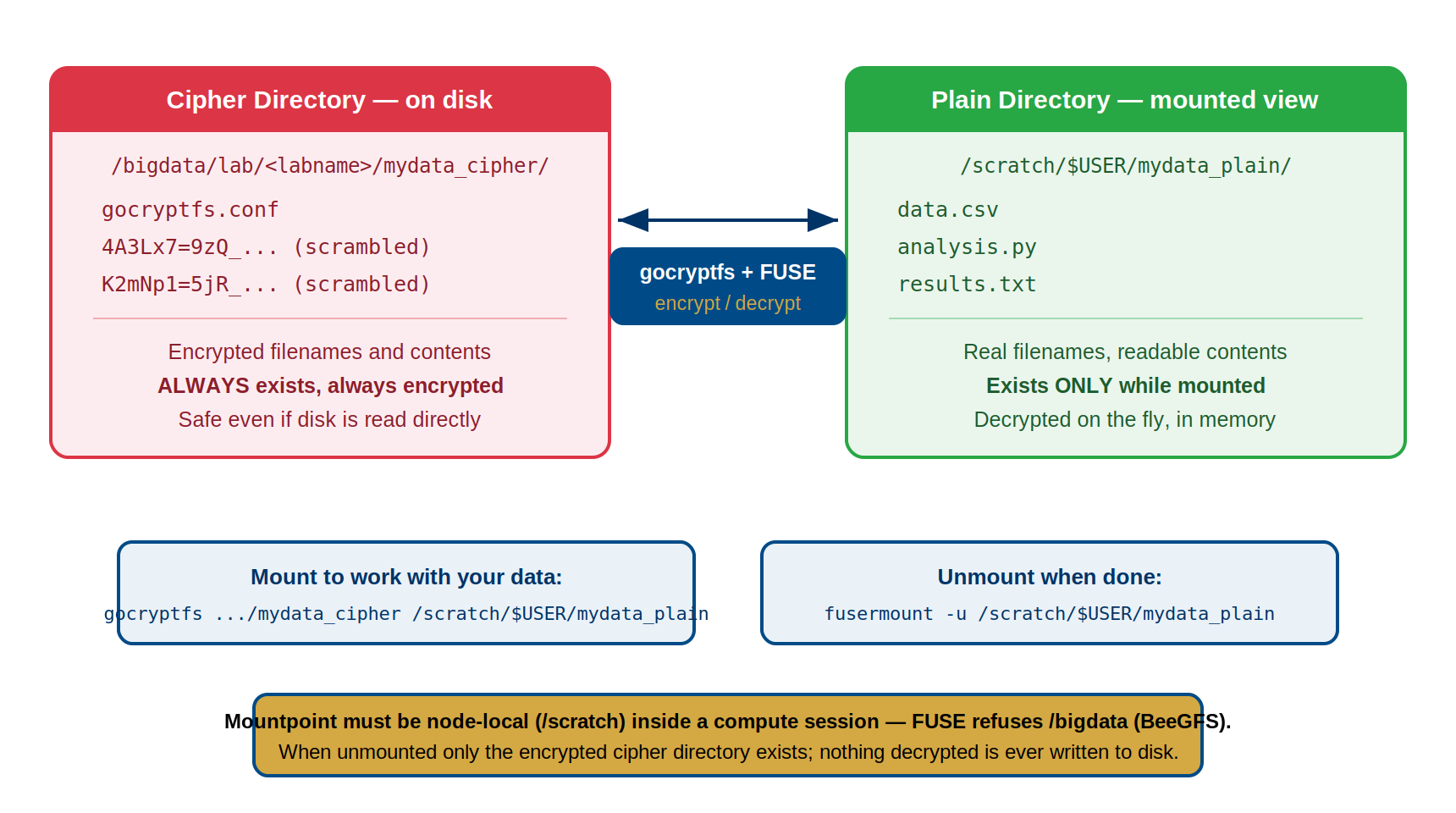
Image 1 of 1: ‘Diagram of the gocryptfs two-directory model. On the left, the cipher directory on disk contains gocryptfs.conf and files with scrambled encrypted names; it always exists and is always encrypted. On the right, the plain directory mounted view shows real filenames data.csv, analysis.py, and results.txt; it exists only while mounted and is decrypted on the fly in memory. The cipher directory lives at /bigdata/lab/<labname>/mydata_cipher and the plain directory at /scratch/$USER/mydata_plain. Between them, gocryptfs plus FUSE encrypts and decrypts. Below, the mount command and the unmount command fusermount -u. A banner notes the mountpoint must be node-local /scratch inside a compute session because FUSE refuses /bigdata on BeeGFS, and when unmounted only the encrypted cipher directory exists with nothing decrypted ever written to disk.’
The two-directory model: the cipher directory
always exists encrypted on disk; the plain directory is a decrypted
in-memory view that exists only while mounted.
Figure 2
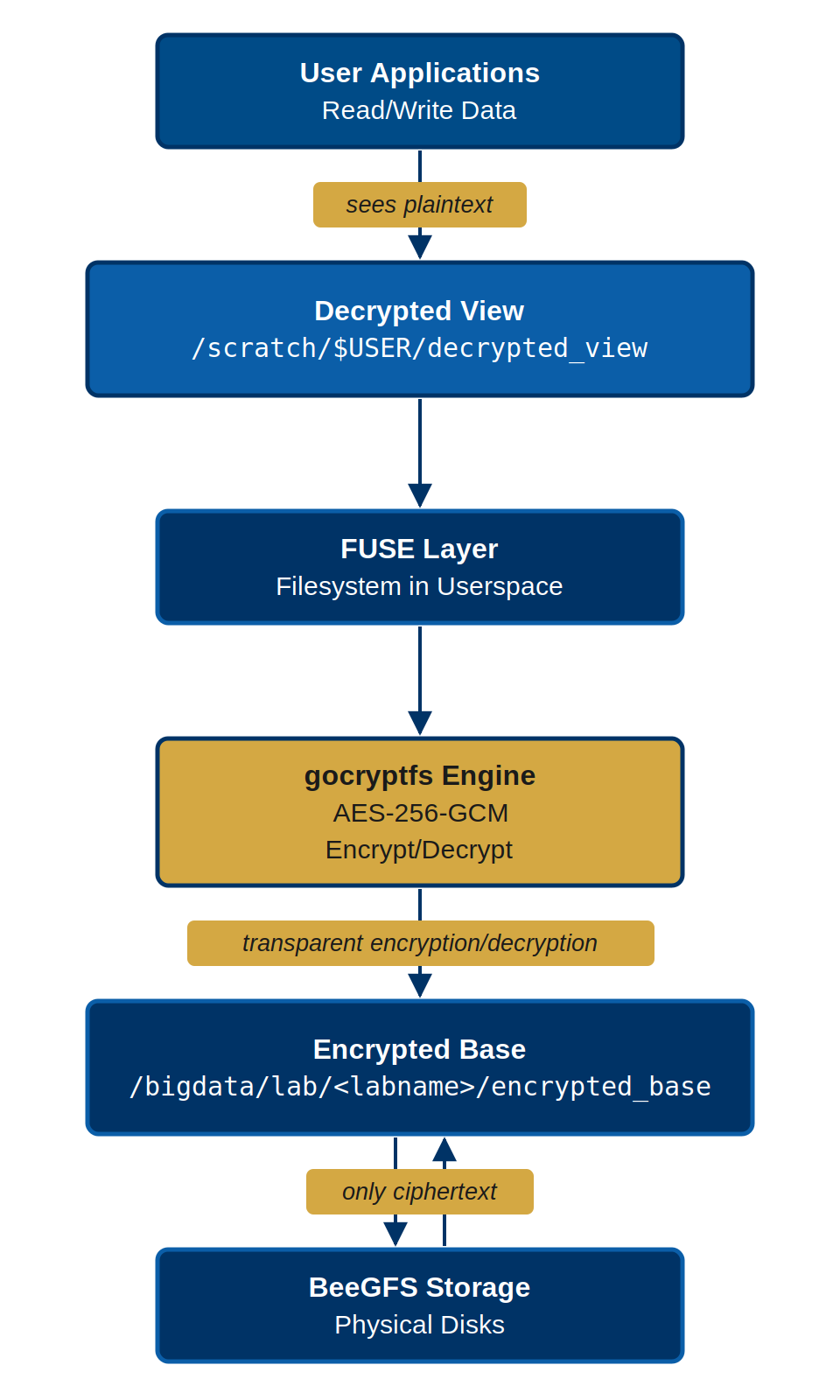
Image 1 of 1: ‘Layered diagram of the gocryptfs stack. User applications read and write data and see plaintext through a decrypted view at /scratch/$USER/decrypted_view on node-local scratch. Below that, the FUSE filesystem-in-userspace layer passes operations to the gocryptfs engine, which performs AES-256-GCM encryption and decryption transparently. Encrypted data lives in the encrypted base directory /bigdata/lab/<labname>/encrypted_base, and only ciphertext is stored on the BeeGFS physical disks.’
Every read and write passes through FUSE to the
gocryptfs engine, so only ciphertext ever touches the BeeGFS
disks.
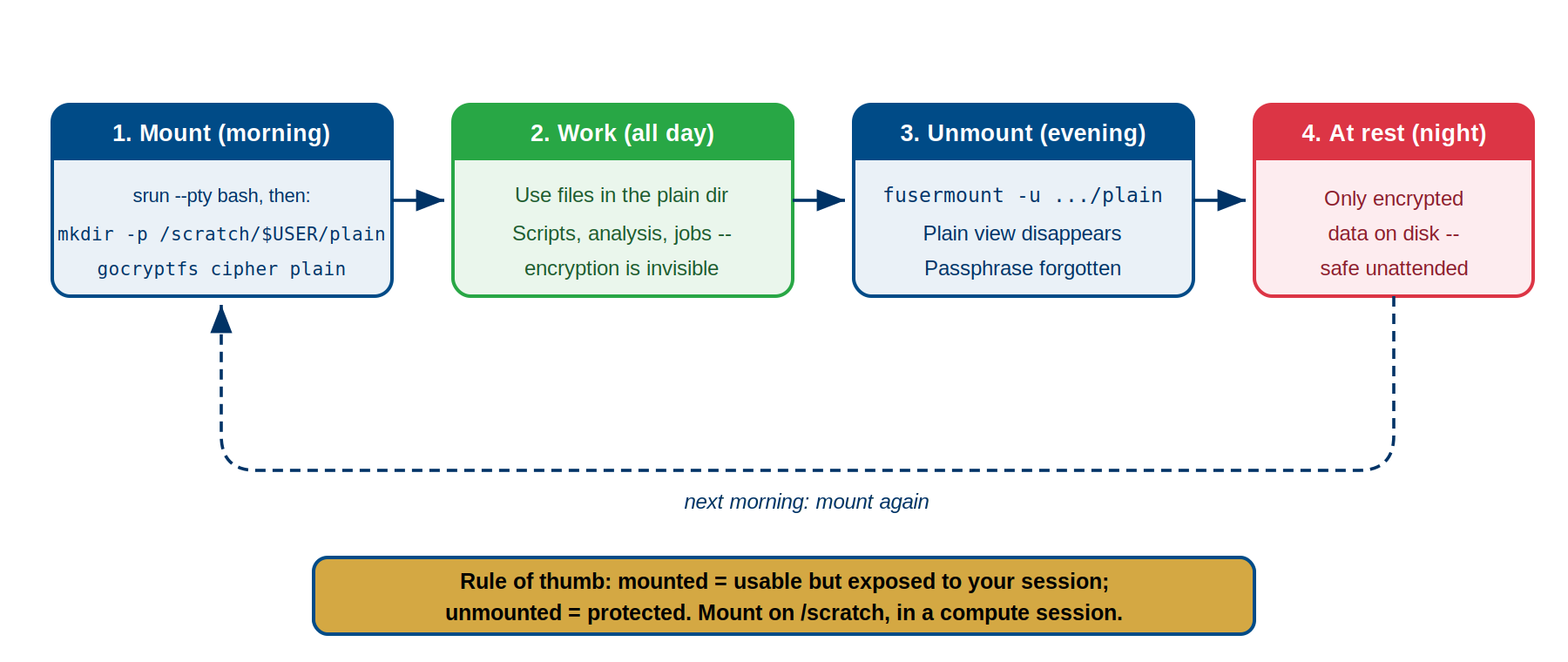
Image 1 of 1: ‘Four-step daily cycle. Step 1, mount in the morning: start an interactive compute session with srun, create the mountpoint with mkdir -p /scratch/$USER/plain, then run gocryptfs. Step 2, work all day: use files in the plain directory; scripts, analysis, and jobs run with encryption invisible. Step 3, unmount in the evening: fusermount -u plain; the plain view disappears and the passphrase is forgotten. Step 4, at rest overnight: only encrypted data on disk, safe unattended. A dashed arrow loops back to mounting again the next morning. Banner: mounted equals usable but exposed to your session; unmounted equals protected; mount on /scratch inside a compute session.’
The daily rhythm: mount in the morning, work all
day, unmount before you leave.
Figure 2
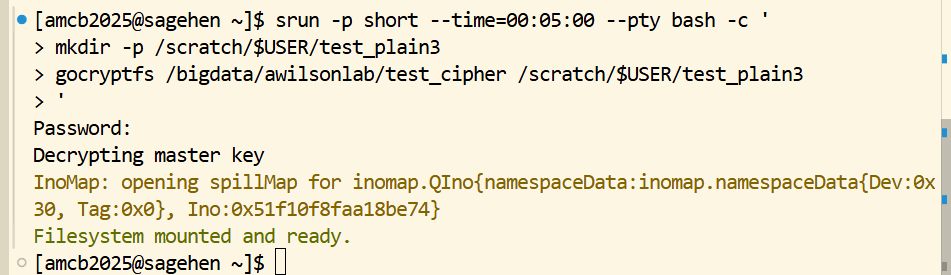
Image 1 of 1: ‘Terminal on Sagehen. An srun command on the short partition opens a five-minute interactive session running a small script that first creates the mountpoint with mkdir -p under /scratch/$USER, then runs gocryptfs against a cipher directory on /bigdata. gocryptfs prompts for a password, reports that it is decrypting the master key, prints an InoMap spillMap line, and finishes with the message that the filesystem is mounted and ready. The shell prompt then returns.’
The same sequence on Sagehen HPC: claim a
compute session, create the mountpoint, mount.
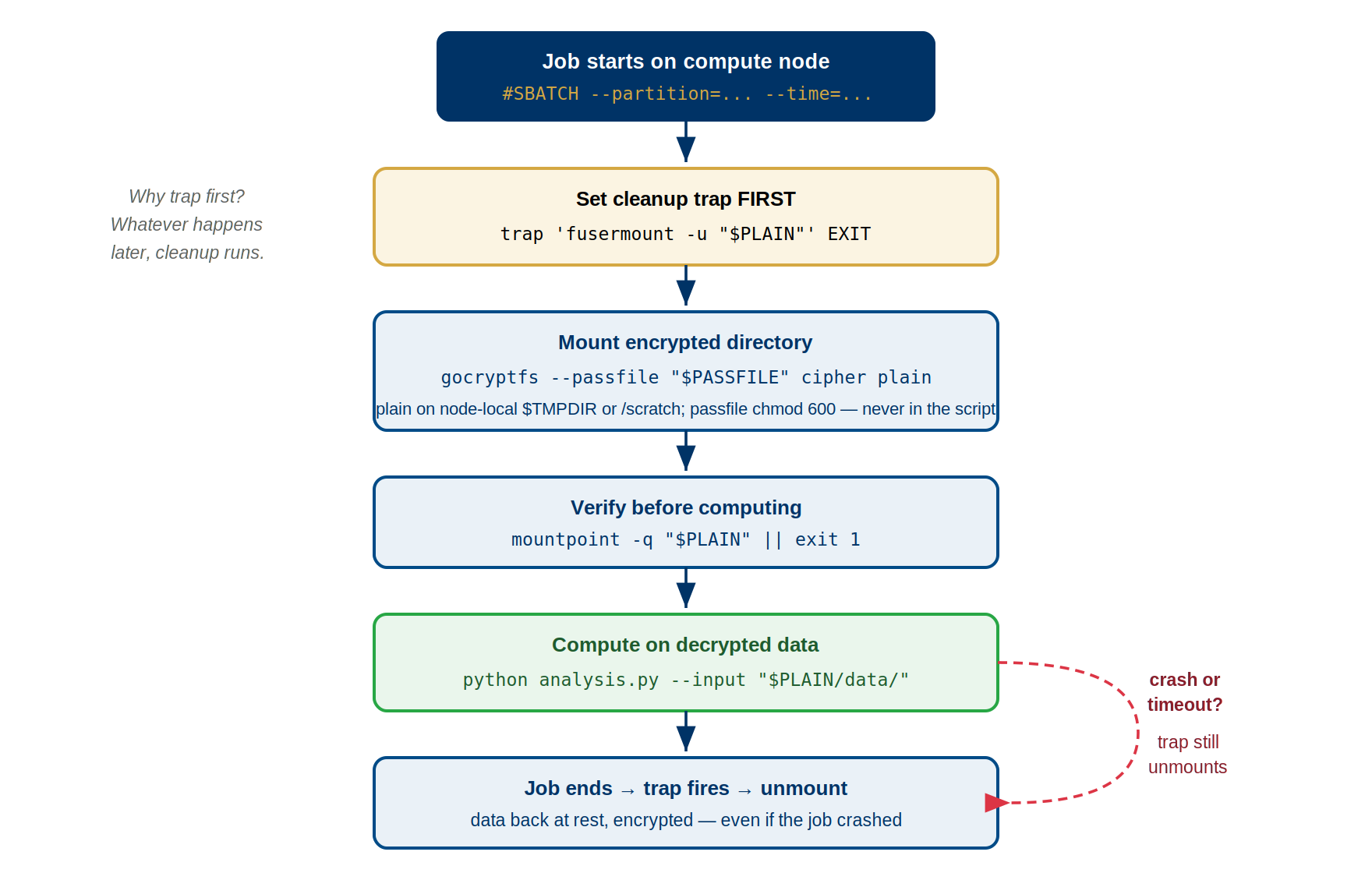
Image 1 of 1: ‘Flow diagram of the SLURM mount-compute-unmount pattern. The job starts on a compute node with SBATCH directives for partition and time. First, set a cleanup trap: trap fusermount -u dollar PLAIN on EXIT — whatever happens later, cleanup runs. Then mount the encrypted directory with gocryptfs --passfile, with the plain directory on node-local storage (TMPDIR or /scratch) and the passfile chmod 600, never embedded in the script. Verify with mountpoint -q dollar PLAIN or exit 1. Compute on the decrypted data, for example python analysis.py with input from the plain directory. When the job ends the trap fires and unmounts, leaving data at rest encrypted. A dashed red path shows that even on a crash or timeout the trap still unmounts.’
The shape every encrypted batch job follows:
trap first, then mount, verify, compute — the trap guarantees the
unmount even if the job crashes.
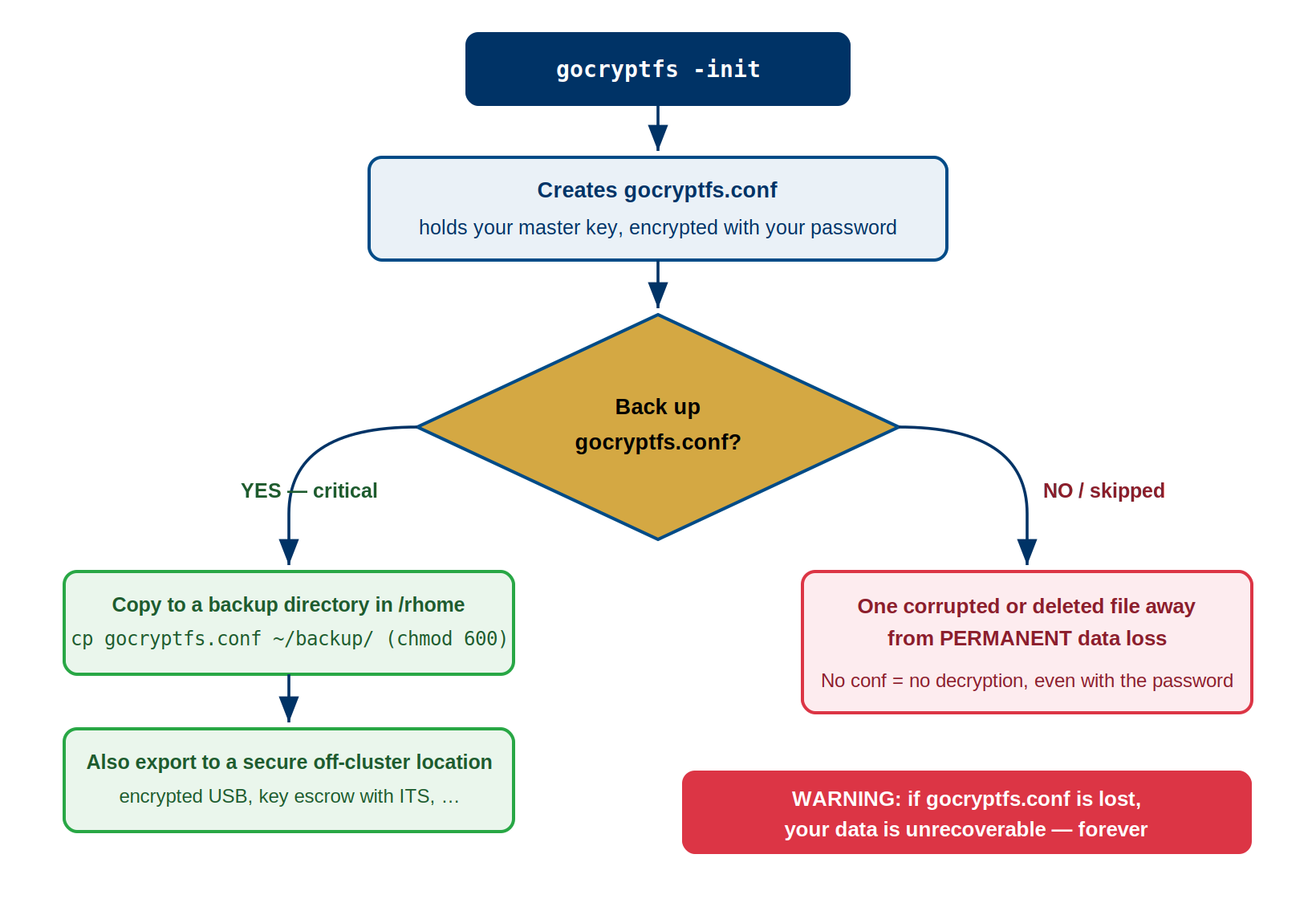
Image 1 of 1: ‘Decision flow for key backup. Running gocryptfs -init creates gocryptfs.conf, which holds the master key encrypted with your password. At the decision point, back up gocryptfs.conf question mark. The YES branch, marked critical, copies the file to a backup directory in /rhome with chmod 600 and also exports it to a secure off-cluster location such as an encrypted USB drive or key escrow with ITS. The NO branch warns you are one corrupted or deleted file away from permanent data loss, because without the conf file there is no decryption even with the password. A warning banner states that if gocryptfs.conf is lost the data is unrecoverable forever.’
Back up gocryptfs.conf the moment you initialize
– skipping this step leaves you one deleted file away from permanent
loss.
Figure 2
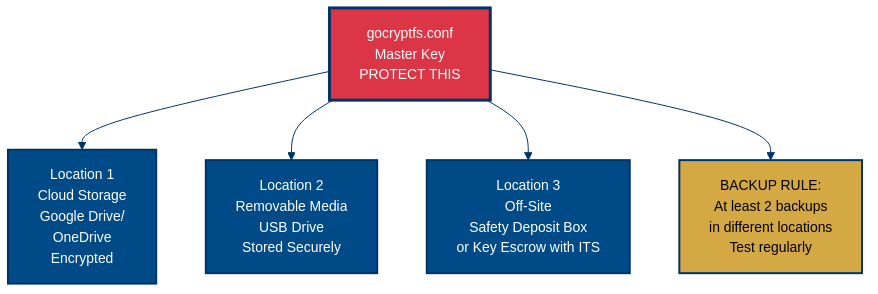
Image 1 of 1: ‘Diagram of gocryptfs.conf master key backup locations. The master key file, marked protect this, fans out to three locations: location 1 cloud storage such as Google Drive or OneDrive in encrypted form, location 2 removable media such as a USB drive stored securely, and location 3 off-site such as a safety deposit box or key escrow with ITS. A gold box states the backup rule: at least 2 backups in different locations, tested regularly.’
Keep at least two backups of gocryptfs.conf in
different locations, and test them regularly.
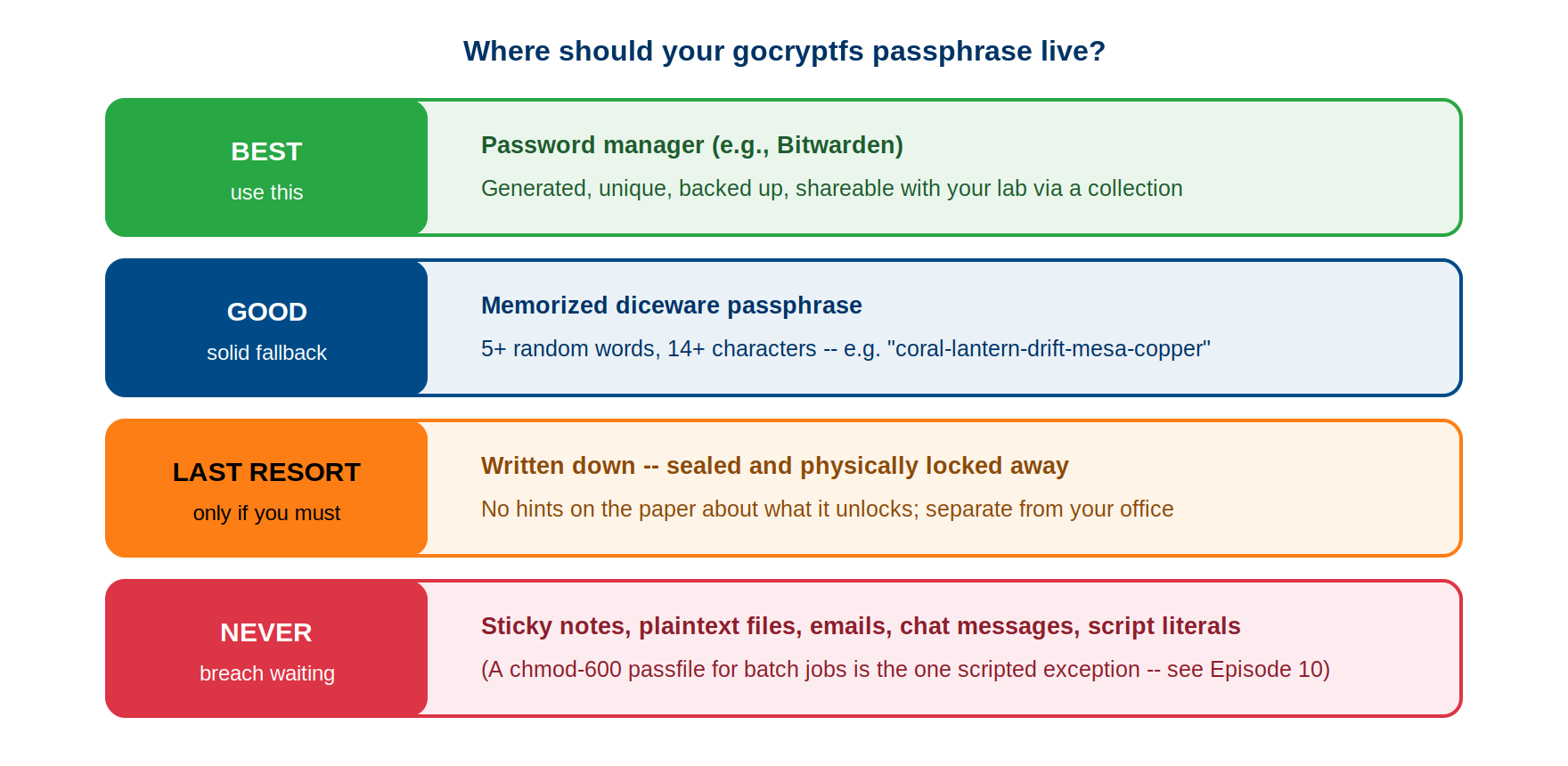
Image 1 of 1: ‘Ranked ladder titled where should your gocryptfs passphrase live. BEST, green: a password manager such as Bitwarden — generated, unique, backed up, shareable with your lab via a collection. GOOD, blue: a memorized diceware passphrase of five or more random words and at least 14 characters, for example coral-lantern-drift-mesa-copper. LAST RESORT, orange: written down, sealed, and physically locked away, with no hints about what it unlocks, kept separate from your office. NEVER, red: sticky notes, plaintext files, emails, chat messages, or script literals — a chmod 600 passfile for batch jobs is the one scripted exception, covered in Episode 10.’
Where your passphrase should live, from best
practice to never-do-this.