
All in One View
Content from Why Machine Learning on HPC?
Last updated on 2026-08-27 | Edit this page
Overview
Questions
- When do you need HPC for machine learning?
- What problems require cluster computing?
- What are the advantages and tradeoffs of HPC for ML?
Objectives
- Understand when HPC is necessary for ML
- Identify machine learning bottlenecks that HPC solves
- Evaluate whether a project benefits from HPC resources
The Machine Learning Bottleneck
Machine learning practitioners often run into walls where their laptop simply cannot do the work:
- A neural network training takes 3 weeks instead of 3 days
- A hyperparameter search would take 6 months of serial processing
- A dataset is too large to fit in RAM
- Multiple team members need to train models simultaneously
These bottlenecks are not performance annoyances; they’re project stoppers. This is where HPC becomes essential.
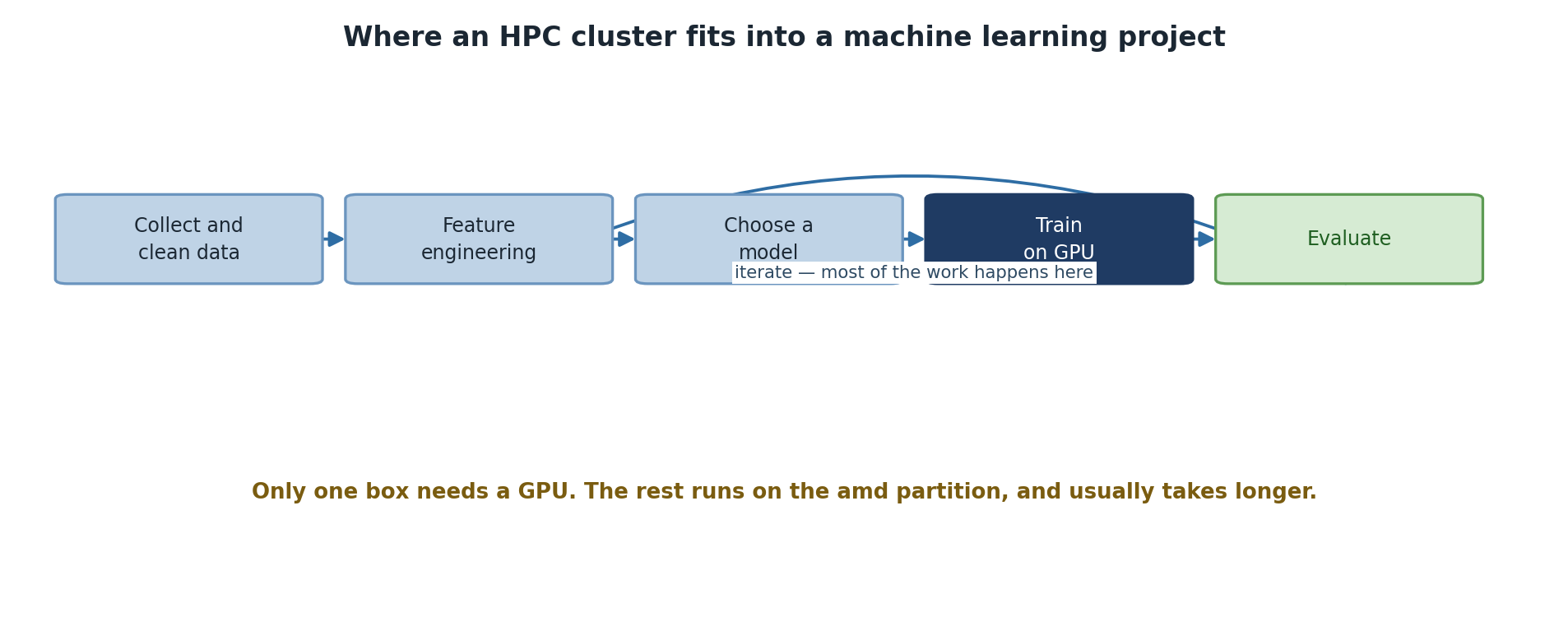
When HPC is Necessary
Scenario 1: Large Datasets
Data size directly impacts both training time and memory requirements:
- < 1 GB: Laptop sufficient (fits in RAM)
- 1-10 GB: Laptop slow but workable (disk I/O becomes bottleneck)
- 10-100 GB: Needs HPC cluster storage (/bigdata or /scratch)
- 100 GB - 1 TB: Requires distributed preprocessing (Dask, Spark)
- > 1 TB: Distributed storage and streaming processing mandatory
Example: Image classification with ImageNet (150 GB) - Laptop: Weeks of training (slow disk I/O, CPU bottleneck) - Sagehen HPC GPU: 1-3 days (parallel I/O, GPU acceleration)
Scenario 2: Long Training Times
- Simple models (< 1M parameters), small data: Minutes to hours. Laptop is fine.
- Medium models (1-100M parameters), moderate data: 4-48 hours. HPC GPU saves 10-20x time.
- Large models (> 100M parameters), large datasets: Days to weeks on CPU, hours to days on GPU. HPC is mandatory.
Time scaling example: ResNet-50 on ImageNet
Laptop (CPU):        7-10 days
Sagehen single A100: 12-18 hours
Sagehen 4 A100s:     3-5 hours (4x parallelism)
Scenario 3: Hyperparameter Optimization
Hyperparameter search requires training many models. This is where HPC shines:
-
Grid search: 100 combinations, each taking 10 hours
- Serial on laptop: 42 days
- Parallel on Sagehen (using 4 A100s out of 10 total GPUs): 25 hours
-
Bayesian optimization: 50 iterations, each training
multiple candidates
- Serial on laptop: 21 days
- Parallel on Sagehen: 4-5 days
Cost-Benefit Analysis
Should I use Sagehen for this project?
YES if:
✓ Training takes > 4 hours on laptop
✓ Dataset > 10 GB
✓ Hyperparameter sweep needed
✓ Team sharing resources
✓ Code is already written

NO if:
✗ Training < 30 minutes
✗ Exploring model architecture (too slow to iterate with job queue)
✗ Learning to code (laptop is faster feedback)
✗ One-off experiments
Challenge
Scenario Analysis: Is HPC Worth It?
You have three ML projects: 1. Project A: Fine-tuning a pre-trained BERT model on 5 GB of text. Estimated training: 8 hours on CPU. 2. Project B: Random forest with scikit-learn on 2 GB dataset. Training: 15 minutes on CPU. 3. Project C: 3D CNN for medical imaging. Dataset: 50 GB. Estimated training on CPU: 2 weeks.
For each, decide: Does it benefit from HPC? Should you use GPU or CPU nodes?
Project A: YES, use HPC GPU. 8 hours on CPU becomes ~30 minutes on A100. Fine-tuning benefits from CUDA.
Project B: NO, use laptop. 15 minutes is already fast. Random forest doesn’t parallelize efficiently on GPU.
Project C: ABSOLUTELY YES, use multi-GPU. 2 weeks on CPU is prohibitive. 3D convolutions are GPU-friendly. Multi-GPU gets it to 1-2 days.
- HPC becomes essential when training takes > 4 hours or datasets exceed 10 GB
- Hyperparameter optimization and multi-GPU training turn weeks into days
- Always test code on small data first before scaling to full datasets
- Not every ML project benefits from HPC; evaluate before investing setup time
Content from ML Workflow Overview
Last updated on 2026-08-27 | Edit this page
Overview
Questions
- How do CPUs and GPUs compare for different ML workloads?
- What GPU options are available on Sagehen HPC?
- What does a typical ML workflow on HPC look like?
Objectives
- Learn CPU vs GPU tradeoffs for different workloads
- Know Sagehen’s ML capabilities and GPU options
- Plan ML workflows that effectively use HPC
CPU vs GPU: When to Use Each
CPU Characteristics
- Good at: Sequential logic, complex control flow, sparse operations
- Typical cores: 32-128 cores per node
CPU-friendly ML workloads: - Preprocessing (pandas, scikit-learn) - Tree-based models (random forests, XGBoost, LightGBM) - Sparse linear models - Feature engineering and data cleaning
GPU Characteristics
- Good at: Massive parallelism, dense matrix operations
- Typical cores: 1000-10000 cores per GPU (A100 has 6912 cores)
GPU-friendly ML workloads: - Deep neural networks (CNN, RNN, Transformer) - Large matrix operations - Batch processing - Any framework with CUDA support (PyTorch, TensorFlow)
Sagehen HPC’s GPU Options
GPU Type      VRAM       Best For                         Units
────────────────────────────────────────────────────────────────
A100 (80GB)   80 GB      Large models, distributed        4
                         training, production
L40S (48GB)   48 GB      Single-GPU training,             4
                         inference, general ML
RTX PRO 6000 (96 GB)  96 GB ECC  Largest-memory training / pro     2
                         training, ECC-sensitive numerics
────────────────────────────────────────────────────────────────
Total: 10 GPUs (confirmed by Andrew Wilson, May 2026)
Performance Scaling
Real-world speedups on Sagehen:
| Workload | CPU (32 cores) | 1 A100 GPU | 4 A100 GPUs |
|---|---|---|---|
| Training ResNet-50 | 1.0x (baseline) | 15-20x | 50-60x |
| Small dense NN | 1.0x | 8-12x | 20-30x |
| XGBoost | 1.0x | 1-2x | 8-12x |
| Data loading | 1.0x | 1.0x | 1.0x |
Key insight: GPUs excel at deep learning but don’t help with data I/O or tree-based models.
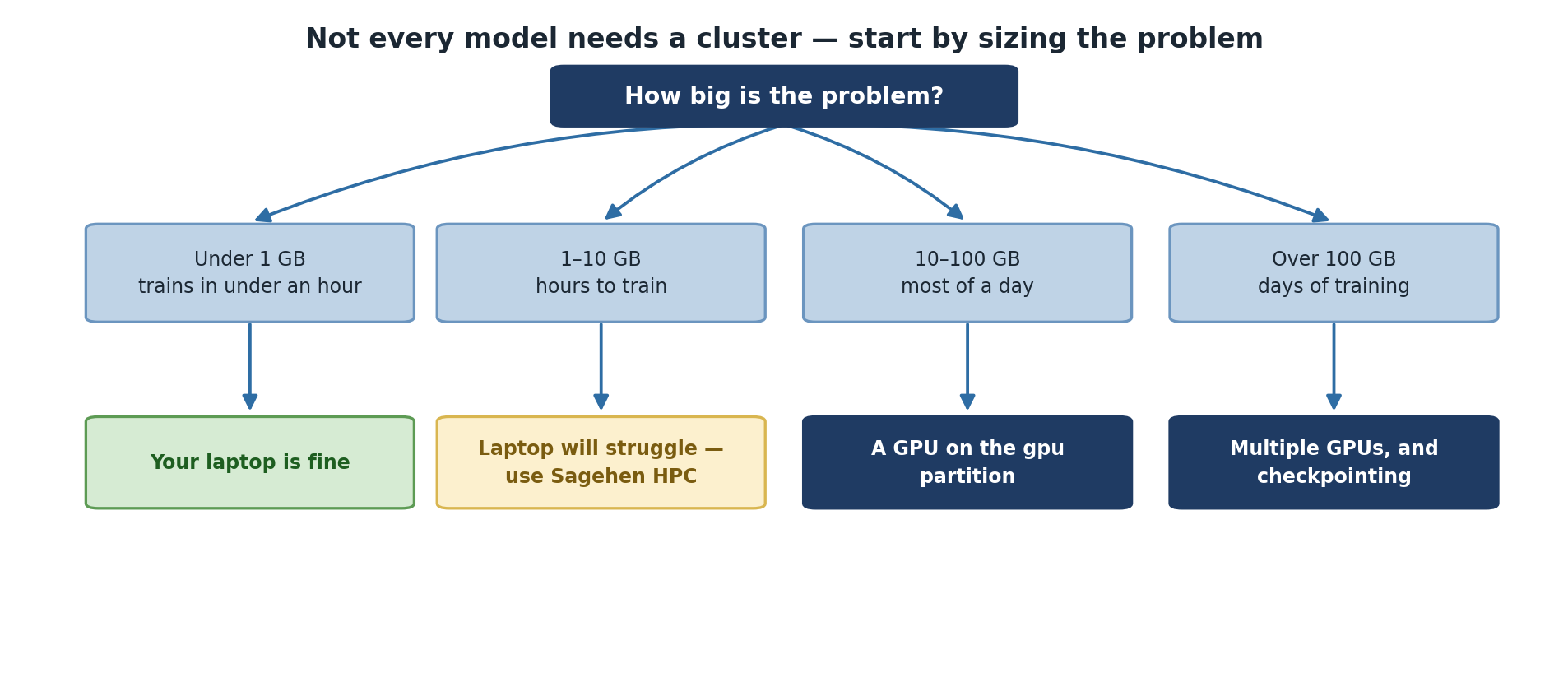
Sagehen HPC ML Infrastructure
Storage Architecture
BASH
/rhome/$USER                Quota: 100 GB
├─ Purpose: Personal files, code, small datasets
├─ Speed: Moderate (BeeGFS), Backed up: YES
└─ Best for: Git repos, config files, scripts

/bigdata/$LAB               Quota: 1+ TB per lab
├─ Purpose: Research datasets, large data
├─ Speed: Good (BeeGFS parallel FS), Backed up: NO
└─ Best for: Raw datasets, training data

/scratch/$USER              Node-local, inside jobs only
├─ Purpose: Job I/O, intermediate results
├─ Speed: Fast (NVMe SSD), Deleted when the job ends
└─ Best for: Input/output during jobs
Compute Resources
- Login nodes: Interactive work (no heavy compute)
- CPU nodes (amd partition): 32-128 cores, up to 512 GB RAM, ideal for preprocessing
- GPU nodes (gpu partition): 10 GPUs total — A100/L40S/RTX PRO 6000, max 720 hours, ideal for training
-
short partition: Quick test / debug jobs with a
shorter max walltime (check
sinfo -p short) - OnDemand web interface: Interactive Jupyter notebooks with optional GPU
Typical ML Workflow on Sagehen HPC
PHASE 1: Local Development (Laptop)
├─ Write model code, test on toy dataset, debug

PHASE 2: Preprocessing (HPC CPU or OnDemand)
├─ Copy full dataset to /bigdata
├─ Write preprocessing pipeline, create train/test splits
└─ Save to /scratch for fast access

PHASE 3: Model Training (HPC GPU)
├─ Submit SLURM job with GPU allocation
├─ Train with checkpointing, monitor GPU usage
└─ Save checkpoints and final model

PHASE 4: Evaluation (Laptop or OnDemand)
├─ Load trained model, evaluate on test set
└─ Generate plots and analysis

PHASE 5: Iteration (Cycle back to PHASE 3)
├─ Adjust hyperparameters, try different architectures
└─ Compare results
Challenge
Challenge: Project Planning
You’re starting a project to classify satellite images (1 TB dataset, ResNet-50).
- Which storage tier should you use for raw data?
- Which GPU should you request for single-GPU training?
- How would you estimate training time without running the full dataset?
1. Storage: /bigdata for raw data (1 TB
is too large for /rhome or /scratch).
2. GPU Selection: Start with L40S (48GB) since ResNet-50 is ~100MB, fits easily. Save A100s for larger models.
3. Time Estimation: Download a 10 GB sample, train ResNet-50 on the sample, measure time per epoch, then extrapolate to full dataset. Plan for extra time accounting for I/O.
- GPUs accelerate deep learning 15-20x; CPUs are better for preprocessing and tree models
- Sagehen offers 10 GPUs total: A100 (80 GB), L40S (48 GB), and RTX PRO 6000 (96 GB ECC)
- Storage tiers (/rhome, /bigdata, /scratch) have different performance characteristics
- Successful ML on HPC combines local development with remote training
- CPU preprocessing + GPU training is more efficient than trying everything on GPU
Content from Setting Up Your ML Environment
Last updated on 2026-08-27 | Edit this page
Overview
Questions
- How do you load ML modules on Sagehen HPC?
- What pre-built modules are available for PyTorch and TensorFlow?
- How do you verify GPU access is working?
- When should you reuse a shared conda environment vs. build your own?
Objectives
- Load modules and prepare Sagehen for ML work
- Activate a working PyTorch or TensorFlow conda environment
- Verify CUDA and GPU availability
- Decide when to reuse an existing environment and when to build your own
Why Environment Setup Is the First Real Hurdle
Before any model trains, you have to get a Python interpreter, the
right framework, the right CUDA libraries, and the right cuDNN version
all agreeing with each other. On a personal laptop this is annoying. On
a shared HPC cluster, where you cannot just pip install
system-wide and where the GPU driver is fixed by ITS, it is the single
most common failure point for new users.
Sagehen has no pytorch or tensorflow module
— Lmod provides the supporting pieces (miniconda3,
cuda), and the framework itself always comes from a conda
environment. So the real choice is between reusing an environment
someone in your lab already built and building your own. Start by
reusing one to confirm the GPU path works end to end, then build your
own once you need specific versions or extra packages.
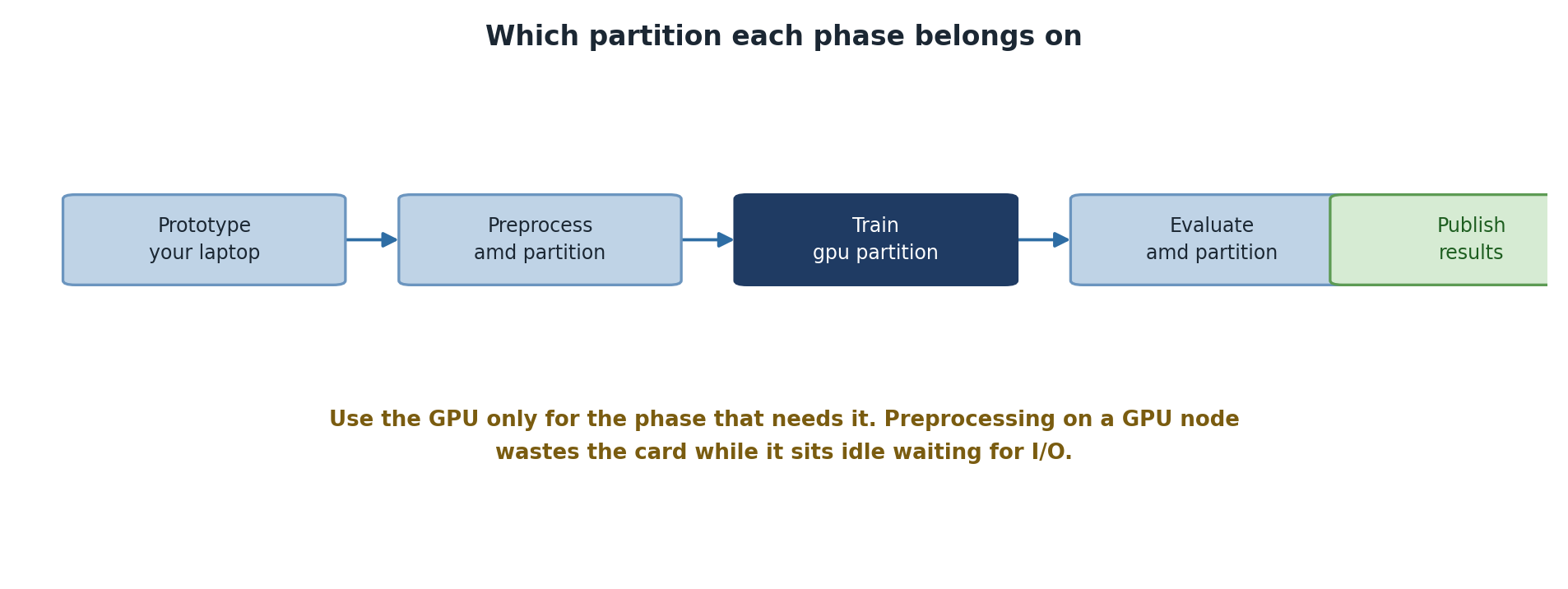
Understanding Sagehen HPC’s Module System
Sagehen uses Lmod (a module system) to manage software versions.
Modules provide pre-configured environments without cluttering your
shell. Each module sets PATH, LD_LIBRARY_PATH,
and other environment variables for one specific tool, and
module unload cleanly reverses those changes.
View Available Modules
BASH
# List all available modules
module avail

# List modules containing "python" or "cuda"
module avail python
module avail cuda

# Get detailed info about a module
module show cuda/12.2.1
module show is underused. It tells you exactly which
CUDA version a framework module loads, which PATH entries
it adds, and which other modules it depends on. Reading this once for
cuda/12.2.1 makes the whole “why doesn’t my framework see
the GPU” debugging conversation 10 times faster.
Loading Modules
Verify the actual Lmod tree with module spider cuda for
the versions currently available on Sagehen.
BASH
# Load a single module
module load miniconda3

# Load multiple modules
module load miniconda3 cuda/12.2.1

# Check what's loaded
module list

# Remove a module
module unload cuda/12.2.1

# Clear all modules
module purgeModule loading inside SLURM scripts
Modules loaded in your interactive shell do not carry into a SLURM job. You must explicitly load them inside the batch script:
BASH
#!/bin/bash
#SBATCH --partition=gpu
#SBATCH --gres=gpu:1

module purge
module load miniconda3 cuda/12.2.1
conda activate pytorch_env   # created in the next episode

python train.py
Including module purge first is a habit worth forming:
it ensures the script starts from a known clean state and is not
affected by whatever happened to be loaded in the submitting shell.
Quick Start: Getting a Framework Running
Neither framework ships as a module, so both come from conda. The
fastest start is to activate an environment that already exists — the
commands below assume pytorch_env and tf_env
have been created as described in the next episode.
Option 1: PyTorch
BASH
# PyTorch comes from a conda environment -- there is no pytorch module.
# The cuda module supplies the GPU toolkit; conda's pytorch bundles cuDNN.
module load miniconda3 cuda/12.2.1
conda activate pytorch_env

# Test it works
python3 << 'EOF'
import torch
print(f"PyTorch version: {torch.__version__}")
print(f"CUDA available: {torch.cuda.is_available()}")
print(f"CUDA version: {torch.version.cuda}")
print(f"Number of GPUs: {torch.cuda.device_count()}")

if torch.cuda.is_available():
    print(f"GPU Name: {torch.cuda.get_device_name(0)}")
EOFVerifying Your Environment
After loading modules, test all components:
PYTHON
import torch

print(f"PyTorch Version: {torch.__version__}")
print(f"CUDA Available: {torch.cuda.is_available()}")
print(f"CUDA Version: {torch.version.cuda}")

gpu_count = torch.cuda.device_count()
print(f"Number of GPUs: {gpu_count}")

if gpu_count > 0:
    for i in range(gpu_count):
        props = torch.cuda.get_device_properties(i)
        print(f"GPU {i}: {props.name}, Memory: {props.total_memory / 1e9:.1f} GB")

# Quick computation test
if torch.cuda.is_available():
    x = torch.randn(1000, 1000, device='cuda')
    y = torch.randn(1000, 1000, device='cuda')
    z = torch.matmul(x, y)
    print(f"GPU computation test: PASSED (result shape: {z.shape})")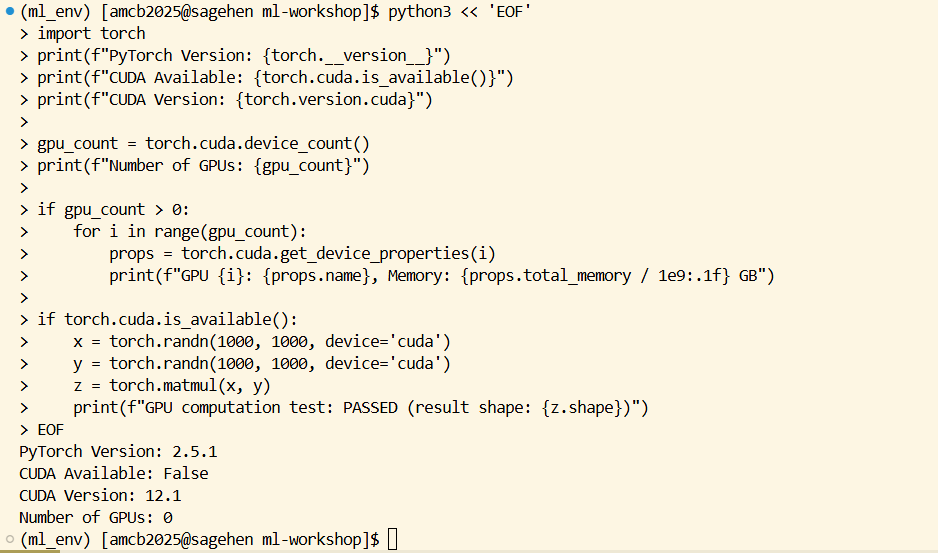
ml_env environment.The GPU name in the output tells you which Sagehen GPU you got.
Sagehen has a heterogeneous GPU pool of 10 GPUs total (confirmed May
2026): 4× A100 80 GB, 4× L40S 48 GB, and 2× RTX PRO 6000 96 GB. Without
a --gres constraint, SLURM hands you whatever is free
first.
When to Reuse an Environment vs. Build Your Own
Decision rubric
Reuse an existing environment when:
- You are getting started and just want something working today.
- Your lab already maintains one with the versions your project needs.
- You do not need packages beyond what it already contains.
Roll your own conda environment when:
- You need a specific framework version the shared environment does not have.
- Your project has many extra dependencies (transformers, scikit-learn, custom packages).
- You need to share an environment file with collaborators for reproducibility.
- You need to mix two frameworks (e.g., PyTorch + TensorFlow + JAX).
Most serious research projects end up with their own environment. A shared one is best as a quick-start tool and as a fallback when your own is broken.
Where Conda Lives on Sagehen HPC
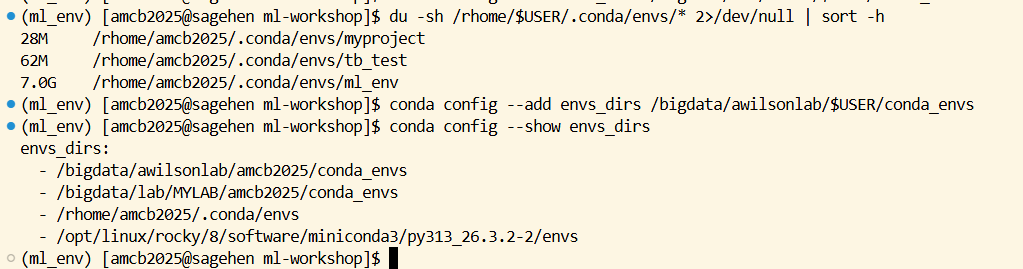
When you run conda create -n myenv ..., the environment
is stored under /rhome/$USER/.conda/envs/myenv. Each
environment with a deep learning framework can easily reach 5 to 10 GB.
Your /rhome quota is 100 GB. Three or four large ML
environments will fill it.
To check your usage:
If you are bumping into the quota, two options: prune unused
environments with conda env remove -n old_env, or
reconfigure conda to store environments under your lab’s
/bigdata allocation:
/bigdata.Challenge
Challenge: Verify Your GPU Setup
Activate a PyTorch environment on a GPU node, then write and run a script that: 1. Prints the PyTorch version 2. Checks how many GPUs are available 3. Identifies the GPU type (A100, L40S, or RTX PRO 6000) 4. Runs a small matrix multiplication on GPU and verifies the result
BASH
srun --partition=gpu --gres=gpu:1 --time=00:10:00 --pty bash

module purge
module load miniconda3
conda activate pytorch_env

python3 << 'EOF'
import torch
print(f"PyTorch: {torch.__version__}")
print(f"GPUs: {torch.cuda.device_count()}")
if torch.cuda.is_available():
    name = torch.cuda.get_device_name(0)
    mem = torch.cuda.get_device_properties(0).total_memory / 1e9
    print(f"Got: {name} with {mem:.0f} GB")
    x = torch.randn(100, 100, device='cuda')
    y = torch.matmul(x, x)
    print(f"GPU test PASSED: result shape {y.shape}")
EOF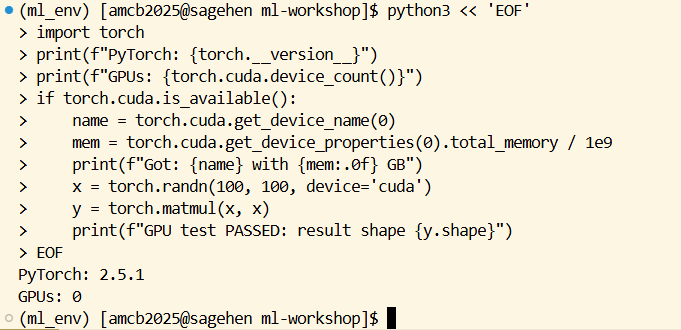
The interactive srun is important: you must be on a GPU
node, not the login node, to see a GPU. The name output
reveals which of the three Sagehen GPU types you got.
Challenge
Challenge: When the System Module Won’t Do
A research collaborator sends you their codebase, which requires
torch==2.3.1 and transformers==4.38. Your
lab’s shared environment has an older PyTorch. Sketch the steps you
would take to set up a working environment without breaking anyone
else’s.
- Load the conda module:
module load miniconda3. - Create an environment with the exact versions:
conda create -n collab_proj python=3.11 pytorch=2.3.1 pytorch-cuda=12.1 -c pytorch -c nvidia -y. - Activate and install transformers:
conda activate collab_proj; pip install transformers==4.38. - Verify the GPU works: load the env in an interactive
srun --gres=gpu:1session and run the verification script above. - Export for reproducibility:
conda env export > environment.ymland commit to the project repo.
This isolates the collaborator’s exact stack in your own environment without touching the shared one other users depend on.
-
module load miniconda3, thenconda activatean existing environment, is the quickest way to start -
module show NAMEreveals what a module actually does (CUDA version, dependencies) - Always re-load modules inside SLURM scripts; the login-node environment does not transfer
- Sagehen’s GPU driver reports CUDA 12.7; the newest CUDA
toolkit module is
cuda/12.2.1. They are different things and do not need to match - Always test GPU access with small verification scripts before large jobs
- Roll your own conda environment when you need pinned versions or extra packages
- Conda environments can be moved to /bigdata if /rhome quota gets tight
Content from Loading ML Frameworks
Last updated on 2026-08-27 | Edit this page
Overview
Questions
- How do you create custom conda environments for ML?
- How do you create reproducible environments for team collaboration?
- What are common environment setup mistakes and how do you fix them?
- How do you keep environments small enough to fit your /rhome quota?
Objectives
- Create and activate conda environments with GPU support
- Install PyTorch and TensorFlow with the correct CUDA version
- Export environments for reproducibility
- Troubleshoot the four most common environment problems
- Manage environment storage to stay within quota
Why Custom Environments Eventually Become Necessary
For rigorous environment management see Workshop 21 (Reproducible Research Pipelines).
Sagehen HPC has no pre-built pytorch or
tensorflow module, so a conda environment is not an
optional upgrade — it is the only way to get either framework running.
Conda environments also give you full control: pin every version,
install anything from PyPI or conda-forge, and export the result for
reproducibility.
The downside is disk space and complexity. Each ML environment can be
5 to 10 GB after pytorch-cuda and a few extras. Three or
four large environments will eat your /rhome quota. The patterns below
keep environments small, reproducible, and fast to recreate.
Creating Custom Conda Environments
For projects requiring specific package versions or combinations:
Step 2: Create Environment
BASH
# PyTorch with GPU support (recommended)
conda create -n pytorch_env python=3.11 \
  pytorch torchvision torchaudio \
  pytorch-cuda=12.1 \
  mkl==2021.4.0 pip \
  -c pytorch -c nvidia -y

# Or both frameworks together
conda create -n ml_both python=3.11 \
  pytorch torchvision torchaudio pytorch-cuda=12.1 \
  mkl==2021.4.0 pip pandas scikit-learn \
  -c pytorch -c nvidia -y
Three parts of that command are easy to leave out, and each causes a failure that is hard to diagnose later:
-
python=3.11pins the interpreter. Without it, conda resolves whatever version it prefers and you can end up with an environment whose Python does not match the packages installed into it. -
mkl==2021.4.0pins Intel’s Math Kernel Library to a known-good version. MKL 2024.1 and later dropped a symbol PyTorch’s binary expects, soimport torchfails withImportError: ... libtorch_cpu.so: undefined symbol: iJIT_NotifyEvent. Confirmed on Sagehen — 2021.4.0 is the version verified working. -
pipinstalls pip into the environment. Without it, a laterpython3 -m pip installfails withNo module named pip.
TensorFlow is best installed with pip inside an existing environment rather than through conda — TensorFlow’s own documentation advises against the conda route:
The channel order matters. Channels are searched in priority order;
-c pytorch -c nvidia puts the official PyTorch channel
first, ensuring you get the correctly-built CUDA-enabled wheels rather
than a CPU-only version that happens to share the same name on
conda-forge.
Step 3: Activate and Install Additional Packages
BASH
conda activate pytorch_env
conda install jupyter matplotlib seaborn -y
python3 -m pip install wandb tensorboard
Use python3 -m pip, never a bare pip. A
bare pip can resolve to the one belonging to the loaded
miniconda3 module rather than the one inside your
environment, silently installing packages into the wrong Python — the
import then fails with ModuleNotFoundError even though the
install reported success. If you are unsure which you are getting, check
with which python3 and which pip; both should
point inside your environment directory.
Mixing conda and pip safely
Conda and pip both install packages, but they manage dependencies differently. Mixing them can break things in subtle ways:
The safe pattern is conda first (for the framework and its CUDA dependencies), then pip last (for everything else). Doing it the other way around can cause conda to overwrite pip-installed packages on the next conda install.
If you must use pip for a specific package version that conda doesn’t
have, use it inside an already-active conda environment, and avoid
running any further conda install after that.
Creating Reproducible Environments
Export Environment
BASH
conda activate pytorch_env
conda env export > pytorch_env.yml

# Or, export only top-level packages (smaller, more portable)
conda env export --from-history > pytorch_env_minimal.yml
The full conda env export lists every package, including
platform-specific transitive dependencies. The
--from-history version is much smaller and lists only what
you explicitly installed; conda fills in the dependencies on recreation.
Use the minimal form for sharing across machines and the full form for
exact reproduction.
Recreate Environment
If the environment file is the full export and you are on a different OS, recreation may fail because of OS-specific dependencies. The minimal form is more robust.
Challenge
Challenge: Set Up a Team Environment
Create a conda environment with PyTorch (GPU support), pandas, scikit-learn, matplotlib, and Jupyter. Then export it for teammates to use.
BASH
module load miniconda3

conda create -n research_ml \
  pytorch torchvision pytorch-cuda=12.1 \
  pandas scikit-learn matplotlib jupyter \
  -c pytorch -c nvidia -y

conda activate research_ml
conda env export --from-history > research_ml.yml

# Teammates install with:
# conda env create -f research_ml.yml
The --from-history flag produces a portable file that
records what you actually asked for, not the OS-specific dependency
tree.
Troubleshooting Environment Problems
Problem 1: “ModuleNotFoundError: No module named torch”
BASH
# Make sure conda environment is activated
conda activate pytorch_env

# Check Python version matches environment
which python3
If which python3 shows /usr/bin/python3,
conda is not activated. The fix is
conda activate pytorch_env. If that fails, you forgot
module load miniconda3.
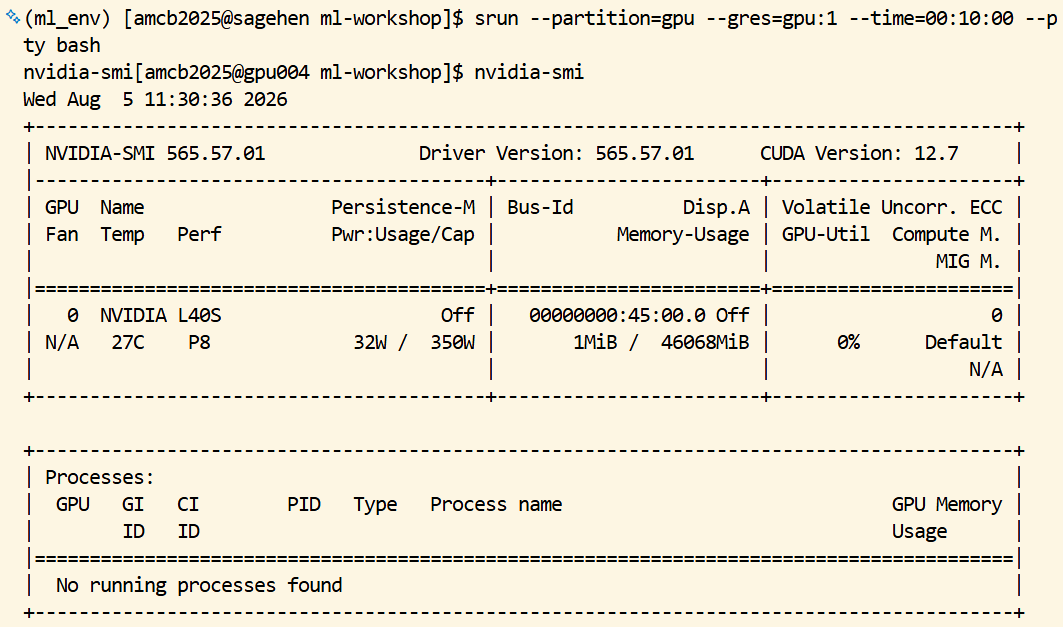
Problem 2: “torch.cuda.is_available() returns False”
BASH
# Check if GPU is detected
nvidia-smi

# Check if PyTorch can see GPU
python3 -c "import torch; print(torch.cuda.is_available())"

# If False, reinstall with correct CUDA version
conda install pytorch pytorch-cuda=12.1 -c pytorch -c nvidia -y
The most common cause is installing the CPU-only PyTorch by accident.
Look for pytorch-cpu or cpuonly in
conda list; if either is present, that is the problem.
Reinstall with pytorch-cuda=12.1 to force the GPU
build.
The second most common cause is running on the login node. The login
node has no GPU. Get an interactive GPU session first:
srun --partition=gpu --gres=gpu:1 --time=00:30:00 --pty bash.
nvidia-smi.Problem 3: “CUDA/cuDNN version mismatch”
BASH
# Driver's CUDA capability -- on Sagehen's GPU nodes this reports 12.7
nvidia-smi

# What PyTorch was actually built against
python3 -c "import torch; print(torch.version.cuda)"

# If mismatch, specify correct version
conda install pytorch pytorch-cuda=12.1 -c pytorch -c nvidia -y
The PyTorch CUDA toolkit must be less than or equal to the system
CUDA driver version. nvidia-smi reports the driver
capability; torch.version.cuda reports what PyTorch was
built against. As long as PyTorch’s CUDA is <= the
driver’s, things work.
Three Different “CUDA Versions” — Don’t Confuse Them
This trips people up constantly, because all three are called “CUDA”:
| What | Where you see it | On Sagehen |
|---|---|---|
| Driver capability |
nvidia-smi, top right |
12.7 |
| Toolkit module | module avail cuda |
11.8.0, 12.0.0, 12.2.1 (default) |
| What PyTorch was built against | torch.version.cuda |
whatever pytorch-cuda= you installed |
The rule is only ever: PyTorch’s CUDA ≤ the driver’s
CUDA. pytorch-cuda=12.1 is fine against a 12.7
driver, and it does not need to match the toolkit module number at all —
conda ships its own CUDA runtime inside the environment.
So a “CUDA version mismatch” almost never means “these numbers differ”. It means PyTorch was built for a newer CUDA than the driver supports.
Problem 4: “/rhome quota exceeded”
BASH
# Check usage
du -sh /rhome/$USER/.conda/envs/* | sort -h

# Remove unused environments
conda env remove -n old_env_name
conda clean -a   # remove caches
Caches alone can be a few GB. conda clean -a is safe to
run periodically.
Environment Best Practices 1. One
environment per project: avoid dependency conflicts and version
drift. 2. Pin top-level versions explicitly:
pytorch=2.1 is more reproducible than pytorch.
3. Document requirements in the repo: keep
environment.yml with the code. 4. Watch the
quota: /rhome is 100 GB and conda environments add
up. 5. Move large environments to /bigdata:
conda config --add envs_dirs /bigdata/lab/<labname>/$USER/conda_envs
redirects future installs.
Challenge
Challenge: Diagnose a Failing Environment
A teammate has a script that uses
from torch.utils.tensorboard import SummaryWriter. They
ran:
and got
ModuleNotFoundError: No module named 'tensorboard'. The
conda environment was created from the same research_ml.yml
you exported. List two likely causes and the diagnostic command for
each.
Cause 1: tensorboard was installed via pip in your original
environment, but conda env export --from-history does not
capture pip-installed packages. Diagnostic:
cat research_ml.yml and look for a pip:
section. If absent, that is the issue. Fix: add a pip:
block listing tensorboard, or re-export with regular
conda env export (which captures pip).
Cause 2: the teammate created the environment but did not install
tensorboard. Diagnostic:
conda list -n research_ml | grep tensor. If only torch is
there, install with pip install tensorboard.
- Load miniconda3, then create environments with
conda create - Use
pytorch-cuda=12.1when installing PyTorch for Sagehen’s CUDA version - Channel order in
conda creatematters; put-c pytorch -c nvidiafirst - Mix conda and pip safely: conda first for frameworks, pip last for extras
- Export environments with
--from-historyfor portability, full export for exact reproduction - Common errors (missing CUDA, wrong versions, missing packages) are usually environment setup issues
- Watch /rhome quota; redirect conda to /bigdata if needed
- Store environment files in git repos for team consistency
Content from Data Preparation Basics
Last updated on 2026-08-27 | Edit this page
Overview
Questions
- How do you efficiently prepare large datasets on HPC systems?
- What are best practices for handling missing values, normalization, and encoding?
- How do you avoid common data preparation pitfalls?
- When does pandas hit its limits, and what comes next?
Objectives
- Understand data layout and I/O optimization on Sagehen HPC
- Handle missing values, normalize features, and encode categorical variables
- Avoid data leakage and class imbalance pitfalls
- Recognize when to graduate from pandas to Dask
The Data Preparation Bottleneck
In real ML workflows:
- 80% of project time goes to data collection, cleaning, and preparation
- Poor preprocessing leads to worse model performance than poor algorithms
- I/O bottlenecks can make GPU training inefficient if data loading is slow
The preparation phase is where most projects die quietly. A model trained on subtly leaky data looks great on validation and falls apart in deployment. A model trained on imbalanced classes optimizes the majority class and ignores the minority class entirely. A model with the wrong feature scaling never converges. Each of these is fixable in 20 lines of preprocessing code, but only if you know to look.
Data Placement Strategy on Sagehen HPC
For ML workflows on GPU nodes:
1. Store original data in /bigdata (persistent, accessible to all)
2. Copy training data subset to /scratch at job start (fast SSD access)
3. Process intermediate files to /scratch
4. Store final results back to /bigdata
I/O performance differs significantly across storage tiers:
/rhome:   ~50 MB/s   (BeeGFS, backed up)
/bigdata: ~200 MB/s  (BeeGFS parallel filesystem)
/scratch: ~1000 MB/s (node-local NVMe SSD, deleted when the job ends)
For a model that reads its dataset 50 epochs in a row, the difference
between training off /bigdata and /scratch is
the difference between hours and minutes. The pattern is to copy once at
job start, train repeatedly against scratch, and write the final model
back to /bigdata.
Preprocessing with pandas
For datasets that fit in memory (< 50 GB on login node):
Loading and Exploring Data
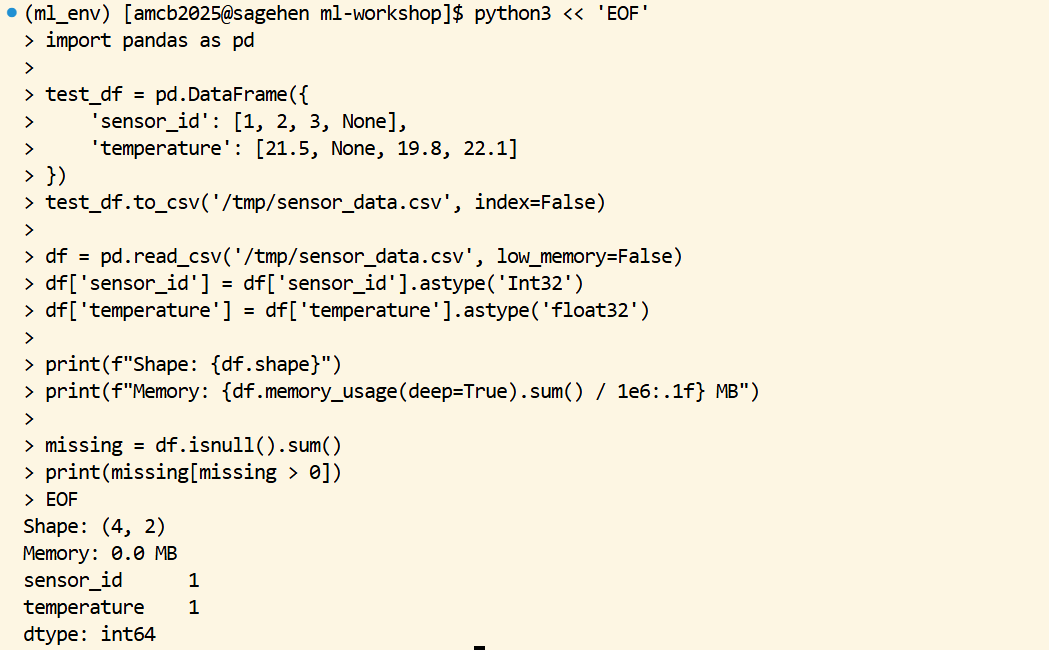
PYTHON
import pandas as pd

df = pd.read_csv('/bigdata/lab/<labname>/datasets/sensor_data.csv',
                  low_memory=False,
                  dtype={'sensor_id': 'int32', 'temperature': 'float32'})

print(f"Shape: {df.shape}")
print(f"Memory: {df.memory_usage(deep=True).sum() / 1e6:.1f} MB")

# Check for missing data
missing = df.isnull().sum()
print(missing[missing > 0])
The explicit dtype argument is one of the cheapest
performance optimizations available. By default, pandas reads numeric
columns as float64 (8 bytes per number). For most ML
features, float32 (4 bytes) is more than enough precision.
On a 100-million-row dataset, that single change halves memory usage and
roughly halves load time.
Handling Missing Values
PYTHON
# Forward fill for time series
df['temperature'] = df['temperature'].ffill()

# Interpolation
df['sensor_reading'] = df['sensor_reading'].interpolate(method='linear')

# Mean/median imputation with sklearn
from sklearn.impute import SimpleImputer
imputer = SimpleImputer(strategy='mean')
df[numeric_cols] = imputer.fit_transform(df[numeric_cols])
The right strategy depends on the data. Forward fill makes sense for sensor data where missing values are gaps in a stream. Linear interpolation works for time series where neighboring values are smooth. Mean imputation is the safe default when you cannot make assumptions about the underlying process. Always document which strategy you chose and why; “missing values were handled” is not enough information for a reviewer.
Normalization and Standardization
PYTHON
from sklearn.preprocessing import StandardScaler, MinMaxScaler

# StandardScaler: (x - mean) / std
scaler = StandardScaler()
X_train_scaled = scaler.fit_transform(X_train)
X_test_scaled = scaler.transform(X_test)  # Use fit scaler, don't refit!
StandardScaler centers each column at zero and scales to unit variance, which is the right default for most neural networks and gradient-based methods. MinMaxScaler maps to [0, 1], which matters for image data (pixel values typically already 0-255 and you divide by 255).
The fit_transform on training data and
transform on test data is the safe pattern. Calling
fit_transform on test data is data leakage: you would be
using test-set statistics in training, which inflates apparent
accuracy.
Handling Categorical Variables
PYTHON
# One-hot encoding
df = pd.get_dummies(df, columns=['color', 'category'], drop_first=True)

# Label encoding (for tree-based models)
from sklearn.preprocessing import LabelEncoder
le = LabelEncoder()
df['species_encoded'] = le.fit_transform(df['species'])
Use one-hot encoding for nominal categories with no order (color, country, breed). Use label encoding for ordinal categories (rating: low/medium/high) and for tree-based models that handle integer encoding natively. Never use label encoding for nominal categories with linear models: it imposes a fake ordering on unordered categories.
The drop_first=True parameter avoids the dummy variable
trap for linear models. With three colors (red, green, blue), one-hot
encoding produces three columns; one is redundant because the third is
implied by the first two. drop_first removes one to keep
features linearly independent.
Common Data Pitfalls
Pitfall 1: Data Leakage – Never compute statistics on the entire dataset.
PYTHON
# WRONG: leaks test data into training statistics
scaler.fit_transform(X_all_data)

# CORRECT: Fit on training data only
scaler.fit(X_train)
X_test_scaled = scaler.transform(X_test)
Data leakage is the single most common reason for “great validation, terrible production” outcomes. Any preprocessing that uses dataset-wide statistics (mean, std, max, min, percentiles, target encodings) must be fit on training data only.
Pitfall 2: Forgetting to Save Your Scaler
PYTHON
import joblib
joblib.dump(scaler, '/bigdata/lab/<labname>/scaler.pkl')
scaler = joblib.load('/bigdata/lab/<labname>/scaler.pkl')
The fit scaler is part of your model. If you train with a scaler and deploy without it, your inputs at inference time are out of distribution and accuracy collapses. Save scaler (and any encoder, imputer, or other fit transformer) alongside the model checkpoint.
Pitfall 3: Not Checking Class Imbalance
PYTHON
print(df['label'].value_counts(normalize=True))

from sklearn.utils.class_weight import compute_class_weight
weights = compute_class_weight('balanced', classes=np.unique(y), y=y)
A 99/1 imbalance produces a model with 99% accuracy that always predicts the majority class. Always check class balance before training; if it is skewed, decide whether to use class weights, oversample, undersample, or change the metric (F1 instead of accuracy).
When to Move Beyond pandas
Pandas is comfortable up to about 50 GB on a Sagehen amd
node (which has 512 GB RAM, but you do not want to be the only thing
running on a shared node). Beyond that:
For 50 to 500 GB datasets, switch to Dask (covered in episode 06). Dask uses pandas-like syntax but processes data in chunks and parallelizes across cores.
For 500 GB to multi-TB datasets, consider Apache Spark or similar distributed systems. These are heavier to set up but scale further.
For tabular ML specifically, consider Polars as a faster pandas alternative; it is single-node but much more memory-efficient and faster on most operations.
Challenge
Challenge: Prepare a Sensor Dataset
You have
/bigdata/lab/<labname>/datasets/sensor_data_raw.csv
with 1 million rows, some missing temperature values (2%), and a
categorical status column (OK, WARNING, ERROR). Write a script that
handles missing values, standardizes numeric features, and one-hot
encodes the status column.
PYTHON
import pandas as pd
import os
from sklearn.preprocessing import StandardScaler

df = pd.read_csv('/bigdata/lab/<labname>/datasets/sensor_data_raw.csv')
df['temperature'] = df['temperature'].interpolate(method='linear')
df = df.dropna()

scaler = StandardScaler()
numeric_cols = ['temperature', 'humidity', 'pressure']
df[numeric_cols] = scaler.fit_transform(df[numeric_cols])

df = pd.get_dummies(df, columns=['status'], drop_first=True)
df.to_csv(f'/scratch/{os.environ["USER"]}/sensor_data_clean.csv', index=False)
Challenge
Challenge: Catch a Data-Leakage Bug
Below is a colleague’s preprocessing snippet. Identify the leakage and fix it.
The scaler is fit on the entire dataset before the train/test split. Test-set statistics are leaking into the training preprocessing. Fix:
PYTHON
df = pd.read_csv('data.csv')
X = df[['x1', 'x2']]
y = df['label']
X_train, X_test, y_train, y_test = train_test_split(X, y, test_size=0.2)

scaler = StandardScaler()
X_train_scaled = scaler.fit_transform(X_train)
X_test_scaled = scaler.transform(X_test)  # transform only, do not re-fit

model.fit(X_train_scaled, y_train)
print(model.score(X_test_scaled, y_test))
The fix moves all preprocessing inside the train/test boundary. In
production code, wrap this in sklearn.pipeline.Pipeline so
the pattern is enforced automatically.
- Use /scratch for intermediate ML data during jobs (4-7x faster than /bigdata)
- Specify dtypes when loading large CSVs to halve memory and load time
- Always split fit/transform between training and test data to avoid leakage
- Save preprocessing objects (scaler, encoder, imputer) alongside model checkpoints
- Check class balance before training; imbalance silently corrupts accuracy metrics
- pandas works well up to ~50 GB; switch to Dask above that
- Document the rationale for missing-value strategy, scaler choice, and encoding choice
Content from Data Pipelines for HPC
Last updated on 2026-08-27 | Edit this page
Overview
Questions
- How do you process datasets larger than RAM?
- How do you build efficient data loading pipelines for GPU training?
- How do you run preprocessing at scale with SLURM?
- When should preprocessing run on CPU nodes vs GPU nodes?
Objectives
- Use Dask for parallel preprocessing of large datasets
- Build PyTorch DataLoader pipelines that keep the GPU fed
- Write SLURM jobs for data preprocessing at scale
- Diagnose I/O bottlenecks during training
Why Data Pipelines Matter on HPC
A modern A100 80GB GPU on Sagehen HPC can process roughly 5,000 to
20,000 training images per second once data sits in GPU memory. Reading
those same images from /bigdata (BeeGFS, a shared parallel
filesystem, ~200 MB/s for this kind of many-small-file access) into RAM,
decoding them, and copying them to the device can take ten times longer
than the forward and backward pass. The result is a $20,000 GPU sitting
at 5% utilization while you wait for disk.
A good data pipeline does three things at once. It moves data from persistent storage onto fast scratch storage. It transforms raw inputs into model-ready tensors using as many CPU cores as the node provides. And it overlaps that transformation with GPU compute so the next batch is ready by the time the current batch finishes. When the pipeline is set up correctly, GPU utilization climbs past 90%. When it is not, your job spends most of its allocated time waiting on I/O.
This episode covers the two halves of that pipeline separately. First, large-scale preprocessing with Dask, run as a CPU-only batch job before training. Second, the per-batch loading machinery that PyTorch and TensorFlow use during training itself.
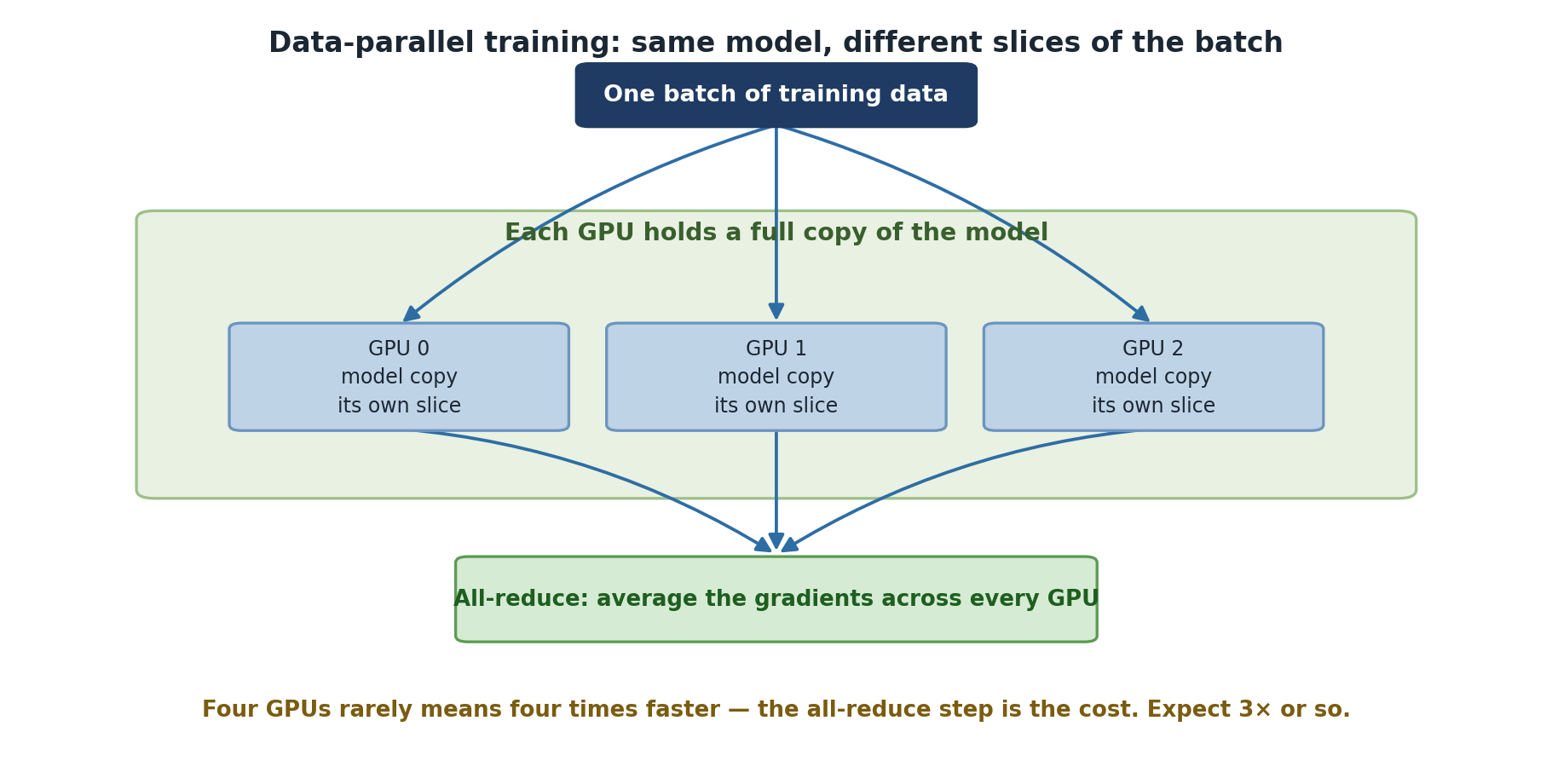
Large-Scale Preprocessing with Dask
When the raw dataset is larger than a single node’s 512 GB of RAM, or
when the cleaning step itself is too slow on one core, Dask gives you
parallel pandas-like operations across many cores or many nodes. On a
single Sagehen amd node Dask can use all 128 cores. The
pattern is almost always the same: read lazily, chain transformations,
and only call .compute() or .to_parquet() when
you actually need the output.
BASH
module load miniconda3
conda activate pytorch_env   # any env works -- add dask with: conda install dask
PYTHON
import dask.dataframe as dd
from dask.distributed import Client, LocalCluster

with LocalCluster(n_workers=8, threads_per_worker=4, memory_limit='8GB') as cluster:
    with Client(cluster) as client:
        # Load with Dask (lazy evaluation)
        ddf = dd.read_csv('/bigdata/lab/<labname>/datasets/large_data_*.csv')

        # Preprocessing operations (lazy, not computed yet)
        ddf = ddf[ddf['value'] > 0]
        ddf['scaled'] = (ddf['value'] - ddf['value'].mean()) / ddf['value'].std()

        # Compute only when needed
        result = ddf.compute()
Two design choices in that snippet are worth understanding. The
n_workers x threads_per_worker product is your
effective parallelism. With 8 workers x 4 threads = 32 cores you leave
headroom on a 128-core node, which is sensible if your data fits in 8 x
8 GB = 64 GB of memory. Bumping workers to 32 with 4 threads each
saturates the node but pushes memory pressure toward 256 GB. Watch the
Dask dashboard or seff output to find the right
balance.
The memory_limit='8GB' is per-worker. Workers spill to
disk when they exceed this limit, which slows the job dramatically. If
you see a lot of spilling in the dashboard, either increase per-worker
memory or process fewer partitions at a time.
When to choose Dask over pandas
Use plain pandas when the dataset fits comfortably in node RAM (less than ~50 GB after loading). Pandas is faster than Dask for in-memory work because it skips the scheduling overhead.
Use Dask when:
- The raw dataset is larger than 50 GB and you need the whole thing in one transform.
- Preprocessing is CPU-bound and parallelizable across rows or files.
- You want one script that works on a 1 GB sample on your laptop and a 1 TB dataset on Sagehen.
Avoid Dask for graph-shaped or sequence-shaped data where rows are not independent. The overhead is rarely worth it.
Building Efficient Data Pipelines for Training
During training, data flows through three stages: storage to RAM
(I/O), RAM to tensors (CPU), and RAM to GPU (PCIe transfer). Each stage
runs on different hardware and each can become the bottleneck. The
PyTorch DataLoader is designed to overlap all three.
PyTorch DataLoader Pipeline
PYTHON
import torch
from torch.utils.data import DataLoader, Dataset
import pandas as pd

class SensorDataset(Dataset):
    def __init__(self, csv_file, transform=None):
        self.data = pd.read_csv(csv_file)
        self.transform = transform

    def __len__(self):
        return len(self.data)

    def __getitem__(self, idx):
        sample = self.data.iloc[idx]
        features = torch.tensor([sample['temp'], sample['humidity']],
                               dtype=torch.float32)
        label = torch.tensor(sample['label'], dtype=torch.long)
        if self.transform:
            features = self.transform(features)
        return features, label

# Create dataset and dataloader
dataset = SensorDataset('/scratch/$USER/sensor_data_clean.csv')
dataloader = DataLoader(dataset, batch_size=32, shuffle=True, num_workers=4,
                        pin_memory=True, persistent_workers=True)
The num_workers argument forks subprocesses that prepare
the next batches while the GPU works on the current one. With
num_workers=0 (the default), data loading is synchronous
and your GPU will idle between batches. Setting it to 4 to 8 is a good
starting point on Sagehen GPU nodes; going higher only helps when your
__getitem__ does heavy work like image decoding or
tokenization.
pin_memory=True allocates the staging buffers in
page-locked host memory so the CPU-to-GPU copy can use direct memory
access without an extra copy through pageable memory. The speedup is
usually 10 to 30 percent on PCIe transfers and costs a small amount of
RAM.
persistent_workers=True keeps the worker processes alive
between epochs. Without it, PyTorch tears down and recreates workers
every epoch, which can cost 5 to 30 seconds depending on your
__init__.
Diagnosing data pipeline bottlenecks
If nvidia-smi shows your GPU oscillating between 0% and
100% utilization, your pipeline is starving the GPU. Try:
- Increase
num_workersfirst. - Move the dataset to
/scratchif it lives on/bigdataor/rhome. - Pre-decode images and serialize as torch tensors or NumPy memory-mapped arrays.
- Check that
__getitem__does not call expensive Python libraries that hold the GIL. - Profile with
torch.profilerto see where time is actually spent.
If GPU utilization is steady at 100%, your pipeline is fine and the model is the bottleneck.
Where Data Should Live During a Job
Sagehen has three storage tiers and the right tier depends on the job phase:
| Stage | Storage | Why |
|---|---|---|
| Original raw data, indefinite | /bigdata/lab/<labname>/ |
Persistent, 1 TB per lab, readable from every node |
| Anything a later job needs | /bigdata/lab/<labname>/ |
The only tier that survives the end of a job |
| Active training data, this job only | /scratch |
Node-local NVMe SSD, ~1 GB/s, no backups |
| Job scripts, configs | /rhome |
Backed up, small (100 GB) |
| Model checkpoints | Write to /scratch, copy the ones you want to keep to
/bigdata before the job ends
|
Avoids hammering /bigdata with intermediate writes, without losing the final result |
/scratch does not outlive the job
/scratch is local to the compute node your job is
running on, and it is cleared when that job ends. Two consequences that
catch people out:
- Another job cannot read your
/scratch— even a job that starts seconds later, because SLURM may place it on a different node. - Anything still in
/scratchwhen the job finishes is gone. There is no grace period.
So /scratch is working space within a single
job. Every artifact you want afterwards — a preprocessed dataset, a
final checkpoint, a metrics file — has to be copied to
/bigdata before the job exits.
A common mistake is to point DataLoader directly at
/bigdata. This works but wastes throughput, especially with
many workers all reading concurrently from the same BeeGFS mount. Stage
data to /scratch at job start using rsync or
cp -r. The first few minutes feel like overhead but they
pay back ten times during training.
SLURM Job for Preprocessing at Scale
BASH
#!/bin/bash
#SBATCH --job-name=preprocess
#SBATCH --partition=amd
#SBATCH --nodes=1
#SBATCH --cpus-per-task=32
#SBATCH --time=04:00:00
#SBATCH --output=preprocess_%j.log

module load miniconda3
conda activate ml_env

python3 << 'EOF'
import dask.dataframe as dd
import os
from dask.distributed import Client, LocalCluster

with LocalCluster(n_workers=8, threads_per_worker=4, memory_limit='8GB') as cluster:
    with Client(cluster) as client:
        ddf = dd.read_parquet('/bigdata/lab/<labname>/raw_data/')
        ddf = ddf[ddf['value'] > 0]
        ddf['scaled'] = (ddf['value'] - ddf['value'].mean()) / ddf['value'].std()
        ddf.to_parquet('/bigdata/lab/<labname>/processed_data')

print("Preprocessing complete!")
EOF
Note that this job uses --partition=amd, not
--partition=gpu. Preprocessing is CPU-bound and pure Dask
code does not touch the GPU. Running it on a GPU node burns expensive
GPU-hours for nothing.
The standard pattern is one CPU job to preprocess, then a second GPU
job to train, chained with --dependency=afterok:JOBID so
the training job waits:
The handoff between them has to go through /bigdata,
which is why the job above writes its Parquet output there rather than
to /scratch. The training job then stages that dataset onto
its own node’s /scratch as its first step:
BASH
# first lines of train.sh, before training starts
mkdir -p /scratch/$USER/$SLURM_JOB_ID
rsync -a /bigdata/lab/<labname>/processed_data/ /scratch/$USER/$SLURM_JOB_ID/data/
That gives you both things at once: the fast node-local reads during
training, and a preprocessed dataset that still exists when the second
job starts. Writing the handoff to /scratch instead is the
classic version of this bug — the preprocessing job succeeds, the
training job starts on a different node, and it fails with
FileNotFoundError on a path that very definitely existed a
minute ago.
Output formats: CSV, Parquet, or memory-mapped arrays?
CSV is human-readable but ~5x slower to parse than Parquet and uses ~3x more disk. Use Parquet for any preprocessed dataset bigger than a few hundred megabytes. Parquet keeps types, supports column-wise reads, and compresses well.
For ML training where you read the same data many epochs, consider
serializing the final tensor representation to a .npy
(NumPy memory-mapped) or .pt (PyTorch) file. Skipping the
parse step every epoch can shave minutes off each epoch on large
datasets.
Challenge
Challenge: Create a Scalable Data Pipeline
Build a SLURM job that loads 10 GB of raw data from
/bigdata, preprocesses using Dask (4 workers), and saves
processed chunks in Parquet format for a later training job to use. It
should run in less than 30 minutes. Think about where the output has to
go for that later job to find it.
BASH
#!/bin/bash
#SBATCH --job-name=dask_preprocess
#SBATCH --partition=amd
#SBATCH --nodes=1
#SBATCH --cpus-per-task=16
#SBATCH --time=00:30:00
#SBATCH --output=preprocess_%j.log

module load miniconda3
conda activate ml_env

python3 << 'EOF'
import dask.dataframe as dd
import os
from dask.distributed import Client, LocalCluster

with LocalCluster(n_workers=4, threads_per_worker=4, memory_limit='4GB') as cluster:
    with Client(cluster) as client:
        ddf = dd.read_csv('/bigdata/lab/<labname>/raw_data/*.csv')
        ddf = ddf.dropna()
        numeric_cols = [c for c in ddf.columns if ddf[c].dtype in ['float64', 'int64']]
        for col in numeric_cols:
            ddf[col] = (ddf[col] - ddf[col].mean()) / ddf[col].std()
        ddf.to_parquet('/bigdata/lab/<labname>/processed_data')
EOF
The 16 cpus-per-task matches 4 workers x 4 threads. Time
limit of 30 minutes is conservative; 10 GB of CSV typically processes in
5 to 10 minutes on this configuration.
The output goes to /bigdata, not /scratch,
because a later job has to read it — and /scratch
will not exist by then. If the lab quota is tight and the intermediate
stages are large, you can do the intermediate shuffling on
/scratch and copy only the final compressed Parquet to
/bigdata at the end of the job, but that copy has to happen
before the job exits.
Challenge
Challenge: Profile a Slow DataLoader
You are training a vision model on Sagehen. nvidia-smi
shows the GPU at 30% utilization. Your DataLoader reads
JPEGs from /bigdata, decodes with PIL, and applies
torchvision transforms. List three changes you would try, in order, and
predict the effect of each.
Stage the JPEG directory to
/scratchat job start. Expected: GPU utilization climbs to 60 to 80% if I/O was the bottleneck. Cost: a few minutes ofrsyncat job start.Increase
num_workersfrom default to 8 (matching half of--cpus-per-task=16). Expected: GPU climbs further if PIL decoding was the bottleneck. Cost: 8 worker processes use proportionally more RAM.Pre-decode the JPEGs once into a torch tensor file or use
torchvision.io.read_image(faster than PIL). Expected: largest gain if decoding dominates; worth profiling first to confirm.
The order matters. Cheap changes (storage, workers) come before expensive refactors (pre-decoding the dataset).
- A good data pipeline overlaps storage I/O, CPU transforms, and GPU compute
- Use Dask for datasets larger than RAM that need parallel preprocessing
- Stage active training data on /scratch; keep /bigdata for source-of-truth
- /scratch is node-local and cleared at job end — anything a later job needs must be written to /bigdata before the job exits
- DataLoader settings that matter most: num_workers, pin_memory, persistent_workers
- Run preprocessing as a CPU job on the amd partition, training as a GPU job
- If GPU utilization oscillates, you have a data pipeline problem, not a model problem
Content from Training with PyTorch
Last updated on 2026-08-27 | Edit this page
Overview
Questions
- How do you set up PyTorch for GPU training on Sagehen HPC?
- What does an efficient training loop look like?
- How do you handle GPU memory errors?
- How do you choose between A100, L40S, and RTX PRO 6000 nodes for your job?
Objectives
- Write efficient GPU training loops in PyTorch
- Use mixed precision training for speed and memory savings
- Diagnose and fix common GPU memory errors
- Pick the right Sagehen GPU type for your model size
- Save and resume from checkpoints across SLURM time limits
The GPUs You Will Actually Use
Sagehen hosts 10 GPUs total across multiple nodes (confirmed by Andrew Wilson, May 2026): 4 NVIDIA A100 80 GB, 4 NVIDIA L40S 48 GB, and 2 NVIDIA RTX PRO 6000 96 GB. The differences matter when you submit jobs:
| GPU | VRAM | Best for | Limit |
|---|---|---|---|
| A100 80 GB | 80 GB | Large models, large batches, long training runs | Highest demand, queue often |
| L40S 48 GB | 48 GB | Mid-size training, transformers, fine-tuning | Frequently available |
| RTX PRO 6000 | 96 GB ECC | Largest models, ECC-sensitive numerics, pro visualization | Often available |
If your model fits comfortably in 48 GB, prototype on an L40S first:
they are the least contended GPUs on the cluster. The A100s are
oversubscribed, and tying one up for exploratory work makes everyone
else wait. For final long runs at scale, request A100 with
--gres=gpu:a100:1 in your SLURM script and budget for queue
time.
GPU Memory Anatomy
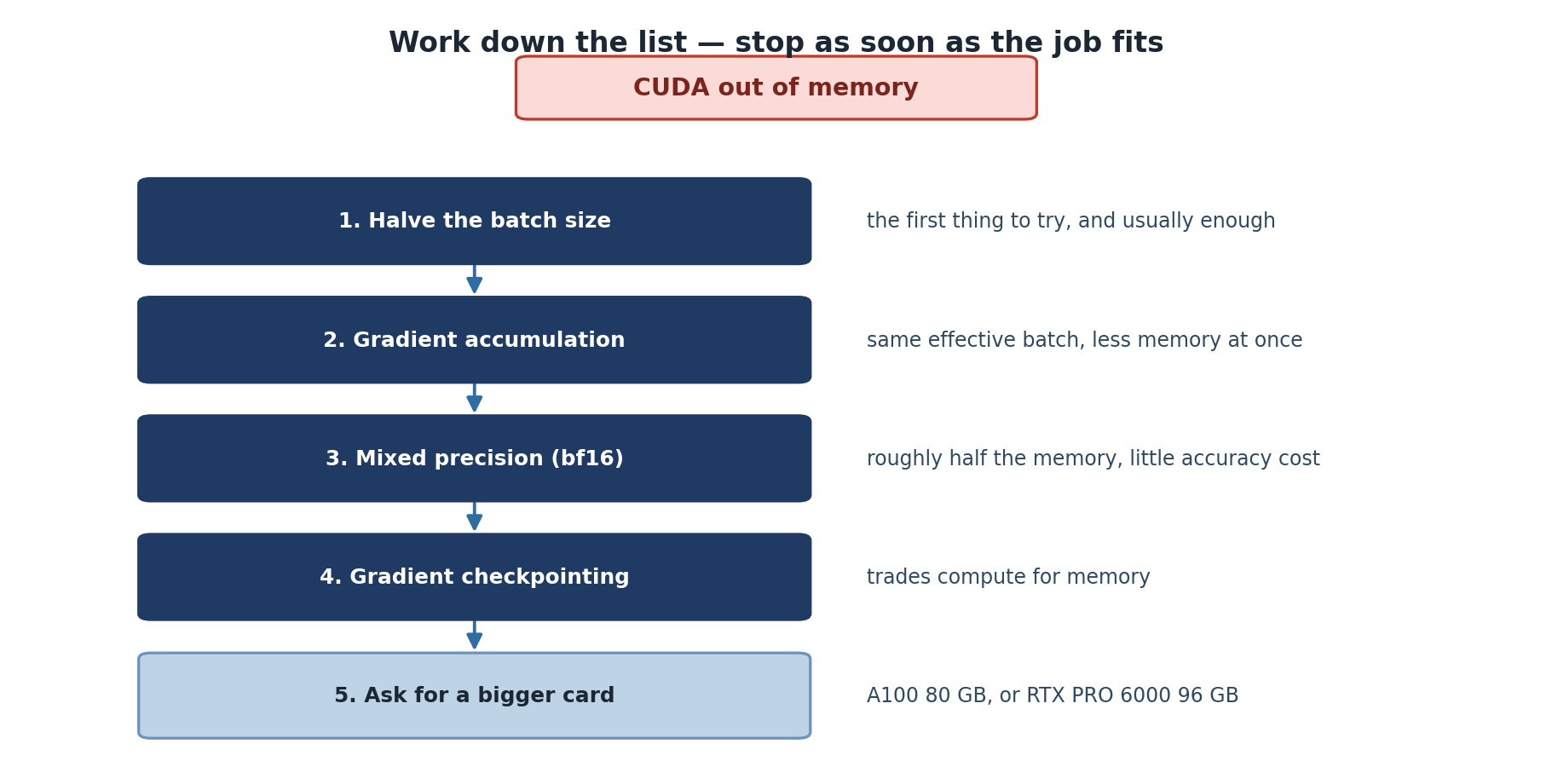
Before writing the training loop, understand where memory goes. CUDA out-of-memory errors are the single most common failure mode for ML jobs on HPC, and they almost always come from misjudging this breakdown:
System RAM:  25 GB available per GPU job (configurable via --mem)
GPU VRAM:    Model weights + activations + gradients + optimizer state

Typical for ResNet-50 with batch size 256:
- Model weights:        ~100 MB
- Forward activations:  ~1500 MB   (largest, scales with batch size)
- Gradients:            ~100 MB    (same size as weights)
- Optimizer state:      ~100 MB    (Adam stores 2 copies per parameter)
- CUDA workspace:       ~500 MB    (cuDNN, kernels, fragmentation)
Total:                  ~2300 MB on GPU
The single biggest term is forward activations, and it scales linearly with batch size. Doubling the batch from 128 to 256 doubles activation memory but does not change weights, gradients, or optimizer state. If you hit OOM, halving batch size is almost always the right first move.
Single-GPU Training Loop
PYTHON
import torch
import torch.nn as nn
from torch.utils.data import DataLoader

# 1. Define model
model = nn.Sequential(
    nn.Linear(28 * 28, 128),
    nn.ReLU(),
    nn.Linear(128, 10)
)

# 2. Move model to GPU
device = torch.device('cuda' if torch.cuda.is_available() else 'cpu')
model = model.to(device)

# 3. Loss and optimizer
criterion = nn.CrossEntropyLoss()
optimizer = torch.optim.Adam(model.parameters(), lr=0.001)

# 4. Training loop
for epoch in range(10):
    for batch_idx, (data, target) in enumerate(train_loader):
        data, target = data.to(device, non_blocking=True), target.to(device, non_blocking=True)

        output = model(data)
        loss = criterion(output, target)

        optimizer.zero_grad()
        loss.backward()
        optimizer.step()

        if batch_idx % 100 == 0:
            print(f'Epoch {epoch} [{batch_idx}/{len(train_loader)}] Loss: {loss.item():.4f}')
Three small details in this loop matter for performance. First,
non_blocking=True on .to(device) lets the host
CPU continue while the copy runs asynchronously, which only helps when
paired with pin_memory=True in the DataLoader. Second,
optimizer.zero_grad() should come before the backward pass,
not after the step; some tutorials get this wrong. Third,
loss.item() forces a CUDA synchronization; calling it every
batch is fine but doing more aggressive printing inside the loop hurts
throughput.
Always test on CPU or a tiny dataset first
Spending an hour in the GPU queue only to crash with a shape mismatch
on the first batch is demoralizing. Run your training script on the
login node with a 100-sample dataset and device='cpu' until
it completes one epoch without errors. Only then submit a real GPU job.
Your future self will thank you.
GPU Memory Management
Monitoring GPU Usage
Two views of GPU memory are useful: an external view from
nvidia-smi and an internal view from PyTorch.
BASH
# In a second SSH session or terminal tab during a job
ssh sagehen.hpc.pomona.edu
ssh gpu001  # only works while you have an active job there
watch -n 1 nvidia-smi
PYTHON
# Inside your training script
def print_gpu_memory():
    print(f"Allocated: {torch.cuda.memory_allocated() / 1e9:.2f} GB")
    print(f"Reserved:  {torch.cuda.memory_reserved() / 1e9:.2f} GB")
    print(f"Max alloc: {torch.cuda.max_memory_allocated() / 1e9:.2f} GB")
Allocated is what your tensors actually need. Reserved is the larger pool PyTorch holds onto for reuse. Max-allocated is the high-water mark since the last reset; this is the number that determines whether you OOM, not the current allocation.
Fixing “CUDA out of memory”
The error message often blames the line where the OOM happened, but the root cause is usually upstream. Apply these fixes in order:
PYTHON
# Fix 1: Reduce batch size (the big lever)
batch_size = 16  # halve it until OOM goes away

# Fix 2: Gradient accumulation simulates a larger effective batch
accumulation_steps = 4
optimizer.zero_grad()
for i, (data, target) in enumerate(train_loader):
    output = model(data.to(device))
    loss = criterion(output, target.to(device)) / accumulation_steps
    loss.backward()

    if (i + 1) % accumulation_steps == 0:
        optimizer.step()
        optimizer.zero_grad()
Gradient accumulation is the trick that lets a 48 GB L40S train
models that would otherwise need an 80 GB A100. The math is clean: 4
micro-batches of size 8 produce the same gradients as one batch of size
32 (with one subtle caveat: batch normalization statistics are computed
per micro-batch). Effective batch size is
batch_size * accumulation_steps.
Other fixes worth knowing:
PYTHON
# Fix 3: Free unused tensors explicitly
del intermediate_output
torch.cuda.empty_cache()  # returns reserved memory to the GPU pool

# Fix 4: Use checkpointing to trade compute for memory
from torch.utils.checkpoint import checkpoint
output = checkpoint(my_block, input_tensor)  # recompute activations during backward
torch.utils.checkpoint is most useful for transformer
blocks and other deep networks where activations dominate memory. It
re-runs the forward pass during backward, so you pay roughly 25% more
compute for 30 to 50% less memory.
Mixed Precision Training
Sagehen’s A100 and L40S GPUs have dedicated tensor cores that run float16 and bfloat16 operations 2 to 4 times faster than float32. Mixed precision uses float16 for the bulk of computation and float32 only for the final weight update, where small numbers matter for numerical stability.
PYTHON
from torch.cuda.amp import autocast, GradScaler

scaler = GradScaler()

for data, target in train_loader:
    data, target = data.to(device, non_blocking=True), target.to(device, non_blocking=True)

    with autocast(device_type='cuda', dtype=torch.float16):
        output = model(data)
        loss = criterion(output, target)

    scaler.scale(loss).backward()
    scaler.step(optimizer)
    scaler.update()
    optimizer.zero_grad()

# Results: ~2x faster on A100/L40S, uses ~50% memory, similar accuracy
The GradScaler is necessary because float16 has a narrow
dynamic range. Multiplying loss by a large scale factor before backward
keeps gradients out of the underflow region; the scaler unscales them
before the optimizer step. If gradients overflow, the scaler skips that
step and reduces the scale factor.
On all of Sagehen’s GPUs (A100, L40S, and RTX PRO 6000), prefer
torch.bfloat16. It is often more numerically stable than
float16 because it has the same exponent range as float32 even though
the mantissa is smaller. Bfloat16 does not need a
GradScaler.
Checkpointing across SLURM time limits
The gpu partition on Sagehen does not have a published
hard limit comparable to the amd 30-day, but in practice
GPU jobs longer than 24 hours sit in queue indefinitely. Save
checkpoints every epoch (or every N minutes) and structure your script
to resume from the latest checkpoint:
PYTHON
def save_checkpoint(model, optimizer, epoch, path):
    torch.save({
        'epoch': epoch,
        'model_state': model.state_dict(),
        'optimizer_state': optimizer.state_dict(),
    }, path)

def load_checkpoint(model, optimizer, path):
    if not os.path.exists(path):
        return 0
    ckpt = torch.load(path, map_location=device)
    model.load_state_dict(ckpt['model_state'])
    optimizer.load_state_dict(ckpt['optimizer_state'])
    return ckpt['epoch'] + 1
Write checkpoints to /scratch first (fast), then copy
the final or best one to /bigdata. Hammering /bigdata with
a checkpoint every 5 minutes is rude to your lab-mates who share the
mount.
Challenge
Challenge: Train a CNN on CIFAR-10
Write a training script that loads CIFAR-10, defines a simple CNN (2-3 conv layers), trains on GPU for 5 epochs, and prints GPU memory usage every 50 batches.
PYTHON
import torch
import torch.nn as nn
import torchvision
from torchvision import transforms

transform = transforms.Compose([transforms.ToTensor(), transforms.Normalize((0.5,), (0.5,))])
train_data = torchvision.datasets.CIFAR10('/scratch', download=True, transform=transform)
train_loader = torch.utils.data.DataLoader(train_data, batch_size=128, shuffle=True,
                                            num_workers=4, pin_memory=True)

class SimpleCNN(nn.Module):
    def __init__(self):
        super().__init__()
        self.conv1 = nn.Conv2d(3, 32, 3, padding=1)
        self.conv2 = nn.Conv2d(32, 64, 3, padding=1)
        self.fc = nn.Linear(64 * 8 * 8, 10)

    def forward(self, x):
        x = torch.relu(self.conv1(x))
        x = torch.max_pool2d(x, 2)
        x = torch.relu(self.conv2(x))
        x = torch.max_pool2d(x, 2)
        x = x.view(x.size(0), -1)
        return self.fc(x)

device = torch.device('cuda')
model = SimpleCNN().to(device)
optimizer = torch.optim.Adam(model.parameters())
criterion = nn.CrossEntropyLoss()

for epoch in range(5):
    for batch_idx, (data, target) in enumerate(train_loader):
        data, target = data.to(device, non_blocking=True), target.to(device, non_blocking=True)
        optimizer.zero_grad()
        loss = criterion(model(data), target)
        loss.backward()
        optimizer.step()

        if batch_idx % 50 == 0:
            print(f'Epoch {epoch} [{batch_idx}] Loss: {loss.item():.4f}')
            print(f'GPU memory: {torch.cuda.memory_allocated() / 1e9:.2f} GB')
Note that CIFAR-10 downloads to /scratch, not your home
directory. Downloading 170 MB to /rhome every job is rude
when /scratch exists.
Challenge
Challenge: Diagnose an OOM
A graduate student submits a training job that fails with
CUDA out of memory: tried to allocate 4.2 GB. They are
using --gres=gpu:l40s:1 (48 GB), batch size 256, and a
ResNet-152 model with bfloat16 mixed precision. List three diagnostic
steps and the most likely fix.
Check
torch.cuda.max_memory_allocated()from a small test run to estimate the high-water mark. ResNet-152 at batch 256 with mixed precision needs roughly 45 to 50 GB on an L40S, leaving no headroom at all.Confirm whether the GPU is shared.
nvidia-smishould show only this job’s process; if there is another tenant, request a different GPU, such as--gres=gpu:a100:1, instead.Check whether mixed precision is actually engaged. If
autocastis missing or scoped wrong, the model runs in float32 and uses 2x the memory.
Most likely fix: drop batch size to 128 and use gradient accumulation
with accumulation_steps=2 to recover the effective batch
size of 256. This trades a small throughput hit for fitting the model on
the L40S.
- Sagehen has 10 GPUs across three types (A100 80 GB, L40S 48 GB, RTX PRO 6000 96 GB); pick the right one for your job
- Move data and models to GPU using
.to(device, non_blocking=True)paired with pinned-memory DataLoader - Forward activations dominate GPU memory and scale with batch size
- Mixed precision gives ~2x speed and ~50% memory on A100/L40S; bfloat16 is more stable than float16
- Gradient accumulation simulates large batches when memory is tight
- Always checkpoint to /scratch and copy final results to /bigdata
- Test on CPU or a tiny dataset before submitting a real GPU job
Content from Training with TensorFlow
Last updated on 2026-08-27 | Edit this page
Overview
Questions
- How do you set up TensorFlow for GPU training on Sagehen HPC?
- What are the differences between PyTorch and TensorFlow workflows?
- How do you use Keras for rapid model development?
- When should you choose TensorFlow over PyTorch (and vice versa)?
Objectives
- Write TensorFlow training code with Keras
- Use tf.data pipelines for efficient I/O on Sagehen
- Apply transfer learning with pre-trained models
- Monitor training with TensorFlow callbacks
- Decide between PyTorch and TensorFlow for a research project
TensorFlow vs PyTorch: Which to Choose
Both frameworks run well on Sagehen and both expose roughly the same capabilities. The choice usually comes down to ecosystem and team rather than raw performance:
PyTorch:             Imperative, dominant in research, dynamic graphs by default,
                     simpler debugging, larger university adoption, default for
                     transformers and most cutting-edge model implementations.

TensorFlow/Keras:    Was declarative (TF1) and now hybrid (TF2 eager), strong in
                     production deployment, best-in-class TFLite/TF Serving for
                     edge and serving, integrates cleanly with Google Cloud,
                     Keras API is genuinely friendly for newcomers.
Most ML coursework at Pomona and most arXiv papers since 2022 ship in PyTorch. If your collaborators or advisor use TensorFlow, or your downstream pipeline needs TFLite or TF Serving, TensorFlow is the right call. Otherwise default to PyTorch and revisit only if there is a specific reason.
Setting Up TensorFlow on Sagehen HPC
The cluster has a system module for TensorFlow, but creating your own conda environment is usually safer because version pinning is in your control:
BASH
# TensorFlow comes from a conda environment -- there is no tensorflow module on Sagehen
module load miniconda3
conda create -n tf_env python=3.11
conda activate tf_env
pip install tensorflow[and-cuda]==2.15
Confirm the install picked up the GPU before queuing a long job:
PYTHON
import tensorflow as tf
print(f"TensorFlow version: {tf.__version__}")
print(f"GPUs Available: {len(tf.config.list_physical_devices('GPU'))}")

# Important: set memory growth to avoid grabbing the entire GPU at startup
gpus = tf.config.list_physical_devices('GPU')
for gpu in gpus:
tf.config.experimental.set_memory_growth(gpu, True)Why memory_growth matters on shared GPUs
By default TensorFlow tries to allocate nearly all GPU memory at
process startup. On a shared cluster this is antisocial: even if your
model only needs 4 GB, TF locks 80 GB on an A100 and other tenants OOM.
With set_memory_growth(True), TF allocates incrementally as
needed.
Set this before any other TF call. If you create an op or variable first, TF has already grabbed the memory and the flag does nothing.
Keras High-Level API
Keras is the standard way to write TensorFlow models. The API is sequence-of-layers for simple models and a functional API for branching architectures:
PYTHON
from tensorflow import keras
from tensorflow.keras import layers

model = keras.Sequential([
    layers.Dense(128, activation='relu', input_shape=(784,)),
    layers.Dropout(0.2),
    layers.Dense(64, activation='relu'),
    layers.Dense(10, activation='softmax')
])

model.compile(optimizer='adam', loss='sparse_categorical_crossentropy', metrics=['accuracy'])
history = model.fit(x_train, y_train, epochs=10, batch_size=32,
                   validation_data=(x_val, y_val))
compile configures the optimizer, loss, and metrics.
fit runs the actual training loop and history
is a dict-like object with per-epoch losses and metrics that you can
plot or save.
The Keras API hides the loop entirely, which is great for prototyping
and frustrating when you need fine control. For custom training (custom
losses with multiple terms, GAN-style alternating updates, distributed
strategies) drop to a tf.GradientTape loop:
PYTHON
optimizer = keras.optimizers.Adam()
loss_fn = keras.losses.SparseCategoricalCrossentropy()

@tf.function  # compile to a graph for speed
def train_step(x, y):
    with tf.GradientTape() as tape:
        logits = model(x, training=True)
        loss = loss_fn(y, logits)
    grads = tape.gradient(loss, model.trainable_variables)
    optimizer.apply_gradients(zip(grads, model.trainable_variables))
    return loss

for epoch in range(10):
    for x_batch, y_batch in train_dataset:
        loss = train_step(x_batch, y_batch)
The @tf.function decorator traces the Python code into a
static computation graph the first time it runs. Subsequent calls skip
Python and run pure C++ operations, which on Sagehen GPUs is typically
1.5 to 3 times faster than eager execution.
Efficient Data Loading with tf.data
tf.data.Dataset is the equivalent of PyTorch’s
DataLoader. The same overlapping principles apply: read from storage,
transform on CPU, hand to GPU, all in parallel.
PYTHON
dataset = tf.data.Dataset.from_tensor_slices((x_train, y_train))
dataset = dataset.shuffle(buffer_size=1000)
dataset = dataset.map(preprocess_fn, num_parallel_calls=tf.data.AUTOTUNE)
dataset = dataset.batch(32)
dataset = dataset.prefetch(tf.data.AUTOTUNE)  # overlap loading with training

model.fit(dataset, epochs=10)
The two arguments named AUTOTUNE tell TF to dynamically
pick parallelism levels based on observed throughput. This is almost
always the right choice on Sagehen. Manual tuning with explicit numbers
is only useful when you are debugging a specific bottleneck.
For datasets too big to fit in memory, read directly from disk with
tf.data.TFRecordDataset or
tf.data.Dataset.from_generator. Stage the data files on
/scratch first, exactly as you would for a PyTorch
DataLoader.
A subtle gotcha: shuffle buffer size
shuffle(buffer_size=1000) only shuffles within a window
of 1000 examples. If your dataset is sorted by class (label 0, then
label 1, then label 2, …), this is not enough randomness. For ML on HPC
where you load 100k or 1M examples, set buffer_size to at least 10x your
batch size and ideally close to your full dataset size.
If memory is tight, shuffle the input file list before reading and rely on per-shard randomness instead of one giant buffer.
Transfer Learning with Pre-trained Models
Most ML projects on Sagehen are not training from scratch. Transfer learning starts from a model pre-trained on ImageNet, COCO, or a large text corpus and fine-tunes it on your dataset. This converges 10 to 100 times faster than starting from random weights and typically gives better accuracy with limited data.
PYTHON
from tensorflow.keras.applications import ResNet50

base_model = ResNet50(weights='imagenet', include_top=False, input_shape=(224, 224, 3))
base_model.trainable = False  # Freeze base weights

model = keras.Sequential([
    base_model,
    layers.GlobalAveragePooling2D(),
    layers.Dense(256, activation='relu'),
    layers.Dropout(0.5),
    layers.Dense(10, activation='softmax')
])

model.compile(optimizer='adam', loss='sparse_categorical_crossentropy', metrics=['accuracy'])
model.fit(train_dataset, epochs=5)

# Stage 2: Fine-tune base model with a tiny learning rate
base_model.trainable = True
model.compile(optimizer=keras.optimizers.Adam(1e-5), loss='sparse_categorical_crossentropy')
model.fit(train_dataset, epochs=10)
The two-stage pattern is important. First, freeze the base and train only the new head. The base provides good features and the head learns to map them to your task. Second, unfreeze the base and continue training with a much smaller learning rate (typically 1e-5 instead of 1e-3). Skipping stage one and unfreezing immediately can destroy the pretrained weights with large gradients.
TensorFlow Callbacks
Callbacks run logic at specific points during training without modifying the loop. Three callbacks are worth knowing for HPC training runs:
PYTHON
checkpoint = tf.keras.callbacks.ModelCheckpoint(
    f'/scratch/{os.environ["USER"]}/best_model.h5',
    monitor='val_loss',
    save_best_only=True
)

early_stop = tf.keras.callbacks.EarlyStopping(
    monitor='val_loss',
    patience=3,
    restore_best_weights=True
)

lr_schedule = tf.keras.callbacks.ReduceLROnPlateau(
    monitor='val_loss',
    factor=0.5,
    patience=2,
    min_lr=1e-7
)

model.fit(train_dataset, validation_data=val_dataset, epochs=20,
         callbacks=[checkpoint, early_stop, lr_schedule])
ModelCheckpoint writes the model after every epoch where
validation loss improved. Without save_best_only=True it
writes every epoch, which fills /scratch quickly with
hundreds of megabytes of redundant snapshots.
EarlyStopping halts training when validation loss has
not improved for patience epochs. On a job with
--time=24:00:00, early stopping reliably saves you from
wasting GPU-hours on a model that has converged.
ReduceLROnPlateau halves the learning rate when
validation plateaus. This is the “learning rate decay” pattern many
tutorials handcode; the callback is cleaner and resilient to checkpoint
resumption.
Multi-GPU training: when and how
Sagehen GPU nodes typically host 2 GPUs each. Training across both
with tf.distribute.MirroredStrategy is straightforward:
PYTHON
strategy = tf.distribute.MirroredStrategy()
print(f'Devices: {strategy.num_replicas_in_sync}')

with strategy.scope():
    model = build_model()
    model.compile(optimizer='adam', loss='sparse_categorical_crossentropy')

model.fit(train_dataset, epochs=10)
Submit with --gres=gpu:2 (or
--gres=gpu:a100:2 for both A100s on the same node). The
strategy replicates the model on each GPU, splits each batch, and
averages gradients via NCCL all-reduce.
In practice, two-GPU training gives 1.6 to 1.9x speedup, not 2x, because of synchronization overhead and uneven batch boundaries. It is rarely worth requesting two GPUs for a model that already fits and trains in reasonable time on one.
Challenge
Challenge: Transfer Learning on CIFAR-10
Using TensorFlow/Keras, load CIFAR-10 with tf.data, use a pre-trained ResNet50, and train for 5 epochs with GPU memory growth enabled.
PYTHON
import tensorflow as tf
from tensorflow.keras.applications import ResNet50
from tensorflow.keras import layers
import os

gpus = tf.config.list_physical_devices('GPU')
for gpu in gpus:
    tf.config.experimental.set_memory_growth(gpu, True)

(x_train, y_train), _ = tf.keras.datasets.cifar10.load_data()

def preprocess(x, y):
    return tf.image.resize(x, [224, 224]) / 255.0, y

dataset = tf.data.Dataset.from_tensor_slices((x_train, y_train))
dataset = dataset.map(preprocess, num_parallel_calls=tf.data.AUTOTUNE)
dataset = dataset.shuffle(5000).batch(32).prefetch(tf.data.AUTOTUNE)

base_model = ResNet50(weights='imagenet', include_top=False, input_shape=(224, 224, 3))
base_model.trainable = False

model = tf.keras.Sequential([
    base_model, layers.GlobalAveragePooling2D(), layers.Dense(10, activation='softmax')
])
model.compile(optimizer='adam', loss='sparse_categorical_crossentropy', metrics=['accuracy'])
model.fit(dataset, epochs=5)
Notice the resize from 32x32 to 224x224 in the preprocessing function. ResNet50 expects ImageNet-sized inputs. Skipping this resize will fail with a shape mismatch on the first batch.
Challenge
Challenge: Pick a Framework for Three Projects
For each scenario, recommend PyTorch or TensorFlow and explain why in one sentence:
A. A first-year graduate student fine-tuning BERT for sentiment classification on a corpus of student course evaluations.
B. A senior thesis project deploying a trained classifier to an embedded device that runs at the edge of a sensor network.
C. A computational biology lab implementing a recently-published transformer variant whose code only ships in PyTorch.
A. PyTorch. The HuggingFace Transformers library is PyTorch-first; nearly all BERT fine-tuning tutorials and pretrained checkpoints are easier to use in PyTorch.
B. TensorFlow. TFLite is the standard path for converting trained models to run on edge hardware (Raspberry Pi, microcontrollers, mobile). The TF ecosystem for deployment is meaningfully better than PyTorch’s.
C. PyTorch. Re-implementing a paper’s code in another framework is rarely worth the time, and you risk subtle bugs that affect reproducibility.
- TensorFlow with Keras provides a high-level API for fast prototyping; tf.GradientTape gives full control
- Always set memory_growth=True on shared GPUs; otherwise TF grabs the whole device
- tf.data with AUTOTUNE is the equivalent of PyTorch DataLoader for parallel I/O
- Transfer learning is the default starting point: train the head first, then fine-tune
- Callbacks (ModelCheckpoint, EarlyStopping, ReduceLROnPlateau) save GPU-hours on long runs
- MirroredStrategy enables 2-GPU training but the speedup is sub-linear
- Choose framework based on ecosystem fit, not micro-benchmarks
Content from Checkpointing Long Jobs
Last updated on 2026-08-27 | Edit this page
Overview
Questions
- How do you save and resume long-running training jobs?
- What should a complete checkpoint include?
- How do you implement multi-GPU training on Sagehen HPC?
- How often should you checkpoint, and where should checkpoints live?
Objectives
- Implement checkpointing for long training jobs
- Save and restore complete training state
- Choose the right checkpoint cadence and storage location
- Understand data parallelism for multi-GPU training
Why Checkpointing Matters
GPU jobs on Sagehen can run for many hours, and time-limit boundaries, hardware faults, queue evictions, and your own bugs can interrupt training at any point. Without checkpoints, an interruption at hour 23 of a 24-hour run loses everything. With checkpoints saved every 30 minutes, you lose at most 30 minutes of work and resume from the last good state.
Checkpointing is also the foundation for two other patterns: hyperparameter sweeps that need to fork from a common pretrained state, and analysis runs that need to inspect a model at multiple points in training to understand its learning dynamics.
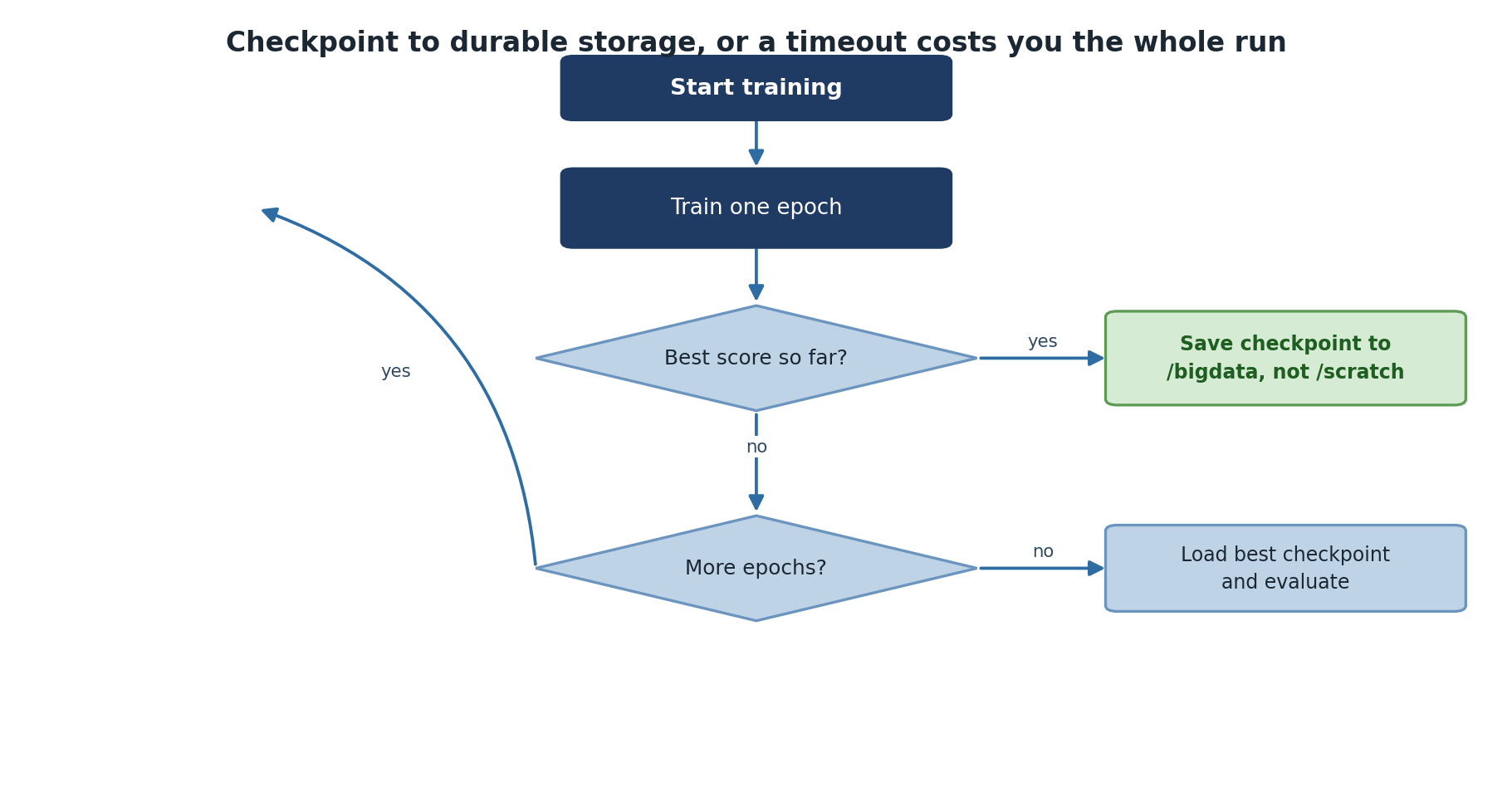
What Goes In a Checkpoint
A complete checkpoint must contain enough state to resume training without changing the result. At minimum:
- Model weights (
model.state_dict()) - Optimizer state (momentum, Adam moments, etc.)
- Current epoch and iteration
- Random number generator state if exact reproducibility matters
- Hyperparameters used (so you can verify on resume)
- Best validation metric so far (so the next checkpoint knows whether to overwrite)
Saving only model weights, which many tutorials do, is enough for inference but loses the optimizer state. Resuming after that gives subtly different training trajectories, which is fine for casual experiments but bad for reproducible research.
PyTorch Checkpointing
Saving Complete Checkpoints
PYTHON
import torch
import os

def scratch_checkpoint_dir():
    """Fast, node-local, and gone when this job ends."""
    return os.path.join('/scratch', os.environ['USER'],
                        os.environ.get('SLURM_JOB_ID', 'interactive'), 'checkpoints')

class ModelTrainer:
    def __init__(self, model, device, checkpoint_dir=None):
        self.model = model.to(device)
        self.device = device
        self.checkpoint_dir = checkpoint_dir or scratch_checkpoint_dir()
        os.makedirs(self.checkpoint_dir, exist_ok=True)

    def save_checkpoint(self, epoch, optimizer, loss):
        checkpoint = {
            'epoch': epoch,
            'model_state': self.model.state_dict(),
            'optimizer_state': optimizer.state_dict(),
            'loss': loss
        }
        path = os.path.join(self.checkpoint_dir, f'checkpoint_epoch_{epoch}.pt')
        torch.save(checkpoint, path)
        print(f"Saved checkpoint: {path}")

    def load_checkpoint(self, path, optimizer=None):
        checkpoint = torch.load(path, map_location=self.device)
        self.model.load_state_dict(checkpoint['model_state'])
        if optimizer:
            optimizer.load_state_dict(checkpoint['optimizer_state'])
        return checkpoint['epoch']
The map_location=self.device argument matters when
reloading: a checkpoint saved on gpu001 can be loaded on
gpu003 only if you re-map the device. Without it, PyTorch
tries to put tensors on the exact GPU index they were saved from, which
may not exist on a different node.
Training with Periodic Checkpoints
PYTHON
trainer = ModelTrainer(model, device)
for epoch in range(num_epochs):
    train_loss = trainer.train_epoch(train_loader, criterion, optimizer)
    val_loss = trainer.validate(val_loader, criterion)
    print(f'Epoch {epoch}: train={train_loss:.4f}, val={val_loss:.4f}')

    # Save every 2 epochs
    if epoch % 2 == 0:
trainer.save_checkpoint(epoch, optimizer, val_loss)How often to checkpoint
The right cadence balances three things: how much work loss is acceptable, how much disk space checkpoints consume, and how much time saving costs.
For typical neural network training, save every epoch and keep only the best (by validation loss) plus the latest. Two checkpoint files at any time, fixed disk usage, near-zero work loss.
For very fast epochs (under a minute), checkpoint every N epochs instead.
For very slow epochs (over an hour), checkpoint mid-epoch using
torch.save calls inside the training loop on a step-count
condition.
For the largest models where each checkpoint is many GB, save to
/scratch during the run and only move the final or best to
/bigdata. Hammering the shared BeeGFS filesystem with
frequent multi-GB writes slows the cluster down for everyone.
Resuming from Checkpoint
PYTHON
# Resume training
checkpoint = torch.load('checkpoint_epoch_50.pt', map_location=device)
model.load_state_dict(checkpoint['model_state'])
optimizer.load_state_dict(checkpoint['optimizer_state'])
start_epoch = checkpoint['epoch'] + 1

for epoch in range(start_epoch, num_epochs):
    train_one_epoch(model, train_loader, optimizer, criterion)
A safe pattern is to wrap this in a “resume if checkpoint exists” check at the top of the script. The same script then handles both fresh starts and resumes:
PYTHON
import glob

ckpts = sorted(glob.glob(f'{checkpoint_dir}/checkpoint_epoch_*.pt'))
if ckpts:
    last = ckpts[-1]
    print(f"Resuming from {last}")
    ckpt = torch.load(last, map_location=device)
    model.load_state_dict(ckpt['model_state'])
    optimizer.load_state_dict(ckpt['optimizer_state'])
    start_epoch = ckpt['epoch'] + 1
else:
    start_epoch = 0
This makes the SLURM script restartable: submit again with the same script and it picks up where it left off.
Multi-GPU Training Overview
When single-GPU training takes too long, data parallelism distributes batches across GPUs:
PyTorch DistributedDataParallel
PYTHON
import torch.distributed as dist
from torch.utils.data import DistributedSampler

def train_distributed(rank, world_size):
    dist.init_process_group(backend='nccl', rank=rank, world_size=world_size)
    torch.cuda.set_device(rank)

    model = MyModel().cuda(rank)
    model = torch.nn.parallel.DistributedDataParallel(model, device_ids=[rank])

    sampler = DistributedSampler(train_dataset, num_replicas=world_size, rank=rank)
    dataloader = DataLoader(train_dataset, sampler=sampler, batch_size=batch_size // world_size)

    for epoch in range(num_epochs):
        for data, target in dataloader:
            data, target = data.cuda(rank), target.cuda(rank)
            optimizer.zero_grad()
            loss = criterion(model(data), target)
            loss.backward()
            optimizer.step()

        if rank == 0:
            torch.save(model.module.state_dict(), f'checkpoint_{epoch}.pt')

    dist.destroy_process_group()
Three things in this snippet are important and easy to miss. The
nccl backend is the right choice for Sagehen GPU nodes
(NVIDIA’s collective communication library, much faster than
gloo on GPUs). DistributedSampler ensures each
rank sees a different slice of the dataset; without it, all ranks
process the same data and you get no speedup. Saving only on rank 0
(if rank == 0:) prevents N ranks from all writing the same
checkpoint to disk simultaneously.
TensorFlow Multi-GPU
PYTHON
strategy = tf.distribute.MirroredStrategy()
with strategy.scope():
    model = tf.keras.Sequential([...])
    model.compile(optimizer='adam', loss='sparse_categorical_crossentropy')
model.fit(dataset, epochs=10)  # Automatically distributed
TensorFlow’s MirroredStrategy handles the same pattern
with much less boilerplate. The with strategy.scope() block
must wrap model creation and compilation; fit then
automatically splits batches and averages gradients.
Multi-GPU on Sagehen HPC: when is it worth it?
Sagehen GPU nodes typically host 2 GPUs. Going from 1 to 2 GPUs gives 1.6 to 1.9x speedup, not 2x, because of communication overhead and uneven batch boundaries.
Use multi-GPU when:
- A single GPU cannot fit your batch size, even with gradient accumulation.
- You have demonstrated wall-clock pressure (a multi-day single-GPU run that you need to halve).
- Your dataset is large enough that even halved per-GPU batches still keep both GPUs busy.
Avoid multi-GPU when:
- The single-GPU baseline trains in a few hours. The complexity is not worth the small speedup.
- Your model is tiny and the dominant cost is not GPU compute.
- You have not first tried mixed precision (fp16/bf16), which often gives a similar speedup with no code complexity.
Challenge
Challenge: Add Checkpointing to a Training Script
Modify a training loop to save checkpoints every 5 epochs, including model weights, optimizer state, epoch number, and validation loss. Then write the code to resume from the latest checkpoint.
PYTHON
import glob, os, re, shutil

# Fast working copy: node-local, disappears when this job ends
SCRATCH_CKPT = os.path.join('/scratch', os.environ['USER'],
                            os.environ.get('SLURM_JOB_ID', 'interactive'), 'checkpoints')
# Durable copy: survives the job, so the *next* submission can find it
DURABLE_CKPT = '/bigdata/lab/<labname>/checkpoints/myproject'

os.makedirs(SCRATCH_CKPT, exist_ok=True)
os.makedirs(DURABLE_CKPT, exist_ok=True)

def save_checkpoint(model, optimizer, epoch, val_loss):
    name = f'checkpoint_{epoch:04d}.pt'
    local = os.path.join(SCRATCH_CKPT, name)
    torch.save({
        'epoch': epoch,
        'model_state': model.state_dict(),
        'optimizer_state': optimizer.state_dict(),
        'val_loss': val_loss
    }, local)
    # Promote it immediately: /scratch will not exist after this job
    shutil.copy2(local, os.path.join(DURABLE_CKPT, name))

# Resume from the DURABLE location, not /scratch --- a requeued job almost
# certainly lands on a different node, where /scratch is empty.
checkpoints = sorted(glob.glob(os.path.join(DURABLE_CKPT, 'checkpoint_*.pt')))
if checkpoints:
    ckpt = torch.load(checkpoints[-1])
    model.load_state_dict(ckpt['model_state'])
    optimizer.load_state_dict(ckpt['optimizer_state'])
    start_epoch = ckpt['epoch'] + 1
    print(f"Resuming from {checkpoints[-1]} at epoch {start_epoch}")
else:
    start_epoch = 0
    print("No checkpoint found --- starting from epoch 0")

for epoch in range(start_epoch, 100):
    train_loss = train_one_epoch(model, train_loader, optimizer, criterion)
    val_loss = validate(model, val_loader, criterion)
    if epoch % 5 == 0:
        save_checkpoint(model, optimizer, epoch, val_loss)
Two details worth copying into your own code. The filename is
zero-padded (checkpoint_0007.pt), because
sorted() on unpadded names puts
checkpoint_10.pt before checkpoint_9.pt and
you resume from the wrong epoch. And the resume path prints what it
found — a restart that silently begins at epoch 0 looks exactly like a
normal start in the logs, and you will not notice until you have burned
another day of GPU time.
Challenge
Challenge: Plan a Restartable Long Job
You need to train a model that takes ~36 hours on a single A100. List your plan: where checkpoints live, how often to save, what SLURM directives to use, and what command actually starts/restarts the job.
Plan:
- Checkpoints written to
/scratch/$USER/$SLURM_JOB_ID/checkpoints/during training and copied to/bigdata/lab/<labname>/checkpoints/PROJECT/as each one is written — not only at the end, because a job killed by timeout never reaches the end. - Save every epoch; keep only the latest and the best (by validation loss).
- SLURM directives:
--partition=gpu --gres=gpu:a100:1 --time=24:00:00. Submit twice (or use--dependency=afterany:JOBIDto chain). - Script resumes from the newest checkpoint in
/bigdata, not/scratch. The second submission will land on a different node, where/scratchis empty — resuming from there would silently restart training at epoch 0 and waste the entire first run. - Use
#SBATCH --signal=B:USR1@600and a trap to copy checkpoints back if the job is killed by timeout.
This pattern survives a single 24-hour limit but completes a 36-hour run in two queue cycles.
- Save checkpoints periodically to recover from interruptions, time limits, or hardware faults
- Include model state, optimizer state, epoch, and best validation loss in checkpoints
- Use
map_locationwhen loading checkpoints across different GPU nodes - A “resume if checkpoint exists” pattern makes scripts restartable from any point
- Save checkpoints to /scratch during the run, copy final to /bigdata at end
- DistributedDataParallel is the recommended approach for multi-GPU PyTorch
- TensorFlow MirroredStrategy handles distribution with much less boilerplate
- Save checkpoints only on rank 0 in distributed training
- Multi-GPU is worth ~1.7x; try mixed precision first for similar speedup with no complexity
Content from SLURM Scripts for ML
Last updated on 2026-08-24 | Edit this page
Overview
Questions
- How do you write SLURM scripts for GPU training jobs?
- How do you request GPU resources correctly?
- How do you launch multi-GPU training with SLURM?
Objectives
- Write SLURM batch scripts for GPU training
- Request appropriate GPU, CPU, and memory resources
- Launch distributed training with torchrun and SLURM
Single-GPU SLURM Job
BASH
#!/bin/bash
#SBATCH --job-name=pytorch_training
#SBATCH --partition=gpu
#SBATCH --gres=gpu:1
#SBATCH --cpus-per-task=4
#SBATCH --mem=16GB
#SBATCH --time=02:00:00
#SBATCH --output=training_%j.log

module load miniconda3/py313_26.3.2-2   # then activate your conda env -- no pytorch module exists

python3 << 'EOF'
import torch
print(f"GPU available: {torch.cuda.is_available()}")
print(f"GPU device: {torch.cuda.get_device_name(0)}")

# Your training code here
EOF
Submit and monitor:

squeue -l that it’s RUNNING on a GPU node.TensorFlow SLURM Job
BASH
#!/bin/bash
#SBATCH --job-name=tf_training
#SBATCH --partition=gpu
#SBATCH --gres=gpu:1
#SBATCH --cpus-per-task=4
#SBATCH --mem=32GB
#SBATCH --time=04:00:00
#SBATCH --output=tf_training_%j.log

module load miniconda3/py313_26.3.2-2   # then activate your conda env -- no tensorflow module exists

python3 << 'EOF'
import tensorflow as tf
gpus = tf.config.list_physical_devices('GPU')
for gpu in gpus:
    tf.config.experimental.set_memory_growth(gpu, True)

# Your TensorFlow training code here
EOF
Multi-GPU SLURM Job
BASH
#!/bin/bash
#SBATCH --job-name=multi_gpu_training
#SBATCH --partition=gpu
#SBATCH --gres=gpu:4
#SBATCH --cpus-per-task=16
#SBATCH --mem=64GB
#SBATCH --time=04:00:00
#SBATCH --output=training_%j.log

module load miniconda3/py313_26.3.2-2   # then activate your conda env -- no pytorch module exists

# Set master node details for distributed training
export MASTER_ADDR=$(scontrol show hostname ${SLURM_NODELIST} | head -n1)
export MASTER_PORT=29500
export WORLD_SIZE=$SLURM_GPUS_PER_NODE

# Launch with torchrun (automatic launcher)
torchrun --nproc_per_node=4 train_distributed.py
Interactive GPU Sessions
OnDemand Web Interface
Access via https://ondemand.hpc.pomona.edu:
- Log in with Pomona credentials
- Click “Jupyter Lab” or “Terminal”
- Select GPU and duration
- Upload your code
Resource Guidelines
| Workload | GPUs | CPUs | Memory | Time |
|---|---|---|---|---|
| Quick test | 1 | 4 | 16 GB | 30 min |
| Single-GPU training | 1 | 4 | 16-32 GB | 2-8 hours |
| Multi-GPU training | 4 | 16 | 64 GB | 4-24 hours |
| Hyperparameter sweep | 1 per job | 4 | 16 GB | 2 hours each |
Challenge
Challenge: Write a Training Job Script
Write a SLURM script that requests 1 GPU, loads your conda environment, copies data from /bigdata to /scratch, runs training, and saves the model back to /bigdata.
BASH
#!/bin/bash
#SBATCH --job-name=my_training
#SBATCH --partition=gpu
#SBATCH --gres=gpu:1
#SBATCH --cpus-per-task=4
#SBATCH --mem=16GB
#SBATCH --time=04:00:00
#SBATCH --output=training_%j.log

module load miniconda3
conda activate pytorch_env

# Copy data to fast storage
cp -r /bigdata/lab/<labname>/dataset /scratch/$USER/dataset

# Run training
python3 train.py --data /scratch/$USER/dataset --output /scratch/$USER/model.pt

# Save results back to persistent storage
cp /scratch/$USER/model.pt /bigdata/lab/<labname>/models/Important: Always Test First
Before submitting a large GPU job: 1. Run on CPU with small dataset (10 iterations) 2. Check GPU memory usage with an interactive session 3. Verify checkpointing works 4. Then scale up to full training
- Use
--partition=gpuand--gres=gpu:Nto request GPU resources - Request 4 CPUs per GPU as a rule of thumb
- Use torchrun for launching distributed PyTorch training
- Test interactively with
srunbefore submitting batch jobs - Copy data to /scratch for faster I/O during training
Content from Hyperparameter Tuning
Last updated on 2026-08-24 | Edit this page
Overview
Questions
- How do you efficiently tune hyperparameters on HPC?
- What are the differences between grid search, random search, and Bayesian optimization?
- How do you parallelize hyperparameter sweeps with SLURM?
- How do you avoid wasting GPU-hours on bad runs?
Objectives
- Implement grid search and random search
- Use Bayesian optimization for efficient tuning
- Parallelize hyperparameter sweeps across multiple GPU jobs
- Use early stopping and pruning to save GPU-hours
Why Hyperparameter Tuning Is Different on HPC
A hyperparameter sweep that takes 100 model trainings is exactly the kind of workload HPC was built for. Each training is independent, GPUs are abundant, and SLURM job arrays make parallel submission trivial. The art is in choosing which 100 hyperparameter combinations to evaluate; brute-force grid search is rarely the right answer past one or two dimensions.
Three search strategies dominate practice: grid search (exhaustive on a discrete grid), random search (sample uniformly from continuous ranges), and Bayesian optimization (learn from past trials to pick promising next ones). Each has a sweet spot, and combining them with early stopping turns a week-long sweep into an overnight one.
Hyperparameter Tuning Strategies
Hyperparameters are values set before training (learning rate, batch size, layers, etc.). Unlike weights, they are not learned. Their values can change model performance by an order of magnitude, which is why finding good ones is worth the GPU time.
Strategy 1: Grid Search
Test all combinations of predefined values:
PYTHON
param_grid = {
    'learning_rate': [0.001, 0.01, 0.1],
    'batch_size': [16, 32, 64],
    'hidden_units': [64, 128, 256]
}
# Total: 3 x 3 x 3 = 27 models to trainPros: Systematic, guaranteed to find best in grid. Cons: Exponential growth, slow for large spaces.
Grid search becomes intractable past three or four dimensions. With 5 hyperparameters at 5 values each, you have 3,125 trials. At 30 minutes per trial that is over 60 days of GPU time. Unless your search space is small, grid search is not the right tool.
Strategy 2: Random Search
PYTHON
import numpy as np
for trial in range(50):
    lr = np.random.choice(np.logspace(-4, -1, 100))
    bs = np.random.choice([16, 32, 64, 128])
    dp = np.random.choice(np.linspace(0.1, 0.5, 50))
# Train model with these hyperparametersPros: More efficient than grid search, scales to many dimensions. Cons: Each trial is independent; no learning from previous results.
Random search is surprisingly competitive with more sophisticated methods, especially in high-dimensional spaces, because most hyperparameters do not matter much and random sampling explores the few that do. Bergstra and Bengio (2012) showed that random search outperforms grid search consistently.
Strategy 3: Bayesian Optimization
PYTHON
from ray import tune

config = {
    'learning_rate': tune.loguniform(1e-4, 1e-1),
    'batch_size': tune.choice([16, 32, 64, 128]),
    'dropout_rate': tune.uniform(0.1, 0.5)
}

analysis = tune.run(
    train_model, config=config, num_samples=50,
    search_alg=tune.suggest.BayesOptSearch()
)
best_config = analysis.get_best_config(metric='val_loss', mode='min')Pros: Most sample-efficient. Learns which regions of the hyperparameter space are promising and concentrates trials there. Cons: Setup is more complex; benefits are largest when each trial is expensive.
Use Bayesian optimization when each model trial takes hours and you can afford 30 to 100 trials total. For very fast trials or very large numbers of trials, random search can be just as good and simpler.
Parallel Search with SLURM Job Arrays
BASH
#!/bin/bash
#SBATCH --job-name=hyperparam_sweep
#SBATCH --partition=gpu
#SBATCH --gres=gpu:1
#SBATCH --cpus-per-task=4
#SBATCH --mem=16GB
#SBATCH --time=02:00:00
#SBATCH --array=0-9
#SBATCH --output=sweep_%a.log

module load miniconda3
conda activate pytorch_env

LEARNING_RATES=(0.001 0.005 0.01 0.02 0.05 0.1 0.15 0.2 0.25 0.3)
LR=${LEARNING_RATES[$SLURM_ARRAY_TASK_ID]}

python3 train.py --learning_rate $LR --batch_size 32 --epochs 20
The --array=0-9 tells SLURM to submit 10 copies of this
script in parallel, each with a different
SLURM_ARRAY_TASK_ID (0 through 9). The script picks the
corresponding learning rate from the array. With 10 idle GPUs, all 10
trials run simultaneously and the whole sweep finishes in roughly the
time of one trial instead of ten.
For a sweep over multiple parameters, the array-index-to-parameter mapping uses division and modulo:
BASH
#SBATCH --array=0-29   # 5 LRs * 6 BSs = 30 combos

LRS=(0.001 0.005 0.01 0.05 0.1)
BSS=(16 32 64 128 256 512)

lr_idx=$((SLURM_ARRAY_TASK_ID / ${#BSS[@]}))
bs_idx=$((SLURM_ARRAY_TASK_ID % ${#BSS[@]}))

LR=${LRS[$lr_idx]}
BS=${BSS[$bs_idx]}

python3 train.py --learning_rate $LR --batch_size $BS
Submit and gather results:
BASH
sbatch hyperparameter_sweep.sh
squeue -u $USER -l

# Gather results
for log in sweep_*.log; do
    echo "=== $log ==="
    grep "Final validation accuracy" $log
doneEarly stopping inside each trial
Even with random search, many trials are clearly bad after a few epochs. Killing them early saves GPU-hours that you can spend on more trials.
Two ways to implement: a simple validation-loss-plateau check inside
train.py, or a pruning callback from a framework like
Optuna or Ray Tune. The simple version is essentially:
PYTHON
best_val = float('inf')
patience = 5
no_improve = 0
for epoch in range(max_epochs):
    val_loss = train_one_epoch(...)
    if val_loss < best_val:
        best_val = val_loss
        no_improve = 0
    else:
        no_improve += 1
        if no_improve >= patience:
            print("Early stopping")
            break
A 100-trial sweep with 50% early-stopping savings completes in roughly the wall-clock of a 50-trial full sweep, but explores twice as much hyperparameter space.
Choosing the Search Range
The single most common hyperparameter-sweep mistake is searching the wrong range. A few rules of thumb:
Learning rate: search log-uniformly from 1e-5 to 1e-1. Linear spacing wastes most samples on the wrong order of magnitude.
Batch size: powers of 2 (16, 32, 64, …). Memory and GPU efficiency favor these.
Dropout: linear from 0.1 to 0.5. Above 0.5 the model usually under-fits.
Weight decay: log-uniform from 1e-6 to 1e-2.
Number of layers: linear, 2 to 8. Past 8 you usually want a different architecture.
Document the range in your experiment log along with the search method. “Best LR was 0.003” is much less useful than “Searched log-uniform 1e-5 to 1e-1 with 30 random samples; best LR was 0.003”.
Challenge
Challenge: Hyperparameter Sweep
Set up a SLURM array job that trains 10 models with 5 learning rates and 2 batch sizes. Collect results in a CSV file.
BASH
#!/bin/bash
#SBATCH --partition=gpu
#SBATCH --gres=gpu:1
#SBATCH --array=0-9
#SBATCH --output=tune_%a.log

module load miniconda3
conda activate pytorch_env

python3 << 'EOF'
import os, numpy as np, csv

learning_rates = np.logspace(-4, -2, 5)
batch_sizes = [32, 64]
job_id = int(os.environ.get('SLURM_ARRAY_TASK_ID', 0))
lr = learning_rates[job_id // 2]
bs = batch_sizes[job_id % 2]

print(f"Training with lr={lr}, batch_size={bs}")
# ... training code ...

with open(f'/scratch/$USER/results.csv', 'a') as f:
    csv.writer(f).writerow([lr, bs, val_loss, val_accuracy])
EOF
After the sweep completes, sort results.csv by
val_accuracy and inspect the top 3 rows. If they cluster at one end of
the range, the optimum may lie outside your search range; expand and
rerun.
Challenge
Challenge: Pick a Strategy
For each scenario, recommend grid / random / Bayesian and explain why in one sentence:
A. Tuning 2 hyperparameters (learning rate, weight decay) for a 5-minute model.
B. Tuning 8 hyperparameters for a 4-hour model on a constrained GPU budget.
C. Reproducing a published baseline whose paper specifies exact hyperparameters.
A. Grid search. Two dimensions, fast trials, easy to enumerate.
B. Bayesian optimization. Many dimensions and expensive trials make sample efficiency the priority.
C. None: use the published values directly. Tuning here would be wasted compute and risks divergence from the baseline.
- Grid search is fine for 2 to 3 dimensions, intractable beyond that
- Random search is competitive in higher dimensions and scales linearly
- Bayesian optimization wins when each trial is expensive (hours)
- Search log-uniformly for learning rate and weight decay; linear for dropout
- Early stopping inside each trial multiplies the effective number of trials
- SLURM job arrays parallelize sweeps with a single submission
- After a sweep, check that the best values are not at the edge of the range; expand if so
Content from ML Best Practices
Last updated on 2026-08-24 | Edit this page
Overview
Questions
- How do you ensure reproducibility of ML experiments?
- What are common pitfalls in HPC ML workflows?
- How do you track experiments and deploy models?
- What habits separate research-ready ML from one-off scripts?
Objectives
- Follow MLOps best practices for reproducibility
- Monitor and log experiments systematically
- Avoid common HPC ML pitfalls
- Export trained models for deployment and sharing
Why Best Practices Matter More on HPC
A research project that produces a single trained model is a one-off script. A project that produces a dozen variants over six months, with multiple co-authors and a paper deadline, is a system. The difference between the two is whether you can answer questions like “which version of the code produced figure 3?” and “what hyperparameters did the model in checkpoint 47 use?”.
On HPC the stakes are higher than on a laptop because you spend real GPU-hours per experiment. Losing track of which run produced a result means redoing the run, which is sometimes a day of A100 time. The habits below are the ones that pay back many times over their setup cost.
Reproducibility and MLOps
1. Version Control Everything
This is the absolute minimum. Beyond it, commit at every meaningful
experiment boundary, tag the commit that produced each significant
result, and never store data files in git (use .gitignore
for /data and /results). Six months later, the
only reliable way to know exactly what code produced a specific result
is to read its git hash off the saved checkpoint.
2. Configuration Management
YAML
# config.yaml - Never hardcode hyperparameters
model:
  architecture: "resnet50"
  pretrained: true
training:
  learning_rate: 0.001
  batch_size: 32
  epochs: 50
data:
  path: "/bigdata/lab/<labname>/datasets/cifar10"
  train_split: 0.8
PYTHON
import yaml
with open('config.yaml', 'r') as f:
    config = yaml.safe_load(f)
lr = config['training']['learning_rate']
Hardcoded hyperparameters scattered through your code mean tweaking one value can require touching ten files. Externalizing them to a config file means experiments differ from each other only in the YAML, which is easy to diff, easy to share, and easy to commit.
For sweeps, generate one config file per trial and save it alongside the result. Future-you will thank present-you when figuring out what produced run 47.
3. Experiment Tracking with TensorBoard
PYTHON
from torch.utils.tensorboard import SummaryWriter

writer = SummaryWriter(log_dir='/scratch/$USER/runs/exp_lr0.001_bs32')
for epoch in range(epochs):
    train_loss = train_one_epoch(...)
    val_loss, val_acc = validate(...)

    writer.add_scalar('Loss/train', train_loss, epoch)
    writer.add_scalar('Loss/val', val_loss, epoch)
    writer.add_scalar('Accuracy/val', val_acc, epoch)
writer.close()TensorBoard is the simplest experiment tracker for PyTorch and
TensorFlow workflows. Run it locally or via OnDemand to compare 30 sweep
runs in one chart and immediately spot the trial that converged twice as
fast as the others. For more sophisticated tracking, Weights and Biases
(wandb) and MLflow are popular choices that add
cloud-hosted dashboards and richer artifact tracking.
4. Complete Checkpoints
PYTHON
import subprocess
from datetime import datetime

checkpoint = {
    'epoch': epoch,
    'model_state': model.state_dict(),
    'optimizer_state': optimizer.state_dict(),
    'hyperparameters': config,
    'timestamp': datetime.now().isoformat(),
    'git_hash': subprocess.check_output(['git', 'rev-parse', 'HEAD']).decode().strip()
}
torch.save(checkpoint, f'/scratch/$USER/checkpoints/model_epoch_{epoch}.pt')
Saving the git hash inside the checkpoint is the single most useful
reproducibility habit. Six months later, when reviewers ask which
version of the code trained your headline model, you can
git checkout HASH and see exactly that state.
Common HPC ML Pitfalls
Pitfall 1: Forgetting to Scale Learning Rate
When you increase batch size, adjust learning rate:
Larger batches give more accurate gradients, which permits larger steps. Square-root scaling is a reasonable rule for most cases; linear scaling (lr ~ batch_size) is more aggressive and works for some setups.
Pitfall 2: Tuning on Test Set
PYTHON
# WRONG: Using test set for hyperparameter selection
# CORRECT: Use three separate sets
train, val, test = split_data(dataset, [0.6, 0.2, 0.2])
# Tune on val_data, report final metrics on test_data once
This is research integrity 101 but still happens regularly under deadline pressure. Touch the test set exactly once, at the end, when reporting the final number. Tuning on the test set inflates apparent performance and the gap will not survive deployment.
Pitfall 3: GPU Memory Leaks During Sweeps
PYTHON
import gc
for lr in learning_rates:
    model = MyModel()
    train(model, lr)
    del model
    gc.collect()
    torch.cuda.empty_cache()
Without explicit cleanup, the GPU accumulates state from previous iterations and eventually OOMs. The pattern above is the safe boilerplate.
Pitfall 4: Not Monitoring Training
BASH
watch -n 1 nvidia-smi          # GPU usage
squeue -u $USER -l              # Job status
tail -f training.log            # Log output
If your loss has been NaN for the last 20 epochs and you do not notice until the job finishes, you have wasted GPU-hours. Set up monitoring early and check it at least once per training run.
Model Deployment
Export for Production
PYTHON
# PyTorch: TorchScript for production
scripted_model = torch.jit.script(model)
scripted_model.save('model.pt')

# TensorFlow: SavedModel format
model.save('model_saved_model/')
TorchScript and SavedModel are the framework-native serialization formats. They preserve the model architecture and weights together, so the consumer does not need access to your Python code to run inference. Use them whenever you want to share a model with someone outside your immediate codebase.
Prediction Pipeline
PYTHON
def predict(image_path, model_path):
    model = MyModel()
    model.load_state_dict(torch.load(model_path))
    model.eval()

    image = transform(Image.open(image_path)).unsqueeze(0).cuda()
    with torch.no_grad():
        probs = torch.softmax(model(image), dim=1)
        predicted_class = torch.argmax(probs, dim=1)
    return predicted_class.item(), probs[0].cpu().numpy()
Two details matter for any inference pipeline:
model.eval() switches off dropout and uses running
statistics for batch norm, and torch.no_grad() disables
gradient tracking which both speeds up inference and roughly halves
memory use.
A research-grade run log
For each significant experiment, record:
- Date and SLURM job ID
- Git hash of the code
- Path to the config.yaml used
- Path to the dataset (with version or checksum)
- Wall clock time and final epoch reached
- Best metric on validation
- Headline observation in one sentence
Keep this in a single Markdown file (or a spreadsheet) per project. Three months later, when a co-author asks “what was the best run we did with the new architecture?”, you have an answer in 30 seconds instead of 30 minutes of grep through SLURM logs.
Challenge
Challenge: Create a Reproducible Experiment
Set up a complete experiment workflow: 1. Create a config.yaml with model hyperparameters 2. Add TensorBoard logging to your training loop 3. Save checkpoints that include the git hash 4. Export the final model for inference
Challenge
Challenge: Audit a Project for Reproducibility Gaps
You inherit a colleague’s ML project. The repo has
train.py (uses hardcoded hyperparameters),
model.pt (no metadata), and a folder of result CSVs. List
four things you would do, in order, to make this reproducible.
Initialize git in the project and commit the current state. At minimum you can now refer to “the version that produced these results” later.
Externalize hyperparameters into a
config.yamland refactortrain.pyto read it. This makes future experiments diff-able.Add an experiment-log Markdown file documenting what each existing CSV came from (best effort) and start logging new experiments going forward.
Re-train the model with the new pipeline so the resulting checkpoint includes git hash, hyperparameters, and date. The old
model.ptis essentially unreproducible; it stays for reference but is not authoritative.
- Track experiments with TensorBoard, config files, and version control
- Always use separate train/val/test sets; touch test exactly once at the end
- Scale learning rate with batch size (sqrt or linear)
- Monitor GPU memory to avoid leaks during sweeps
- Save complete checkpoints including hyperparameters, git hash, and date
- Export models with TorchScript or SavedModel for deployment
- Keep a per-project run log so you can answer “which run produced figure 3?”