
Checkpointing Long Jobs
Last updated on 2026-08-27 | Edit this page
Estimated time: 45 minutes
Overview
Questions
- How do you save and resume long-running training jobs?
- What should a complete checkpoint include?
- How do you implement multi-GPU training on Sagehen HPC?
- How often should you checkpoint, and where should checkpoints live?
Objectives
- Implement checkpointing for long training jobs
- Save and restore complete training state
- Choose the right checkpoint cadence and storage location
- Understand data parallelism for multi-GPU training
Why Checkpointing Matters
GPU jobs on Sagehen can run for many hours, and time-limit boundaries, hardware faults, queue evictions, and your own bugs can interrupt training at any point. Without checkpoints, an interruption at hour 23 of a 24-hour run loses everything. With checkpoints saved every 30 minutes, you lose at most 30 minutes of work and resume from the last good state.
Checkpointing is also the foundation for two other patterns: hyperparameter sweeps that need to fork from a common pretrained state, and analysis runs that need to inspect a model at multiple points in training to understand its learning dynamics.
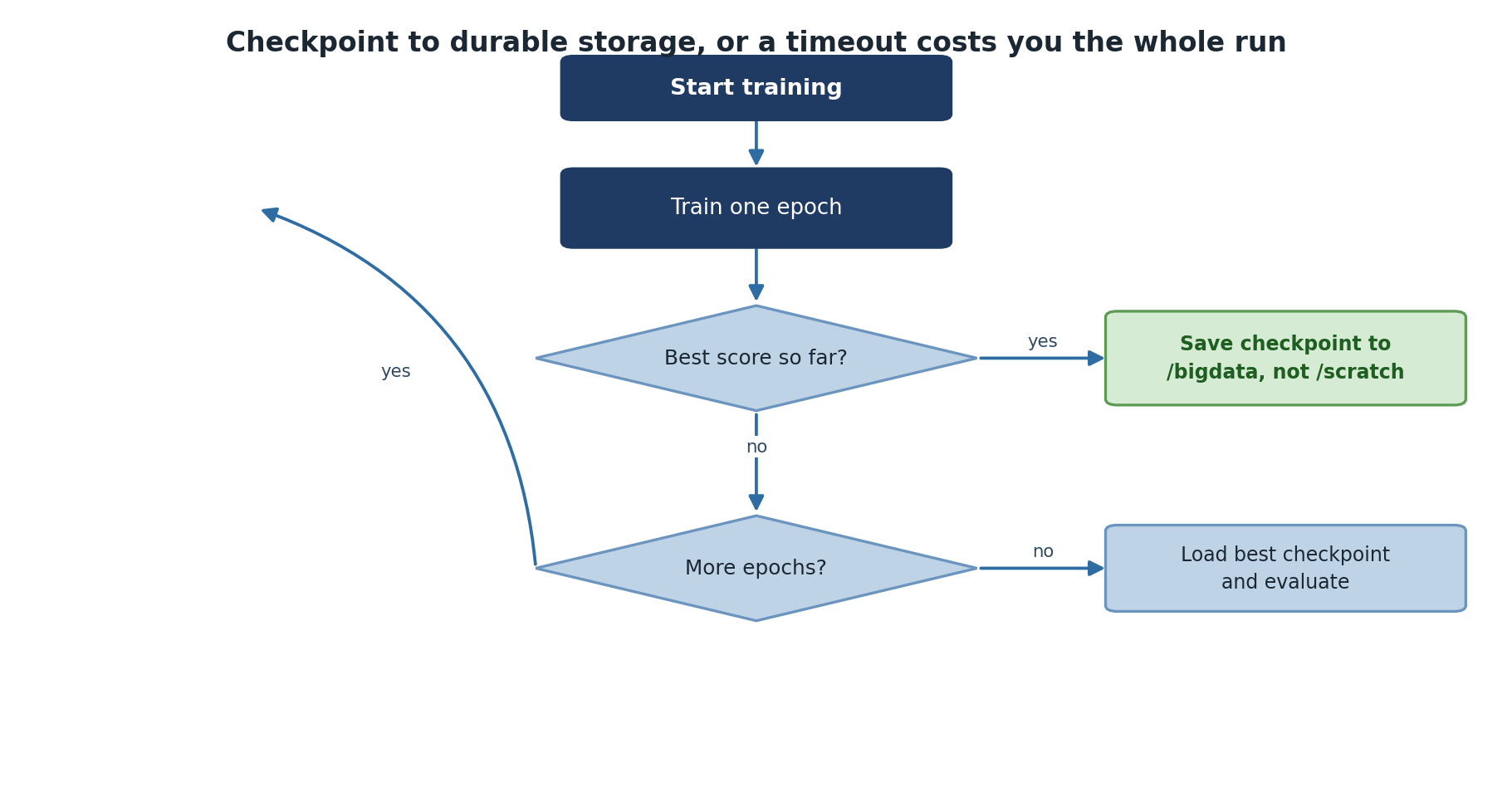
What Goes In a Checkpoint
A complete checkpoint must contain enough state to resume training without changing the result. At minimum:
- Model weights (
model.state_dict()) - Optimizer state (momentum, Adam moments, etc.)
- Current epoch and iteration
- Random number generator state if exact reproducibility matters
- Hyperparameters used (so you can verify on resume)
- Best validation metric so far (so the next checkpoint knows whether to overwrite)
Saving only model weights, which many tutorials do, is enough for inference but loses the optimizer state. Resuming after that gives subtly different training trajectories, which is fine for casual experiments but bad for reproducible research.
PyTorch Checkpointing
Saving Complete Checkpoints
PYTHON
import torch
import os

def scratch_checkpoint_dir():
    """Fast, node-local, and gone when this job ends."""
    return os.path.join('/scratch', os.environ['USER'],
                        os.environ.get('SLURM_JOB_ID', 'interactive'), 'checkpoints')

class ModelTrainer:
    def __init__(self, model, device, checkpoint_dir=None):
        self.model = model.to(device)
        self.device = device
        self.checkpoint_dir = checkpoint_dir or scratch_checkpoint_dir()
        os.makedirs(self.checkpoint_dir, exist_ok=True)

    def save_checkpoint(self, epoch, optimizer, loss):
        checkpoint = {
            'epoch': epoch,
            'model_state': self.model.state_dict(),
            'optimizer_state': optimizer.state_dict(),
            'loss': loss
        }
        path = os.path.join(self.checkpoint_dir, f'checkpoint_epoch_{epoch}.pt')
        torch.save(checkpoint, path)
        print(f"Saved checkpoint: {path}")

    def load_checkpoint(self, path, optimizer=None):
        checkpoint = torch.load(path, map_location=self.device)
        self.model.load_state_dict(checkpoint['model_state'])
        if optimizer:
            optimizer.load_state_dict(checkpoint['optimizer_state'])
        return checkpoint['epoch']
The map_location=self.device argument matters when
reloading: a checkpoint saved on gpu001 can be loaded on
gpu003 only if you re-map the device. Without it, PyTorch
tries to put tensors on the exact GPU index they were saved from, which
may not exist on a different node.
Training with Periodic Checkpoints
PYTHON
trainer = ModelTrainer(model, device)
for epoch in range(num_epochs):
    train_loss = trainer.train_epoch(train_loader, criterion, optimizer)
    val_loss = trainer.validate(val_loader, criterion)
    print(f'Epoch {epoch}: train={train_loss:.4f}, val={val_loss:.4f}')

    # Save every 2 epochs
    if epoch % 2 == 0:
trainer.save_checkpoint(epoch, optimizer, val_loss)How often to checkpoint
The right cadence balances three things: how much work loss is acceptable, how much disk space checkpoints consume, and how much time saving costs.
For typical neural network training, save every epoch and keep only the best (by validation loss) plus the latest. Two checkpoint files at any time, fixed disk usage, near-zero work loss.
For very fast epochs (under a minute), checkpoint every N epochs instead.
For very slow epochs (over an hour), checkpoint mid-epoch using
torch.save calls inside the training loop on a step-count
condition.
For the largest models where each checkpoint is many GB, save to
/scratch during the run and only move the final or best to
/bigdata. Hammering the shared BeeGFS filesystem with
frequent multi-GB writes slows the cluster down for everyone.
Resuming from Checkpoint
PYTHON
# Resume training
checkpoint = torch.load('checkpoint_epoch_50.pt', map_location=device)
model.load_state_dict(checkpoint['model_state'])
optimizer.load_state_dict(checkpoint['optimizer_state'])
start_epoch = checkpoint['epoch'] + 1

for epoch in range(start_epoch, num_epochs):
    train_one_epoch(model, train_loader, optimizer, criterion)
A safe pattern is to wrap this in a “resume if checkpoint exists” check at the top of the script. The same script then handles both fresh starts and resumes:
PYTHON
import glob

ckpts = sorted(glob.glob(f'{checkpoint_dir}/checkpoint_epoch_*.pt'))
if ckpts:
    last = ckpts[-1]
    print(f"Resuming from {last}")
    ckpt = torch.load(last, map_location=device)
    model.load_state_dict(ckpt['model_state'])
    optimizer.load_state_dict(ckpt['optimizer_state'])
    start_epoch = ckpt['epoch'] + 1
else:
    start_epoch = 0
This makes the SLURM script restartable: submit again with the same script and it picks up where it left off.
Multi-GPU Training Overview
When single-GPU training takes too long, data parallelism distributes batches across GPUs:
PyTorch DistributedDataParallel
PYTHON
import torch.distributed as dist
from torch.utils.data import DistributedSampler

def train_distributed(rank, world_size):
    dist.init_process_group(backend='nccl', rank=rank, world_size=world_size)
    torch.cuda.set_device(rank)

    model = MyModel().cuda(rank)
    model = torch.nn.parallel.DistributedDataParallel(model, device_ids=[rank])

    sampler = DistributedSampler(train_dataset, num_replicas=world_size, rank=rank)
    dataloader = DataLoader(train_dataset, sampler=sampler, batch_size=batch_size // world_size)

    for epoch in range(num_epochs):
        for data, target in dataloader:
            data, target = data.cuda(rank), target.cuda(rank)
            optimizer.zero_grad()
            loss = criterion(model(data), target)
            loss.backward()
            optimizer.step()

        if rank == 0:
            torch.save(model.module.state_dict(), f'checkpoint_{epoch}.pt')

    dist.destroy_process_group()
Three things in this snippet are important and easy to miss. The
nccl backend is the right choice for Sagehen GPU nodes
(NVIDIA’s collective communication library, much faster than
gloo on GPUs). DistributedSampler ensures each
rank sees a different slice of the dataset; without it, all ranks
process the same data and you get no speedup. Saving only on rank 0
(if rank == 0:) prevents N ranks from all writing the same
checkpoint to disk simultaneously.
TensorFlow Multi-GPU
PYTHON
strategy = tf.distribute.MirroredStrategy()
with strategy.scope():
    model = tf.keras.Sequential([...])
    model.compile(optimizer='adam', loss='sparse_categorical_crossentropy')
model.fit(dataset, epochs=10)  # Automatically distributed
TensorFlow’s MirroredStrategy handles the same pattern
with much less boilerplate. The with strategy.scope() block
must wrap model creation and compilation; fit then
automatically splits batches and averages gradients.
Multi-GPU on Sagehen HPC: when is it worth it?
Sagehen GPU nodes typically host 2 GPUs. Going from 1 to 2 GPUs gives 1.6 to 1.9x speedup, not 2x, because of communication overhead and uneven batch boundaries.
Use multi-GPU when:
- A single GPU cannot fit your batch size, even with gradient accumulation.
- You have demonstrated wall-clock pressure (a multi-day single-GPU run that you need to halve).
- Your dataset is large enough that even halved per-GPU batches still keep both GPUs busy.
Avoid multi-GPU when:
- The single-GPU baseline trains in a few hours. The complexity is not worth the small speedup.
- Your model is tiny and the dominant cost is not GPU compute.
- You have not first tried mixed precision (fp16/bf16), which often gives a similar speedup with no code complexity.
Challenge
Challenge: Add Checkpointing to a Training Script
Modify a training loop to save checkpoints every 5 epochs, including model weights, optimizer state, epoch number, and validation loss. Then write the code to resume from the latest checkpoint.
PYTHON
import glob, os, re, shutil

# Fast working copy: node-local, disappears when this job ends
SCRATCH_CKPT = os.path.join('/scratch', os.environ['USER'],
                            os.environ.get('SLURM_JOB_ID', 'interactive'), 'checkpoints')
# Durable copy: survives the job, so the *next* submission can find it
DURABLE_CKPT = '/bigdata/lab/<labname>/checkpoints/myproject'

os.makedirs(SCRATCH_CKPT, exist_ok=True)
os.makedirs(DURABLE_CKPT, exist_ok=True)

def save_checkpoint(model, optimizer, epoch, val_loss):
    name = f'checkpoint_{epoch:04d}.pt'
    local = os.path.join(SCRATCH_CKPT, name)
    torch.save({
        'epoch': epoch,
        'model_state': model.state_dict(),
        'optimizer_state': optimizer.state_dict(),
        'val_loss': val_loss
    }, local)
    # Promote it immediately: /scratch will not exist after this job
    shutil.copy2(local, os.path.join(DURABLE_CKPT, name))

# Resume from the DURABLE location, not /scratch --- a requeued job almost
# certainly lands on a different node, where /scratch is empty.
checkpoints = sorted(glob.glob(os.path.join(DURABLE_CKPT, 'checkpoint_*.pt')))
if checkpoints:
    ckpt = torch.load(checkpoints[-1])
    model.load_state_dict(ckpt['model_state'])
    optimizer.load_state_dict(ckpt['optimizer_state'])
    start_epoch = ckpt['epoch'] + 1
    print(f"Resuming from {checkpoints[-1]} at epoch {start_epoch}")
else:
    start_epoch = 0
    print("No checkpoint found --- starting from epoch 0")

for epoch in range(start_epoch, 100):
    train_loss = train_one_epoch(model, train_loader, optimizer, criterion)
    val_loss = validate(model, val_loader, criterion)
    if epoch % 5 == 0:
        save_checkpoint(model, optimizer, epoch, val_loss)
Two details worth copying into your own code. The filename is
zero-padded (checkpoint_0007.pt), because
sorted() on unpadded names puts
checkpoint_10.pt before checkpoint_9.pt and
you resume from the wrong epoch. And the resume path prints what it
found — a restart that silently begins at epoch 0 looks exactly like a
normal start in the logs, and you will not notice until you have burned
another day of GPU time.
Challenge
Challenge: Plan a Restartable Long Job
You need to train a model that takes ~36 hours on a single A100. List your plan: where checkpoints live, how often to save, what SLURM directives to use, and what command actually starts/restarts the job.
Plan:
- Checkpoints written to
/scratch/$USER/$SLURM_JOB_ID/checkpoints/during training and copied to/bigdata/lab/<labname>/checkpoints/PROJECT/as each one is written — not only at the end, because a job killed by timeout never reaches the end. - Save every epoch; keep only the latest and the best (by validation loss).
- SLURM directives:
--partition=gpu --gres=gpu:a100:1 --time=24:00:00. Submit twice (or use--dependency=afterany:JOBIDto chain). - Script resumes from the newest checkpoint in
/bigdata, not/scratch. The second submission will land on a different node, where/scratchis empty — resuming from there would silently restart training at epoch 0 and waste the entire first run. - Use
#SBATCH --signal=B:USR1@600and a trap to copy checkpoints back if the job is killed by timeout.
This pattern survives a single 24-hour limit but completes a 36-hour run in two queue cycles.
- Save checkpoints periodically to recover from interruptions, time limits, or hardware faults
- Include model state, optimizer state, epoch, and best validation loss in checkpoints
- Use
map_locationwhen loading checkpoints across different GPU nodes - A “resume if checkpoint exists” pattern makes scripts restartable from any point
- Save checkpoints to /scratch during the run, copy final to /bigdata at end
- DistributedDataParallel is the recommended approach for multi-GPU PyTorch
- TensorFlow MirroredStrategy handles distribution with much less boilerplate
- Save checkpoints only on rank 0 in distributed training
- Multi-GPU is worth ~1.7x; try mixed precision first for similar speedup with no complexity