
Cluster Architecture
Last updated on 2026-08-27 | Edit this page
Overview
Questions
- What are partitions and why does Sagehen HPC have three?
- What hardware is in each partition?
- How do I view cluster status?
Objectives
- Understand the concept of partitions in HPC clusters
- Learn Sagehen’s specific hardware specifications for each partition
- Use
sinfoto query cluster status
What are Partitions?
A partition in SLURM is a logical grouping of compute nodes with shared characteristics. Sagehen uses partitions to organize nodes by hardware type, time limits, and priority.
Think of partitions like different sections of a library: fiction, non-fiction, reference. Each section is organized for its purpose.
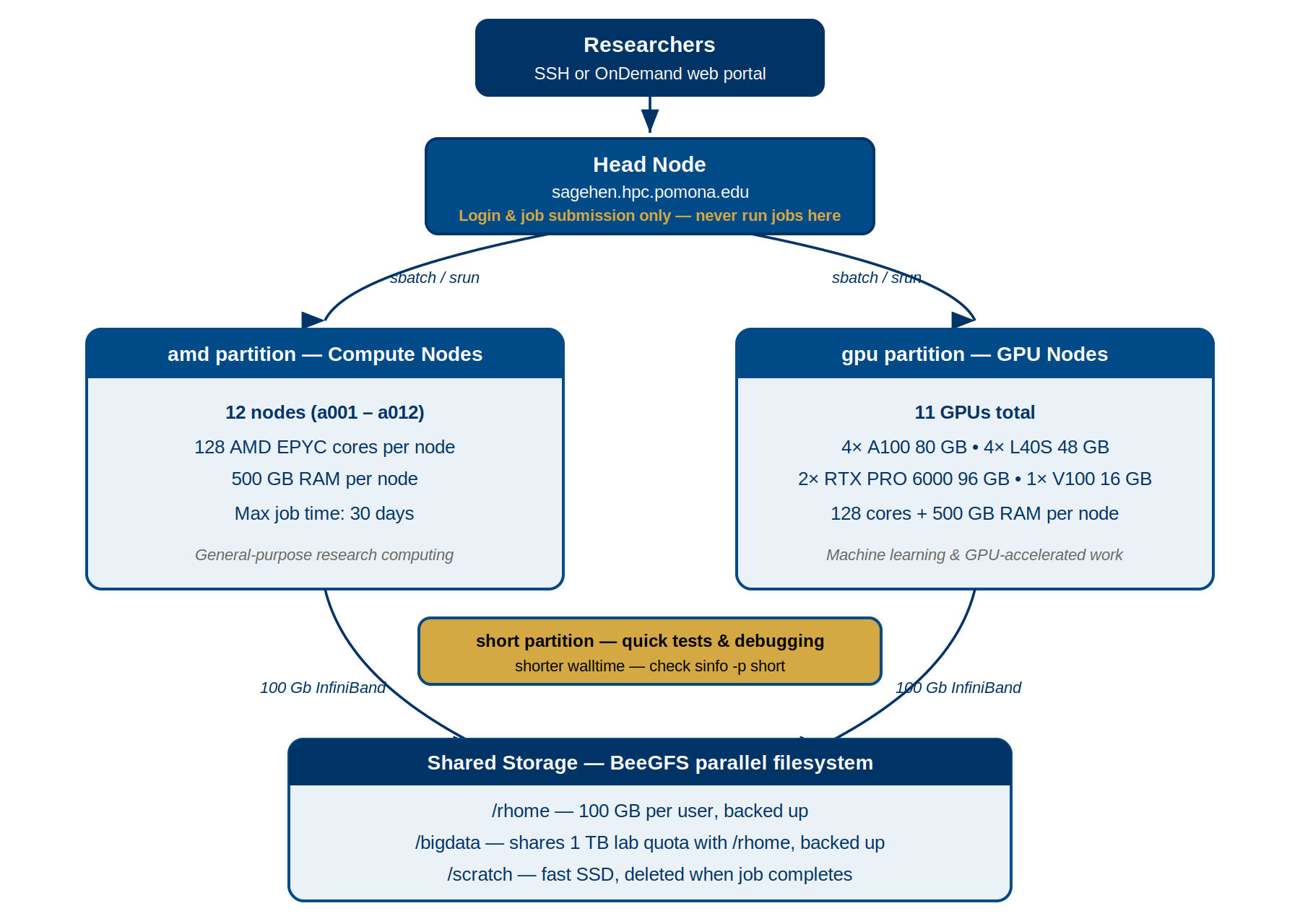
The “amd” Partition (Standard Compute)
The primary general-purpose partition for most research.
- 12 compute nodes
- Cores per node: 128 (AMD EPYC processors)
- Memory per node: 500 GB
- Interconnect: 100 Gb Infiniband
- Maximum job duration: 720 hours (30 days)
When to use: Most research computations, data processing, simulations, first-time job submissions.
The “gpu” Partition (GPU Acceleration)
For research requiring GPU acceleration.
- Multiple GPU-equipped nodes
- CPUs: 128 cores per node, 500 GB RAM
- GPUs:
| GPU Type | Count | GPU Memory | Strength |
|---|---|---|---|
| NVIDIA A100 | 4 | 80 GB each | Excellent for training |
| NVIDIA L40S | 4 | 48 GB each | Tensor-optimized / inference |
| NVIDIA RTX PRO 6000 | 2 | 96 GB each | Largest memory on the cluster (Blackwell) |
That’s 10 GPUs in total across the gpu partition.
- Maximum job duration: 720 hours (30 days)
When to use: CUDA/cuDNN code, deep learning training, GPU-accelerated molecular dynamics.
GPU Allocation Matters
Request only the GPUs you need:
- Deep learning: Usually 1-2 GPUs per job
- Multi-GPU training: 2-4 GPUs (if your code supports it)
- Standard molecular dynamics: 1 GPU
Each GPU reserved limits availability for others. Be considerate!
The “short” Partition (Quick Jobs and Debugging)
For quick test jobs, debugging job scripts, and rapid prototyping.
-
Shorter maximum walltime than
amdandgpu(verify withsinfo -p short) - Higher priority for short-duration work
- Useful for sanity-checking software and submission scripts before running long jobs
When to use: Debugging job scripts, quick test runs,
single-task interactive debugging, and any work that finishes within the
short partition’s walltime limit.
Viewing Cluster Status with sinfo
BASH
# See all partitions
sinfo

# More detailed output
sinfo -l

# Show only a specific partition
sinfo -p amd

# Show all nodes and their state
sinfo -N
Example output:
PARTITION  AVAIL  TIMELIMIT   NODES  STATE
amd           up 30-00:00:00     12  alloc
gpu           up 30-00:00:00      4  alloc
short         up    2:00:00      4  idle
(The exact short partition walltime limit may differ —
always check sinfo -p short for current values.)
-
AVAIL: Is the partition available (up/down)? -
TIMELIMIT: Maximum job duration -
STATE: Current state (alloc=some allocated, idle=free, down=unavailable)
Challenge 1: Exploring Sagehen HPC’s Partitions
Query the cluster to understand its configuration.
Steps:
- View partition information:
sinfo -l - View node details:
sinfo -N -l - Check the head node CPU:
lscpu | head -20
Questions:
- How many nodes are in the “amd” partition?
- What is the maximum walltime for the amd partition?
- How many cores does a compute node have?
- amd partition: 12 nodes
- amd partition maximum walltime: 720 hours (30 days)
- Each compute node: 128 cores
All standard compute nodes on Sagehen have identical configurations.
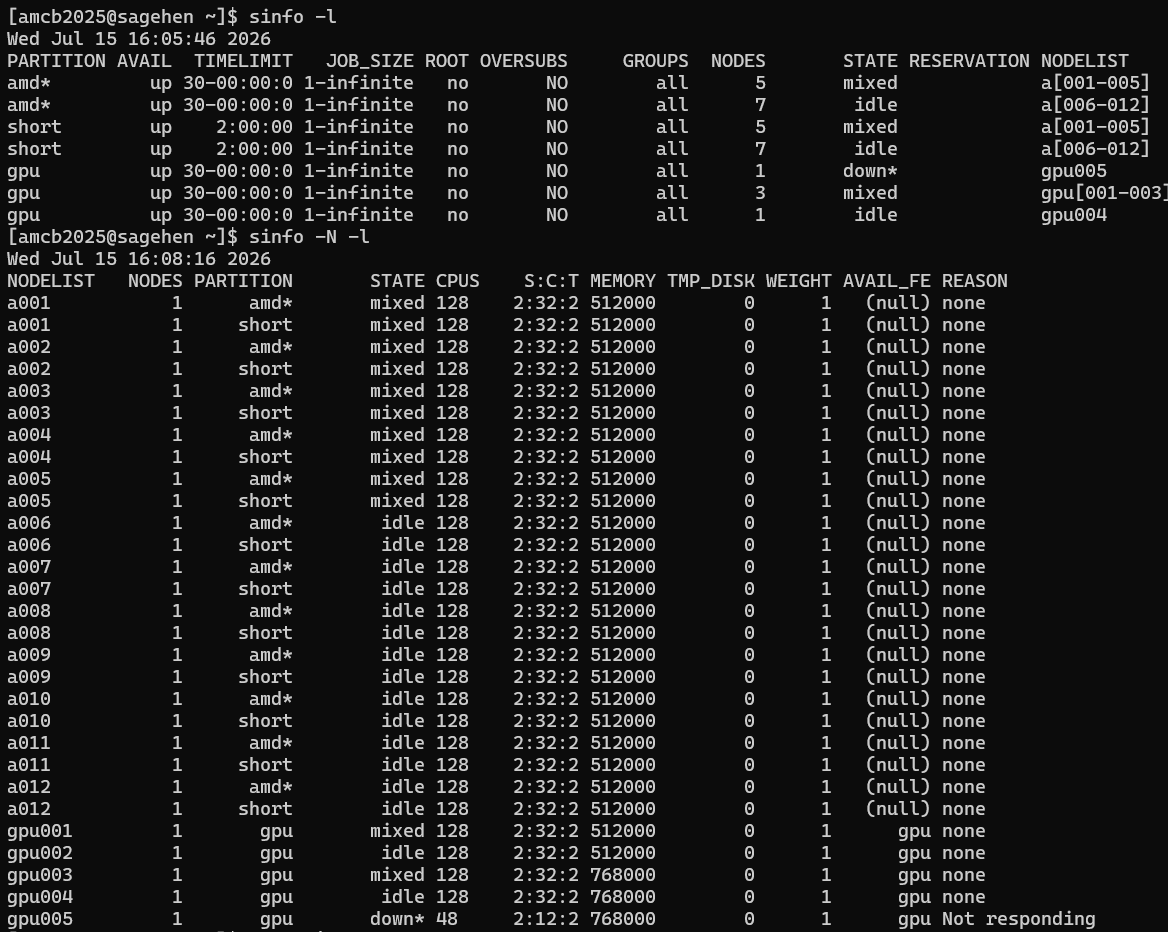
sinfo -l and
sinfo -N -l output: the three partitions and per-node cores
and memory.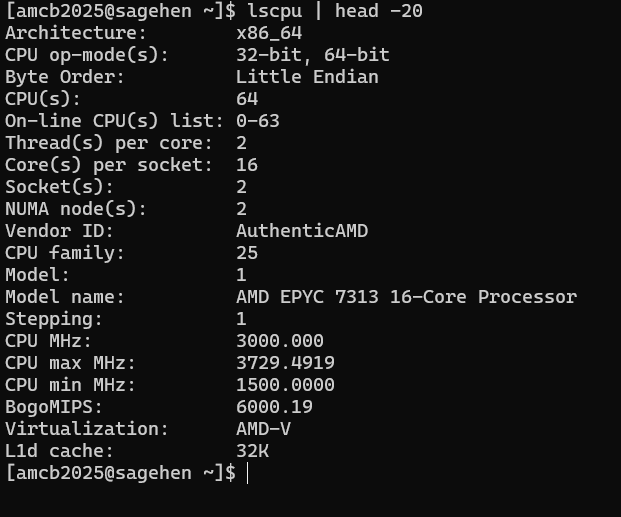
lscpu on the head node — note it
reports 64 threads on dual AMD EPYC 7313 chips, not the 128 cores of a
compute node.- Partitions group nodes by hardware type and enforce time/resource limits
- Sagehen has three partitions:
amd(general purpose),gpu(GPU-accelerated), andshort(quick / test / debug jobs with a shorter walltime) - Each compute node has 128 AMD EPYC cores and 500 GB RAM
- GPU partition offers 10 GPUs: A100, L40S, and RTX PRO 6000
- Use
sinfoto check partition status, node states, and available resources - Maximum job time: 720 hours (30 days) on
amdandgpu; checksinfo -p shortfor theshortpartition limit