
All in One View
Content from Why Parallel Computing?
Last updated on 2026-08-27 | Edit this page
Overview
Questions
- When should I parallelize my code?
- What is speedup and how do I measure it?
- What is the difference between wall clock time and CPU time?
Objectives
- Understand the difference between serial and parallel execution
- Learn about speedup and efficiency metrics
- Distinguish between wall clock time and CPU time
The Serial Computing Assumption
Processor speeds have plateaued around 3-4 GHz. The solution? Parallelism: doing multiple things at once.
Serial vs. Parallel Execution
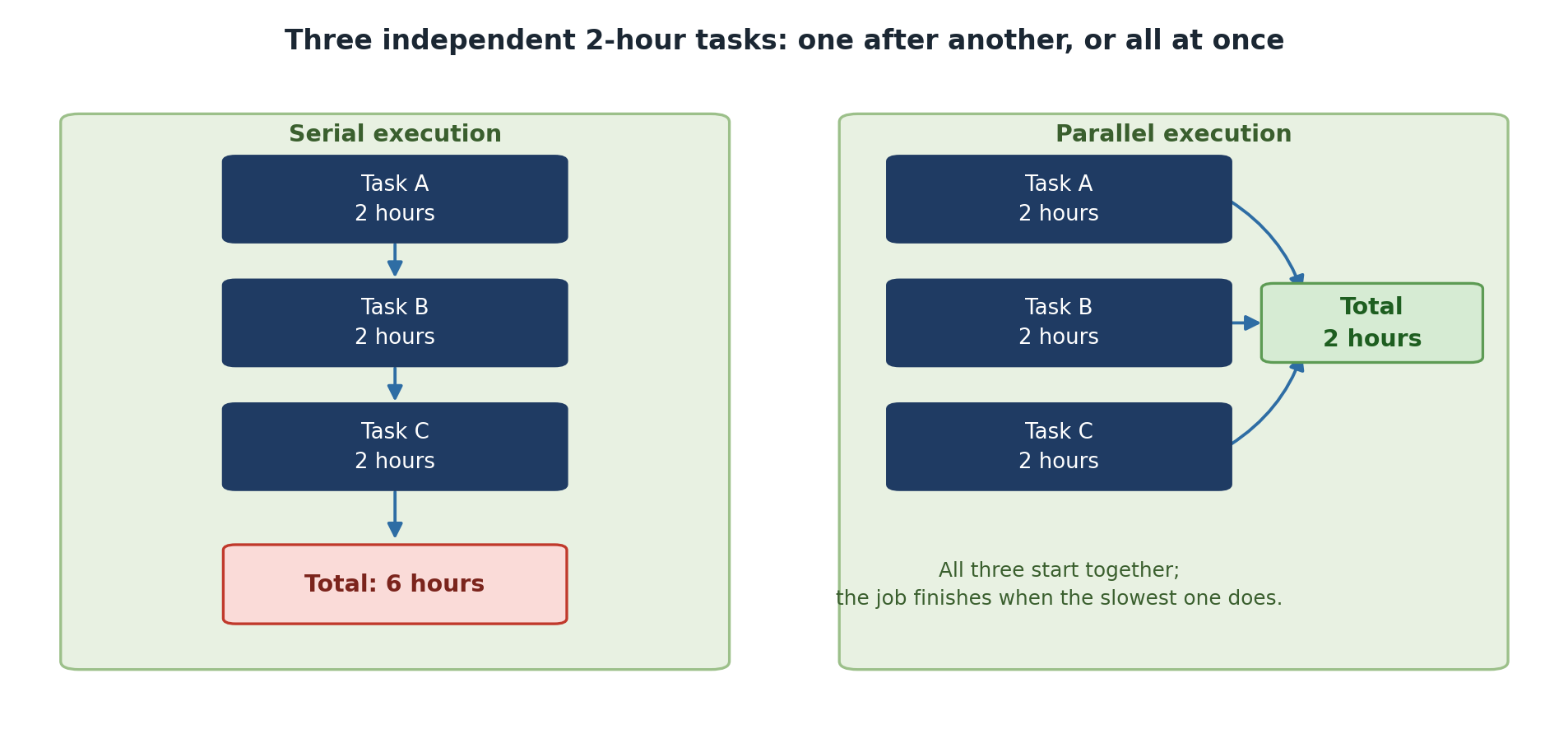
Serial execution (one task at a time):
Task A: [===========]
Task B:             [===========]
Task C:                         [===========]

Total time: 30 seconds
Parallel execution (on 3 processors):
Task A: [===]
Task B: [===]
Task C: [===]

Total time: 10 seconds
Parallelism trades computational work across multiple processors to reduce wall clock time.
Understanding Speedup and Efficiency
Speedup
\[S_p = \frac{T_1}{T_p}\]
Where \(T_1\) = time on 1 processor and \(T_p\) = time on p processors.
Example: Serial time 100s, parallel time on 4 cores 30s: \(S_4 = 100/30 = 3.33\)
Wall Clock Time vs. CPU Time
CPU time = sum of compute time across all cores. Wall clock time = actual elapsed time the user experiences.
1 core:  [============================] 100s wall time, 100 CPU seconds
4 cores: [========] 30s wall time, 120 CPU seconds (100s compute + 20s overhead)
If parallelism is working, wall clock time decreases even if total CPU time increases slightly.
When Parallelism Helps (and When It Doesn’t)
Parallelism Helps When: - The problem is genuinely parallel (independent data points, loosely coupled) - The parallelizable fraction is high (> 80% of execution time) - Communication overhead is small relative to computation - Wall clock time reduction matters to you
Parallelism Does NOT Help When: - Code is inherently serial (long dependency chains) - Communication overhead exceeds computation benefit - Serial fraction is large (> 20%) - Code already completes in seconds
Challenge
Analyzing a Workload
You have a program: reading a file takes 50s (serial), processing takes 50s (parallelizable), writing output takes 10s (serial). Total: 110s. With 4 processors, how fast can it go?
Serial fraction = (50 + 10) / 110 = 55%. Only the 50s processing can be parallelized.
Best case: 50 + 50/4 + 10 = 72.5 seconds. Speedup: 110/72.5 = 1.52x.
Only 52% speedup – the effort may not be worth it. Better to optimize I/O first.
- Parallel computing trades computational resources to reduce wall clock time
- Speedup and efficiency quantify parallel performance
- Profile and measure before parallelizing
- Not all problems benefit from parallelism
Content from Amdahl's Law and Speedup
Last updated on 2026-08-27 | Edit this page
Overview
Questions
- What factors limit how much parallelism can help?
- How do I predict maximum speedup?
- How do I measure if parallelism is working?
Objectives
- Understand Amdahl’s Law and its implications
- Calculate theoretical speedup for different serial fractions
- Recognize when parallelization is not worth the effort
Amdahl’s Law: The Reality Check
Not all code can be parallelized. Some parts are inherently serial: reading input files, initializing data structures, writing output, sequential dependencies.
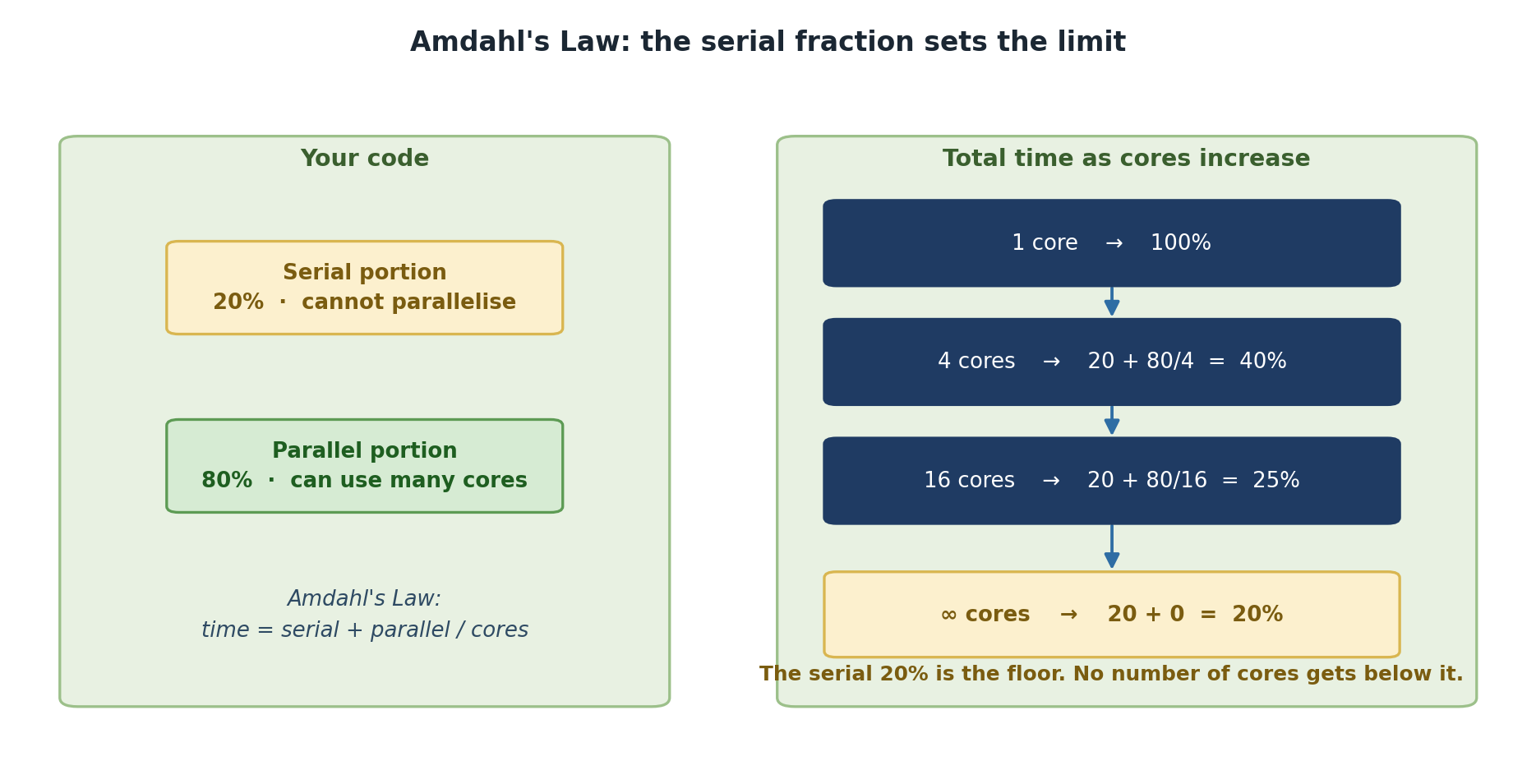
Amdahl’s Law quantifies maximum speedup:
\[S_p = \frac{1}{f_s + (1-f_s)/p}\]
Where \(f_s\) = serial fraction and \(p\) = number of processors.
Amdahl’s Law in Action
10% serial, 90% parallel with 16 processors:
\[S_{16} = \frac{1}{0.1 + 0.9/16} = \frac{1}{0.156} = 6.4\]
Even with 16 processors, only 6.4x speedup. The serial portion is the bottleneck.
5% serial → \(S_{16} = 9.2\). 1% serial → \(S_{16} = 13.9\).
Key Insight
The serial fraction is your enemy. Even a small serial portion becomes a huge bottleneck at scale. This means:
- Measure before parallelizing: Profile your code to find bottlenecks
- Don’t parallelize prematurely: Make sure the parallel portion is actually the bottleneck
- Choose the right granularity: Balance communication overhead against computation
Challenge
Calculating Amdahl’s Law
For each scenario, calculate the theoretical speedup on 8 processors:
Scenario 1: 99% parallelizable. \(S_8 = \frac{1}{0.01 + 0.99/8} = ?\)
Scenario 2: 95% parallelizable. \(S_8 = \frac{1}{0.05 + 0.95/8} = ?\)
Scenario 3: 80% parallelizable. \(S_8 = \frac{1}{0.20 + 0.80/8} = ?\)
Scenario 1: \(S_8 = 1/0.1338 = 7.48\) (93.5% efficiency)
Scenario 2: \(S_8 = 1/0.1688 = 5.92\) (74% efficiency)
Scenario 3: \(S_8 = 1/0.30 = 3.33\) (42% efficiency – may not be worth it!)
Measuring in Practice
BASH
# Create a test program
cat > test_serial.py << 'PYTHON'
import time

# Serial initialization (10% of runtime)
print("Initializing...")
time.sleep(1)

# Parallelizable work (90% of runtime)
start = time.time()
result = 0
for i in range(100000000):
    result += i
elapsed = time.time() - start
print(f"Elapsed: {elapsed:.2f} seconds")
PYTHON

python3 test_serial.py
Questions to consider: 1. How long did initialization take relative to computation? 2. What does Amdahl’s Law predict with 4 cores? 3. Could you optimize the serial portion instead?
- Amdahl’s Law shows that serial code limits maximum speedup
- Even small serial fractions (5-10%) become significant bottlenecks at scale
- Profile serial code first to identify the true bottleneck
- Don’t parallelize prematurely; ensure the payoff justifies the complexity
Content from Types of Parallelism
Last updated on 2026-08-27 | Edit this page
Overview
Questions
- What is the difference between shared memory and distributed memory?
- What is data parallelism vs task parallelism?
- How does Sagehen HPC’s architecture combine both?
Objectives
- Understand shared-memory and distributed-memory parallelism
- Learn the difference between task parallelism and data parallelism
- Understand Sagehen’s hybrid architecture
Shared-Memory vs. Distributed-Memory
Shared-Memory Parallelism
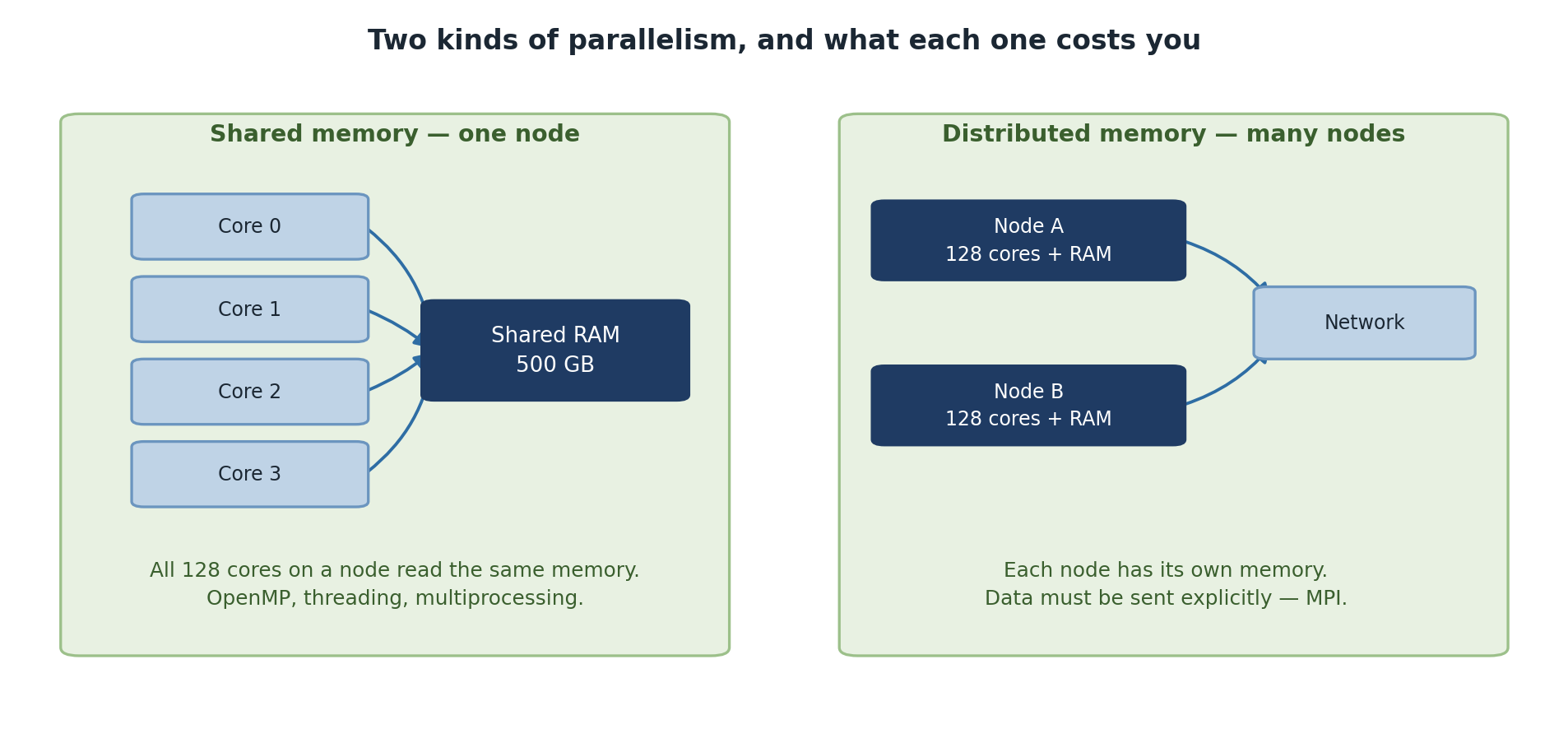
Multiple processors access the same memory space:
                   Shared Memory (RAM)
                        |
         _______________|_______________
        |               |               |
      Core 0          Core 1          Core 2
Advantages: Easy communication, low latency, good for single-node work. Challenges: Race conditions, limited to single-node memory. Examples: OpenMP, Python multiprocessing, R parallel package.
Distributed-Memory Parallelism
Each processor has its own memory. Data sharing requires explicit message passing:
  Node 1            Node 2            Node 3
  Memory            Memory            Memory
    |                 |                 |
  Core 0            Core 1            Core 2

  Communication: explicit send/receive messages
Advantages: Scales to many nodes, simpler synchronization. Challenges: Higher latency, explicit communication code. Examples: MPI, Spark, distributed databases.
Data Parallelism vs. Task Parallelism
Comparison: Which Type of Parallelism?
| Scenario | Best Approach | Why |
|---|---|---|
| 100 independent simulations | Job arrays | No communication needed |
| Processing 10,000 images | Job arrays | Independent files |
| Single simulation on 4 cores | multiprocessing | Shared memory |
| Large dataset analysis | Data parallelism | Divide data, apply function |
| Tightly-coupled physics | MPI | Needs frequent communication |
Challenge
Categorizing Problems
For each, identify: is it data parallel, task parallel, or tightly coupled?
- Analyzing 1,000 gene sequences independently
- Simulating fluid flow where each grid point depends on neighbors
- Training 3 different ML algorithms on the same data
- Task parallel / embarrassingly parallel – each sequence is independent. Use job arrays.
- Tightly coupled – spatial dependencies between grid points. Use shared-memory or MPI.
- Task parallel – each algorithm trains independently. Use job arrays (only 3 tasks though).
- Shared-memory parallelism works within a node; distributed-memory across nodes
- Data parallelism applies the same operation to different data
- Task parallelism runs different tasks in parallel
- Most research problems are embarrassingly parallel at some level
Content from Embarrassingly Parallel Problems
Last updated on 2026-08-27 | Edit this page
Overview
Questions
- How do I know if my problem is embarrassingly parallel?
- What are common embarrassingly parallel patterns?
- How do I convert serial code to run in parallel?
Objectives
- Recognize embarrassingly parallel problems in your research
- Understand common patterns: parameter sweeps, Monte Carlo, batch processing
- Practice converting serial code to parallel structure
What Makes a Problem Embarrassingly Parallel?
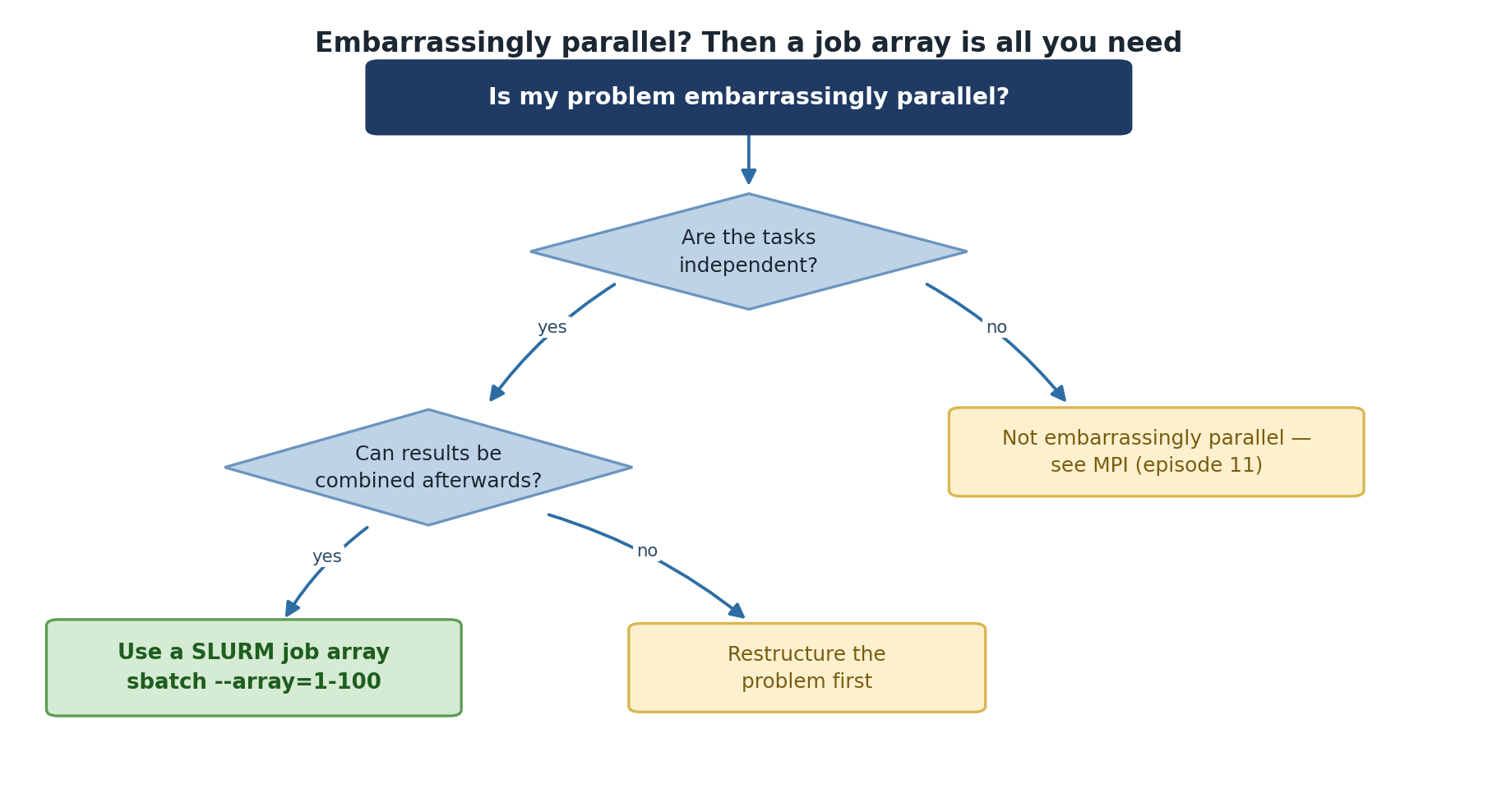
A problem is embarrassingly parallel when:
- Tasks are completely independent: No communication between tasks
- Results don’t depend on task order: Task A doesn’t wait for Task B
- Each task needs only its input data: No shared state
- Results can be combined trivially: Simple aggregation at the end
Checklist: Is Your Problem Embarrassingly Parallel?
- Can each task run without data from other tasks? (YES = good)
- Does the order of execution matter? (NO = good)
- Can you run each task in isolation? (YES = good)
- Is combining results as simple as concatenating or averaging? (YES = very good)
If you answered YES to all four, use job arrays!
Common Patterns
Pattern 1: Parameter Sweeps
Serial: 100 learning rates x 30 seconds each = 50 minutes
Parallel (100 cores): 30 seconds
Pattern 2: Monte Carlo Simulations
PYTHON
def estimate_pi(n_samples, seed):
    random.seed(seed)
    inside = sum(1 for _ in range(n_samples)
                 if random.random()**2 + random.random()**2 <= 1)
    return 4 * inside / n_samples
Each random trial is independent. Run 100 jobs, average the results.
Converting Serial Code to Parallel
Step 4: Combine Results
Challenge
Is It Embarrassingly Parallel?
Code A: Analyze 1000 gene sequences independently:
Code B: Simulate a time series where each step depends on the previous:
Code A: YES. Each sequence is independent. Use job arrays for up to 1000x speedup.
Code B: NO. Each step depends on the previous one.
Look for other parallelism (e.g., parallelize within
evolve(), or run many independent simulations with
different initial conditions).
- Embarrassingly parallel problems have no dependencies between tasks
- Common patterns: parameter sweeps, Monte Carlo, batch processing, resampling
- Convert serial code by accepting parameters and using unique output files
- These are the easiest to parallelize and often the most valuable
Content from GNU Parallel and Shell Parallelism
Last updated on 2026-08-27 | Edit this page
Overview
Questions
- How do I run many independent commands in parallel from the shell?
- What does
paralleldo that aforloop with&cannot? - How do I throttle concurrency, capture output, and resume a failed batch?
- When should I move from shell parallelism to SLURM job arrays?
Objectives
- Run parallel tasks from the command line with both shell
backgrounding and
parallel - Throttle concurrency so you do not overload a node
- Tag and capture output so logs from many parallel tasks stay legible
- Resume an interrupted batch from where it stopped
- Recognize when to graduate from shell parallelism to SLURM job arrays
Why Shell-Level Parallelism
Before reaching for SLURM, the simplest parallelism is running
multiple commands at once on a single node. Sagehen HPC amd
nodes have 128 cores; if you only need to process a few hundred files
and each takes a few seconds, running 64 in parallel on one node
finishes faster than the SLURM queue takes to schedule a job array.
Shell parallelism shines for:
- Quick interactive testing of an “embarrassingly parallel” script before scaling to job arrays.
- Workflows under a few hundred tasks where total time is under a few hours.
- Pipeline glue between heavy SLURM jobs (e.g., postprocessing many output files in parallel).
When tasks number in the thousands, run for days, or need different node counts, switch to SLURM job arrays (next episode).
The Simplest Pattern: Background Jobs
Append & to a command to send it to the background.
wait blocks until all backgrounded jobs finish:
BASH
# Run 10 jobs in background
for i in {1..10}; do
    python3 monte_carlo_pi.py $i &
done
wait  # Wait for all background jobs to finish
This works but has three problems. First, it offers no concurrency limit. If the loop has 1000 iterations, you spawn 1000 processes at once and the node falls over. Second, output from all jobs interleaves on stdout in unpredictable order. Third, there is no easy way to know which iteration failed.
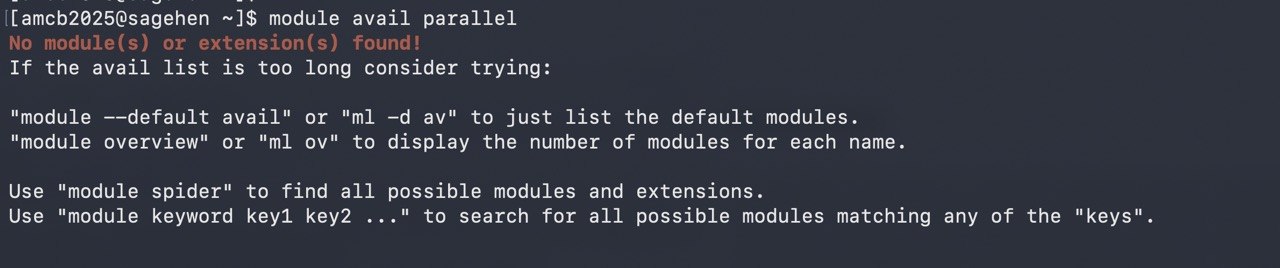
parallel module, which is why the episode installs it into
your own conda environment.GNU Parallel: The Better Default
GNU Parallel solves all three problems. It is not
preinstalled on Sagehen (there is no parallel module
either) – install it once into a conda environment:
If you’d rather not install anything, xargs -P (always
available) covers the basic case, without the progress bars and job
logs:
With GNU Parallel installed, two ways to feed it work:
BASH
# Pass each input as one argument
seq 1 100 | parallel -j 32 python3 monte_carlo_pi.py {}

# Or with explicit file list
ls /scratch/$USER/inputs/*.txt | parallel -j 32 process_file.sh {}
The -j 32 flag caps concurrency at 32 simultaneous
processes. The {} placeholder substitutes each input. You
get a progress bar with --progress, an estimated
time-remaining with --eta, and a per-task log file with
--joblog.
::: arg1 arg2 arg3 is parallel’s inline argument syntax.
You can also use :::: file_with_args.txt. Combine multiple
input lists for cross-products:
BASH
# Sweep over learning rates and seeds: 5 x 10 = 50 jobs
parallel -j 16 python3 train.py --lr {1} --seed {2} \
    ::: 0.001 0.003 0.01 0.03 0.1 \
::: $(seq 1 10)parallel vs xargs -P
xargs also has a -P parallelism flag and is
more universally available than parallel. For very simple
cases (one input list, no quoting headaches)
xargs -P 32 -n 1 -I {} command {} works fine.
Choose parallel when you need:
- Multiple input lists with cross-products
(
::: a b ::: x y). - Per-task log files (
--joblog). - Resume from a failed batch (
--resume-failed). - Output tagged with input value (
--tag). - Distribution across multiple SSH hosts
(
--sshloginfile).
Choose xargs when the parallelism is incidental and you
do not need the bells and whistles.
Keeping Output Legible
The biggest pain point with shell parallelism is interleaved output. Three flags fix it:
BASH
# --tag prefixes each line with the input value
parallel --tag -j 8 'echo Processing {}; sleep 1; echo Done {}' ::: a b c d

# --linebuffer flushes output line-by-line so you see progress in real time
parallel --linebuffer -j 8 long_running_command {} ::: input_*

# Redirect each task to its own file for clean post-hoc analysis
parallel -j 8 'analyze.sh {} > logs/{/.}.log 2>&1' ::: data/*.csv
The {/.} syntax in the last example strips the path and
the extension from the input, turning data/foo.csv into
foo. Other handy substitutions: {/} for
basename only, {.} to drop the extension only,
{#} for the job number.
Throttling and Resume
Two parallel features pay for the rest of the tool.
Concurrency throttling:
BASH
# Hard cap at 32, never more than 32 concurrent processes
parallel -j 32 ...

# Use 75% of available cores, dynamic
parallel -j 75% ...

# Use all cores minus 4 (leave headroom for the OS)
parallel -j -4 ...
And resume after failure:
BASH
# First run, captures status of every task
parallel --joblog runs.log -j 32 python3 task.py {} ::: $(seq 1 1000)

# (Suppose this crashes after task 432.)

# Resume only the failed and unrun tasks
parallel --resume-failed --joblog runs.log -j 32 python3 task.py {} ::: $(seq 1 1000)
This is invaluable for batches that take hours. The job log records which inputs completed successfully so a second invocation skips them and only retries the failures.
Writing Parallel-Ready Scripts
Whether you use parallel, xargs, or SLURM
arrays, the script you parallelize must follow three rules:
Take the variable input as an argument or environment variable. Never hard-code the input file path or seed inside the script.
Write outputs to unique filenames keyed on the input. Two simultaneous instances writing to
output.txtwill trash each other.Be idempotent. Running the same input twice should produce the same result, so resume after a crash is safe.
Monte Carlo Pi Estimation
PYTHON
#!/usr/bin/env python3
import random
import sys

def estimate_pi(n_samples, seed):
    random.seed(seed)
    inside = 0
    for _ in range(n_samples):
        x = random.random()
        y = random.random()
        if x**2 + y**2 <= 1:
            inside += 1
    return 4 * inside / n_samples

if __name__ == "__main__":
    job_id = int(sys.argv[1]) if len(sys.argv) > 1 else 1
    pi_estimate = estimate_pi(1_000_000, seed=job_id)

    with open(f"pi_{job_id:03d}.txt", "w") as f:
        f.write(f"{pi_estimate}\n")

    print(f"Job {job_id}: pi approx {pi_estimate}")
Bootstrap Resampling
PYTHON
#!/usr/bin/env python3
import numpy as np
import sys

data = np.loadtxt("data.csv")

def bootstrap_sample(data, seed):
    np.random.seed(seed)
    indices = np.random.choice(len(data), size=len(data), replace=True)
    return np.mean(data[indices])

if __name__ == "__main__":
    job_id = int(sys.argv[1])
    stats = [bootstrap_sample(data, seed=job_id * 1000 + i) for i in range(1000)]
    np.savetxt(f"bootstrap_{job_id}.csv", stats)
Both scripts accept a job ID, seed deterministically from it, and write to a unique output file. They satisfy all three rules.
Combining Results
After all parallel runs complete, aggregate. Two approaches: a Python combining script for analysis, or shell concatenation for raw data:
PYTHON
#!/usr/bin/env python3
import glob
import numpy as np

estimates = []
for file in sorted(glob.glob("pi_*.txt")):
    with open(file) as f:
        estimates.append(float(f.read().strip()))

estimates = np.array(estimates)
print(f"Mean estimate: {estimates.mean():.6f}")
print(f"Std deviation: {estimates.std():.6f}")
print(f"95% CI: [{np.percentile(estimates, 2.5):.6f}, {np.percentile(estimates, 97.5):.6f}]")When to Graduate to SLURM Job Arrays
Shell parallelism caps at one node’s resources: 128 cores or 512 GB
on an amd node. Beyond that, SLURM job arrays let you
spread tasks across multiple nodes, queue them properly so they share
fairly with other users, and survive a node reboot. Graduate to job
arrays when:
- You need more than one node’s worth of cores or memory.
- The total runtime exceeds a few hours and you want SLURM to manage scheduling.
- Tasks need very different resource amounts (some need GPU, others CPU only).
- You want each task’s accounting and logs handled by SLURM.
The transition is mechanical: a SLURM array’s
$SLURM_ARRAY_TASK_ID plays the role that $1 or
{} played in shell parallelism. Your script does not need
to change. The next episode covers the SLURM side.
Common pitfall: parallel reads from /bigdata
Running parallel -j 32 where every task reads from
/bigdata can saturate the shared BeeGFS filesystem and slow
every job using it. If your tasks read shared input data, copy it to
/scratch once at the start and have all parallel tasks read
from there.
Challenge
Write a Parallel-Ready Script and Run It Two Ways
Write a Python script that accepts a job ID, computes a simple
simulation (e.g., sum of random numbers with that seed), and saves to a
unique file. Run it once with shell backgrounding (&
and wait) and once with parallel. Note one
advantage you observe with parallel.
PYTHON
# simulate.py
import numpy as np, sys
job_id = int(sys.argv[1])
np.random.seed(job_id)
result = np.sum(np.random.randn(1000000))
with open(f"result_{job_id}.txt", "w") as f:
    f.write(f"{result}\n")
PYTHON
# combine.py
import glob, numpy as np
results = [float(open(f).read()) for f in sorted(glob.glob("result_*.txt"))]
print(f"Mean: {np.mean(results):.4f}, Std: {np.std(results):.4f}")
Shell backgrounding:
GNU Parallel:
The parallel version visibly throttles to 8 concurrent
processes (so 20 tasks complete in 3 waves rather than all-at-once),
gives a per-task log in runs.log, and lets you resume
failed tasks with --resume-failed.
Challenge
When to Use Job Arrays Instead
A graduate student wants to run 5,000 hyperparameter configurations of a model that each take 90 minutes on one CPU and uses 8 GB of RAM. Each run is independent. Should they use shell parallelism on one Sagehen node, or SLURM job arrays?
SLURM job arrays. Reasoning:
- 5,000 jobs x 90 min serial = 312 days. Even at 128-way parallelism on one node, that is 2.4 days of wallclock with no fault tolerance.
- 8 GB per task x 128 concurrent tasks = 1 TB RAM, exceeding the node’s 512 GB. Concurrency would have to drop to ~64.
- Job arrays scale across all 12 amd nodes, finishing in roughly 5 hours.
- SLURM tracks each task’s accounting, and a node reboot does not lose progress.
Shell parallelism would be the right choice if there were 50 configs, not 5,000.
-
parallel -j Nruns up to N tasks concurrently with throttling, logging, and resume - Background jobs (
&) work for trivial cases but lack concurrency limits and per-task logs -
--joblogplus--resume-failedmakes long batches restartable -
--tagand per-task log files keep output legible - Structure scripts to take input as args and write unique output files
- Stage shared input on /scratch to avoid hammering /bigdata with parallel reads
- Move from shell parallelism to SLURM job arrays when tasks exceed one node or run for many hours
Content from SLURM Job Arrays
Last updated on 2026-08-27 | Edit this page
Overview
Questions
- How do I submit many jobs at once with SLURM?
- What is SLURM_ARRAY_TASK_ID and how do I use it?
- How do I map array indices to my parameters?
- How do I avoid hammering SLURM with thousands of tiny tasks?
Objectives
- Understand SLURM job arrays and the –array flag
- Use SLURM environment variables to differentiate tasks
- Map array indices to parameters efficiently
- Monitor and manage job arrays as a unit
- Choose the right granularity for array tasks
Why Job Arrays
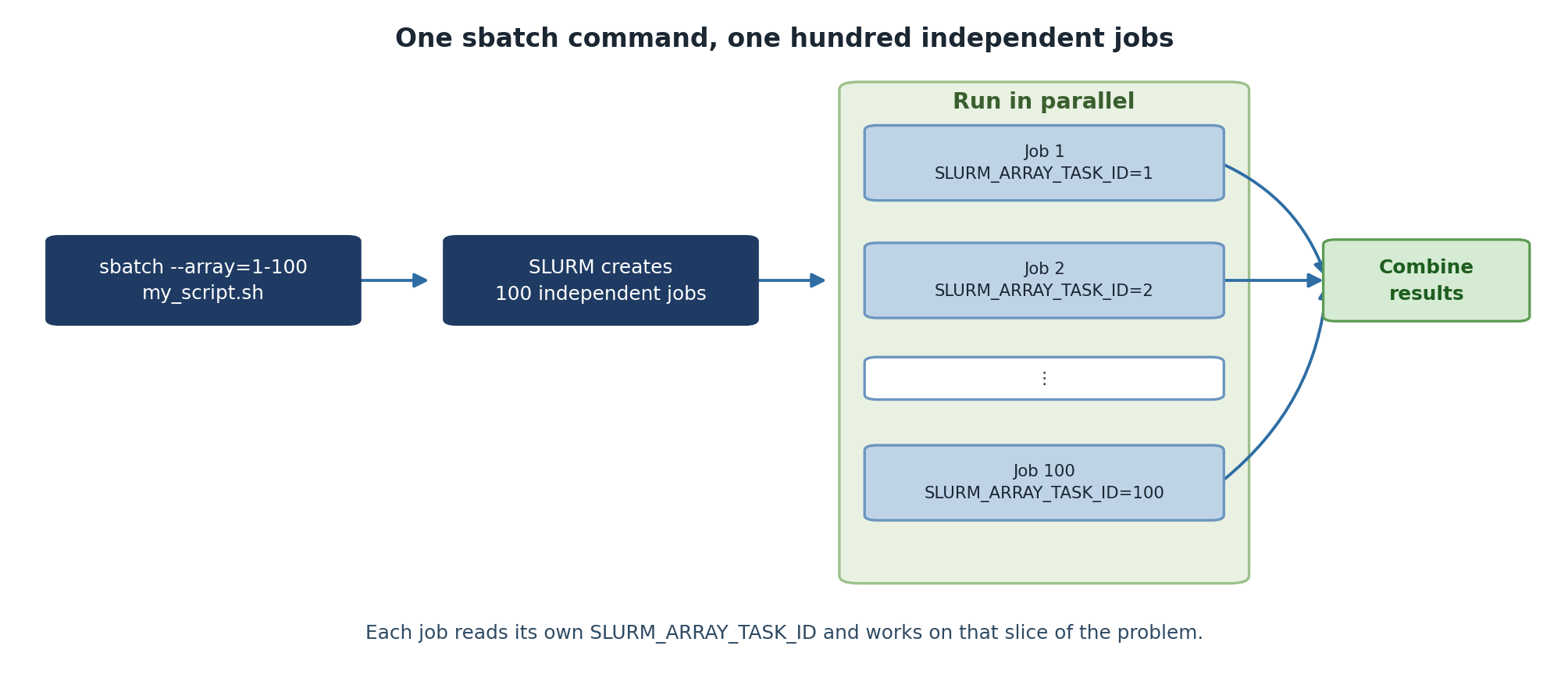
Job arrays are the cleanest way to express “run this script with N
different inputs” to SLURM. They let you submit a thousand parallel jobs
with one sbatch command, monitor them as a group, and
cancel them as a group. Without arrays, you would write a wrapper script
that loops over inputs and submits one job per iteration: harder to
manage, more strain on the scheduler, and no easy way to gather
results.
The pattern works for any embarrassingly parallel workload: parameter sweeps, batch processing of files, Monte Carlo simulations with different seeds, hyperparameter tuning. If your tasks are independent and you need to run many of them, arrays are almost always the right answer.
Job Arrays vs. Loops
Without job arrays (bad):
With job arrays (good):
The wrapper-loop version submits 100 separate jobs, each with its own
job ID and accounting record. The array version submits one job ID with
100 tasks. SLURM handles array dispatch much more efficiently than 100
individual sbatch calls, and you can manage the entire
batch as a single entity.
Basic Syntax
BASH
#!/bin/bash
#SBATCH --job-name=simulation
#SBATCH --array=1-100
#SBATCH --time=01:00:00
#SBATCH --ntasks=1
#SBATCH --cpus-per-task=1
#SBATCH --mem=4G

echo "Running task $SLURM_ARRAY_TASK_ID"
python3 my_script.py --param_set $SLURM_ARRAY_TASK_ID
The --array=1-100 directive tells SLURM to run this same
script 100 times, each invocation seeing a different value of
$SLURM_ARRAY_TASK_ID (1 through 100). Resource directives
like --time and --mem apply per task, not per
array. A 100-task array with --mem=4G total memory
commitment is 400 GB, distributed across nodes as SLURM schedules.
Array Index Variations
BASH
sbatch --array=1-100 script.sh        # IDs: 1, 2, ..., 100
sbatch --array=0-100:10 script.sh     # IDs: 0, 10, 20, ..., 100
sbatch --array=1,5,10,15,20 script.sh # Explicit list
sbatch --array=1-100%10 script.sh     # 100 tasks, max 10 running concurrently
The %N modifier is especially useful. Submitting
--array=1-1000%50 runs 1,000 tasks but only 50 at any time,
which is gentler on shared resources and avoids consuming everyone
else’s queue priority.
Practical Examples
Parameter Sweep
BASH
#!/bin/bash
#SBATCH --job-name=ml_sweep
#SBATCH --array=1-100
#SBATCH --time=00:30:00
#SBATCH --mem=4G

LEARNING_RATE=$(sed "${SLURM_ARRAY_TASK_ID}q;d" param_list.txt)
python3 train_model.py \
    --learning_rate $LEARNING_RATE \
    --output results/model_${SLURM_ARRAY_TASK_ID}.pkl
The sed "${N}q;d" file idiom prints just line N from a
file, which is the simplest way to map an array index to a parameter
line in a text file.
Batch File Processing
BASH
#!/bin/bash
#SBATCH --job-name=image_proc
#SBATCH --array=1-100
#SBATCH --cpus-per-task=4
#SBATCH --mem=8G

START=$(( (SLURM_ARRAY_TASK_ID - 1) * 10 ))
END=$(( SLURM_ARRAY_TASK_ID * 10 ))

for i in $(seq $START $((END - 1))); do
    python3 analyze_image.py images/image_${i}.tif --output results/analysis_${i}.csv
done
This processes 1,000 images in 100 array tasks of 10 images each. The “batch within a task” pattern (covered next episode) reduces SLURM scheduling overhead when individual tasks are very fast.
SLURM Environment Variables
BASH
$SLURM_ARRAY_TASK_ID      # This task's index
$SLURM_ARRAY_JOB_ID       # Master job ID
$SLURM_ARRAY_TASK_MIN     # Minimum task ID
$SLURM_ARRAY_TASK_MAX     # Maximum task ID
$SLURM_JOB_ID             # Individual job ID for this task
$SLURM_JOB_ID is unique per task while
$SLURM_ARRAY_JOB_ID is shared across all tasks in the
array. Use $SLURM_ARRAY_JOB_ID if you want all output files
to share a common prefix; use $SLURM_JOB_ID if you want
each task’s output to have a unique number.
Monitoring and Managing
BASH
squeue -j 12345            # View all jobs in array
squeue -j 12345_5          # View specific task
scancel 12345              # Cancel entire array
scancel 12345_5            # Cancel only task 5
scancel 12345_{1-50}       # Cancel tasks 1-50
scontrol requeue 12345_5   # Requeue failed task
scontrol requeue is invaluable when one task in a
100-task array fails because of a transient error (a node hiccup, a
temporary file system issue). You can re-submit only that one task
without re-running the other 99.
Dependency Chains
BASH
# Run analysis after all sweep jobs complete
sbatch --dependency=afterok:12345 analyze_results.sh
A common pattern: array job submits the sweep, dependency job waits for the entire array to finish, then aggregates the results. The aggregation script can iterate over all output files and produce a summary.
Choosing array task granularity
Each SLURM task has overhead: scheduling, container setup, environment activation, module loading. For very fast tasks (under a minute), this overhead can dominate the actual work.
If each task takes seconds: batch 50 to 100 of them into one task that loops internally.
If each task takes minutes to hours: one task per work unit is fine.
If each task takes days: consider checkpointing within the task so a hardware failure does not lose all progress.
A rule of thumb: aim for tasks of at least 5 minutes each. Below that, internal looping pays.
Challenge
Submit Your First Job Array
Create a job array that runs a Monte Carlo pi estimation with 10
different seeds (array 1-10). Each task should save its result to
results/pi_N.txt.
Challenge
Right-Size an Array
You have 5,000 input files to process; each takes about 30 seconds.
Should you submit --array=1-5000, or batch them? Justify
your choice.
Batch them. 5,000 tasks of 30 seconds each have an unfavorable ratio
of SLURM overhead to actual work. A reasonable design:
--array=1-50%20, where each task processes 100 files in a
loop. That gives 50 tasks of about 50 minutes each, throttled to 20
concurrent. SLURM scheduling overhead becomes negligible, and you stay
polite by not consuming 5,000 queue slots at once.
- SLURM job arrays submit many similar jobs with one command
- Each task gets a unique SLURM_ARRAY_TASK_ID
- Map array indices to parameters and data files
- Save results with unique filenames based on task ID
- Monitor and manage entire arrays with a single job ID
- Use
--array=1-1000%50to throttle concurrency on shared clusters - Aim for tasks of at least 5 minutes; batch internally if shorter
-
scontrol requeuere-runs only failed tasks without redoing the rest
Content from Advanced Job Arrays
Last updated on 2026-08-27 | Edit this page
Overview
Questions
- How do I map array indices to multiple parameters?
- How do I use argparse with job arrays?
- What are performance considerations for large arrays?
- How do I gather and verify results from a sweep?
Objectives
- Map array indices to multi-dimensional parameter grids
- Use Python argparse with SLURM job arrays
- Understand scheduling and performance considerations
- Aggregate and verify array results cleanly
Multi-Parameter Sweeps
The simple “one parameter per task” pattern stops working once you want to vary two or more things at once. Three approaches handle multi-parameter sweeps: direct index arithmetic, parameter file lookup, and Python parameter generation.
Cartesian Product Mapping
Map a single array index to multiple parameters using division and modulo:
BASH
#!/bin/bash
#SBATCH --job-name=train_sweep
#SBATCH --array=1-10

LEARNING_RATES=(0.001 0.002 0.005 0.01 0.02 0.05 0.1 0.2 0.5 1.0)
BATCH_SIZES=(16 32 64)

task_id=$((SLURM_ARRAY_TASK_ID - 1))
lr_idx=$((task_id / ${#BATCH_SIZES[@]}))
bs_idx=$((task_id % ${#BATCH_SIZES[@]}))

LR=${LEARNING_RATES[$lr_idx]}
BS=${BATCH_SIZES[$bs_idx]}

python3 train_model.py --learning_rate $LR --batch_size $BS \
    --output results/model_task${SLURM_ARRAY_TASK_ID}.pkl
The arithmetic is: total tasks = N(LR) x N(BS), index decomposes as
(lr_idx, bs_idx) = divmod(task_id, len(BS)). For three
parameters, extend with another modulo. This works but gets unwieldy
past three dimensions.
Parameter File Approach
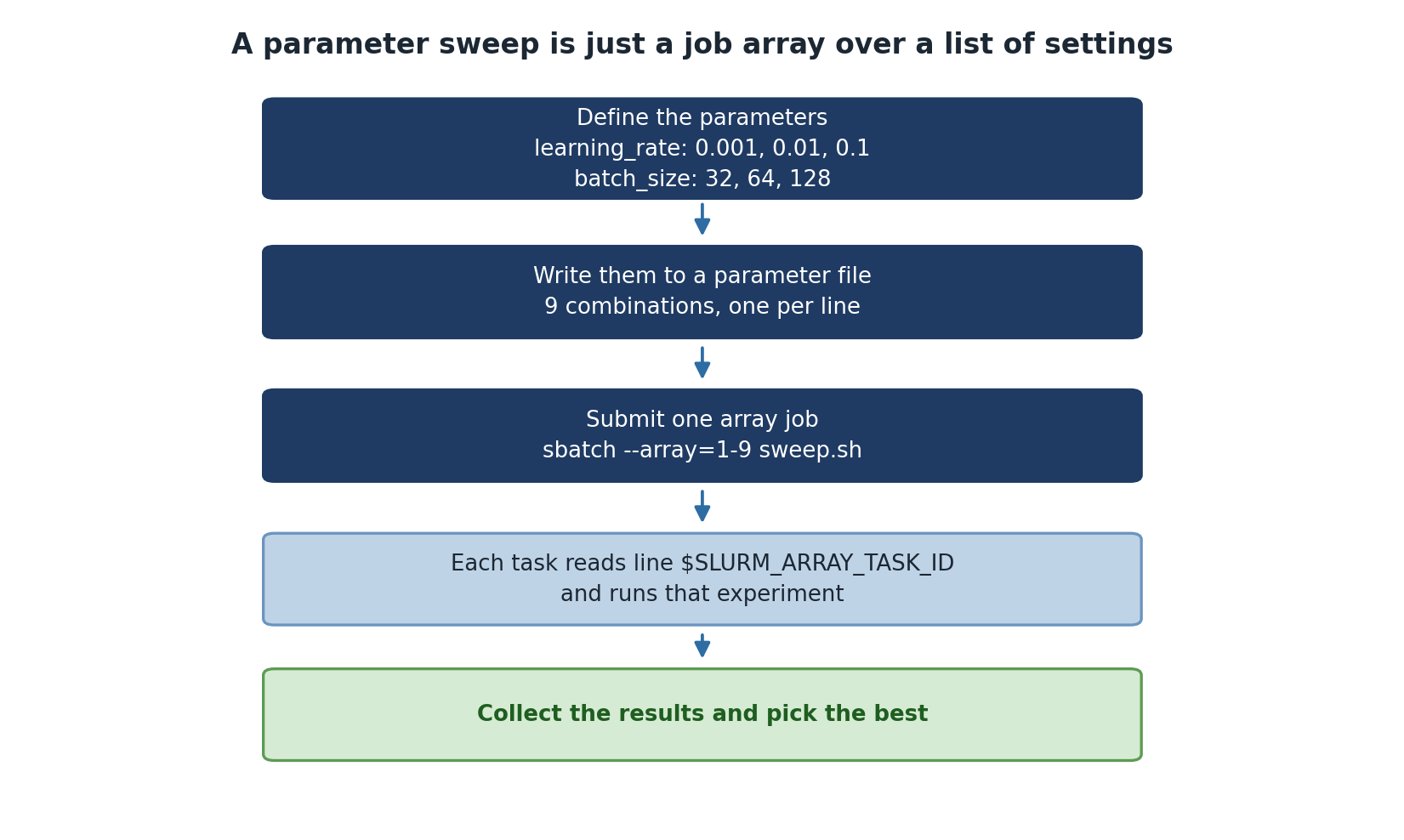
For sweeps with many parameters or non-cartesian combinations, write a parameter file once and look up by line number:
# param_list.txt
1 red
1 green
1 blue
2 red
2 green
2 blue
BASH
#!/bin/bash
#SBATCH --array=1-6
PARAMS=$(sed "${SLURM_ARRAY_TASK_ID}q;d" param_list.txt)
SETTING=$(echo $PARAMS | awk '{print $1}')
COLOR=$(echo $PARAMS | awk '{print $2}')

python3 run_experiment.py --setting $SETTING --color $COLOR
Generate the parameter file in Python beforehand:
PYTHON
# generate_params.py
import itertools

settings = [1, 2, 3]
colors = ['red', 'green', 'blue']

with open('param_list.txt', 'w') as f:
    for s, c in itertools.product(settings, colors):
        f.write(f"{s} {c}\n")

print(f"Wrote {len(settings) * len(colors)} parameter combinations")
The file approach decouples parameter generation from the SLURM script. You can review the file before submission, modify combinations without changing the script, and replicate the exact same sweep later by saving the file in version control.
Using argparse with Job Arrays
The SLURM script handles index-to-parameter mapping, but the actual
training script should accept parameters as command-line arguments using
argparse:
PYTHON
#!/usr/bin/env python3
import argparse
import os

def main():
    parser = argparse.ArgumentParser()
    parser.add_argument('--learning_rate', type=float, required=True)
    parser.add_argument('--batch_size', type=int, default=32)
    parser.add_argument('--output', required=True)
    args = parser.parse_args()

    print(f"Training with lr={args.learning_rate}, bs={args.batch_size}")
    # ... training code ...

    with open(args.output, 'w') as f:
        f.write(f"Model trained with lr={args.learning_rate}\n")

if __name__ == "__main__":
    main()
This separation is important. The Python script knows nothing about SLURM and can be tested by hand, on a laptop, or with a different scheduler. The SLURM script knows nothing about what the training does. Each layer is independently debuggable.
Performance Considerations
Scheduling Delays
Large arrays may experience delays:
If you request scarce resources (a specific GPU type, very high
memory) at high concurrency, jobs queue. The fix is to throttle
concurrency: --array=1-1000%20 runs at most 20 tasks at a
time, which is much more likely to schedule promptly than asking for
1,000 GPUs simultaneously.
If many tasks are identical and very short, SLURM scheduling overhead per task can dominate. Batch tasks internally (process 50 work units per array task instead of 1).
Batching Tasks
For very fast tasks, batch multiple into one job:
BASH
#!/bin/bash
#SBATCH --array=1-50

# Each job processes 20 items (1000 total / 50 jobs)
START=$(( (SLURM_ARRAY_TASK_ID - 1) * 20 + 1 ))
END=$(( SLURM_ARRAY_TASK_ID * 20 ))

for i in $(seq $START $END); do
    python3 process_item.py $i
done
This converts 1,000 SLURM tasks into 50 longer-running tasks. SLURM scheduling overhead drops by 20x, and the actual work is unchanged.
Checking Array Status
BASH
# View completed job stats
sacct -j 12345 --format=JobID,MaxRSS,Elapsed,CPUTime

# Count completed vs pending
squeue -j 12345 -t COMPLETED | wc -l
squeue -j 12345 -t PENDING | wc -l

# Find failed tasks
sacct -j 12345 --format=JobID,State | grep FAILED
sacct is the right tool for post-mortem on a finished
array. It shows actual memory usage (MaxRSS), wall-clock
time per task, and exit codes. Use the output to right-size the next
sweep.
Aggregate cleanly
The end of every array sweep needs an aggregation step. Submit it as a dependent job so it only runs after the array completes:
BASH
SWEEP=$(sbatch --parsable --array=1-100 sweep.sh)
sbatch --dependency=afterok:$SWEEP aggregate.sh
The --parsable flag makes sbatch output
just the job ID, which is easy to capture in a shell variable. The
aggregator script reads each task’s output, builds a summary CSV, and
reports anomalies (failed tasks, weird metric values).
Challenge
Multi-Parameter Sweep
You need to test 5 learning rates and 3 batch sizes (15 combinations). Write a SLURM job array script that maps each array index to the correct combination.
BASH
#!/bin/bash
#SBATCH --job-name=param_sweep
#SBATCH --array=0-14
#SBATCH --time=00:30:00
#SBATCH --mem=4G

LRS=(0.001 0.005 0.01 0.05 0.1)
BSS=(32 64 128)

lr_idx=$((SLURM_ARRAY_TASK_ID / 3))
bs_idx=$((SLURM_ARRAY_TASK_ID % 3))

LR=${LRS[$lr_idx]}
BS=${BSS[$bs_idx]}

echo "Task $SLURM_ARRAY_TASK_ID: lr=$LR bs=$BS"
python3 train.py --lr $LR --bs $BS --output results/model_${SLURM_ARRAY_TASK_ID}.pkl
Tip: use --array=0-14 rather than 1-15 so
the index arithmetic uses zero-indexed lookups directly without
subtracting 1.
Challenge
Verify a Completed Sweep
A 100-task array job has finished. Write the commands to (a) check that all 100 tasks succeeded, (b) report any failed tasks, (c) gather the validation accuracy from each task’s output log into a single CSV.
BASH
# (a) Count successful and failed
sacct -j JOBID --format=JobID,State -n | awk '{print $2}' | sort | uniq -c

# (b) List failed task IDs
sacct -j JOBID --format=JobID,State -n | awk '$2!="COMPLETED" {print $1}'

# (c) Gather metrics
echo "task_id,val_acc" > sweep_results.csv
for f in sweep_*.log; do
    id=$(echo $f | sed 's/sweep_\(.*\)\.log/\1/')
    acc=$(grep "Final validation accuracy" $f | awk '{print $NF}')
    echo "$id,$acc" >> sweep_results.csv
done
sort -t, -k2 -g sweep_results.csv | tail -5 # top 5 by accuracy- Map single array indices to multi-parameter grids using division and modulo
- Parameter files provide a clean way to define complex sweeps and version-control them
- Use argparse so the work script is independent of the SLURM script
- Batch small tasks into fewer jobs to reduce scheduling overhead
- Use sacct to review completed array performance and find failures
- Submit an aggregation job with
--dependency=afterok:$SWEEP_ID - Throttle concurrency with
--array=1-1000%20on busy clusters
Content from Threading in Python and R Parallelism
Last updated on 2026-08-27 | Edit this page
Overview
Questions
- When should I use threading instead of multiprocessing in Python?
- How do I parallelize R code?
- What are common shared-memory patterns for research computing?
- What performance tips should I follow?
Objectives
- Recognize when threading is appropriate for Python
- Use R’s parallel package for multi-core computation
- Apply common shared-memory patterns (file processing, bootstrap)
- Follow performance best practices for shared-memory parallelism
When Threading Is the Right Choice in Python
The previous episode argued that processes
(multiprocessing) beat threads in Python because the GIL
prevents true thread parallelism for pure Python code. That is true for
CPU-bound work. For I/O-bound work, threading is often the better choice
because:
- Threads share memory, so passing data between them is free (no pickling overhead).
- The GIL is released while waiting for I/O, so threads do run in parallel during network calls, disk reads, or database queries.
- Spinning up threads is much cheaper than spinning up processes.
PYTHON
from concurrent.futures import ThreadPoolExecutor
import requests

urls = ['http://example.com/data1.csv', 'http://example.com/data2.csv']

with ThreadPoolExecutor(max_workers=8) as executor:
    responses = list(executor.map(requests.get, urls))
Eight concurrent HTTP requests with 8 threads finish in roughly the
time of one request, not eight. Try that with
multiprocessing.Pool and you incur process startup costs,
plus pickling each Response object, which can be slower
than running serially.
The rule: I/O-bound (network, disk wait, database) -> threading. CPU-bound (numerical computation, parsing, image processing) -> multiprocessing.
R Parallel Computing
R has built-in parallel support via the parallel
package, which works very differently from Python because R does not
have a GIL. R’s parLapply is closer in spirit to Python’s
multiprocessing.Pool.map.
Parallel Apply
R
library(parallel)

square_plus <- function(x) { return(x^2 + 2*x) }

# Serial
result_serial <- lapply(1:1000000, square_plus)

# Parallel
n_cores <- detectCores()
cl <- makeCluster(n_cores)
result_parallel <- parLapply(cl, 1:1000000, square_plus)
stopCluster(cl)
The makeCluster / stopCluster pair is
mandatory: without stopCluster, the worker processes leak
and stay around until the R session ends. On Sagehen HPC, leaked workers
can fill up the node’s process table and cause subsequent jobs to fail
mysteriously.
R Monte Carlo Example
R
library(parallel)

estimate_pi_sample <- function(n) {
    inside <- sum(runif(n)^2 + runif(n)^2 <= 1)
    return(4 * inside / n)
}

n_cores <- detectCores()
cl <- makeCluster(n_cores)
clusterExport(cl, "estimate_pi_sample", envir = environment())

estimates <- parLapply(cl, rep(1000000, 10), estimate_pi_sample)
stopCluster(cl)

cat("pi approx", mean(unlist(estimates)), "\n")
clusterExport is needed because each worker is a fresh R
process and does not inherit the parent’s function definitions
automatically. For one-off scripts where the function is defined inline,
this is easy to miss; the workers will fail with “function not found”
errors.
R SLURM Script
BASH
#!/bin/bash
#SBATCH --ntasks=1
#SBATCH --cpus-per-task=8
#SBATCH --mem=32G

Rscript << 'R_SCRIPT'
library(parallel)
n_cores <- as.integer(Sys.getenv("SLURM_CPUS_PER_TASK"))
cl <- makeCluster(n_cores)
# ... your parallel R code ...
stopCluster(cl)
R_SCRIPT
The same lesson as for Python: read SLURM_CPUS_PER_TASK
rather than detectCores(). detectCores()
returns the physical core count of the node (128 on Sagehen amd), not
the cores SLURM allocated to your job. Using that count will
oversubscribe and starve other jobs sharing the node.
Common Shared-Memory Patterns
Pattern: Parallel File Processing
PYTHON
#!/usr/bin/env python3
from multiprocessing import Pool
import glob, os

def process_file(filepath):
    with open(filepath) as f:
        lines = f.readlines()
    return {'file': os.path.basename(filepath), 'lines': len(lines),
            'chars': sum(len(line) for line in lines)}

if __name__ == "__main__":
    files = glob.glob("data/*.txt")
    n_cores = int(os.environ.get('SLURM_CPUS_PER_TASK', 4))
    with Pool(processes=n_cores) as pool:
        results = pool.map(process_file, files)
    total_lines = sum(r['lines'] for r in results)
    print(f"Processed {len(files)} files, {total_lines} total lines")
This is the bread-and-butter HPC workload: many independent files,
identical processing. Multiprocessing scales linearly until you saturate
I/O bandwidth (around 8 to 16 workers on Sagehen /scratch,
fewer on /bigdata).
Pattern: Bootstrap Resampling
PYTHON
#!/usr/bin/env python3
import numpy as np
from multiprocessing import Pool

def bootstrap_resample(args):
    data, seed = args
    np.random.seed(seed)
    indices = np.random.choice(len(data), size=len(data), replace=True)
    return np.mean(data[indices])

if __name__ == "__main__":
    data = np.loadtxt("data.csv")
    tasks = [(data, seed) for seed in range(1000)]

    with Pool(processes=8) as pool:
        bootstrap_means = pool.map(bootstrap_resample, tasks)

    print(f"95% CI: [{np.percentile(bootstrap_means, 2.5):.4f}, "
          f"{np.percentile(bootstrap_means, 97.5):.4f}]")
Note the (data, seed) tuple. Pool.map only
passes one argument; for multi-argument functions either pack into a
tuple, or use pool.starmap which unpacks tuples
automatically.
A subtle issue: each worker receives a copy of data in
its args, which means data is pickled and sent
to each worker. For a 1 GB array sent to 100 workers, that is 100 GB of
pickling overhead. For large shared data, use Pool with an
initializer that loads the data once per worker, or use a
memory-mapped file.
Performance Tips
Measure overhead: Parallelization costs (process creation, data copying) must be less than computation time. For tasks under a millisecond, parallelism makes things slower.
Use the right number of processes: Match
SLURM_CPUS_PER_TASK, not the node’s physical core count. Oversubscribing causes context-switch overhead and is rude to neighbors on shared nodes.Avoid copying large data: For datasets over a few hundred MB, prefer memory-mapped files (
np.memmap) that workers can read without pickling.Profile first: Use
cProfileto find bottlenecks before parallelizing. If 90% of time is in one function, parallelize that function. If time is spread evenly across 50 functions, consider whether the script is even worth parallelizing.Consider job arrays: If tasks are embarrassingly parallel and total runtime is hours, SLURM job arrays are often simpler than in-script parallelism and scale across nodes.
Threading vs. multiprocessing vs. arrays decision tree
Each task is short (under a second) and reads from disk: threading.
Each task is short (under a minute) and is computational: multiprocessing on one node.
Each task is medium (minutes to a few hours) and is computational, fits on one node: multiprocessing.
Each task is long (hours), or you need more than one node, or each task needs significant memory: SLURM job arrays.
When in doubt, start with multiprocessing on one node. It is the easiest to debug and offers about 100x speedup on Sagehen. Move to arrays only when one node is not enough.
Challenge
Bootstrap Confidence Interval
Write a parallel bootstrap script that computes a 95% confidence interval for the mean of a dataset using 4 cores and 1000 resamples.
PYTHON
import numpy as np, os
from multiprocessing import Pool

def bootstrap_mean(args):
    data, seed = args
    np.random.seed(seed)
    return np.mean(np.random.choice(data, size=len(data), replace=True))

if __name__ == "__main__":
    data = np.random.randn(10000)
    n_cores = int(os.environ.get('SLURM_CPUS_PER_TASK', 4))
    with Pool(n_cores) as pool:
        means = pool.map(bootstrap_mean, [(data, i) for i in range(1000)])
    print(f"95% CI: [{np.percentile(means, 2.5):.4f}, {np.percentile(means, 97.5):.4f}]")
Challenge
Diagnose a Slow Pool
A colleague’s Pool(64) script runs no faster than
Pool(8). Their function process(x) does heavy
NumPy linear algebra. List two likely causes and how to verify each.
Cause 1: NumPy is using its own internal threading (BLAS), so 8
Python workers x 16 BLAS threads each = 128 threads competing for 128
cores. Verify: check OMP_NUM_THREADS and
OPENBLAS_NUM_THREADS env vars. Set them to 1 inside the
script before importing NumPy.
Cause 2: input pickling dominates. Each call passes a large array;
with 64 workers all receiving copies, the pickling cost exceeds the
parallel speedup. Verify: time pickle.dumps(x) for a
representative input. Fix: use shared memory or a memory-mapped
array.
- Threading is right for I/O-bound work in Python; multiprocessing for CPU-bound
- R’s parallel package provides parLapply for multi-core computation
- Use
clusterExportto share function definitions with R workers - Common patterns: file processing, bootstrap resampling, parameter sweeps
- Match process count to SLURM_CPUS_PER_TASK, not the node’s physical cores
- Avoid pickling large data; use memory-mapped files for shared inputs
- Profile before parallelizing; the gain depends on what dominates runtime
Content from Distributed Computing Concepts
Last updated on 2026-08-27 | Edit this page
Overview
Questions
- When do I need distributed-memory computing?
- What is MPI and how does it work?
- How do I run MPI programs on Sagehen HPC?
Objectives
- Understand when MPI is appropriate
- Learn MPI core concepts: rank, communicator, send/recv
- Understand SLURM directives for MPI jobs
When Do You Need Distributed Computing?
Use MPI (distributed computing) when ALL of these apply: 1. Problem is too large for one node (> 128 cores or 512GB memory) 2. Tight communication loop between processors 3. Iterative algorithms with frequent synchronization 4. Computation time far exceeds communication time
Don’t use MPI if: - Tasks are embarrassingly parallel (use job arrays) - Problem fits on single node (use multiprocessing) - Communication overhead would exceed speedup benefit
MPI makes sense for: Large-scale physics simulations, molecular dynamics, coupled multi-physics problems.
MPI is overkill for: Parameter sweeps, processing independent files, single-node analyses.
MPI Core Concepts
Rank: Each process has a unique ID.
Communicator: Group of processes that can communicate
(default: COMM_WORLD). Send/Recv: Explicit
message passing between ranks.
Basic Operations
PYTHON
from mpi4py import MPI

comm = MPI.COMM_WORLD
rank = comm.Get_rank()     # What's my process ID?
size = comm.Get_size()     # How many total processes?

comm.send(data, dest=1)           # Send to rank 1
data = comm.recv(source=0)        # Receive from rank 0
data = comm.bcast(data, root=0)   # Rank 0 sends to all
total = comm.reduce(my_value, op=MPI.SUM, root=0)  # Sum across all
comm.Barrier()                    # Wait for all to reach this point
SLURM Directives for MPI Jobs
InfiniBand Advantage
Sagehen has InfiniBand 100Gb/s interconnect: - 100 Gb/s bandwidth (vs. 1-10 Gb/s Ethernet) - Sub-microsecond latency - MPI programs scale much better on fast interconnects
Challenge
When to Use MPI?
For each scenario, decide: job arrays, multiprocessing, or MPI?
- 500 independent simulations, 1 hour each
- 3D fluid simulation on a grid with neighbor dependencies, needs 256 cores
- Processing 10,000 images independently
- Job arrays – embarrassingly parallel, no communication needed
- MPI – tightly coupled, needs more than one node (256 > 128 cores/node)
- Job arrays – each image is independent
- Distributed-memory systems have separate memory per node
- MPI enables explicit message passing between processes
- Use MPI only for tightly-coupled algorithms across multiple nodes
- Launch MPI with srun under SLURM
- InfiniBand makes MPI practical on Sagehen
Content from MPI Basics
Last updated on 2026-08-27 | Edit this page
Overview
Questions
- How do I write and run MPI programs in Python?
- How do I distribute data across ranks?
- What are common MPI patterns?
- When is MPI worth the complexity over simpler approaches?
Objectives
- Write MPI programs using mpi4py
- Distribute and gather data across MPI ranks
- Implement parallel integration with MPI
- Decide when MPI is the right tool
What MPI Is and Why It Exists
MPI (Message Passing Interface) is the standard for cross-node parallelism in HPC. Where shared-memory parallelism (multiprocessing, OpenMP) works on one node and SLURM job arrays work for embarrassingly parallel jobs that need no coordination, MPI handles the case in the middle: many processes on many nodes that need to talk to each other while computing.
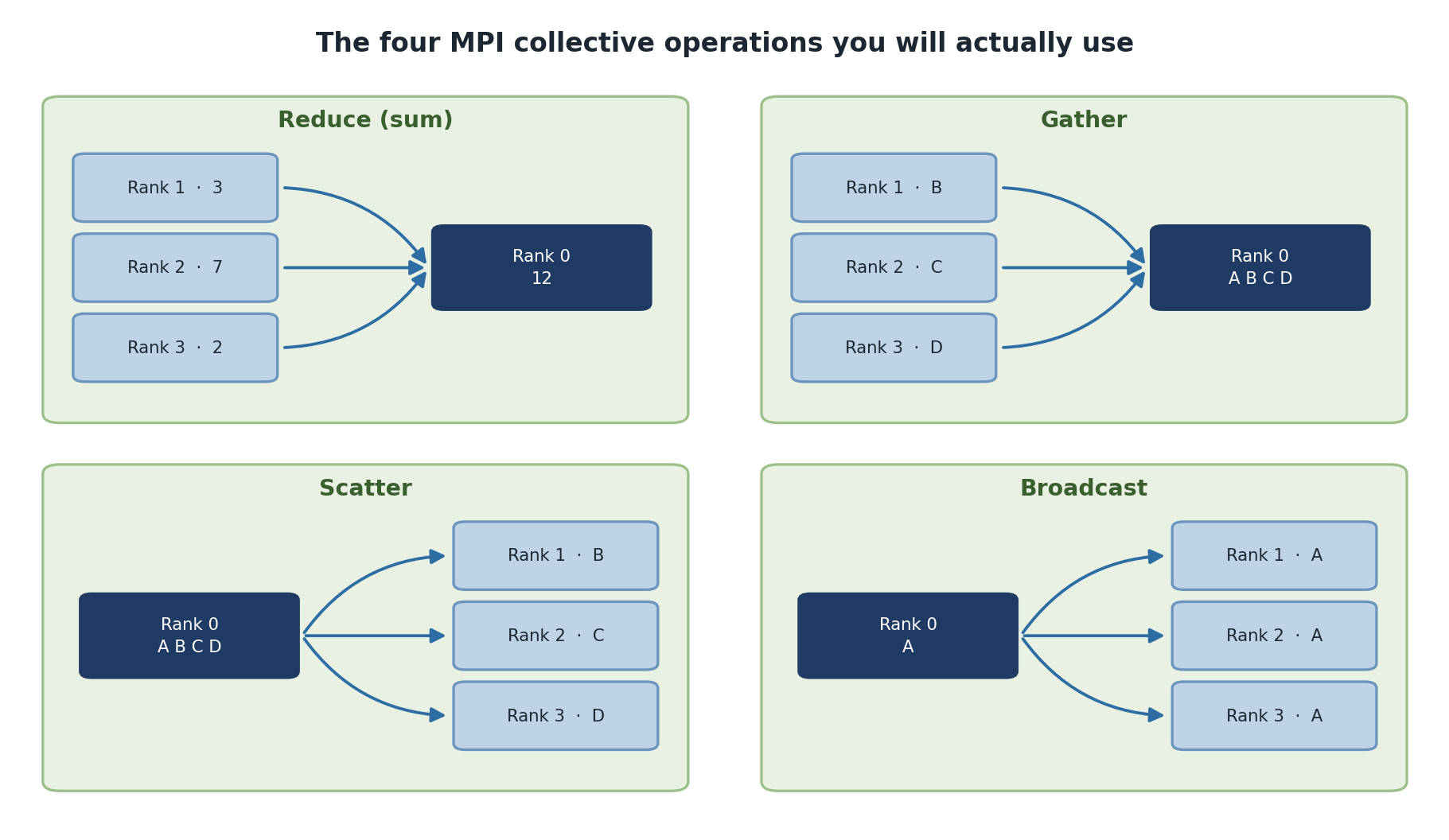
MPI’s model is rigid but powerful. You launch N processes (called
ranks) at the same time. Each rank knows its own ID (rank)
and the total count (size). Ranks coordinate through
explicit message-passing primitives: send, receive, scatter, gather,
broadcast, reduce. Memory is not shared; everything moves through
messages.
For 90% of research workflows, MPI is overkill. Job arrays are simpler and scale just as well. But for tightly-coupled simulations (climate models, molecular dynamics, distributed deep learning), MPI is essentially mandatory.
Hello World with mpi4py
PYTHON
#!/usr/bin/env python3
from mpi4py import MPI

comm = MPI.COMM_WORLD
rank = comm.Get_rank()
size = comm.Get_size()

print(f"Hello from rank {rank} of {size}")

comm.Barrier()

if rank == 0:
    print("All processes have said hello!")
Three concepts in this snippet form the core of MPI:
comm (the communicator, a group of processes that can
talk), rank (this process’s ID within the communicator),
and size (total number of processes).
comm.Barrier() is a synchronization point: every rank waits
until all ranks have reached it. Use it sparingly; barriers force
synchronization that throws away parallelism.
Run with SLURM:
BASH
#!/bin/bash
#SBATCH --ntasks=4
#SBATCH --cpus-per-task=1
#SBATCH --mem-per-cpu=1G
#SBATCH --time=00:05:00

srun python3 hello_mpi.py
The key SLURM directive is --ntasks=4, which tells SLURM
to launch 4 MPI processes. Use srun (not
mpirun) to launch on Sagehen HPC because srun
knows about SLURM’s allocation and places ranks correctly across
nodes.
Distributed Sum
PYTHON
#!/usr/bin/env python3
from mpi4py import MPI
import numpy as np

comm = MPI.COMM_WORLD
rank = comm.Get_rank()
size = comm.Get_size()

if rank == 0:
    data = np.arange(1, 101)
else:
    data = None

# Scatter data to all ranks
local_data = comm.scatter(np.array_split(data, size) if rank == 0 else None, root=0)
print(f"Rank {rank} received: {local_data}")

# Each rank computes partial sum
partial_sum = np.sum(local_data)

# Gather results at rank 0
total_sum = comm.reduce(partial_sum, op=MPI.SUM, root=0)

if rank == 0:
    print(f"Total sum: {total_sum}")
This shows the basic distribute-compute-collect pattern.
scatter splits an array on rank 0 into pieces and sends one
piece to each rank. Each rank computes locally. reduce
collects partial results back, applying an operation
(MPI.SUM, MPI.MAX, MPI.MIN, etc.)
along the way and depositing the result on rank 0.
comm.scatter and comm.reduce are the most
common collective operations. Other essentials:
-
comm.bcast(value, root=0): send the same value from rank 0 to every other rank. -
comm.gather(local, root=0): collect each rank’s local value into a list on rank 0 (no reduction). -
comm.allreduce(value, op=MPI.SUM): reduction whose result is delivered to every rank.
Parallel Integration
Compute an integral by having each rank calculate a portion:
PYTHON
#!/usr/bin/env python3
from mpi4py import MPI
import numpy as np

def integrate_range(a, b, n_steps):
    dx = (b - a) / n_steps
    x = np.linspace(a + dx/2, b - dx/2, n_steps)
    return np.sum(np.sin(x)) * dx

comm = MPI.COMM_WORLD
rank = comm.Get_rank()
size = comm.Get_size()

a, b = 0, np.pi
n_steps = 1_000_000

# Divide range across ranks
local_a = a + rank * (b - a) / size
local_b = a + (rank + 1) * (b - a) / size

local_integral = integrate_range(local_a, local_b, n_steps // size)
print(f"Rank {rank}: integral from {local_a:.3f} to {local_b:.3f} = {local_integral:.6f}")

total_integral = comm.reduce(local_integral, op=MPI.SUM, root=0)

if rank == 0:
    print(f"Total integral: {total_integral:.6f}")
    print(f"Expected: 2.0")
This is a classic MPI pattern: each rank gets disjoint work derived from its rank ID, computes locally, and contributes to a final reduction. There is no inter-rank communication during the actual computation, only at the end. This minimizes communication and gives near-linear scaling.
MPI Performance Considerations
MPI scales well only if:
- Computation >> Communication: Each rank does more work than it spends sending messages.
- Communication is infrequent: Not synchronizing every step.
- Messages are large: Amortize the per-message latency.
Two terms you will encounter:
Strong scaling: same problem size, more ranks. Speed-up is bounded by the serial fraction (Amdahl’s law) and by communication overhead. Strong scaling typically plateaus at 4 to 32 ranks.
Weak scaling: grow problem size proportionally with ranks. Each rank’s local work stays constant, only communication grows. Weak scaling is what you want for “I have 16x more data and 16x more ranks; should still take the same time”.
MPI is Complex, Use Only When Necessary
Possible issues: deadlocks (two ranks both waiting to receive from each other), unbalanced load (one rank has 10x more work and the others wait), message ordering bugs, MPI process-leak after a crash.
Before writing MPI code, ask: Can I solve this with job arrays or multiprocessing?
If the problem is embarrassingly parallel (no inter-rank communication needed): job arrays.
If the work fits on one node: multiprocessing.
If neither, and the data dependencies are tightly coupled: MPI.
For data-parallel deep learning specifically, prefer PyTorch’s
DistributedDataParallel or TensorFlow’s
MultiWorkerMirroredStrategy over raw MPI. They use MPI
under the hood (or NCCL) but expose a more friendly Python API.
Common MPI Pitfalls
Forgetting to launch with srun. Running
python script.py instead of
srun python script.py runs only one rank, with
size = 1. The script appears to work but is serial.
Mismatched send/receive. comm.send(data, dest=2)
requires a corresponding comm.recv(source=ANY) on rank 2 to
retrieve it. If the receive is missing, the sender hangs forever waiting
for the buffer to clear.
Using comm.send (point-to-point) when a collective
(scatter, gather, bcast) would
do. Collectives are optimized for the underlying network topology and
almost always faster than equivalent point-to-point patterns.
Heavy reliance on comm.Barrier(). Barriers force
synchronization across all ranks. Each barrier is a place where the
slowest rank holds up everyone else. Use them only where correctness
requires.
Challenge
Run an MPI Program
Write an MPI program where each rank computes the sum of a local
array segment, then all ranks contribute to a global sum using
comm.reduce.
PYTHON
from mpi4py import MPI
import numpy as np

comm = MPI.COMM_WORLD
rank = comm.Get_rank()
size = comm.Get_size()

local_sum = sum(i % 7 for i in range(10_000_000))
print(f"Rank {rank}/{size}: local sum = {local_sum}")

global_sum = comm.reduce(local_sum, op=MPI.SUM, root=0)
if rank == 0:
print(f"Global sum: {global_sum}, Average: {global_sum / size}")Challenge
Debug a Stalled MPI Job
A colleague’s MPI job runs for the full time limit and then gets killed. They see “Rank 0 sent message” in the log but no other output. List two likely causes and what to check.
Cause 1: rank 0 called comm.send(data, dest=1) but rank
1 never called the matching comm.recv. The send blocks
because the buffer is full. Verify: search the source for
send calls and check that each has a matching
recv on the destination rank.
Cause 2: rank 0 called a collective (bcast,
scatter, reduce) but only some ranks reached
the same call. Collectives require all ranks in the communicator to
participate. Verify: look for branching code (if rank == 0)
that calls a collective inside one branch only.
Both lead to deadlocks where the program runs forever. Adding
explicit print statements with flush=True
after each MPI call helps locate the offending line.
- mpi4py provides Python bindings for MPI
- Each rank knows its own ID (rank) and total count (size)
- scatter distributes data, reduce combines results
- Use srun (not mpirun) on Sagehen to launch MPI jobs correctly
- Each rank works on its portion independently, then results are gathered
- Strong scaling has limits (Amdahl’s law); weak scaling is more achievable
- MPI is powerful but complex; reserve for truly distributed problems
- For deep learning, prefer DistributedDataParallel over raw MPI
Content from Choosing the Right Approach
Last updated on 2026-08-27 | Edit this page
Overview
Questions
- How do I know which parallelization technique to use?
- How do I measure if parallelization is helping?
- What is the simplest approach that will work?
Objectives
- Follow a decision framework for parallelization
- Profile code and benchmark parallel performance
- Avoid common parallelization mistakes
Decision Framework
Measure Before You Optimize
NEVER parallelize code you haven’t profiled. You might optimize the wrong part or add complexity for minimal benefit.
PYTHON
import cProfile, pstats
cProfile.run('my_function()', 'profile_stats')
pstats.Stats('profile_stats').sort_stats('cumulative').print_stats(10)
Only parallelize if: computation takes minutes+, parallelizable fraction > 80%, and multiple cores are available.
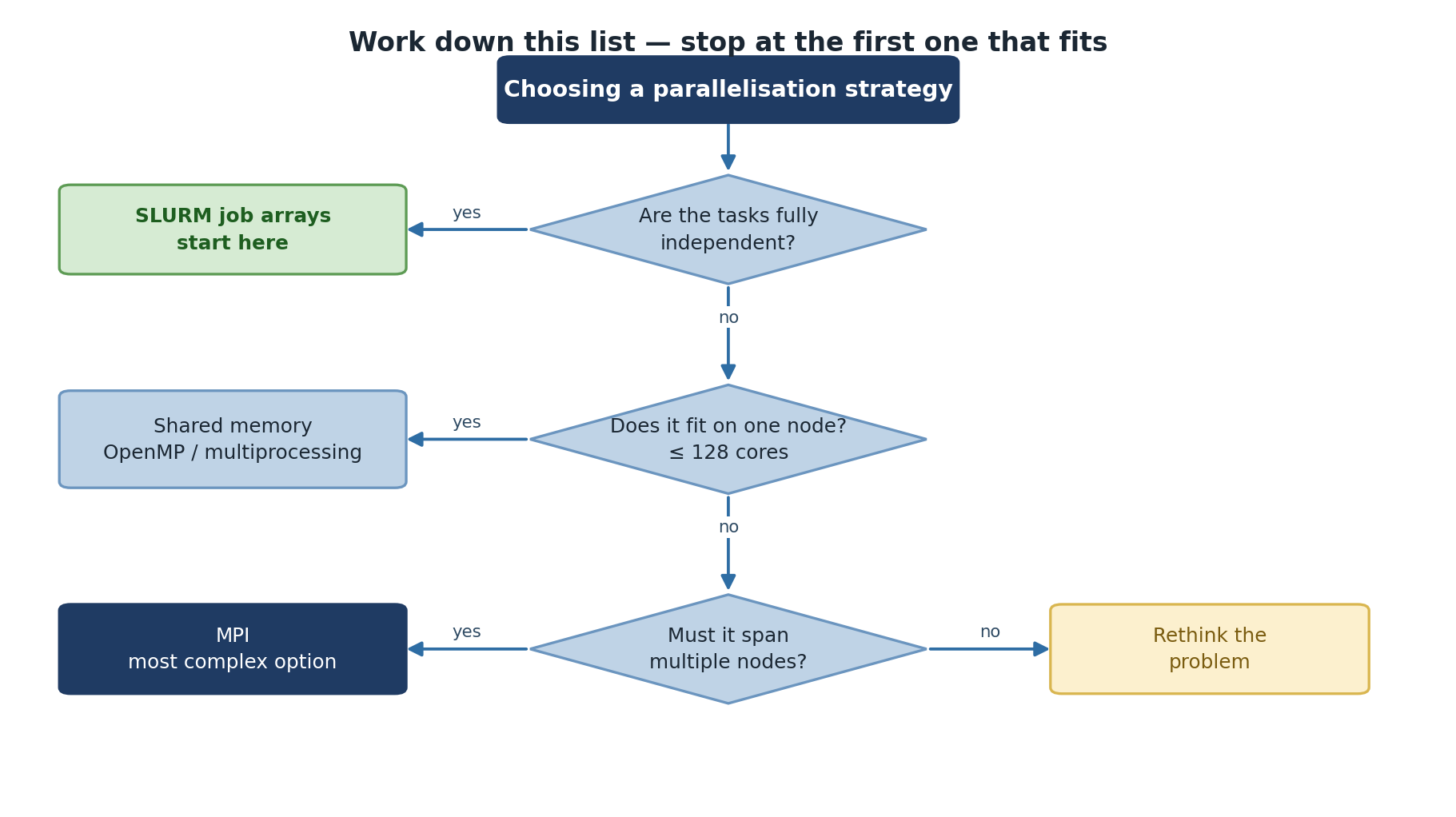
Decision Tree
Does it take > 1 minute?
  NO  -> Don't parallelize
  YES -> Is the parallelizable fraction > 80%?
    NO  -> Optimize serial code first
    YES -> Fits on one node (128 cores)?
      YES -> Embarrassingly parallel?
        YES -> Use job arrays (simplest!)
        NO  -> Use shared-memory (multiprocessing)
      NO  -> Use MPI (distributed)
Order of preference: Job arrays > Shared memory > MPI
Worked Examples
Parameter Sweep (100 ML trainings, 30s each)
Analysis: Independent tasks, no communication. Use job arrays.
Large Matrix Operations (10,000 x 10,000)
Analysis: Data parallel, fits on one node. Use optimized library (numpy) or multiprocessing.
Benchmarking
PYTHON
import time
from multiprocessing import Pool

for n_cores in [1, 2, 4, 8]:
    start = time.time()
    with Pool(n_cores) as p:
        results = p.map(slow_function, data)
    elapsed = time.time() - start
    speedup = baseline_time / elapsed
    efficiency = speedup / n_cores
    print(f"Cores: {n_cores}, Speedup: {speedup:.2f}x, Efficiency: {efficiency:.1%}")
Look for: speedup increasing with cores, efficiency above 50%, diminishing returns.
Common Mistakes
Mistake 4: Not Checking Correctness
PYTHON
serial_result = [f(x) for x in data]
with Pool(4) as p:
    parallel_result = p.map(f, data)
assert all(s == p for s, p in zip(serial_result, parallel_result))
Challenge
Choose the Right Approach
Problem 1: Process 500 text files (10s each). Total: 83 minutes.
Problem 2: 3D chemical reaction simulation, 1000 time steps, tightly coupled, 2GB memory.
Problem 3: ML parameter search: 20 architectures x 50 hyperparameters x 1000 augmentations = 1M trainings.
Problem 1: Job arrays. Embarrassingly parallel.
sbatch --array=1-500
Problem 2: Shared-memory parallelism. Fits on one
node, but tightly coupled. --cpus-per-task=16
Problem 3: Job arrays with batching. Each job trains
100 models: sbatch --array=1-10000 train_batch.sh. Or
combine with multiprocessing: each job runs 4 trainings in parallel.
Summary
- Measure: Is there a performance problem?
- Profile: Where is the bottleneck?
- Analyze: Is it parallelizable? What fraction?
- Choose: Job arrays > Shared memory > MPI (simplest first)
- Verify: Check speedup and efficiency
- Iterate: Scale up after validating on small test
- Follow a decision framework: measure, profile, analyze, choose, verify
- Job arrays are the simplest approach for embarrassingly parallel problems
- Profile serial code first to identify bottlenecks
- Don’t over-engineer: use the simplest approach that works
- Always validate that parallelization actually improves performance