
Project Directory Structure
Last updated on 2026-08-27 | Edit this page
Overview
Questions
- How should I organize my research files?
- What’s the difference between raw data and processed data?
- How do I prevent accidental modification of raw data?
- Why do relative paths matter?
Objectives
- Design a standard project directory structure
- Understand why separating concerns (data/code/results) matters
- Make raw data read-only and tamper-proof
- Use relative paths to ensure code portability
A Common Disaster
Let’s start with a true story. A biologist has been working on a gene expression analysis for months. Her main analysis folder looks like this:
gene_analysis/
├── data/
│   ├── samples.csv
│   ├── samples_fixed.csv
│   ├── samples_fixed2.csv
│   ├── samples_final.csv
│   ├── samples_backup.csv
│   ├── data.xlsx
│   └── master_v3.csv
├── analysis.R
├── analysis_v2.R
├── analysis_final.R
├── results.csv
├── figure.png
├── figure_v2.png
├── figure_for_paper.png
└── notes.txt
Questions she can’t answer:
- Which data file is the original? Which was modified?
- Which analysis script is the one she actually used?
- What did she change between analysis.R and analysis_final.R?
- Can she hand this to a collaborator and they would know what to do?
This is preventable. The solution is a standardized project structure that clearly separates concerns.
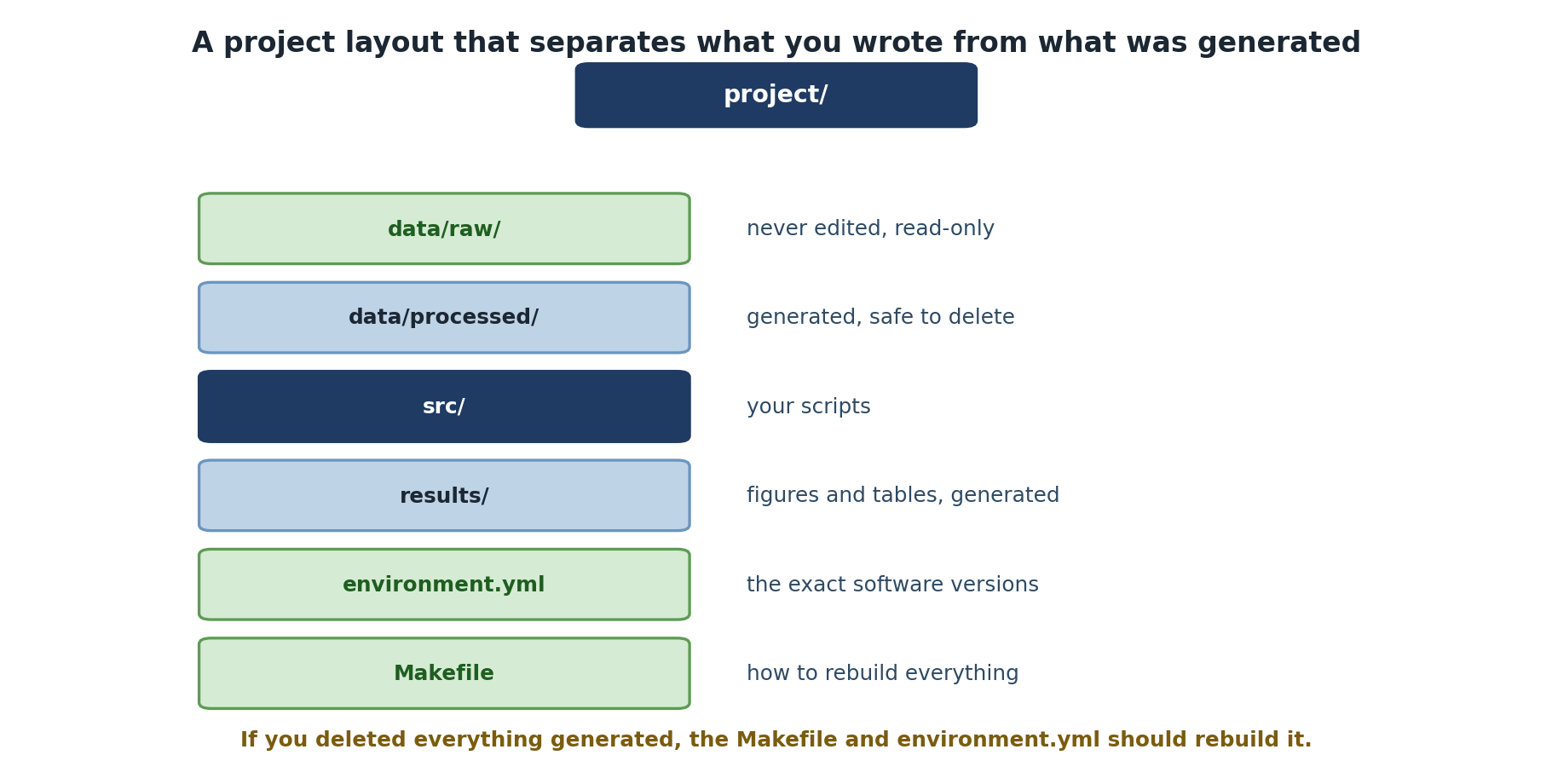
The Standard Research Project Structure
Here’s a widely-adopted structure for research projects:
project-name/
├── README.md              # Project overview and how to use it
├── LICENSE                # Legal license for your code
├── data/
│   ├── raw/              # Original, untouched data
│   └── processed/        # Cleaned/transformed versions
├── src/                  # Source code for analysis
│   ├── analysis.py
│   ├── visualization.py
│   └── utilities.py
├── results/              # Output files (figures, tables, summaries)
│   ├── figures/
│   └── tables/
├── notebooks/            # Jupyter notebooks for exploration (optional)
├── Makefile              # Automation commands
├── environment.yml       # conda environment specification
└── .gitignore            # Tell git what to ignore
Core Principle: Separate Concerns
The key insight is this: Your code, your data, and your results serve different purposes and should live in different places.
Raw Data: Sacred Ground
Raw data is your ground truth. It should:
- Never be modified: Only in specific, documented, version-controlled ways
- Be easily readable: In open formats (CSV, JSON, HDF5) not proprietary formats
- Be annotated: Include metadata about what each column means, units, data collection date
- Be preserved: Keep the original files, never overwrite them
Processed Data: Tracked and Documented
Processed data is the result of cleaning, filtering, or transforming
raw data. Each processed dataset should have a corresponding script that
generates it from raw data. You should be able to run
python src/clean_data.py and have
data/processed/samples_cleaned.csv regenerated identically
every time.
Making Raw Data Read-Only
A critical practice: make your raw data read-only so you can never accidentally modify it.
This removes write permissions. Now if you try to edit a raw data file, you’ll get an error. To deliberately modify raw data (rare!), you must explicitly re-enable writing:
In Git, add to your .gitignore to prevent accidentally
committing large raw data files. Instead, document how to obtain raw
data in data/raw/README.md with source URLs and MD5
checksums.
Relative Paths: Portability
Always use relative paths in your code, not absolute paths.
Absolute Path (BAD):
If anyone else clones your repository or you move it to a different location, this breaks immediately.
Relative Path (GOOD):
PYTHON
from pathlib import Path
data_file = Path(__file__).parent.parent / "data" / "raw" / "samples.csv"
df = pd.read_csv(data_file)
In R, the here package detects your project root and
builds paths relative to it:
R
data_file <- here::here("data", "raw", "samples.csv")
df <- read.csv(data_file)
Never use absolute paths in code you intend to share. Always use paths relative to your project root or the script location.
Exercise: Design Your Project Structure
Choose a recent analysis you’ve done or the project you’re about to work on.
-
Sketch your project structure: Draw or write out
what files would go in
data/,src/, andresults/for your project. - Identify raw data: What are the input files that start your analysis? Mark them as read-only.
-
Trace the pipeline: For one key result (a table or
figure), write down the path it takes:
- Raw data file(s) -> Processing script(s) -> Processed data file -> Analysis script(s) -> Result file
A completed example for a climate data analysis project:
climate-analysis/
├── README.md
├── environment.yml
├── Makefile
├── data/
│   ├── raw/                    # READ-ONLY
│   │   ├── temperature_2023.csv
│   │   └── README.md
│   └── processed/
│       └── temperature_cleaned.csv
├── src/
│   ├── clean_data.py
│   ├── analyze.py
│   └── visualize.py
└── results/
    ├── figures/
    │   └── trend_plot.pdf
    └── tables/
        └── summary_stats.csv
Pipeline trace for trend_plot.pdf:
data/raw/temperature_2023.csv
  -> src/clean_data.py
    -> data/processed/temperature_cleaned.csv
      -> src/analyze.py + src/visualize.py
        -> results/figures/trend_plot.pdf
Verify raw data is read-only:
- A standard project structure (data/src/results) makes research clear and reproducible
- Raw data is sacred: keep it original, unchanged, and read-only
- Processed data should be generated by scripts, not manually edited
- Results are artifacts that should be regeneratable from code
- Always use relative paths in code so it’s portable
- Separating concerns (data, code, results) prevents confusion and accidents