
Introduction to Makefiles
Last updated on 2026-08-27 | Edit this page
Overview
Questions
- What is Make and why is it useful for research?
- How do I write a Makefile?
- How do I define dependencies between steps?
Objectives
- Understand why manual step-by-step analysis is error-prone
- Learn Make syntax: targets, prerequisites, and recipes
- Write a basic Makefile that automates a multi-step research pipeline
The Manual Problem
A researcher has this analysis procedure:
- Download raw data
- Clean the data (remove bad rows, fix formatting)
- Run analysis (compute statistics)
- Generate figures
- Generate summary table
When they do this manually:
BASH
# Day 1
wget https://example.com/data.csv -O data/raw/data.csv
python src/clean_data.py

# Day 2 (need to rerun with new parameters)
# Did I clean the data? With what version of the script?
python src/clean_data.py
python src/analyze.py

# Day 3 (collaborator asks for new figures)
# Did I run analysis already? Do I need to rerun everything?
python src/visualize.py
Questions that arise: Did I skip a step? If I change the visualization code, do I need to re-run the analysis? If it fails halfway, where do I restart?
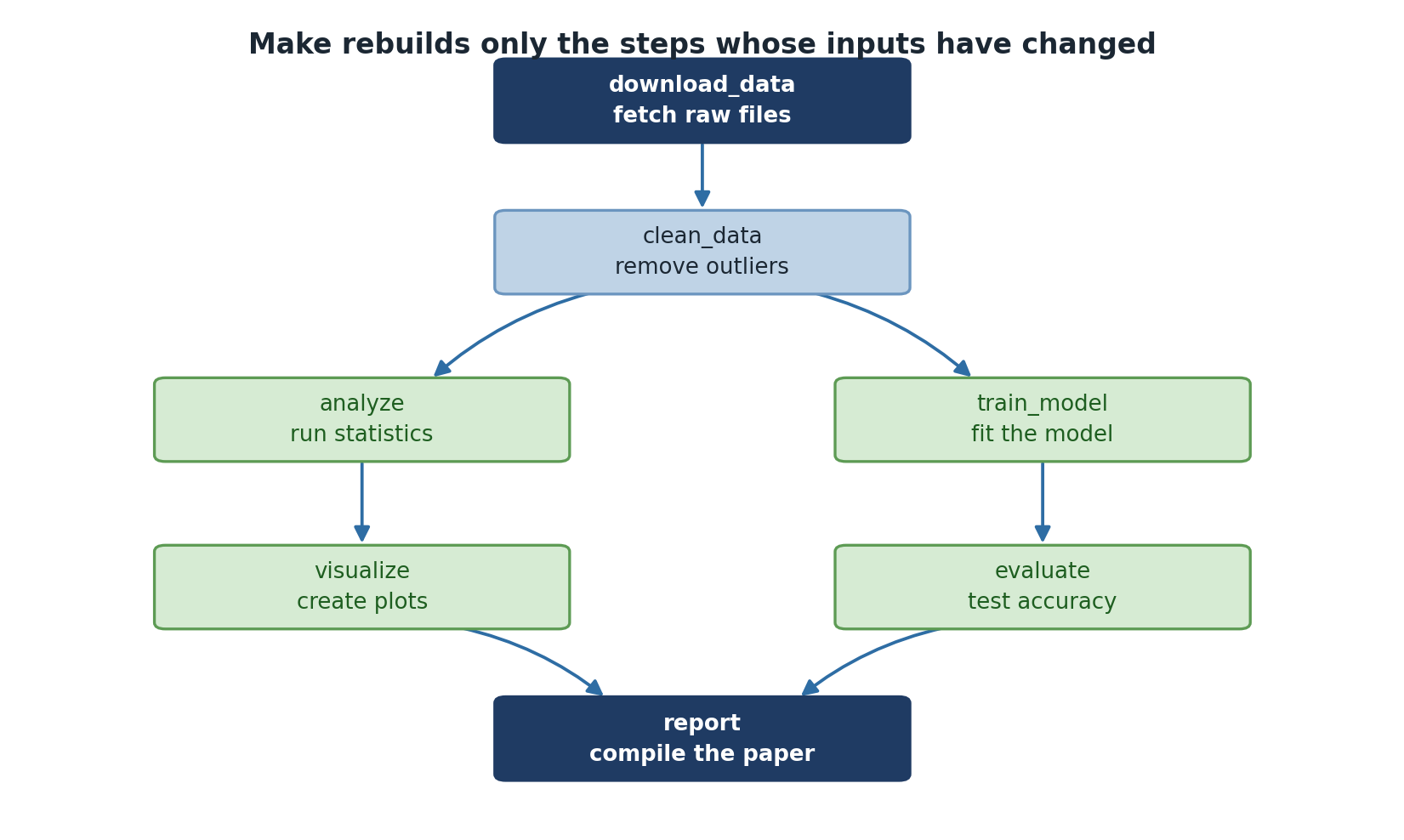
This is tedious and error-prone. The solution: Make, a tool that automates step-by-step workflows and only re-runs what’s necessary.
What Is Make?
Make is a tool that:
- Defines a series of analysis steps
- Tracks which outputs depend on which inputs
- Automatically re-runs steps when their inputs change
- Avoids re-running steps that haven’t changed
- Provides a single command to execute an entire pipeline
Make has been used in software development for decades and is equally valuable for research.
Why Make for Research?
- Explicit dependencies: You document which steps depend on which files
- Incremental re-running: If you change one script, only affected steps re-run
- Reproducibility: The Makefile is executable documentation of your analysis
- Parallelization: Make can run independent steps in parallel
- Sharing: Someone can read your Makefile and understand your entire workflow
Make Basics: Targets, Prerequisites, and Recipes
A simple Makefile:
MAKEFILE
# Target: what we want to create
# Prerequisites: what this target depends on
# Recipe: how to create the target
results/analysis.csv: data/processed/data_clean.csv src/analyze.py
	python src/analyze.py

results/figure.png: results/analysis.csv src/visualize.py
	python src/visualize.py
When you run make results/figure.png, Make does
this:
- Check if
results/figure.pngexists - If not, check if its prerequisites exist
- If
results/analysis.csvdoesn’t exist, make it first (by running its recipe) - If anything changed, re-run the recipe
A Complete Example
Here’s a realistic Makefile for a research project:
MAKEFILE
# Reproducible gene expression analysis pipeline
# Run with: make
# Clean with: make clean

PYTHON := python3
DATA_DIR := data
RAW_DATA := $(DATA_DIR)/raw/samples.csv
PROCESSED_DATA := $(DATA_DIR)/processed/samples_clean.csv
RESULTS_DIR := results

# Default target: what "make" runs if no target specified
.PHONY: all
all: $(RESULTS_DIR)/figures/heatmap.pdf $(RESULTS_DIR)/tables/stats.csv

# Download data
$(RAW_DATA):
	mkdir -p $(DATA_DIR)/raw
	wget https://example.com/samples.csv -O $@

# Clean data
$(PROCESSED_DATA): $(RAW_DATA) src/clean_data.py
	mkdir -p $(DATA_DIR)/processed
	$(PYTHON) src/clean_data.py

# Run analysis
$(RESULTS_DIR)/analysis.csv: $(PROCESSED_DATA) src/analyze.py
	mkdir -p $(RESULTS_DIR)
	$(PYTHON) src/analyze.py

# Generate figures
$(RESULTS_DIR)/figures/heatmap.pdf: $(RESULTS_DIR)/analysis.csv src/visualize.py
	mkdir -p $(RESULTS_DIR)/figures
	$(PYTHON) src/visualize.py

# Generate summary table
$(RESULTS_DIR)/tables/stats.csv: $(RESULTS_DIR)/analysis.csv src/summarize.py
	mkdir -p $(RESULTS_DIR)/tables
	$(PYTHON) src/summarize.py

# Clean up generated files
.PHONY: clean
clean:
	rm -rf $(RESULTS_DIR)

.PHONY: help
help:
	@echo "Available targets:"
	@echo "  make all      - Run entire pipeline (default)"
	@echo "  make clean    - Remove results/"
	@echo "  make help     - Show this help message"
Variables
Variables make your Makefile cleaner and easier to modify. Use
$(VARIABLE) to reference them. $@ is a special
variable meaning “the target name”.
.PHONY Targets
.PHONY declares targets that aren’t actual files (like
all, clean, help). Without this,
if a file named clean exists, make clean won’t
work.
Automatic Re-running
The beauty of Make: if you modify src/visualize.py, Make
automatically re-runs only the visualization step because
src/visualize.py (a prerequisite) has a newer timestamp
than the output.
Running the Makefile
BASH
make              # Run the entire pipeline
make results/figures/heatmap.pdf  # Run a specific target
make -n           # View what would happen (dry run)
make help         # Show help
make clean # Clean upExercise: Write a Basic Makefile
Create a Makefile for a three-step pipeline:
- Process raw data -> processed data
- Analyze processed data -> results
- Create figure from results -> figure
Define:
- Variables for data directories
- Targets for each output
- Prerequisites between targets
-
.PHONYtargets (all,clean,help)
Test with make -n (dry run) to see what would
execute.
MAKEFILE
PYTHON := python3

.PHONY: all clean help

all: results/figure.png

data/processed/data_clean.csv: data/raw/data.csv src/process.py
	mkdir -p data/processed
	$(PYTHON) src/process.py data/raw/data.csv data/processed/data_clean.csv

results/analysis.csv: data/processed/data_clean.csv src/analyze.py
	mkdir -p results
	$(PYTHON) src/analyze.py data/processed/data_clean.csv results/analysis.csv

results/figure.png: results/analysis.csv src/visualize.py
	$(PYTHON) src/visualize.py results/analysis.csv results/figure.png

clean:
	rm -rf results/ data/processed/

help:
	@echo "make all   - Run full pipeline"
	@echo "make clean - Remove generated files"
Expected dry-run output:
- Make automates multi-step workflows and only re-runs necessary steps
- Makefiles explicitly document data dependencies and analysis steps
- A Makefile target depends on prerequisites; if anything changes, the target is re-run
- Recipe lines must use TABs, not spaces
-
.PHONYtargets likeall,clean, andhelpmake your Makefile self-documenting