
Partitions and Resources
Last updated on 2026-08-27 | Edit this page
Overview
Questions
- What partitions are available on Sagehen HPC?
- How do I choose the right partition for my job?
- What GPU types are available?
Objectives
- Understand the characteristics and use cases for each Sagehen partition
- Match job requirements to the appropriate partition
- Know the available GPU types and their strengths
The “amd” Partition (General Compute)
The workhorse of Sagehen, suitable for most research computing.
For the current node count, CPU count, and RAM configuration, run
sinfo -p amd on Sagehen.
| Property | Value |
|---|---|
| Configuration | See sinfo -p amd for current details |
| Max job time | 720 hours (30 days) |
Use cases: Statistical analysis, bioinformatics, physics simulations, data processing, batch processing.
The “gpu” Partition (GPU Acceleration)
For workloads requiring GPU acceleration.
| Property | Value |
|---|---|
| Nodes | Multiple GPU-equipped nodes |
| CPUs per node | 128 cores, 500 GB RAM |
| Max job time | 720 hours (30 days) |
Available GPU Types
Sagehen has 10 GPUs total (confirmed May 2026):
| GPU Type | Memory | Quantity | Best For |
|---|---|---|---|
| NVIDIA A100 | 80 GB HBM2e | 4 | Large models, production AI |
| NVIDIA L40S | 48 GB GDDR6 | 4 | Deep learning, inference |
| NVIDIA RTX PRO 6000 | 96 GB GDDR7 ECC | 2 | Largest memory on the cluster |
Check availability:
sinfo -p gpu --Format=NodeList,Gres,GresUsed
The “short” Partition (Quick Jobs and Debugging)
For short-duration test jobs, debugging, and rapid prototyping. The
short partition has a shorter maximum walltime than
amd and gpu, but jobs typically start more
quickly because the scheduler can back-fill them between longer
jobs.
| Property | Value |
|---|---|
| Configuration | See sinfo -p short for current details |
| Max job time | Shorter than amd/gpu — verify with sinfo -p short
|
Use cases: Quick test of a new submission script, single-task debugging, short interactive sessions, sanity-checking a workflow before launching a 30-day production run.
Example: a quick test job on the short
partition
BASH
#!/bin/bash
#SBATCH --job-name=script_test
#SBATCH --partition=short
#SBATCH --time=00:15:00
#SBATCH --ntasks=1
#SBATCH --cpus-per-task=2
#SBATCH --mem=4G
#SBATCH --output=test_%j.log

module purge
module load miniconda3

python my_script.py --dry-run
If the test succeeds, you can change --partition=short
to --partition=amd (and increase --time) for
the production run.
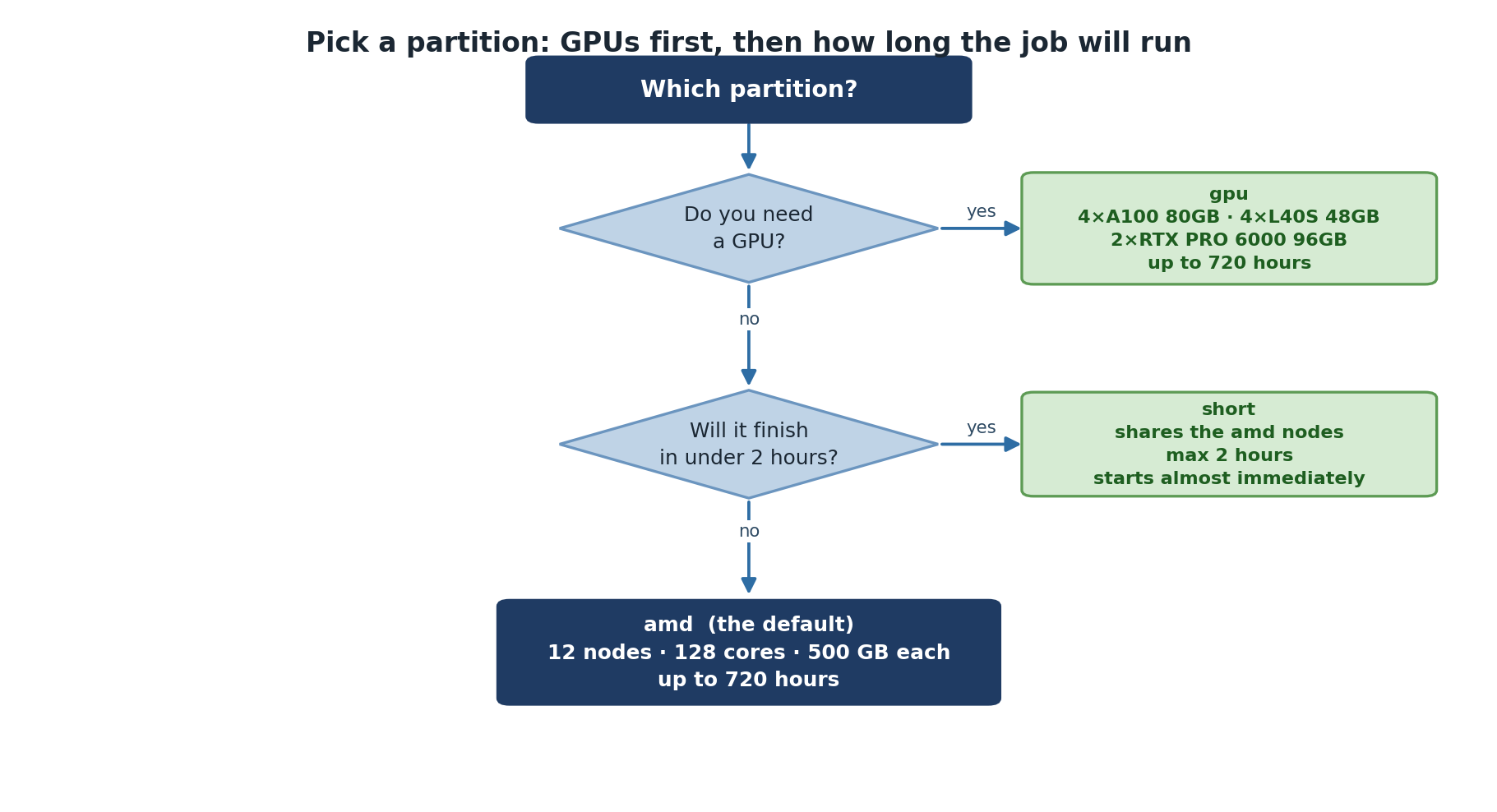
Choosing the Right Partition
-
Need GPU acceleration? ->
gpupartition -
Quick test, debug, or short prototype run (within
shortwalltime limit)? ->shortpartition -
Everything else (production CPU work) ->
amdpartition
Account and Group Limits
Each account has resource limits to ensure fair sharing:
| Limit | Details |
|---|---|
| Max cores per account | Per-account limits apply |
| Max GPUs per account | Per-account limits apply |
| Max submitted jobs | Per-account limits apply |
Check your group’s quota with quota_check.sh. Contact its-hpc@pomona.edu
for current limits or temporary increases.
Challenge 1: Matching Jobs to Partitions
For each scenario, decide which partition to use:
- Testing a new analysis script (takes about 30 seconds)
- Analyzing a 1 TB dataset, expected to take 6 hours
- Training a deep learning model, expected to take 18 hours
- Running a molecular dynamics simulation for 72 hours
-
short – Quick test (~30 seconds) is the canonical
use case for the
shortpartition - amd – General compute, no GPU needed; 6 hours fits within amd’s 30-day limit
- gpu – Deep learning needs GPU acceleration
- amd – Long simulation (72 hours), no GPU needed, fits 30-day amd limit
- Sagehen has three partitions:
amd(general compute),gpu(accelerators), andshort(quick / test / debug jobs) - Choose partition based on GPU need and job duration
- GPU partition offers A100 (production), L40S (inference), and RTX PRO 6000 (large-memory training)
- Per-account resource limits apply; check with
quota_check.sh -
amdandgpusupport up to 720 hours (30 days);shorthas a shorter walltime — checksinfo -p short